Your team and every rep at a glance1:27
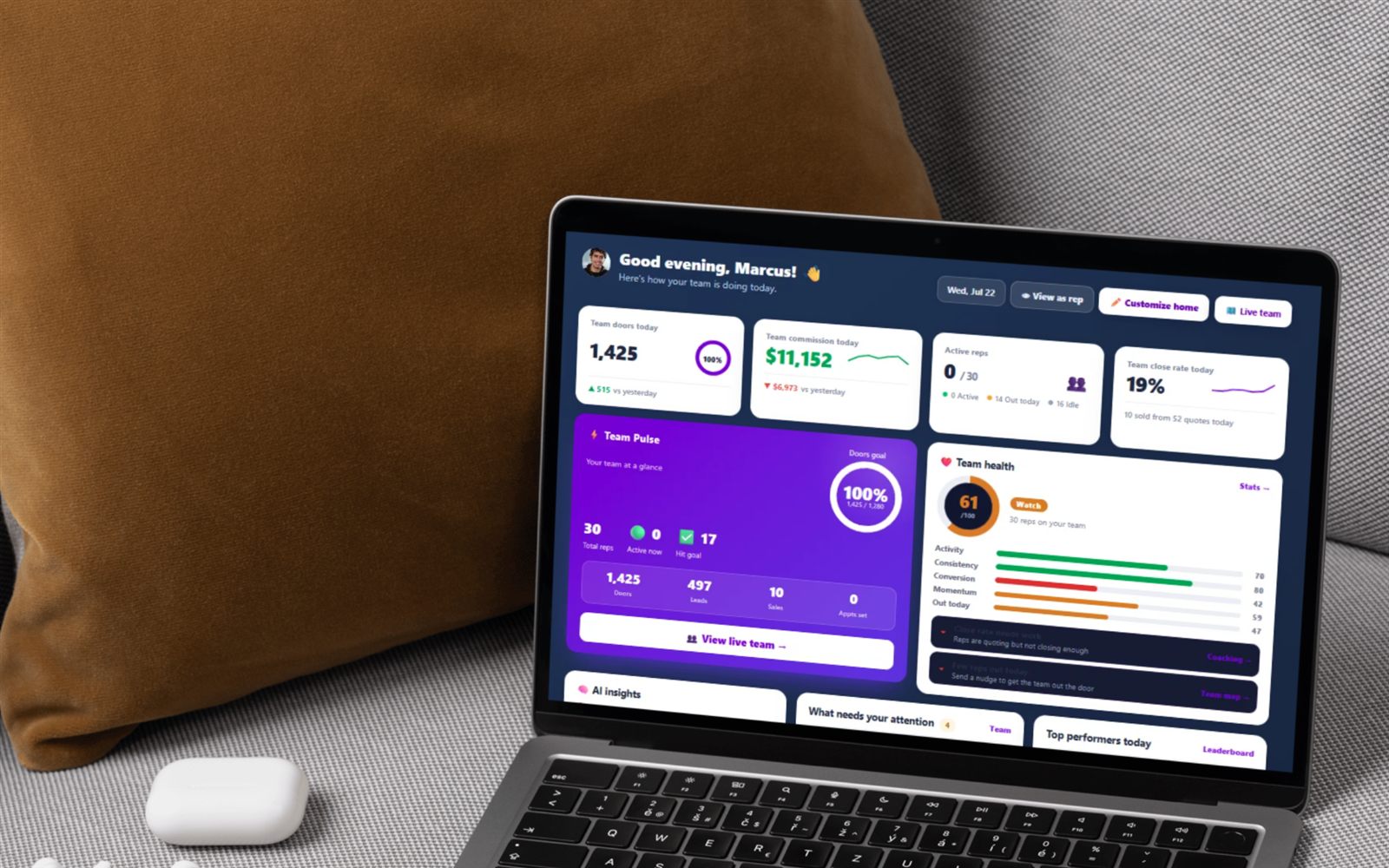
See each rep’s doors today, first and last door, and your override; spot who’s gone quiet; open any rep’s week and every move; hand out leads.
Onboarding, ramp, territory discipline, activity versus results, coaching one weakness at a time, paying accurately — and catching the quiet rep before they quit. Written for the manager who still knocks.
Flat from $30/mo, or $25/mo billed yearly · 14-day free trial · no seat minimums, no contract required
The promotion from rep to manager is brutal because nothing that made you good at the doors makes you good at this. As a rep you controlled one variable: whether you knocked. As a manager you control none of them directly — you only shape the systems around eight or twenty people who each decide, alone, at 4pm on a Tuesday, whether to hit one more street. Managing a door-to-door team is mostly about making that decision easier and making the consequences visible.
What follows is the operating loop most crews converge on, in the order you have to build it.
The gap between "you're hired" and "you're knocking" is where new reps evaporate. Anything you can do in a day, do in a day. FieldStacker gives you three ways in, so nothing waits on paperwork:
More on the intake side in sales rep recruiting software.
One thing worth knowing before the hiring push: when a rep joins your team they take on the team owner's company setup — pricing, equipment and branding. That is deliberate. It means a new rep quotes your prices on day one instead of building their own catalogue, and it means you should get your setup right before you recruit, not during.
Most reps who wash out do so in the first fortnight, and almost always for the same reason: they were handed a blank map and told to go get 'em. A new rep does not need freedom, they need a patch, a list and a script. Give them a territory with leads already inside it and their first day produces conversations instead of driving.
Two decisions to make before their first shift, not after. First, set your GPS-verified knock policy for the whole team — the team owner turns it on once and it applies to everybody, so nobody is arguing about whose numbers are real in week six. Second, decide what "a good day" is in doors and say the number out loud. Our field-side guides on getting more doors per day and door-knocking technique are the ones to hand a new rep on day one.
Two reps on the same street is not a scheduling annoyance, it is a trust problem. The homeowner knocked twice in a day remembers your company name, and the rep who got there second stops believing the map. Territory is the first system to build and the last one you should let slide.
In FieldStacker a manager traces a free-form polygon on the map by tapping points, names it, gives it a colour and assigns it to one rep. Saving it hands every lead the manager owns that falls inside that polygon to that rep, and the rep gets a notification naming the territory and how many leads are inside to work. There is a manual re-sync button for when new leads land inside an existing patch later. Territories can be assigned to you or to anyone in your downline.
Lead ownership is what stops your database leaking. On the Team leads board a manager imports leads and keeps ownership of them; assignees work those leads but never own them, and you can hand one down to anyone under you at any level, not just direct reports. Remove a rep from the team, or move them out of a sub-team, and the leads you gave them return automatically instead of walking out with them.
You draw the territories yourself, by hand, on the map. FieldStacker gives you the polygon and moves the leads inside it; where a city divides into balanced patches stays your judgement rather than an automatic carve-up. Two pages go deeper: how to assign territories to sales reps and territory management software, plus lead distribution for sales teams for the hand-off mechanics. For the rep-side view of the same map, see what a knock map is and the knock map feature page.
Every struggling team measures the wrong thing first. Results — sales, installs, revenue — are lagging and mostly out of a rep's hands this week. Activity is leading and entirely in their hands today. Manage the leading number and the lagging one follows; manage only the lagging one and you produce anxiety with no instruction attached.
The team performance table gives you one row per rep: doors knocked in the last 7 days, doors all-time, quotes, verified installs this year, RMR sold, the override you earn on them, and how long ago they were last active. Close rate is shown as verified installs ÷ quotes. Two rows can carry the same sales number and need opposite conversations — that is exactly why both columns belong on one screen. Tap a rep to drill into their stats, their leads and a full activity feed.
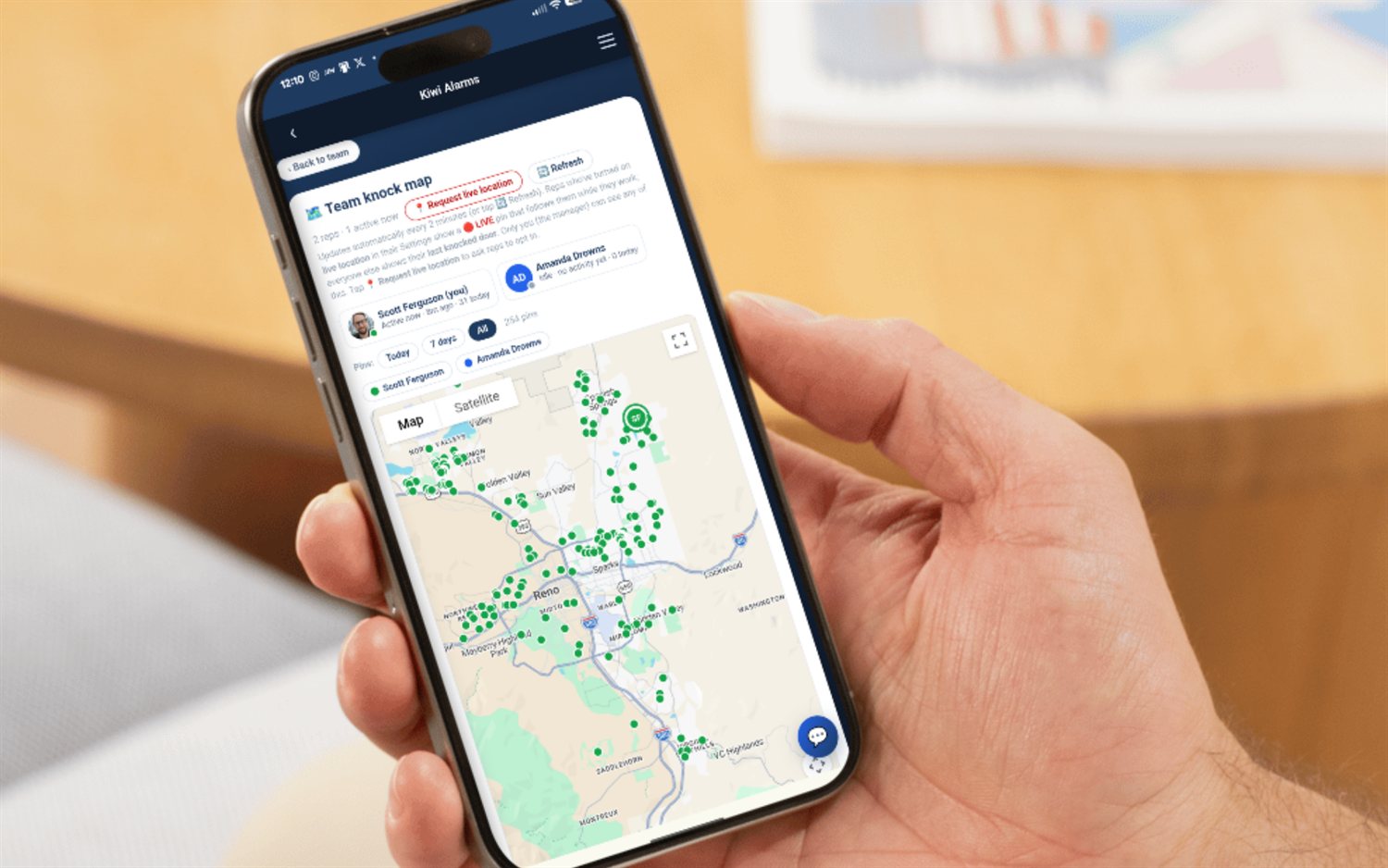
For where people actually are, the Team knock map is a live manager-only view: every knock pin coloured by who knocked it, each rep's dot at their last worked door, an active-or-idle status, doors-today, and an automatic refresh every couple of minutes. Reps who switch on live location in their own settings show a live pin at their current position while it is fresh — within the last 20 minutes — and everyone else shows their last knocked door. It is opt-in per rep, and only the manager sees any of it. More detail on both: sales team GPS tracking and the door-to-door sales leaderboard.
The biggest upgrade to a one-on-one is replacing "how's it going out there?" with a specific, evidenced observation. Pick one weakness per rep per week. Two is already too many to hold onto between doors.
The Team Coaching page exists to make that concrete. For every rep you manage it shows how many practice drills they have run, their average score out of five, whether they hold a passing certification and its certificate number, their weakest objection, a knock-timing flag, and when they were last active — plus team totals for drills, average and how many reps are certified. The weakest objection is derived from per-turn grades across their practice sessions: the one objection with the lowest average score. Click a rep's name to review their actual sessions.
Knock timing is the quiet killer nobody coaches. The timing flag is computed per rep in that rep's own timezone, so an out-of-state manager sees the rep's real best hours rather than a shifted version of them. A rep knocking hard at 1pm and gone by 5pm is not lazy — they are working the worst hours of the day. Send them our guide to the best time to knock doors.
When you are staring at eight reps and cannot decide who needs you most, the "Who to coach this week" button generates an AI-ranked plan — who to work with, on which objection, and whose timing needs a nudge — built from each rep's weakest objection plus their knock timing. Pair it with the objection library in door-to-door sales objections, and see sales team coaching software for the whole coaching stack.
Nothing destroys a 1099 crew faster than pay that is late, wrong or unexplainable. Reps forgive a slow week; they do not forgive being short a hundred dollars and told to check back Friday. Make payroll boring and predictable and you keep people through their bad months.
The Payroll page lists you and every rep you manage for a chosen year, three years back. Each rep's row carries their commissions from verified installs and any bonuses or spiffs you have added, each with its own Paid / unpaid toggle, plus a "Pay all" button that marks everything still outstanding for that rep as paid. Across the top: total payroll, paid out, outstanding. An "Owed only" filter trims the list, and the roster sorts most-owed first so the people you still owe rise to the top. Chargebacks are marked right on the commission line they net against. Bonuses are added inline with an amount and a note — "weekly spiff" — so the reason stays attached to the money.
Three things to know about how it works. Payroll is a tracker: it is your record of what has been paid, and the money itself moves through your own bank, along with the ACH and the 1099 filing. Commissions arrive on the page once an install has been marked installed by the rep and verified by a manager — that verification step is the gate. And your own money settles outside the page: bonuses are something you award your reps rather than yourself, and your team override shows on your row for the year as a reference figure rather than a paid-toggle line, because the dealer settles it with you separately.
The full breakdown lives on sales commission payroll software. Reps handling their own side of the money — commission, chargebacks, mileage, quarterly set-aside — should read 1099 taxes for door-to-door sales reps.
Almost nobody quits a knocking job by telling you. They go quiet — a short day, then a skipped day, then a week of not answering — and by the time it is obvious they left mentally a fortnight ago. The whole skill of retention in this industry is noticing in week one instead of week four.
FieldStacker flags it for you. A rep is marked as needing a hand when they have knocked zero doors in the last 7 days, or have had no activity at all for 7+ days. Reps who joined within the last 5 days are deliberately excluded, so nobody's first week gets a red dot. Flagged reps appear in a callout at the top of the team page with a message link, a call link when they have a phone number on file, and a link to the training hub — so the response is one tap, not a project.
What you do with the flag matters more than the flag. Call, do not text. Ask what happened this week, not why the numbers are down. Offer a morning of riding along, which fixes the skill problem and the morale problem at once. A rep who believes their manager notices them is a rep who knocks in the rain.
Somewhere around eight to ten reps you stop being able to coach everyone yourself, and the answer is sub-teams. Any manager can name their sub-team and add reps under themselves by rep code; the org-chart view groups the whole roster by sub-team so you can see the shape of the team at a glance. Each manager sets a per-rep override on the people under them — on alarms a multiple of the deal's monthly RMR earned once per verified install, on fiber a flat amount per install, on generic canvassing a flat amount per sale.
On alarms and fiber there is also an install checkpoint worth using: when a member marks a quote installed it queues for the team owner to verify or send back, with the install's GPS location linked out to a map. Verifying notifies the rep and is what makes the deal count on the installed leaderboard and appear on payroll.
Two exits exist for a manager and they are not the same. Delete team disbands it and detaches every member. Step down leaves the team running with no leader — the right one when you are handing a region over rather than shutting it down. On fiber, a top dealer also gets a read-only rollup of each sub-dealer's crew, with no override authority over another company's reps, because seeing is not the same as managing.
Every item below is a screen in FieldStacker today, not a roadmap promise.
Trace a polygon by tapping the map, name it, colour it, assign it to one rep — every lead you own inside it goes to them, and they are notified with the territory name and lead count.
Doors in 7 days, doors all-time, quotes, verified installs, RMR, close rate and last-active — one row per rep, so leading and lagging numbers sit side by side.
Knock pins coloured by who knocked them, each rep's dot at their last worked door, active-or-idle status and doors-today, refreshing on its own. Manager-only.
Drills run, average score out of five, certification number, the lowest-scoring objection from graded practice turns, and a knock-timing flag read in the rep's own timezone.
Commissions from verified installs plus bonuses and spiffs, per rep, per year — each with a paid toggle, a "Pay all" shortcut, an Owed-only filter and a running outstanding total.
Zero doors in 7 days, or 7+ days with no activity at all, surfaced automatically with message, call and training links attached — and new hires excluded for their first 5 days.
A sales number on its own tells you nothing about what to say next. Put the doors beside it and the conversation writes itself — show-up problem, or pitch problem.
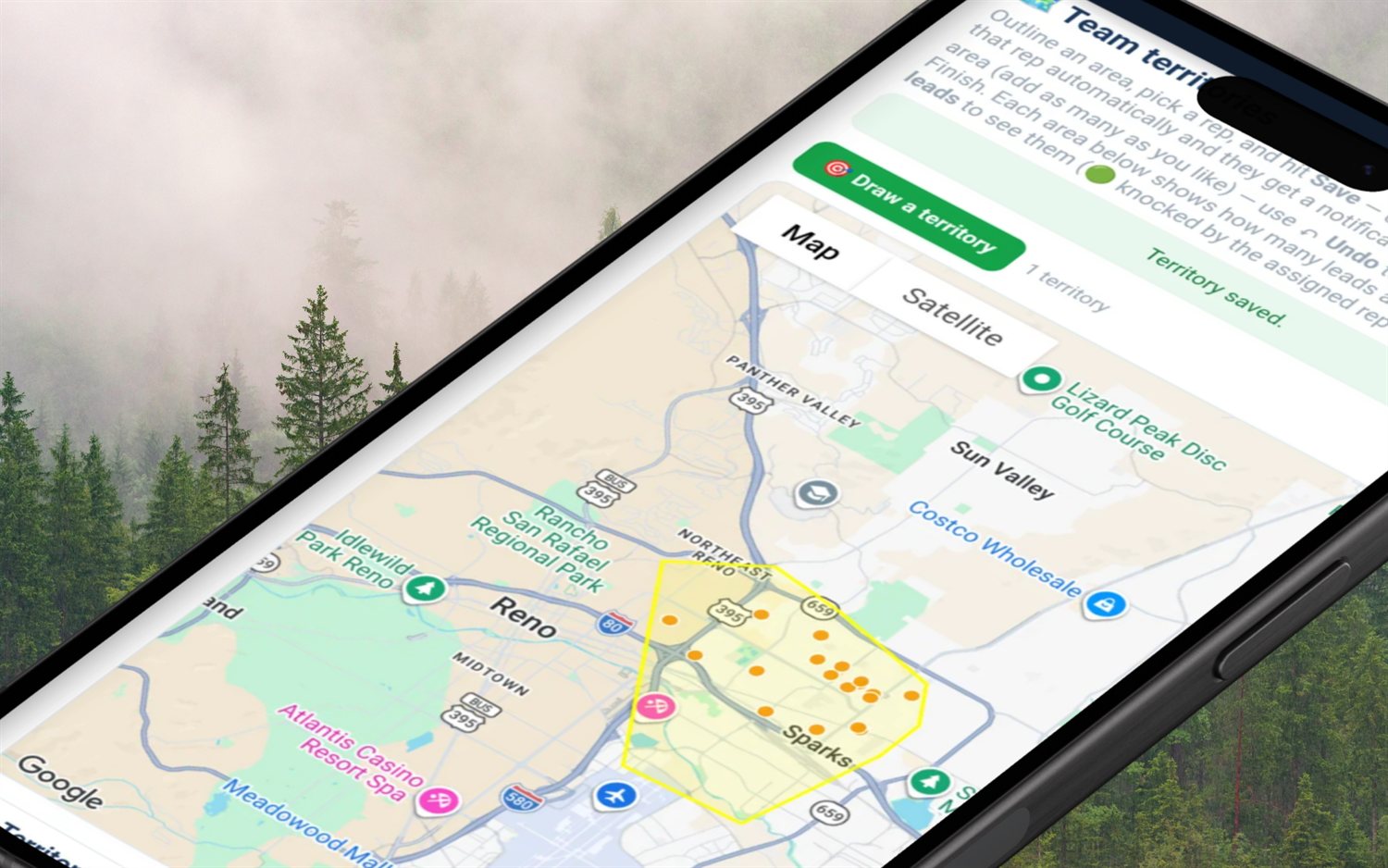
Assignment is one action, not a spreadsheet exercise. Trace the polygon, pick the rep, save — the leads inside move across and the rep is notified with the count. When new leads land in an existing patch later, re-sync sends those too.
The loop that separates a crew that compounds from one that churns.
Draw or re-sync each rep's territory, push the leads inside it, and say the doors number out loud for the week.
Scan doors-7d and last-active before you look at sales. Anyone sitting at zero gets a call today, not a message on Friday.
Open Team Coaching, take each rep's weakest objection and timing flag, and coach that one thing. Nothing else.
Filter Payroll to Owed only, work top-down, mark each commission and spiff paid as it goes out. Outstanding hits zero.
Five specifics, said plainly, so you can build your week around them:
Flat, published, month-to-month, from $30/mo, with a 14-day free trial that takes no card. No seat minimums and no annual contract — if each rep carries their own $30 plan you add one when you hire and drop it when someone leaves. Team plans sit at higher flat tiers and work differently: the bundle buys a fixed block of seats, so the price is the same whether you have filled three of them or all ten — a seat that frees up is reassigned to the next hire rather than refunded. The team page itself is not paywalled: a plain member can open it to see the roster, leaderboard and org chart. What is paid is running a team — creating it, building sub-teams, setting overrides, verifying installs.
If you are comparing, the honest framing is this: the big canvassing platforms are strong, built seat-first for larger organisations, and their numbers move — check current pricing before you commit. FieldStacker's bet is a flat price you can read off a page and a rep-side money layer the big platforms leave to a spreadsheet. Read the head-to-heads: FieldStacker vs SalesRabbit and FieldStacker vs SPOTIO. Selling alarms? The alarm edition is FieldStacker Security, on the same backend.
Four things, on repeat: give every rep a defined patch so nobody overlaps, look at activity numbers before results, run one coaching conversation per rep about one specific weakness, and pay exactly what you owe on the day you said you would. Everything else — contests, group chats, ride-alongs — is decoration on those four loops. In FieldStacker that maps to four screens: Territories to draw and assign the patch, the team performance table and Team knock map for activity, Team Coaching for the weak spot, and Payroll to mark what has actually been paid.
Activity first, results second — because activity is the only number a rep controls today. FieldStacker's team performance table gives you, per rep: doors knocked in the last 7 days, doors knocked all-time, quotes sent, verified installs this year, RMR sold, a close rate (verified installs ÷ quotes) and how long ago they were last active. Read them together. Zero doors this week is a conversation about showing up; 300 doors and a 4% close rate is a conversation about the pitch. Treating those two reps the same is how managers lose both.
Stop guessing from memory. The Team Coaching page lists every rep you manage with the number of practice drills they have run, their average score out of 5, whether they hold a passing certification (with its certificate number), their weakest objection, a knock-timing flag and when they were last active. The weakest objection comes from per-turn grades on their practice sessions — the single objection with the lowest average score — so you walk in with a named objection, not a vibe. There is also a "Who to coach this week" button that generates an AI-ranked 1:1 plan from each rep's weakest objection plus their knock timing.
Catch it in the same week, not at month end. FieldStacker flags a rep as needing a hand when they have knocked zero doors in the last 7 days, or have had no activity at all for 7+ days — and it deliberately does not flag anyone who joined in the last 5 days, so a brand-new rep gets their first week without a red dot. Flagged reps surface in a callout at the top of the team page with a message link, a call link when they have a phone number on file, and a link to the team training hub. A quiet week is usually a resignation you have not been told about yet; a five-minute call in week one is the cheapest retention you will ever buy.
It tracks the payroll; you move the money. The Payroll page lists you and every rep you manage for a chosen year, with their commissions from verified installs and any bonuses or spiffs, each carrying a Paid / unpaid toggle, plus a "Pay all" button per rep and running totals for total payroll, paid out and outstanding. There is an "Owed only" filter and the roster sorts most-owed first. The ACH, the cheque and the 1099 filing stay with you and your accountant — the paid marker is your disbursement record, and nothing on that page changes anyone's own commission totals.
Sub-teams are built in: any manager can name their sub-team and add reps under themselves by rep code, an org-chart view groups the whole roster by sub-team, and each manager sets a per-rep override — a multiple of monthly RMR per verified install on alarms, a flat dollar amount per install on fiber, or a flat amount per sale on generic canvassing. On seats: the team page itself is not paywalled, so a plain member can open it to see the roster, leaderboard and org chart. Running a team — creating it, sub-teams, overrides, verifying installs — is the paid Team Manager capability. Pricing is flat and month-to-month from $30/mo with a 14-day free trial, no card, no seat minimums and no annual contract, with Team plans at higher flat tiers.
Every habit on this page has a screen behind it. The hub page is where teams, seats, reporting lines, overrides and install verification are documented.
Door-to-door sales team management software →
Territory software · Lead distribution · Team GPS map · Commission payroll · Leaderboard · Coaching · Recruiting · How to assign territories
Short, real walk-throughs — no sign-up needed to watch.
See each rep’s doors today, first and last door, and your override; spot who’s gone quiet; open any rep’s week and every move; hand out leads.
See who’s out right now on the live team map and the doors they knocked today, then draw a territory and give it to a rep.
XP for every door and sale, levels, daily objectives, the weekly race, badges, a live feed of wins — and a celebration on every one.
Start a 14-day free trial — no credit card — draw your first territories and see every rep's doors by Friday. Flat month-to-month, cancel anytime.