Team leads · lead distribution

Lead distribution software for door-to-door sales teams

Get every lead into a specific rep's hands, or pull it back. Bulk assign, assign by rep ID, unassign to the pool, and filter to what is still available — from one manager-only board.

Flat month-to-month from $30/mo · 14-day free trial · no seat minimums, no annual contract

FieldStacker's Team leads board is a manual distribution tool, and deliberately so. A manager picks leads and hands them to a rep — in bulk, by rep ID, or by tracing a territory. Every hand-off is human rather than automated: there is no round-robin engine and no stale-lead alert, so automated rotation of inbound web leads is a job for a different product.

Most canvassing teams do not have a lead-routing problem. They have a lead-accountability problem: a manager buys or imports a list, the list lands in one pool, a few hundred get worked, and the rest sit there for six months with nobody's name on them. FieldStacker's answer is not a rules engine. It is a board that makes "who owns this door right now?" impossible to be vague about — every lead is either assigned to a named rep, or it is sitting in the pool as Available, and the count is on screen every time you open the page.

This page walks through exactly how distribution works in the product, including what it leaves to you. It is written for the sales manager or dealer who is trying to work out whether this tool fits their crew, so it names features the way the app names them.

What the Team leads board actually does

The manager-only lead command centre. It appears for any team owner, and for any sub-manager who has reps under them.

Bulk assign

Tick individual leads or use the select-all checkbox, pick a rep from the "Assign to…" dropdown, hit Assign. A live "N selected" counter tells you exactly how many doors you are about to hand over.

🌳

Assign anywhere in your downline

The dropdown holds your whole downline at any depth, not just direct reports, and each name carries their sub-team label — so an owner can hand a lead straight to a rep three levels down.

🔑

Assign by rep ID

Type any active rep's shareable ID (like K7M2-9QX4) to assign leads to someone who is not on your team at all — including across companies. The only person you cannot assign to is yourself.

↩️

Unassign back to the pool

One button clears the assignee and returns the selected leads to the pool. Ownership is untouched, so nothing is lost — the lead simply goes back to being available for someone else.

🔎

Filter to what is still available

Chips for All, Available, and one per team member. "Available" means no working rep yet: truly unassigned, or still sitting with you because an upline handed it down and you have not passed it on.

📤

Choose what you hand out

A segmented control at the top scopes the whole page by lead kind — 🗂️ All leads, 🏡 New homeowners, or 📋 Imported lists — each with a live count, so it is obvious what is about to leave your hands.

The rule that makes it safe

Assigning a lead is not giving it away

Assignment and ownership are two different fields in FieldStacker, and keeping them separate is what lets a manager distribute aggressively without worrying about it.

  • The owner never changes when you assign — leads you imported stay yours
  • Reassign or unassign at any time; a lead has exactly one assignee
  • Assigning also un-hides a lead a rep had tucked away, so it reappears on their map
  • Every assign and unassign is written to that lead's event timeline — who did it, and who it went to
  • When a rep leaves or is removed, every assigned lead they do not own is returned to the pool automatically
  • Delete only ever touches leads you own — never an upline's leads you were handed

See every feature →

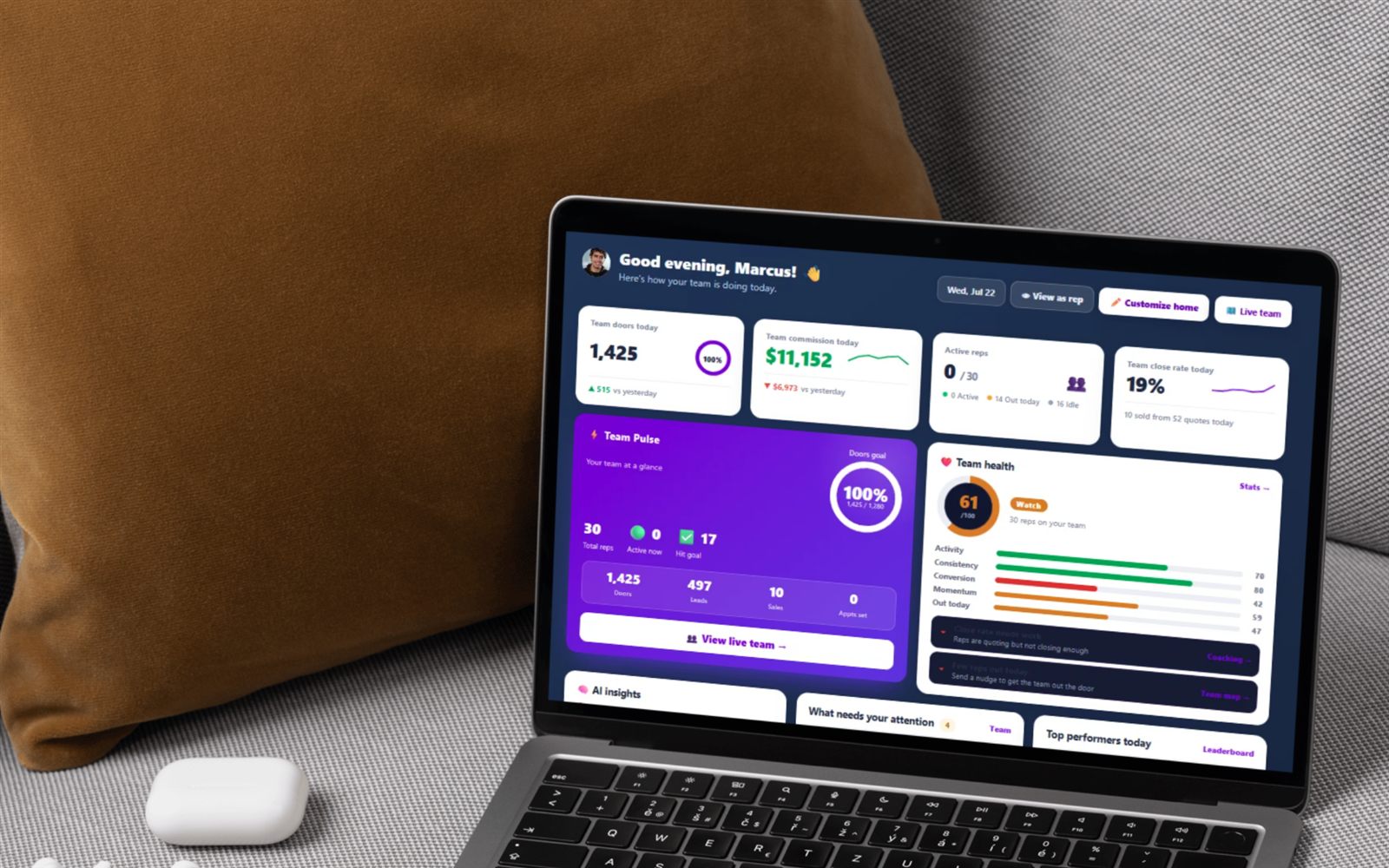
FieldStacker manager dashboard, the home a sales manager lands on before opening the Team leads board to assign leads to reps

From a bought list to a rep's map, in three moves

The distributable pool is imported lists plus new-homeowner leads. Your own hand-dropped map pins are your personal working doors and are never handed out.

1

Get leads into the pool

Import a CSV — the importer reads plain CSVs and SalesRabbit or Spotio exports, matches the columns for you, and geocodes rows that have no coordinates. Whoever imports owns the batch. New-homeowner pulls land in the same pool as their own kind.

2

Pick what you are handing out

Choose the lead kind, then narrow it: search a city, street or ZIP, or use the "Jump to county" and "Jump to ZIP" dropdowns, which group every ZIP in your pool under its county with a count next to each.

3

Assign, and they get pinged

Select and assign. The rep gets an in-app notification — "📍 3 new leads assigned to you" — mirrored to their phone as a push if they have notifications on, linking straight to the knock map where the leads now sit.

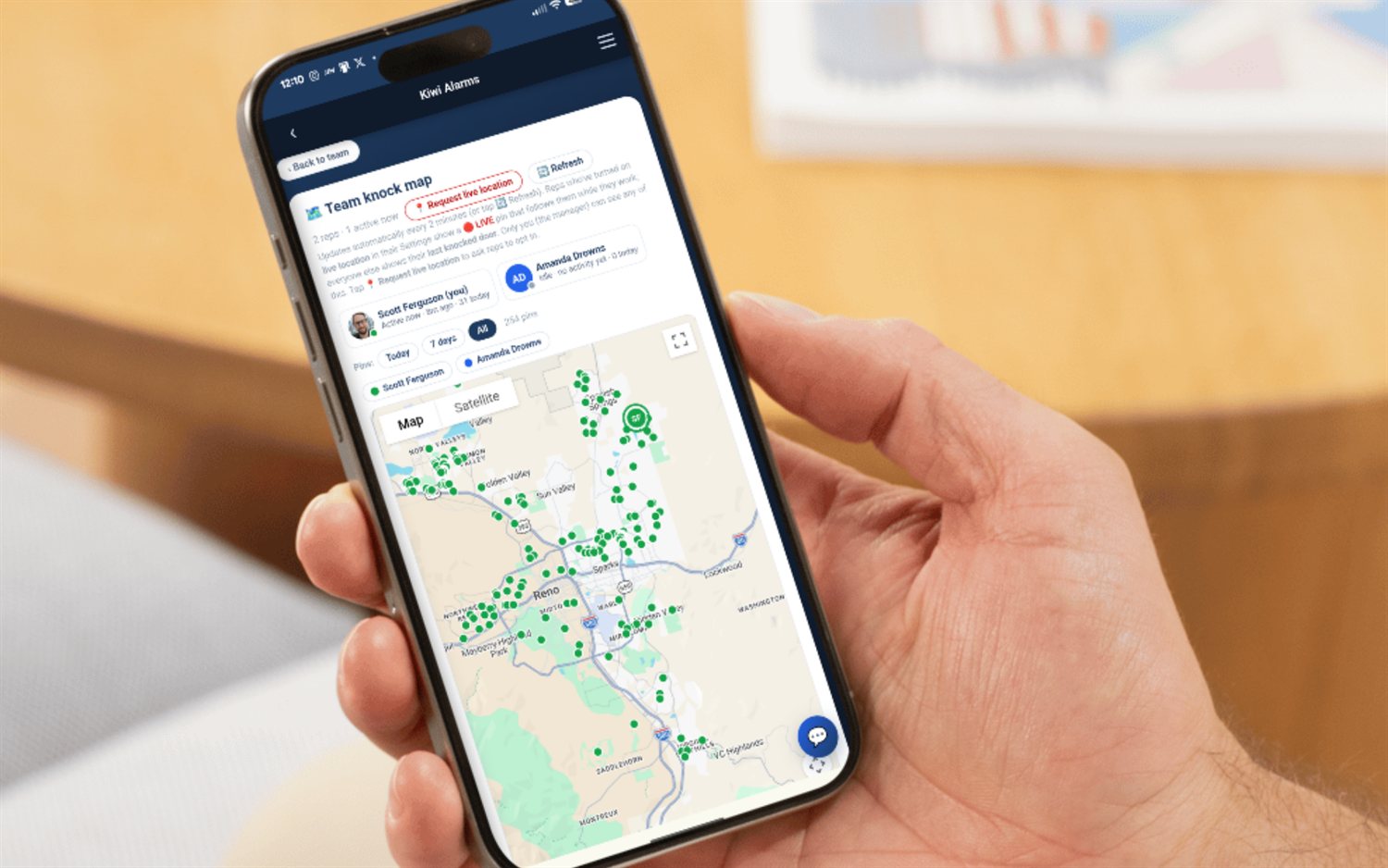
FieldStacker knock map showing the leads a manager assigned to a rep, with dispositions and an imported/assigned lead layer
What the rep sees

The lead lands on their map, not yours

A rep's knock map shows their own pins plus everything assigned to them — so the moment you assign, the door moves out of your map and onto theirs. There is no acceptance step and no queue to work through.

  • Unworked assigned and imported leads sit on their own 🗂️ layer, off by default, so given leads don't clutter the doors a rep actually knocked
  • The moment a rep sets a disposition, that lead graduates onto the main map for good
  • Because a lead has one assignee, two reps are never handed the same door
  • Distribution is always manager-initiated — reps do not self-serve from the pool

How the knock map works →

How the unassigned pool behaves

Here is the operational truth nobody selling lead-distribution software puts on a landing page. The leads that go stale are not the badly-routed ones. They are the ones with nobody's name on them. A lead assigned to a rep has an owner of the outcome — it shows on their map, it counts against their day, and you can ask them about it in a one-on-one. A lead sitting in the pool has none of that. It is not late, because nothing said it was due. It just quietly ages until the phone number is wrong and the new homeowner is no longer new.

FieldStacker gives you the number — the Available to assign tile and the Available filter chip isolate every lead with no working rep — but it will not chase you about it. Where that leaves you:

  • Aging is on you. Nothing notifies you that 400 leads have sat untouched since March. The table has an "Added" date, but there is no aging column, no age filter, and no digest.
  • Distribution is manual. No round-robin, no rules, no capacity limits, no auto-assign on import. If a lead is in the pool, it is because a human has not moved it yet.
  • Filters are kind, assignee and geography only. You can slice by lead type, by rep, by ZIP, by county, or by a text match on the address — not by disposition or by how long a lead has been waiting.
  • The board shows up to 1,000 leads at a time. With a big pool you filter down rather than scroll; the page tells you when you are seeing the first 1,000 of a larger match.

The workaround is a habit, not a feature: open Team leads, click Available, and hand out what is sitting there before you import the next list. Managers who do that weekly get the benefit of a pool. Managers who don't have bought a very expensive spreadsheet.

The other way to distribute

Hand out a neighborhood, not a checklist

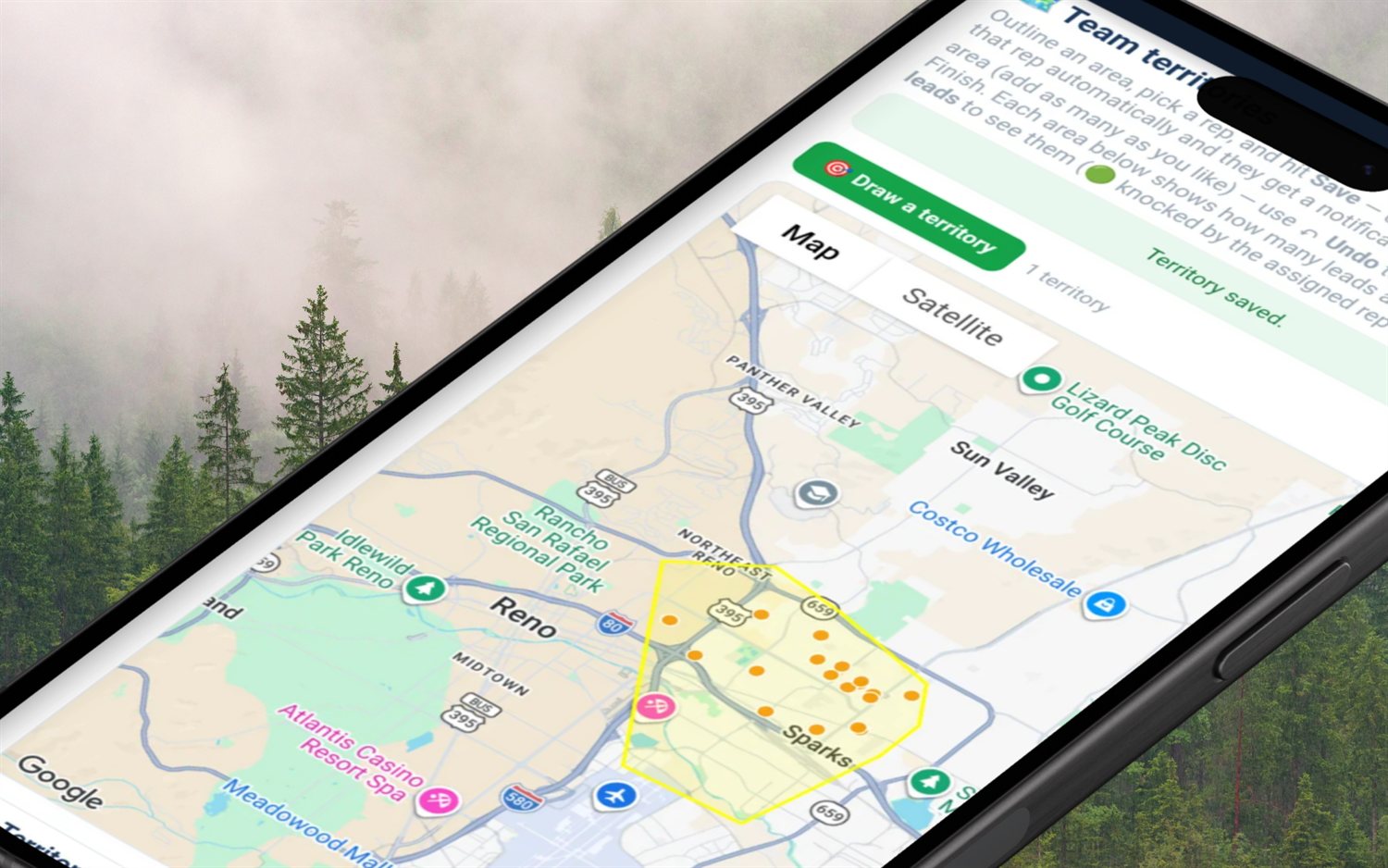
For canvassing, geography usually beats per-lead picking. Territories lets a manager tap out a free-form polygon on the map, name it, colour it and assign it to a rep. Saving it hands that rep every lead you own inside the shape and notifies them — one action, no ticking boxes.

  • Scope a territory to one lead kind — new-homeowner only, imported only, or both
  • A re-sync button re-hands everything inside after you pull or import new leads into the area
  • Point-in-polygon runs server-side, so the assignment matches the shape you actually drew
  • Limit worth knowing: a territory only distributes leads you own that have coordinates — the Team leads board can also pass down leads an upline handed you

Building a D2D team →

FieldStacker territory tool tracing a polygon on the map and assigning every lead inside it to one sales rep
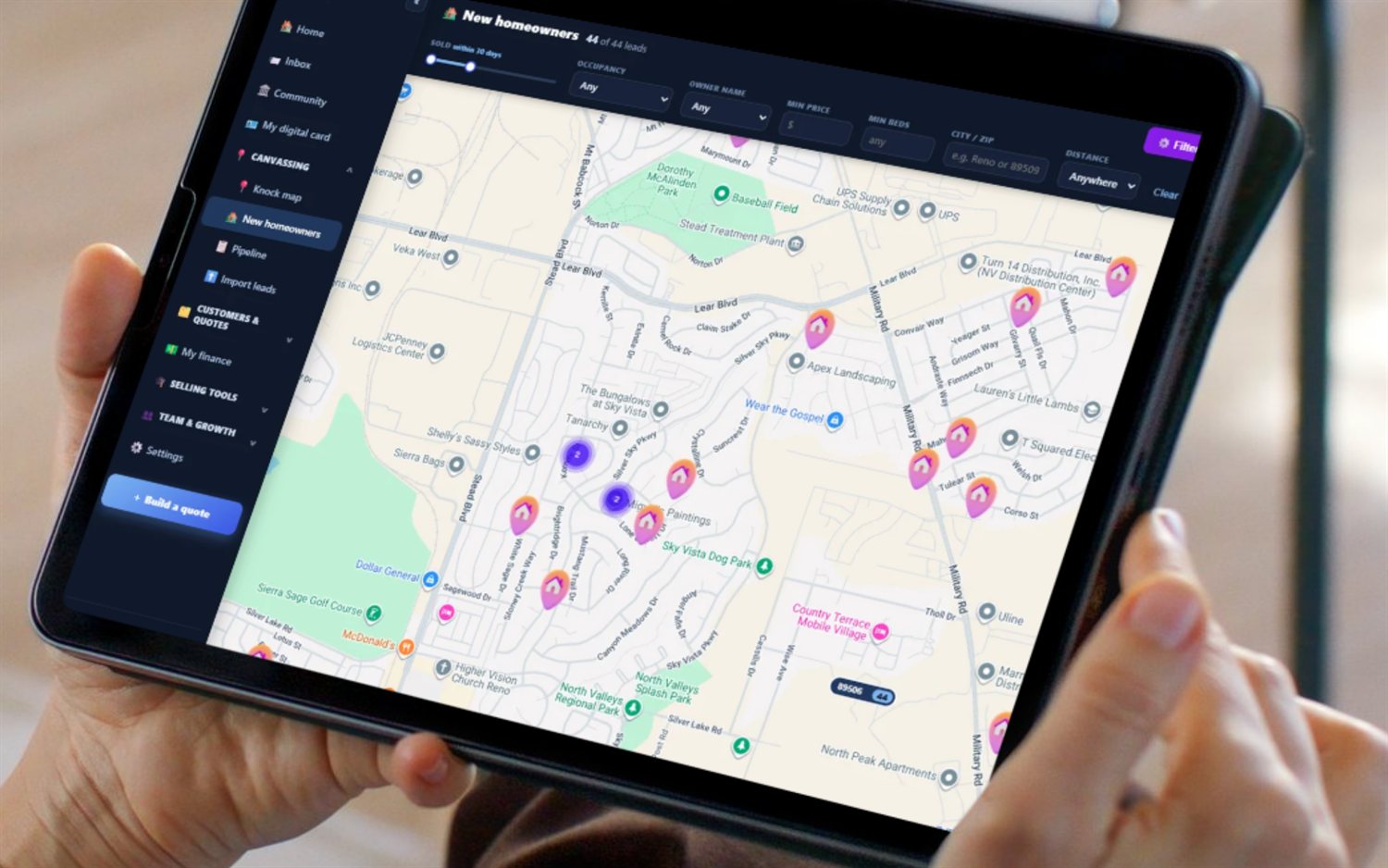
FieldStacker New Homeowners map — recently-sold homes pulled as fresh leads that a manager can then distribute to reps
Pricing, plainly

Distribution shouldn't be an enterprise add-on

Lead assignment is the sort of thing field-sales platforms tend to park behind a bigger tier and an annual commitment. FieldStacker publishes flat month-to-month pricing from $30/mo with a 14-day free trial, no card, no seat minimums and no annual contract, with team plans at higher flat tiers. Reassign a seat when someone leaves and the next hire takes it — the bundle price is flat either way.

SalesRabbit and SPOTIO are capable platforms and plenty of teams are happy on them — they don't publish comparable numbers reliably, so check their sites for current pricing. FieldStacker's importer reads their exports directly, so trying it doesn't mean re-keying your list.

See flat pricing →   vs SalesRabbit →   vs SPOTIO →

Lead distribution questions, answered straight

How do I assign leads to my sales reps?

Open Team leads — the manager-only board in FieldStacker. Choose what you are handing out (all leads, new-homeowner leads, or imported lists), narrow the list with the search box or the county/ZIP jumps, tick the leads you want (or the select-all box at the top of the table), pick a rep from the "Assign to…" dropdown and hit Assign. Every rep in your downline is in that dropdown — not just your direct reports — and each name is labelled with their sub-team so you know who you are handing to. The reps you assign get an in-app notification, mirrored to their phone as a push if they have notifications on, and the leads appear on their knock map.

Does FieldStacker distribute leads automatically or round-robin them?

No — distribution is manual by design. The Team leads board has exactly four actions: assign, assign by rep ID, unassign, and delete, so every hand-off is a person deciding who gets which doors; there is no round-robin, rules engine, capacity cap or auto-rotation. For a lot of D2D teams that is the right trade — you are handing out a neighborhood, not a web form submission, and geography matters more than whose turn it is. If you specifically want a rules engine that sprays inbound leads round-robin the second they arrive, that is a different tool, and better to know now than after you sign up.

Can I assign leads to a rep who is not on my team?

Yes. Next to the team dropdown is an Assign by ID box: type any active rep's rep ID — the short shareable code every FieldStacker account gets, formatted like K7M2-9QX4 — and the selected leads go to them. It works across companies, which is how a dealer hands work to an independent rep who runs their own account. The only rep you cannot assign to is yourself. Fiber dealers get one extra option: a top dealer can also hand leads down to their sub-dealer managers, who then redistribute from their own board.

If I assign a lead to a rep, do I lose it?

No — assignment and ownership are separate. Assigning sets the lead's assignee; the owner never changes, so leads you imported stay yours. You can reassign to someone else or hit Unassign to pull it straight back into the pool at any time. The same split protects you when someone quits: if a rep leaves your team or you remove them, every lead assigned to them that they do not own is automatically returned to the pool and their access is cut, so team leads cannot walk out the door with a leaver. Delete is the one irreversible action, and it only ever touches leads you personally own — never an upline's leads you were merely handed.

How do I keep unassigned leads from going stale in the pool?

By looking, on a schedule — the board gives you the numbers and the chasing is yours. It shows an Available to assign count and an Available filter chip that isolates every lead with no working rep, and the table has an "Added" date. Stale-lead alerts, an aging column and a "sitting untouched for 30 days" filter are not there, so the discipline has to come from you: an unassigned lead is a lead nobody is accountable for, and a pool that only grows is where a paid list goes to die. The habit that fixes it is boring — open Team leads, click Available, and empty it before you import more.

Can I hand out a whole neighborhood at once instead of picking leads?

Yes — that is what Territories is for. Trace a free-form polygon on the map by tapping points, name it, pick a colour and assign it to a rep. Saving it hands that rep every lead you own inside the polygon and notifies them, in one action, with no per-lead ticking. You can scope a territory to one lead kind (new-homeowner only, imported only, or both), and there is a re-sync button to re-hand everything inside after you pull or import new leads into the area. One limit to know: a territory only distributes leads you own and that have coordinates, whereas the Team leads board can also pass down leads an upline manager handed to you.
Part of the manager toolkit

The lead board is one screen in a bigger manager layer — teams, seats, reporting lines, overrides and install verification all live on the hub page.

Door-to-door sales team management software →

Territory software  ·  Team GPS map  ·  Commission payroll  ·  Leaderboard  ·  Coaching  ·  Recruiting  ·  How to assign territories  ·  Managing a team

Empty your lead pool this week

Start a 14-day free trial — no credit card — import your list, and put every lead in a named rep's hands. Flat month-to-month, cancel anytime.