Track your reps and hand out territories1:32
See who’s out right now on the live team map and the doors they knocked today, then draw a territory and give it to a rep.
FieldStacker's Team territories page turns a shape you trace on the map into a rep's working area — and hands over every lead inside it in one save, with a notification, without ticking a single checkbox.
Included in Sales Manager, $60/mo flat · 14-day free trial · no seat minimums, no annual contract
Most canvassing managers do territory management twice: once in their head, and once in a spreadsheet nobody opens after Tuesday. The reason is that the two halves live in different places — the map knows where the neighborhood is, and the lead list knows who is supposed to knock it, and joining them is manual labor that scales with the size of your crew.
FieldStacker collapses that into one page. A manager traces the area on the map, names it, colors it, picks a rep and picks what kind of lead the area hands out. Hitting Save runs a point-in-polygon test over every lead the manager owns, assigns the matches to that rep, and sends the rep a notification with the territory name and the count. That is the entire loop, and it is the feature almost nobody knows we have.
No lasso gestures, no shapefile upload, no training video. Four steps on a phone in the truck.
Hit 🎯 Draw a territory and tap each corner of the area — as many as you want, each marked with a green dot and counted on the Finish button. ↶ Undo point drops the last one. Three corners minimum.
Finish the shape and a save bar opens: a name up to 120 characters ("North side", "Hail zone — 3rd St"), a color swatch that becomes the polygon's fill on the map, and the rep it belongs to.
Pick 🗂️ all leads, 🏡 new homeowners only, or 📋 imported leads only. The area only hands the rep the kind you chose — the rest of your pool stays in your hands.
Save assigns every matching lead inside to that rep and notifies them — "📍 New territory: North side" — telling them who assigned it and how many leads are inside to work, linked to their knock map.
Plenty of apps let you draw on a map. The work is what happens after you let go. In FieldStacker the shape immediately does something:
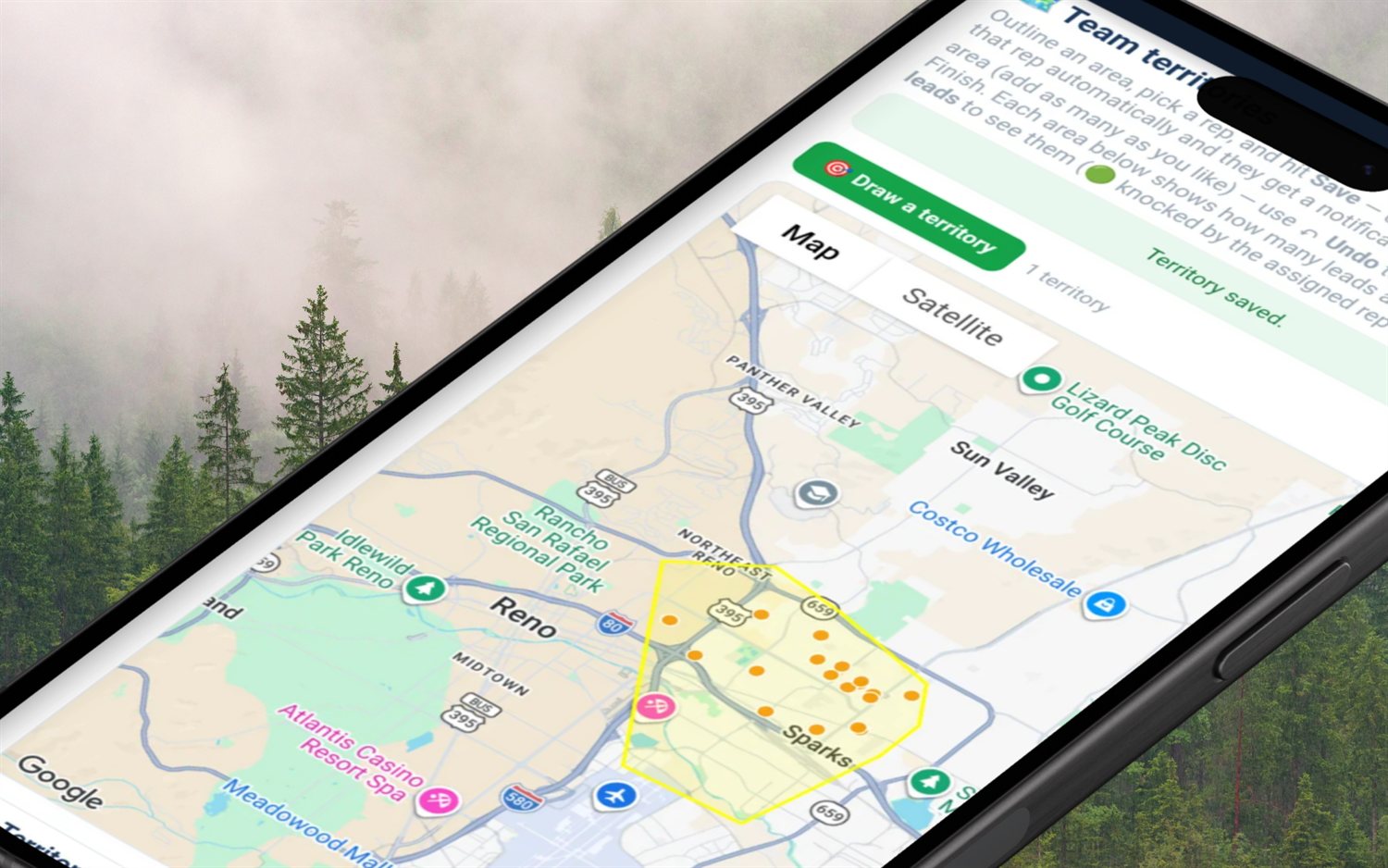
Each saved area is a record, not a doodle — here is everything it holds and what the app does with it.
| On the territory | What FieldStacker does with it |
|---|---|
| The traced shape | Stored server-side as a list of corners. Very detailed traces are simplified down (a Douglas–Peucker pass, capped at 500 points) so a shaky finger doesn't cost you a slow page. |
| Name | Up to 120 characters. Shown on the territory row, in the map pop-up, and inside the notification the rep receives. |
| Color | A hex swatch you pick (blue by default). It fills the polygon on the map and shows as a chip on the list so overlapping crews are visually distinct. |
| Assigned rep | Chosen from you plus your team. A territory can also sit unassigned — it just shows "— unassigned —" and hands out nothing until you pick someone. |
| Lead kind | All leads, new homeowners only, or imported only. It scopes both what gets handed over and the "leads inside" count shown on the row. |
| Leads inside | A live count per territory, with new-homeowner leads called out separately. 🔍 View leads zooms the map to the area and plots them — 🟢 already knocked by the assigned rep, 🟠 still to knock. |

A territory nobody knocks is just a colored shape. The manager home carries a Territory status card with a coverage bar per territory, and the territory list itself tells you the same story door by door.
Territories are for handing over a place. The Team leads page is for handing over a list — and the two share one pool.
A segmented control at the top asks "What are you handing out?" — all leads, new homeowners, or imported lists — each with a live count, so it is never ambiguous what a bulk assign is about to move.
The whole pool is broken down by ZIP, each ZIP resolved to its county and grouped under it, busiest county first. Or free-text search a city, street or ZIP.
Tick the header box to grab the whole filtered set and assign it to a rep in one submit. Unassign drops leads back to the pool; delete only ever removes leads you actually own.
Assign to anyone in your downline, not just direct reports — sub-team reps are listed with their sub-team name, so an owner can hand a lead straight down two levels.
Type an active rep's rep ID and hand them leads even if they are not on your team — useful for an independent rep you work with occasionally.
Every assign and unassign writes an event on the lead itself ("Assigned to Dana", "Returned to the pool by manager"), and on an assign the recipient also gets a notification with the count.
The exact mechanics, so you can check them against the way you run a crew. If one of these is a hard requirement for you, a heavier territory platform is the better buy — we would rather you knew now.
Territories are manager-only: if you don't own a team or have reps under you, the page sends you back to the team screen. Each manager sees, re-assigns and deletes only their own territories — a saved shape cannot be edited in place, so changing a boundary means deleting it and redrawing. The map runs on Google Maps, and falls back to OpenStreetMap when no Maps key is configured, so the tool works either way. The point-in-polygon test runs on the server — a bounding-box prefilter in the database, then an exact ray-cast — which is why FieldStacker needs no GIS database extension to do any of this. Viewing a big area plots up to 1,500 lead pins from a pool of up to 20,000, which is a display cap, not an assignment cap.
In FieldStacker it is one manager-only page called Team territories. You trace a free-form polygon around an area by tapping each corner on the map, give it a name and a color, pick which rep it belongs to, and choose which kind of lead it hands out. When you save it, every lead you own inside that shape is assigned to that rep in a single action and they get a notification naming the territory and the lead count. There is no per-lead ticking, no CSV shuffle, and no drawing tool to learn beyond "tap the corners, tap Finish."
Open Team territories, tap 🎯 Draw a territory, then tap each corner of the area on the map — as many corners as you like, each one marked with a green dot. ↶ Undo point removes the last corner, ✖ Cancel throws the shape away, and ✓ Finish area closes it. You need at least three corners; the button even counts them for you. Finishing opens a small save bar: name (up to 120 characters), the rep to assign it to, which lead kind it hands out, and a color swatch. The shape is stored server-side, simplified down if you traced a very detailed outline, and drawn back on the map in your chosen color every time you open the page.
Yes — that is the whole point of the feature, and it is one action. Saving a territory with a rep on it runs an exact point-in-polygon test over the leads you own, hands every match to that rep, and fires them a notification titled "📍 New territory: your territory name" with the lead count, linked straight to their knock map. Those leads then appear on the rep's map and drop off yours, because the map shows a lead to whoever owns it while it is unassigned and to the assignee once it is handed over. If there are no leads in the area yet, FieldStacker says so plainly instead of silently doing nothing.
No, and we would rather say so than let you find out. A territory assigns what is inside it at the moment you save it. When you later import a list or pull new-homeowner leads into that same area, those leads sit in your pool until you either re-save the territory or hit 🔁 Re-assign inside on the territory row, which re-hands everything inside to its rep and notifies them again. It is one tap, but it is a tap — the polygon is not a standing rule that vacuums up new leads on its own.
No. A FieldStacker territory is an assignment tool, not a fence. Nothing stops another rep from knocking a door inside someone else's polygon, the app does not warn you when two territories overlap, and reps do not see the territory outline on their own knock map — they see the leads that landed in it. What keeps a crew off each other's streets is softer than a fence: a lead has exactly one assignee, so a handed-over lead leaves your map and shows only on theirs, and reps can switch on a team-activity layer that shows teammates' knocks from the last seven days as anonymous colored dots — no address, no name, no disposition, just "someone has been down this street." If you need hard geofenced lockouts, FieldStacker is not that tool today.
Territory drawing and lead assignment come with the Sales Manager plan at a flat $60/mo, and the Team Management Pro bundle at $250/mo carries the same manager layer plus 10 seats on one bill. Everything is month-to-month with a 14-day free trial, no card, no seat minimums and no annual contract. The big canvassing platforms have mature territory tooling and are worth a look, but they are seat-priced and usually quote-based — check their sites for current pricing. The honest comparison: they will out-feature us on enterprise territory administration; we publish a flat number, let a manager draw an area and hand out the leads inside it in one save, and put a rep's own commission, mileage and 1099 tracking in the same app.
FieldStacker vs SalesRabbit → FieldStacker vs SPOTIO → Flat pricing →
Territories are one screen in a bigger manager layer — teams, seats, reporting lines, overrides and install verification all live on the hub page.
Door-to-door sales team management software →
Lead distribution · Team GPS map · Commission payroll · Leaderboard · Coaching · Recruiting · How to assign territories · Managing a team
Short, real walk-throughs — no sign-up needed to watch.
See who’s out right now on the live team map and the doors they knocked today, then draw a territory and give it to a rep.
Start a 14-day free trial — no credit card — trace one neighborhood, and hand it to a rep in a single save. Flat month-to-month, cancel anytime.