Your team and every rep at a glance1:27
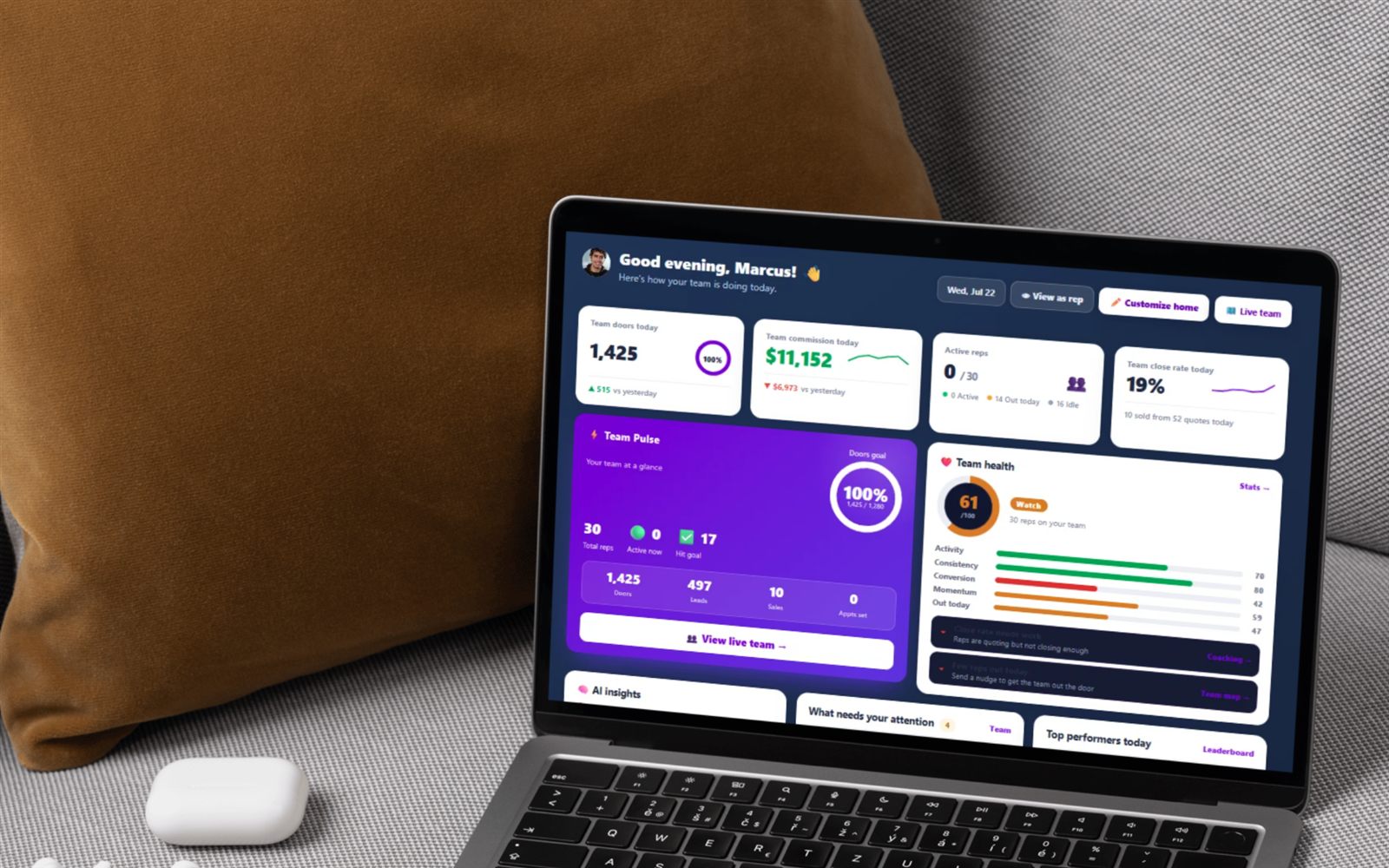
See each rep’s doors today, first and last door, and your override; spot who’s gone quiet; open any rep’s week and every move; hand out leads.
Build the team, get reps on it three different ways, set who reports to whom, and read every rep's doors, installs and override on one screen. Then verify the installs before they count.
Flat from $30/mo, or $25/mo billed yearly · 14-day free trial · no seat minimums, no contract required
Most canvassing software sells the map and then hands the actual management back to you. You still end up with a group chat for the roster, a spreadsheet for overrides, and no way to tell on a Tuesday afternoon which of your thirty reps has not knocked a door since Friday. FieldStacker's manager layer is the boring plumbing that makes a crew run: who is on the team, who they report to, what they did this week, what you earn off it, and which installs are real.
It is one login, and the reps you add are working the same knock map, dispositions and quote flow the solo reps get — you are adding a management layer on top, not moving anyone into a second app.
Every card below is a shipped screen, not a roadmap item.
Name it, drop a logo on it if you want, and you get a shareable team code — an unguessable 8-character code like K7M2-9QX4 — the moment it exists.
Share the team code, invite by email (they get a link that joins them on signup), or paste an existing rep's personal code to add them straight to your roster.
Name your sub-team, add reps under you by code, and see the whole roster as a Team structure org chart grouped by sub-team. Cycles and cross-dealer adds are blocked.
Doors knocked in the last 7 days, quotes, verified installs, RMR sold, each rep's override, what you earn from it, and how long since they were last active.
Reps with no doors this week — or no activity at all for seven days — get flagged in a "could use a hand" callout with Message, Call and Training links right there. A rep who only just joined is exempt for their first few days.
When a rep marks a quote installed it lands in your queue with the customer, plan, monthly, commission and install date — plus a map link if the job has GPS coordinates, and a plain "no GPS" if it does not. Verify it to count it on the installed leaderboard, or send it back and the rep gets a notification asking them to redo it.
Require reps to actually be at the house for a knock to count. It is one switch set by the team owner and it applies to everyone on the team — members see the policy, they do not set it.
Lock the team to your dealer name, logo, colours and powered-by logos so no rep can re-brand a quote page — or unlock it and let them customise their own. Owners and solo reps are never locked.
Team Management Pro is a single $250/mo subscription: your Sales Manager account plus 10 seats. A seat carries no subscription of its own — it mirrors yours, so seats ride your free trial, go active when you subscribe, and stop if the plan lapses. A meter on the page shows seats used out of your total.
Fixed roles, not a permission matrix — that trade is deliberate, and it is why setup takes minutes.
| Seat role | What they do | Notes |
|---|---|---|
| Sales Rep | Knocks and sells | The fallback whenever an invite does not name a role. |
| Technician | Installs and services jobs | Gets the tech-side interface. Hidden on fiber and pure-canvassing accounts. |
| Sales & Tech | Sells and installs | Both toolsets on one seat. Also hidden on fiber and pure-canvassing accounts. |
| Sub-manager | Runs their own downline | Once one seat is a Sub-manager, every other seat gets a "reports to" picker. |
On the Team Management Pro bundle each role also has its own stable, multi-use share link. Copy the Rep link for reps and the Tech link for techs — anyone who signs up through one joins in that role with no plan to choose, no dealer to pick and no email verification step. You can also email a link from the same page.
A quick-nav grid on the Team page drops you straight into the rest of the manager toolkit, and a plain member sees the roster and rankings rather than a paywall.
Realistically an afternoon, most of which is waiting on reps to accept.
Name and logo. You get a team code immediately. Set the GPS knock rule and decide whether reps can brand their own quote pages or inherit yours.
Email invites, the team code, rep codes, or a role share link on a seat bundle. New members report to you by default and are entitled straight away so nobody is paywalled mid-trial.
Name sub-teams, move reps under the managers who actually run them, and set each rep's override. The org chart redraws itself.
Read the per-rep table, chase whoever went quiet, assign leads on the Team leads page, verify installs as they come in, and pay it out on Payroll.
The boundaries a manager evaluating us should know before signing up.
All of it is on this page rather than three weeks into a trial.
Each screen in the manager layer has its own page — what it does, and what it deliberately does not.
Trace a polygon on the map, name and colour it, assign it to a rep, and hand every lead inside over in one save.
The Team leads board: bulk-assign from the pool, assign by rep ID, unassign back, and filter to what is still unclaimed.
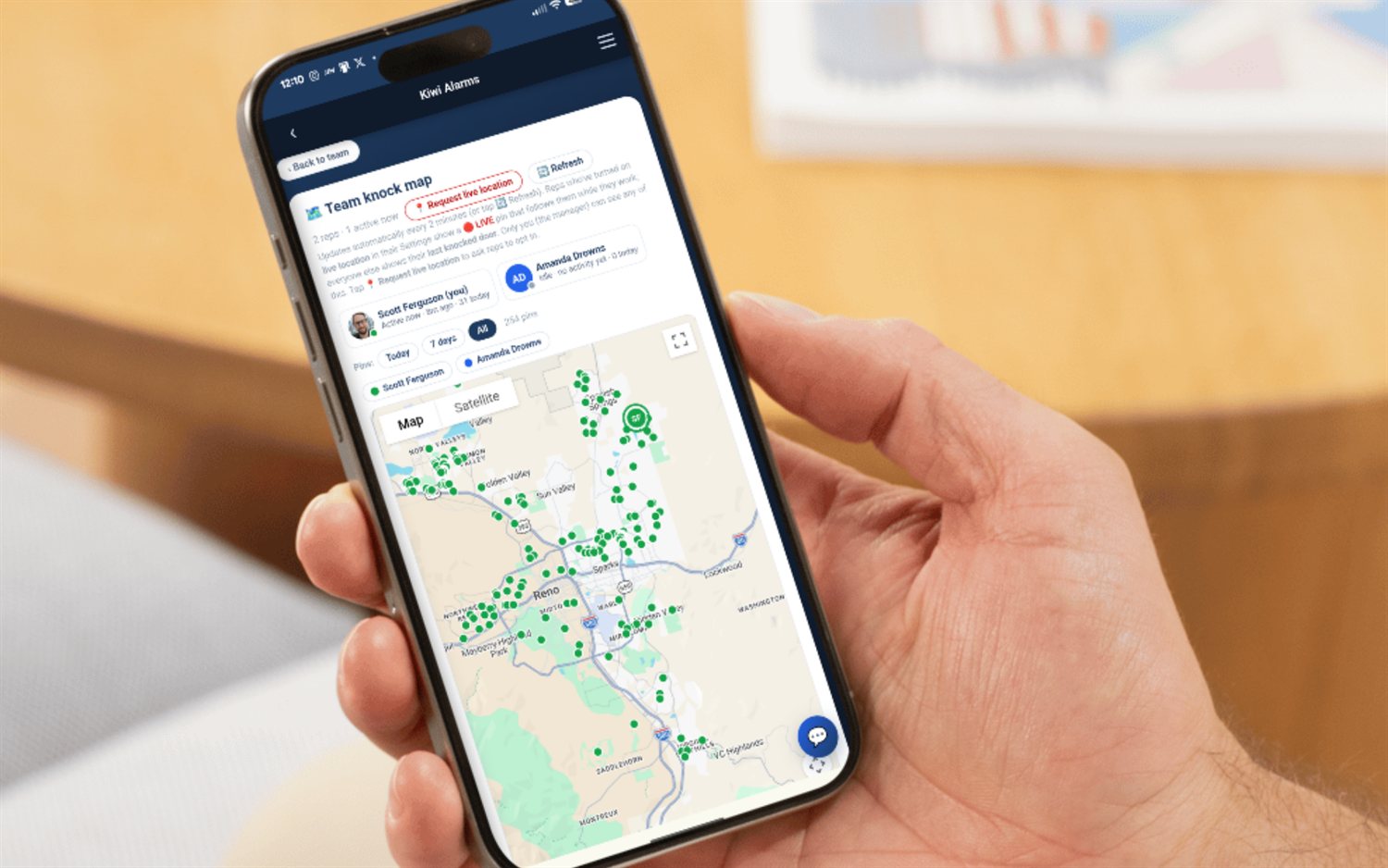
Every rep's knock pins in one view. Live location is opt-in and manager-only; team knocks are GPS-verified.
Mark every commission and spiff paid or unpaid, add a bonus, and pay one rep out at a time.
Today, Week and Month XP boards inside your team, plus a company Team League ranked by average weekly XP per rep.
Per-rep weakest objection, knock-timing flags, an AI who-to-coach plan, and a six-door certification exam.
A personal recruiting link and QR code, a four-stage recruit pipeline, and invites that put people straight on the team.
The field guide: how big to cut them, where the lines go, rotating reps, and when to redraw the map.
The weekly rhythm: territories out, doors and close rate per rep, coach the weakest objection, pay on time.
The rest of the manager and crew material on this site.
Fresh-lead pins, dispositions, territories and routing — what your reps are actually looking at.
Straight comparisons, with their pricing hedged because they do not publish it reliably.
Solar, roofing, pest, fiber and more — plus FieldStacker Security, the alarm edition on the same backend.
At minimum: get reps onto the team, put them in a reporting structure, show you what each one is doing, and let you pay them right. FieldStacker's Team page does all four in one screen — create a team and get a shareable team code, add reps three different ways, build named sub-teams with real reporting lines, and read a per-rep table of doors knocked in the last 7 days, quotes, verified installs, RMR sold, each rep's override and what you earn from it, plus when they were last active. Team settings holds the rest: invites, team name and logo, branding lock, the GPS knock rule, and the danger zone (step down, or delete the team).
Three ways, and you can mix them. (1) Share your team code — an unguessable 8-character code like K7M2-9QX4 that a rep enters on their own Team page to join. (2) Invite by email — they get a link, and signing up through it joins them to your team automatically; pending invites show as Pending until accepted and you can revoke one at any time. (3) Add by rep code — every rep has a personal code; paste it and they land on your team reporting to you. On the Team Management Pro bundle there is a fourth: one stable, multi-use share link per role (Sales Rep, Technician, Sales & Tech, Sub-manager) that you copy or email, and anyone who signs up through it joins in that role with no plan to pick, no dealer to choose and no email verification step.
Not if you put them on seats. Team Management Pro is one $250/mo subscription that carries the Sales Manager toolset plus 10 seats. A seat has no subscription of its own — it mirrors your account, so seats are free while you are on your free trial, active once you subscribe, and cut off if your plan lapses. Assign each seat as Sales Rep, Technician, Sales & Tech or Sub-manager, change any seat's role from a dropdown, and free a seat to hand it to someone else. One deliberate behaviour: a rep who already has their own paid or comped account keeps it rather than being pulled onto a seat. They join your team without using a seat, keep their own subscription, and still appear in your roster, stats and lead assignments.
Yes. Running a team is the paid Sales Manager layer; with it, the team owner or a sub-manager under them can name their own sub-team (up to 60 characters) and add reps beneath themselves by rep code. Add someone who is not on a team yet and they join your team under you; add an existing team-mate and they move into your sub-team. The app blocks the two ways this normally breaks: you cannot add someone you report to, and you cannot pull in a rep from a different dealer's team. On seat bundles there is a "reports to" picker on every seat once at least one seat holds the Sub-manager role — point a seat at you or under one of your manager seats, and the app walks the chain and rejects anything that would loop. The whole structure renders as a Team structure org chart grouped by sub-team, visible to everyone on the team.
You set an override per rep, right on the Team page, and only on reps you actually manage. What the number means depends on the industry the account runs: on a recurring-revenue vertical like alarms it is a multiple of the deal's monthly price (RMR) earned once per verified install, capped at 10× — 2× on a $55/mo account is $110. On a pure canvassing account it is a flat dollar amount per sale, so $25/sale × 8 sales is $200. The table shows a "You earn" column per rep and a year-to-date override total at the top of the card. Overrides are a reporting and payout figure inside FieldStacker; the Payroll page is where commissions and bonuses get marked paid.
Two differences that matter. First, price shape: FieldStacker publishes flat month-to-month pricing from $30/mo with a 14-day free trial, no credit card, no seat minimums and no annual contract, and a whole crew fits on the $250 Team Management Pro bundle. The big canvassing platforms are seat-priced and usually quoted, so check their sites for current pricing. Second, scope: they are canvassing-management platforms with enterprise permissioning; FieldStacker gives you four fixed seat roles rather than a custom permission builder, one team per owner, and each rep on one team at a time — but it also carries the rep's own money (commission, chargebacks, IRS-rate mileage, 1099 set-aside) and the manager's override in the same app. If per-field permission matrices and org-wide role design are what you need, that is a different class of tool.
Short, real walk-throughs — no sign-up needed to watch.
See each rep’s doors today, first and last door, and your override; spot who’s gone quiet; open any rep’s week and every move; hand out leads.
See who’s out right now on the live team map and the doors they knocked today, then draw a territory and give it to a rep.
XP for every door and sale, levels, daily objectives, the weekly race, badges, a live feed of wins — and a celebration on every one.
Start a 14-day free trial — no credit card — create the team, and send the invites today. Flat month-to-month, cancel anytime.