Coaching · for sales managers

Sales coaching software that tells you who to coach, and on what

Your reps drill objections against an AI homeowner. You get a roster table with each rep's weakest objection, their knock timing, who's certified — and a ranked plan for the week.

Flat month-to-month · 14-day free trial · no seat minimums, no annual contract

This coaches practice: reps type their answers against an AI homeowner, every turn is graded 1–5, and the manager side turns those grades into a "who needs a 1:1, on which objection" table. Every grade comes from that practice rather than from a live call — there is no call recording, no audio and no video anywhere in the coaching tools — so recording and scoring real conversations stays with a tool built for it.

Most canvassing apps hand a manager activity: doors, dispositions, pins on a map. Activity tells you who is working; it does not tell you why a rep who knocks 90 doors a day still can't get past "we already have someone." FieldStacker's coaching side exists for that second question. Reps rehearse the door in the app — a single objection, the whole new-homeowner pitch, or a six-door certification gauntlet — and every graded turn is filed under the objection it belongs to. The manager view reads those grades back as a roster: who has practiced, how they score, where each one is weakest, and who has actually passed the exam.

What a manager gets

Six things that exist in the product today, named the way the app names them.

👥

The Team Coaching roster

One row per rep: drills done, average out of 5, certified (with the certificate number), weakest objection, knock timing, last active. Four team totals across the top — members, total drills, team average, and how many are certified.

🎯

Weakest objection, per rep

Not a vibe. Every practice turn is stored with its objection key and its 1–5 grade, so the column shows the exact objection that rep scores lowest on, with the average next to it.

Knock-timing flag

Slows after lunch, Misses the evening, or Good spread — computed from that rep's own logged knocks and answer rates, in that rep's own time zone, once they have at least 15 doors in the window.

🧠

"Who to coach this week"

One button. The AI takes each rep's weakest objection, timing flag, drill count and average and returns a prioritized 1:1 plan — one concrete line per rep, most urgent first, quietly skipping the ones who look fine.

🎧

Exam review, door by door

Click a rep's name to open their certification attempts, newest first: the full homeowner-and-rep transcript of all six doors, each door's score and outcome, and the coaching note the AI left on it.

📖

Your scripts as the standard

The owner pastes the dealer's real pitch and objection responses once. From then on, practice, the full pitch and the exam are role-played and graded against your playbook, not a generic one.

Monday morning, not month-end

A ranked list of 1:1s, built from real practice data

The digest is deliberately boring in the best way: it does not invent a narrative, it reads the same numbers you can see in the table. Each rep goes in as four facts — weakest objection and its score, knock-timing flag, how many drills they've run, their average — and comes back as one line telling you what to work on and why.

  • Ordered most urgent first; reps who look fine are left off
  • Generated on demand and cached with the date it was built
  • Refresh it whenever you want a new read
  • Not emailed, not scheduled — you pull it when you plan the week
  • Your manager home also flags reps as Needs help, Monitor or Doing well from 7-day doors, conversation rate and close rate

Building the team →

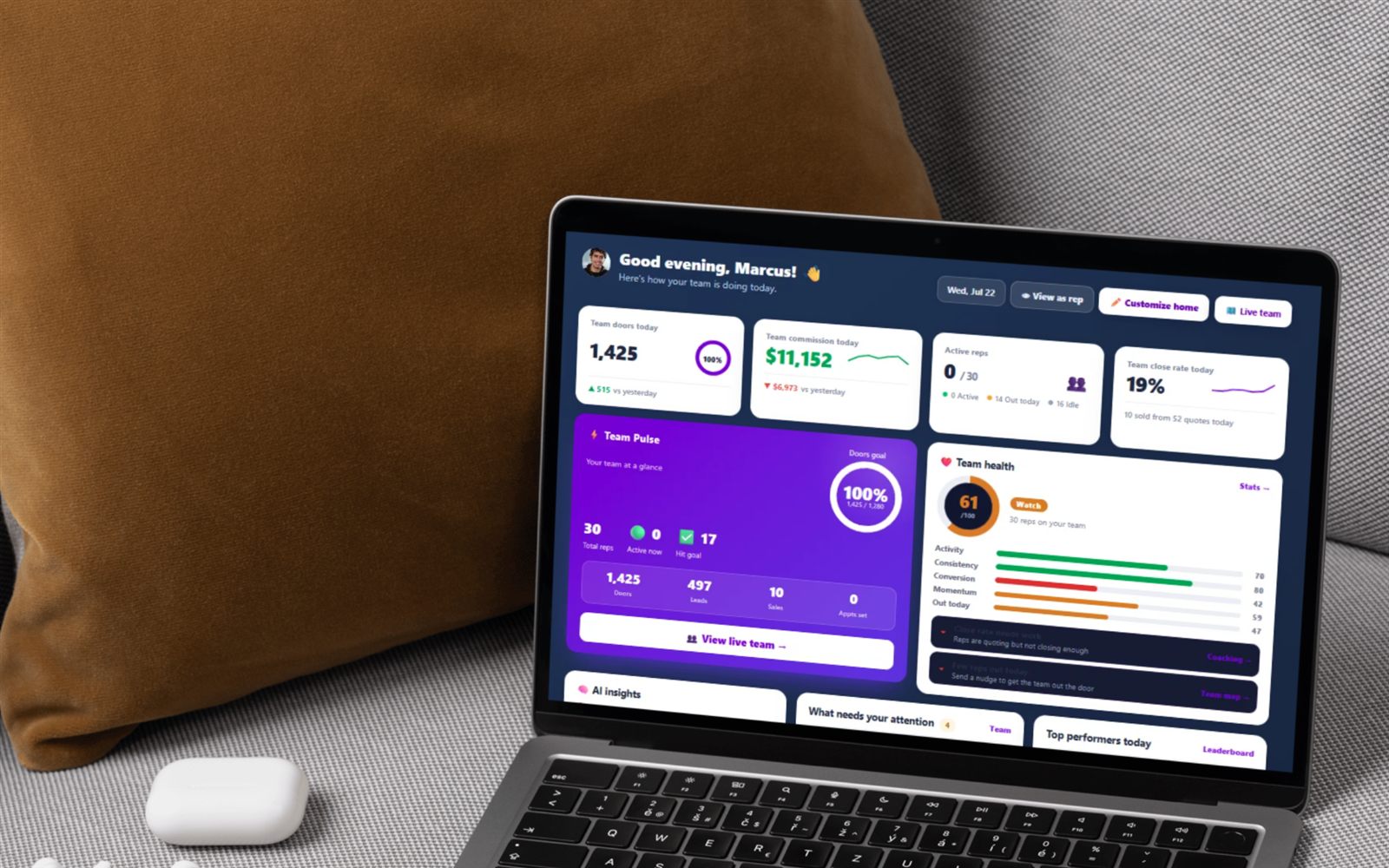
FieldStacker manager home showing a Team Health score with a flagged coaching opportunity linking through to the Team Coaching page

How a coaching week runs

Three moves, about ten minutes of manager time.

1

Read the roster

Open Team Coaching. Scan for blanks — a rep with no drills and no certificate is a different problem from a rep drilling daily who still scores 2.4 on price.

2

Generate the plan

Hit the coaching-plan button and get the ranked list of who needs a 1:1 and on which objection, with the timing issue called out where there is one.

3

Sit with the transcript

Open the rep's exam attempt and read the actual door — what the homeowner said, what they answered, which door dropped the score — then send them back to drill that one objection.

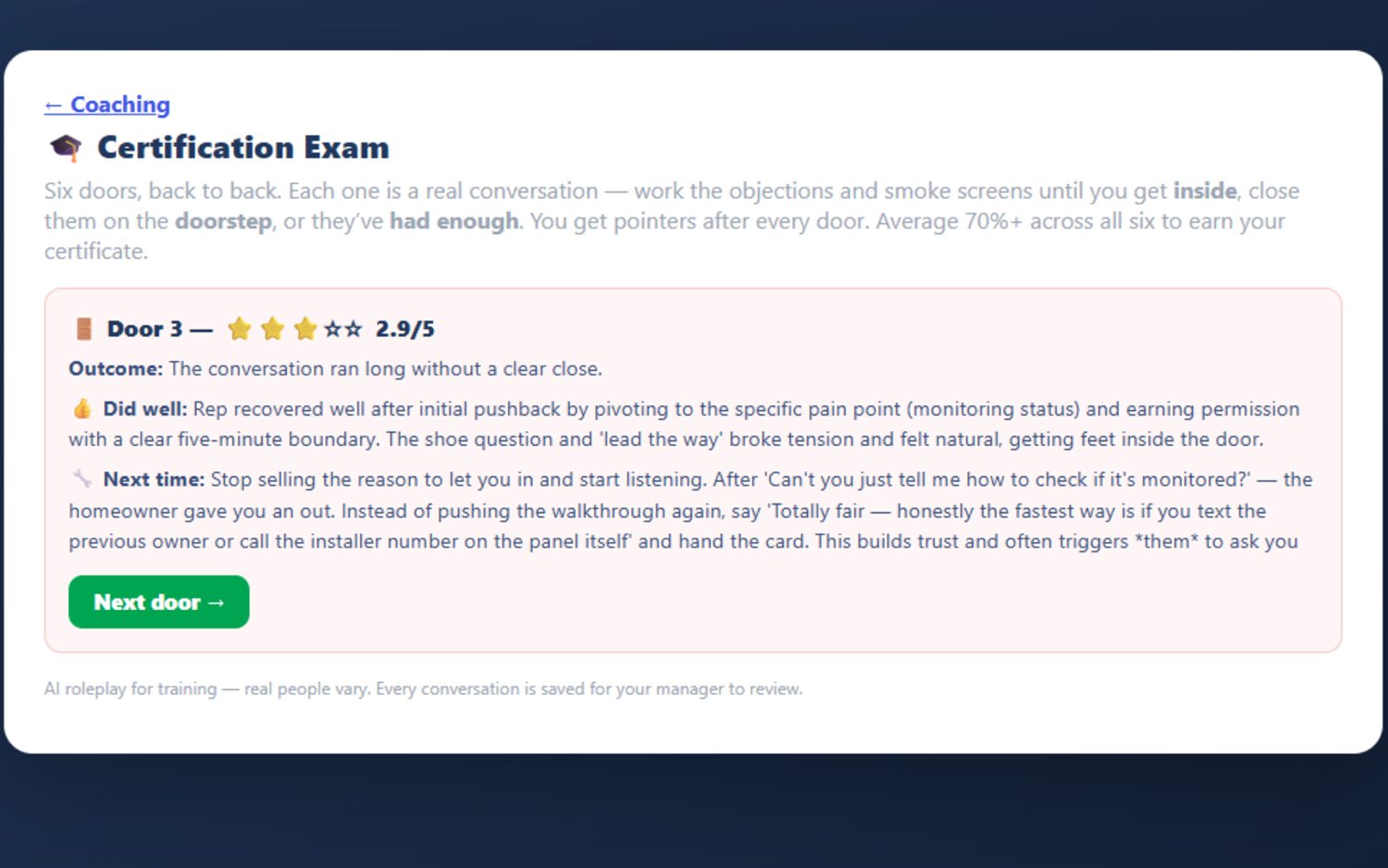
FieldStacker certification exam door result: a 2.9 out of 5 score with the outcome, what the rep did well, and what to do next time
The bar you can point at

Six doors, 70% to certify

The exam is one run of six back-to-back doors, and the households are mixed on purpose so nobody certifies by rehearsing the same new-mover door six times:

  • A new mover, still in boxes
  • Two who already have someone — a paying customer and a convinced DIYer
  • A fourteen-year long-timer who has never bought and never felt the need
  • A lapsed customer who "never got their money's worth"
  • A renter who genuinely cannot sign — disqualifying politely is the right answer

Every turn is graded, every door ends with a "did well" and a "next time," and a 3.5/5 average earns a numbered certificate the rep can print with their name, your company name and the date. Fall short and they get the overall debrief plus a retake, as many times as they want.

What reps get on their own side

Practice they'll actually do

Nothing on the manager page exists unless reps use the rep page, so that side is built to be worth opening: drills done, average score, a day streak and this week's count, plus a "Work on this" card listing their lowest-scoring objections with a one-tap link to drill each one.

  • Ten common door objections to drill, or the whole new-homeowner pitch end to end
  • Six homeowner types — skeptic, busy parent, price shopper, no-soliciting, friendly-but-noncommittal, new homeowner
  • Easy, medium or hard: on hard the homeowner is guarded and one pushy line can lose it
  • Graded 1–5 every turn, with the fix and a stronger line they could have said
  • An AI summary that clusters their recent notes into two or three recurring weaknesses

Common door objections →   Scripts →

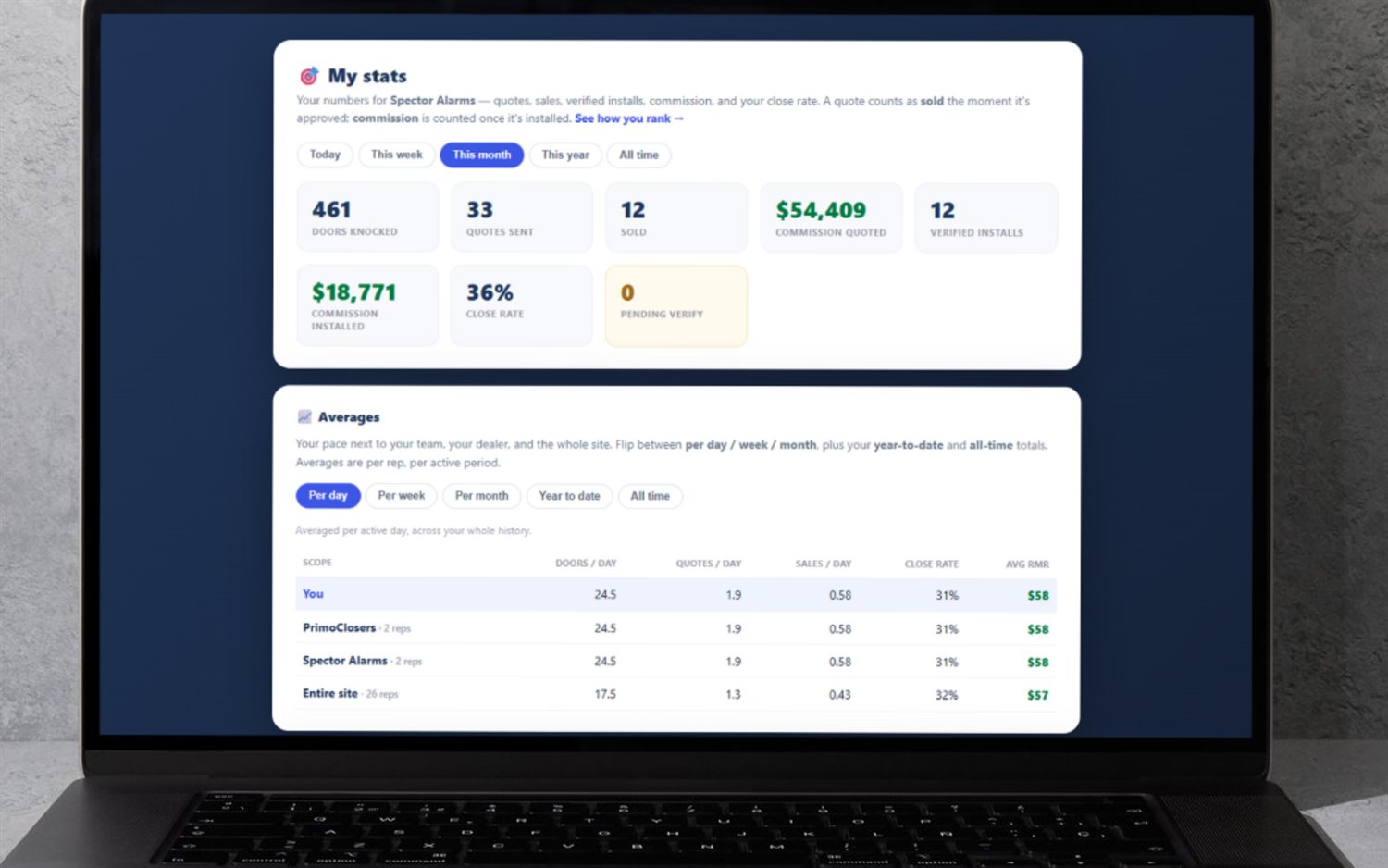
FieldStacker My Stats screen showing a rep's doors knocked, quotes, sales and close rate next to team, dealer and site averages

What gets graded, stored and gated

The precise edges of the feature, so you can match them against how you coach:

  • Grades come from typed practice. Nothing is recorded, transcribed or scored from a real conversation.
  • Only exam runs are stored as transcripts. Practice drills save the score, the turn count and the coaching note — not the conversation. If you want to read a rep's words door by door, send them at the certification exam.
  • The table needs data. Weakest objection is blank until a rep has graded turns; the knock-timing flag stays blank under 15 logged doors in the last 60 days; the certified column stays blank until someone passes.
  • The digest is manual. On-demand and cached — no scheduled email, no push.
  • Scripts are owner-only. One playbook per company; reps cannot edit what they are graded on, and there is no per-sub-team variant.
  • The team view is a manager plan. Drills, the full pitch and the exam are on the $30 Rep plan; the roster, the digest and exam review need Sales Manager or Team Management Pro.

Selling alarms? The same coaching engine runs the alarm edition, FieldStacker Security, on the same backend — with alarm-specific doors (the ADT takeover, the Ring-cameras DIYer) instead of the trade-neutral set. Fiber accounts get a fiber set. Everyone else trains on the neutral framework, spoken in the trade you typed at signup, which is why a solar rep is never graded on getting inside for a walkthrough.

Manager questions, answered straight

What does a manager actually see on the Team Coaching page?

A roster table, one row per rep on your team, with seven columns: drills done, average score out of 5, whether they hold a current certification (and its certificate number), their weakest objection with its average score, a knock-timing flag, and the date they last practiced. Above it sit four team totals — team members, total drills, team average, and how many of your reps are certified. Reps get there by team code or by reporting to you, and you can only open a rep you manage.

How does it decide which objection a rep is weakest at?

Every graded turn of practice is stored with the objection it belongs to and its 1–5 score, so the weakest objection is the lowest-scoring key across all that rep's turns — not a guess and not a whole-session average. There are ten stable objection keys (already has someone, not interested, too expensive, renting, bad timing, ask my spouse, in a contract, just moved in, how'd you get my info, no soliciting), and they stay the same across industries so the stat still means something whether your crew sells alarms, fiber or anything else. If a rep has no per-turn grades yet, the column falls back to their weakest practice mode or homeowner type instead.

What is the "who to coach this week" digest?

A button on the Team Coaching page. It takes each rep's weakest objection, their knock-timing flag, their drill count and their average, sends that snapshot to the AI, and gets back a prioritized 1:1 plan — one concrete line per rep, most urgent first, skipping the reps who look fine. It is generated on demand and cached with the date it was built, so it sits there until you hit Refresh. It is not emailed and not on a schedule; you pull it when you plan the week.

What is the certification exam, and can I read what a rep said?

Six doors, back to back, each a full conversation with an AI homeowner. The households are deliberately mixed — one new mover, two who already have someone (a paid provider and a DIYer), one long-timer who has never bought, one lapsed customer, and one renter who cannot sign, because knowing to disqualify politely is a skill too. Each turn is graded 1–5; the rep gets a "did well" and a "next time" after every door, and needs a 3.5/5 average — 70% — to earn a numbered, printable certificate. Managers can reopen an attempt and read the whole thing door by door: the transcript, the per-door score, the outcome and the coaching notes.

Can I make it coach my own pitch instead of a generic one?

Yes, and only the company owner can. Paste your dealer's own approach, qualifier, objection responses, transition and stories into Pitch Scripts (up to 20,000 characters) and that becomes what reps are role-played against and graded on in objection practice, the full pitch and the certification exam — the AI homeowner raises the objections your pitch anticipates, and the suggested better line sounds like your playbook. Leave it blank and everyone trains on the built-in new-homeowner framework, phrased for your industry. Reps cannot edit it.

Which plan do I need, and how does it compare to SalesRabbit or SPOTIO?

The drills, the full-pitch roleplay and the certification exam are on the $30/mo Rep plan. The team view — the roster table, the who-to-coach digest and reading a rep's exam transcripts — needs a manager plan: Sales Manager at $60/mo, or Team Management Pro at $250/mo with 10 seats that mirror the manager account. All flat, month-to-month, 14-day free trial, no card, no seat minimums. SalesRabbit and SPOTIO are strong canvassing platforms and both sell training modules; check their sites for current pricing, since neither publishes comparable numbers reliably. The difference is what gets graded: ours is practice, not a recording of a real door.
Part of the manager toolkit

Coaching is one screen in a bigger manager layer — teams, seats, reporting lines, overrides and install verification all live on the hub page.

Door-to-door sales team management software →

Territory software  ·  Lead distribution  ·  Team GPS map  ·  Commission payroll  ·  Leaderboard  ·  Recruiting  ·  How to assign territories  ·  Managing a team

Find out who on your crew can't handle "too expensive"

Start a 14-day free trial — no credit card — put the team through the exam this week, and coach from the scores instead of a hunch.