Service scheduling software that fills your week
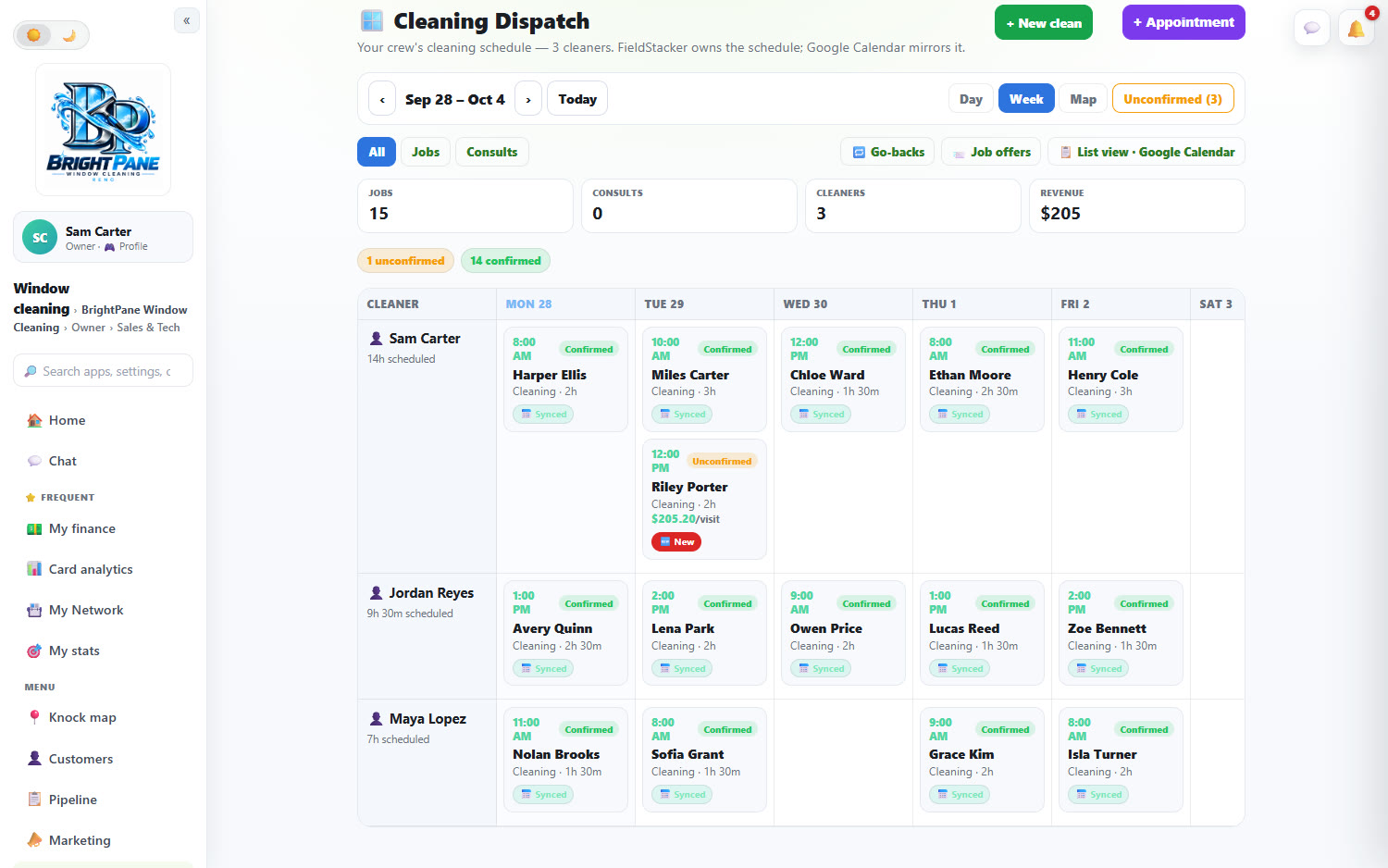
Every tech down the side, the week across the top. One-off jobs, approved estimates and the regulars on a plan all land on the same board, and customers can book your open times themselves.
14-day free trial · no credit card · from $30/mo · your techs are free
A full week does not come from one place. Some of it is repeat work you already know about: the spring AC tune-ups, the quarterly pest treatments, the biweekly cleans. Some is estimates the customer just approved. Some is new customers booking from your website on a Sunday night. Scheduling software for a service business has to pull all three onto one calendar, or you end up with a whiteboard, a paper planner and a phone calendar that never agree.
FieldStacker gives each of those a way onto the board, then shows you the week by tech so you can see who is full and who has a gap on Wednesday afternoon.
Field service scheduling software for the days ahead
How work gets onto next week's calendar, and stays there.
A week by tech
Every tech down the side, days across the top, with hours booked per tech. Switch to Day or Map view from the same screen.
Recurring visits
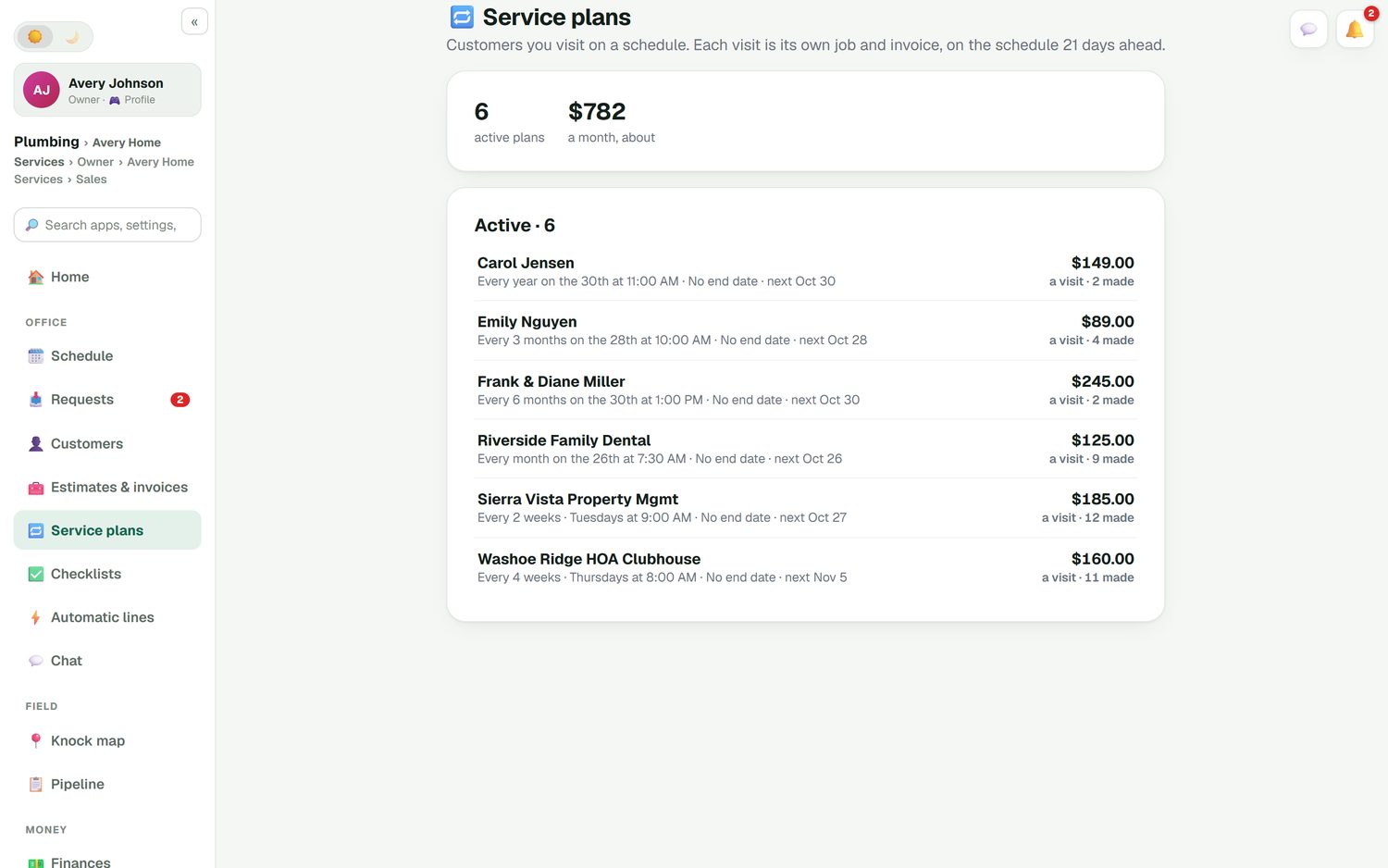
Service plans keep repeat visits on the calendar, weekly through yearly, for any trade. You do not re-book the regulars.
Approved estimates
The office home screen lists approved estimates that still need a date, with the dollar total, so sold work does not sit unbooked.
Customers book open times
Online booking shows your real open times on your website or digital card page, and the booking lands on the board.
Unconfirmed at a glance
Jobs are marked confirmed or unconfirmed, with an Unconfirmed filter, so you know which customers to call before the week starts.
Google Calendar mirror
FieldStacker owns the schedule and Google Calendar mirrors it. Move a job and the customer's calendar invite moves too.
Book next week in FieldStacker, free for 14 days
Send us your customer list and recurring work from your old app. We import it for free.
- No credit card to start
- From $30/mo after the trial
- Your techs and cleaners are free
- Cancel any time from the app
See the gaps before Monday
The week board shows each tech's booked hours next to their name, so a tech at 14 hours and a tech at 7 hours are obvious. Unconfirmed jobs stand out in their own color. Drag a job to a lighter day or a different tech, and the change reaches the customer's calendar without you sending anything.
- Hours scheduled per tech for the week
- Jobs and consults filtered separately
- An Unconfirmed count to clear before the week starts
- A list view for when you just want the rows
The regulars book themselves
Maintenance agreements, quarterly treatments, monthly pool or lawn visits, a dental office's monthly drain service: put the customer on a service plan once and the visits keep coming onto the calendar. Each visit is its own job and its own invoice. Add a card on file and autopay charges each visit when it is done. Customers manage their visits on their own page, so a skip or a new date does not need a phone call.
- Weekly, every 2 weeks, monthly, quarterly, twice a year, yearly
- Every plan's next visit and price per visit in one list
- Card on file and autopay for each visit
- Customers change visit dates on their own page
Book the next visit before you leave
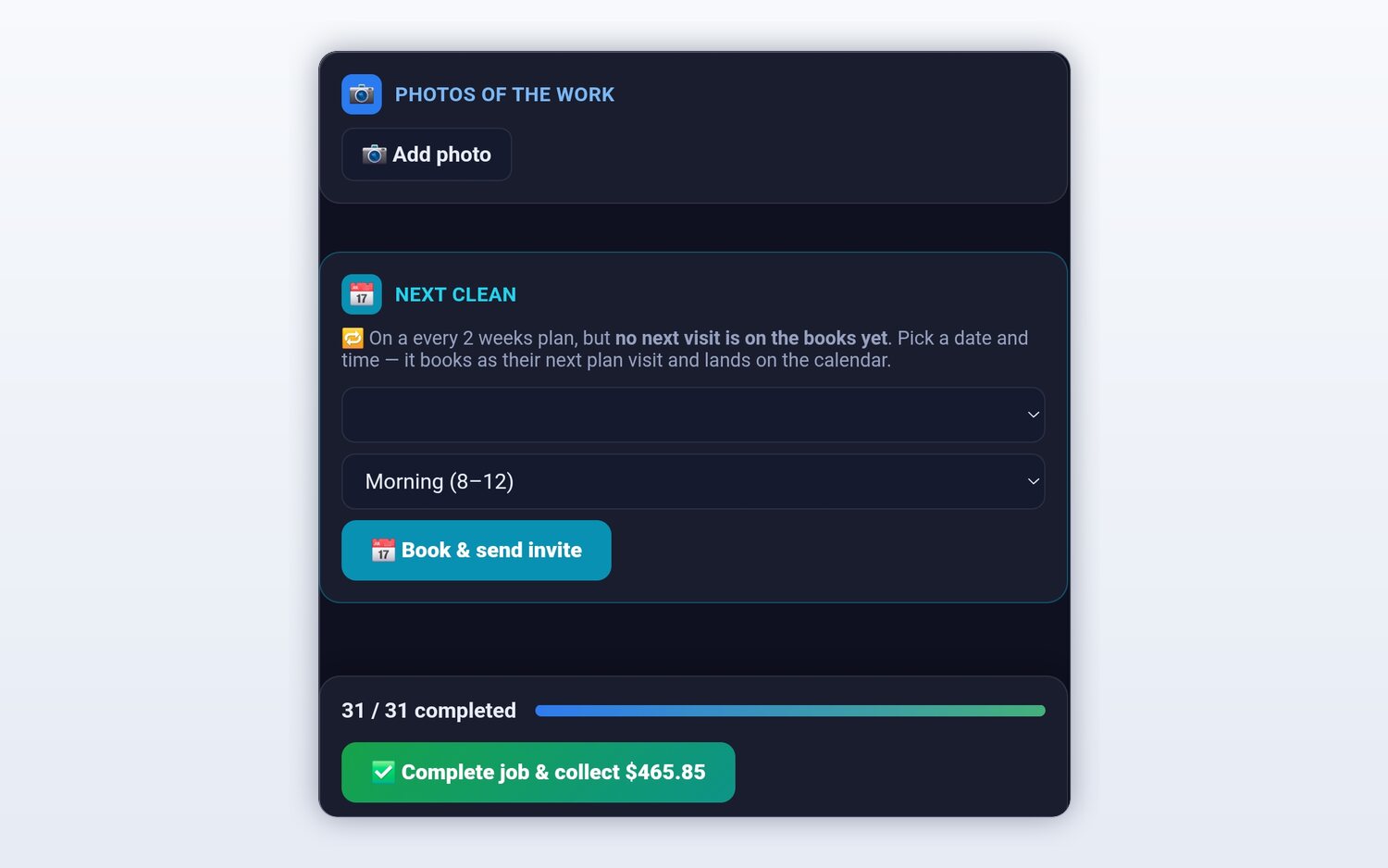
The easiest time to book a return visit is while you are still in the driveway. When a customer on a plan has no next visit on the books, the job screen says so, and the tech picks a date and a time of day right there. It lands on the calendar and the customer gets the invite. The checklist, the photos and the payment are on the same screen.
- A warning when a plan has no next visit booked
- Pick a date and morning or afternoon
- The calendar invite goes to the customer
Scheduling software for service businesses, by trade
Same board, different rhythm. Pick your trade for the details.
HVAC
Spring and fall tune-ups on maintenance agreements, with room left for no-heat and no-cool calls in the seasonal rush.
Pest control
Quarterly treatments on plans, re-services booked as go-backs, and day routes that put each tech's stops in driving order.
Lawn care
Weekly mows on a plan, with rain days moved by dragging the day's jobs to tomorrow.
Service scheduling questions
What is service scheduling software?
Service scheduling software is the calendar a service business books its work into. It holds every job by tech and by day, keeps recurring visits on the calendar, and tells the customer when their appointment is booked or moved. The good ones also take bookings from your website so the week fills without a phone call.
What is the best field service scheduling software for a small business?
The one your crew will keep up to date. For a small team, look for a week view by tech, drag-to-move, recurring visits, calendar invites for the customer and a price you can read on the page. FieldStacker Pro is $30/mo with techs free; for a side-by-side of other tools, see our list of the best scheduling software for service businesses.
Can recurring visits go on the schedule automatically?
Yes. Put a customer on a service plan, weekly through once a year, and the visits stay on the calendar without you re-booking them. Each visit is its own job and invoice, and with a card on file and autopay each visit can be charged when it is done.
Does it sync with Google Calendar?
Yes. FieldStacker owns the schedule and Google Calendar mirrors it, so you can still glance at your phone's calendar. When you move a job in FieldStacker, the customer's calendar invite moves too.
Is there home service scheduling software that lets customers book themselves?
Yes. FieldStacker's online booking shows customers your real open times on your website, your digital card page, or embedded in a site you already have. Bookings land on the same schedule board as the jobs you book by hand.
How much is service scheduling software for a small business?
FieldStacker Pro is $30/mo, or $25/mo billed yearly, for one owner, and techs you add as technicians are free. As checked October 26, 2026, Jobber Core is $49/mo for one user and Housecall Pro Basic is $79/mo for one user. Every FieldStacker plan starts with a 14-day free trial and no card.
Related: dispatching today's jobs · crews and multi-day jobs · online booking · recurring billing · best scheduling software compared · pricing
Put next week on one board
14-day free trial, no credit card. Add your techs free and move your regulars onto plans.