The best scheduling software for service business owners
Seven tools that schedule techs and crews, compared on what they cost, whether customers can book online, how they route, and what each extra tech adds to the bill.
14-day free trial · no credit card · from $30/mo · your techs are free
We make FieldStacker, so weigh our pick accordingly. Every price below comes from each company's own pricing page, checked October 26, 2026. Where a page did not say, we wrote "check their site".
We compared what changes your week: a board by tech, online booking, recurring visits, routing, and the monthly cost once you add more techs.
Best service scheduling software, tool by tool
Who each one is for, what it does well, its starting price, and one honest limitation.
FieldStacker
For: small home and field service businesses, including ones that also sell door to door. Does well: a schedule board by tech with Day, Week and Map views, online booking with next-available-tech, service plans with autopay, day routes, and quotes and invoices in the same app. Techs you add as technicians are free. Price: Pro $30/mo, or $25/mo billed yearly; Team $60/mo for 3 people. Limitation: no consumer financing or flat-rate price book, and it syncs with QuickBooks Online only, not Desktop.
Jobber
For: small and mid-size home service businesses that want a well-known, polished tool. Does well: online booking, quotes and invoicing with online payments from its Core plan; automated reminders, checklists and QuickBooks Online sync from Connect. Price: Core $49/mo for 1 user billed monthly (lower billed annually); Connect from $139/mo. Extra users $29/mo. Limitation: crew scheduling is on the Plus plan, which starts at $499/mo for 5 users.
Housecall Pro
For: residential trades that want scheduling and dispatch with consumer financing and a price book. Does well: online booking, scheduling and dispatch, estimates, financing, price book and job costing on its Basic plan; routes and employee GPS on Essentials. Price: Basic $79/mo ($59/mo billed yearly) for 1 user; Essentials $189/mo for 5 users. Limitation: recurring service plans and route optimization are on Max, $329/mo.
ServiceTitan
For: larger residential and commercial shops in HVAC, plumbing, electrical, roofing, garage door, pest and similar trades. Does well: depth for big operations, across its Starter, Essentials and The Works plans. Price: pricing on request; the page says it is per technician. Limitation: no published price, and contract and onboarding terms are not stated on the pricing page.
See ServiceTitan pricing.
Workiz
For: service trades that want online booking with checkout and on-my-way updates on every plan. Does well: online booking with optional checkout, recurring jobs, service areas, team location tracking and "On my way" on all three plans; Genius Scheduling from Pro. Price: pricing on request for Standard, Pro and Ultimate; 7-day free trial, no card. Limitation: multi-day jobs are listed only on Ultimate.
GorillaDesk
For: route-based services that schedule by route. Does well: routing (street-based drive times from Pro), job and customer mapping, and only users assigned to a schedule need a paid seat. Price: Basic $49/mo, Pro $99/mo, Growth $149/mo, each for the first route, with added routes extra. Limitation: online booking starts on Pro, and Basic routing handles 25 stops at a time.
Service Fusion
For: shops that want every user included at one monthly price. Does well: scheduling and dispatching on every plan, with no user limit, month to month. Price: Starter $245/mo, or $208/mo billed annually; Plus $382/mo; Pro $627/mo. Limitation: a high entry price for a one- or two-truck shop, and the customer web portal is an add-on on Starter and Plus.
Best field service scheduling software at a glance
"Check site" means the vendor's pricing page did not state it when we checked on October 26, 2026.
| What matters | FieldStacker | Jobber | Housecall Pro | ServiceTitan | Workiz | GorillaDesk | Service Fusion |
|---|---|---|---|---|---|---|---|
| Starting price | $30/mo | $49/mo | $79/mo | Request pricing | Request pricing | $49/mo (1 route) | $245/mo |
| Free trial | 14 days, no card | 14 days, no card | 14 days, no card | Check site | 7 days, no card | Yes (length not stated) | Demo |
| Online booking on the starting plan | Yes | Yes | Yes | Check site | Yes | From Pro | Not listed |
| Recurring visits | Service plans + autopay | Check site | Max plan | Check site | Yes | Check site | Check site |
| Routing | Day routes | Check site | Routes on Essentials; optimization on Max | Check site | Check site | Built around routes | Check site |
| Multi-day jobs | Yes | Check site | Check site | Check site | Ultimate only | Check site | Check site |
| Adding techs | Techs free | $29/mo per extra user | $35/mo per extra user (Max) | Per technician | Check site | Per scheduled route | No user limit |
Try the $30/mo option on your own schedule, free
Move your customers and jobs over from Jobber or any other app. We import them for free.
- No credit card to start
- From $30/mo after the trial
- Your techs and cleaners are free
- Cancel any time from the app
How to choose service scheduling software
Four questions that narrow the list quickly.
Price it at your size
Add up the plan you need plus every tech and office person. A low headline price with $29 to $35 per extra user can pass a flat plan at four trucks.
Check the feature's plan
Online booking, recurring plans, routing and crew scheduling often sit on higher tiers. Check which plan.
Match how you schedule
Routes, repair calls and multi-day projects schedule differently. Pick the tool built for your week.
Try it with real jobs
Book a real week during the trial. Demo-only tools add a sales call first.
The week by tech, then the invoice
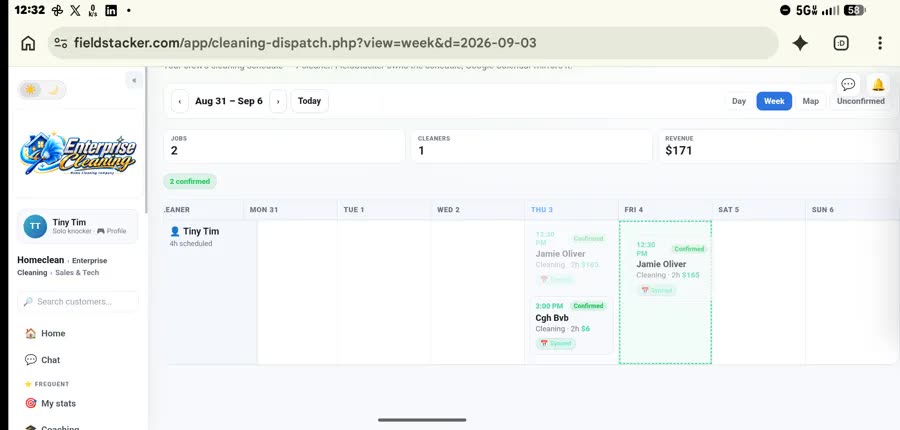
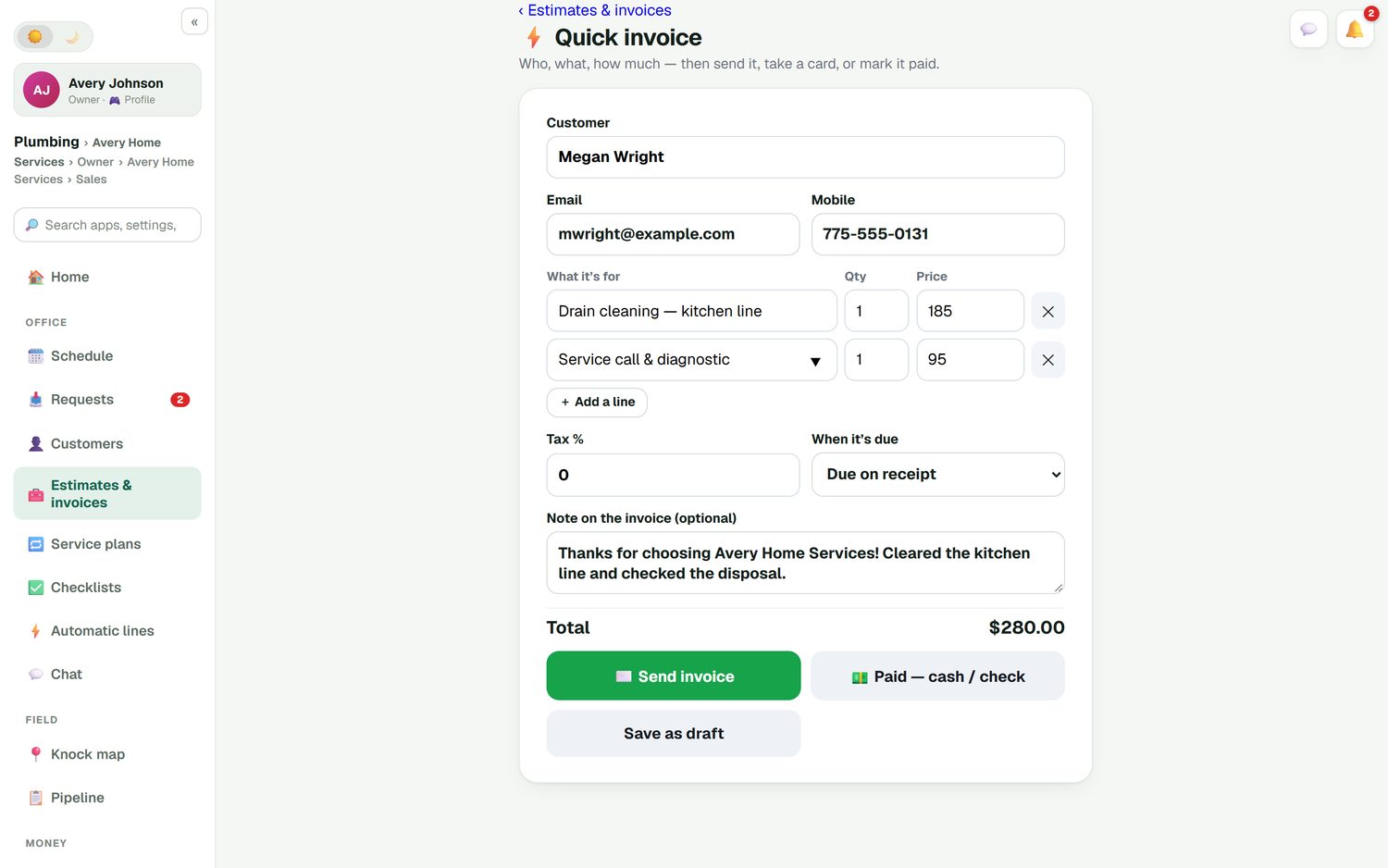
FieldStacker's schedule is a week board with every tech down the side; drag a job to another day or tech and the customer's calendar invite follows. Customers book open times on your website. When the job is done, quick invoice takes it from the job to sent, paid by card or marked cash or check, on one screen. All of it is on Pro at $30/mo, and your techs are free.
- Day, Week and Map views of one schedule
- Online booking and a Requests inbox
- Service plans with card on file and autopay
- Quick invoice and batch invoicing up to 100 jobs
A schedule that ends in a payment
Whichever tool you pick, check how a finished job becomes an invoice. In FieldStacker the home screen lists finished jobs not yet invoiced, and card payments go through your own Stripe account with no added fee.
Questions about scheduling software
What is the best scheduling software for a service business?
It depends on your size and how you schedule. Small shops that want booking, scheduling and invoicing at a low flat price should look at FieldStacker or Jobber. Residential trades that want financing and a price book often pick Housecall Pro, route-heavy services look at GorillaDesk, and large multi-crew operations look at ServiceTitan.
What is the best service scheduling software for a small team?
For one to five techs, the price per person matters as much as the features. Jobber charges $29/mo per extra user and Housecall Pro includes 5 users on Essentials at $189/mo, as checked October 26, 2026. FieldStacker Pro is $30/mo with techs added as technicians free.
What is the best field service scheduling software with route optimization?
Housecall Pro lists route optimization on its Max plan at $329/mo. GorillaDesk is built around routes and prices by route, from $49/mo. FieldStacker includes day routes that put a tech's jobs in the best driving order on its $30/mo Pro plan.
Which scheduling software lets customers book online?
Jobber, Housecall Pro, Workiz and FieldStacker list online booking on their entry plans. GorillaDesk lists it from Pro. Service Fusion's pricing page did not mention online booking when we checked, so ask them.
Is ServiceTitan worth it for a small business?
ServiceTitan does not publish prices; every plan says "Request Pricing", priced per technician. It is built for larger residential and commercial shops. A small team should get a written quote and compare it with tools that publish their prices.
Which of these have a free trial?
Jobber, Housecall Pro and FieldStacker offer 14-day free trials with no card. Workiz offers 7 days with no card, and GorillaDesk has a free trial button without a stated length. Service Fusion's pricing page offers a demo instead.
Related: free scheduling apps · dispatch software · best field service management software · FieldStacker pricing
Put your own week to the test
14-day free trial, no credit card. Book a real week of jobs, add your techs free, and compare.