Dispatch software for the day you are in
See every job and every tech for today on one screen. Drop in the 10 AM emergency, hand a job to whoever is free, and move the rest without a round of phone calls. The customer's calendar moves with it.
14-day free trial · no credit card · from $30/mo · your techs are free
Most of a dispatcher's day is not the plan made the night before. It is the call from a customer with water on the floor, the tech who is still at the first job at noon, the estimate that was approved and needs a date, and the customer who has to push to Thursday. Service dispatch software earns its keep in those moments. If it takes six taps and a phone call to move one job, the office goes back to a whiteboard.
FieldStacker keeps the day on one screen and keeps the changes short: open the job, pick the new tech or time, done. The tech sees it on their phone. The customer sees it on their calendar.
Field service dispatch software, built around today
The parts of the day an office actually spends time on.
What needs you now
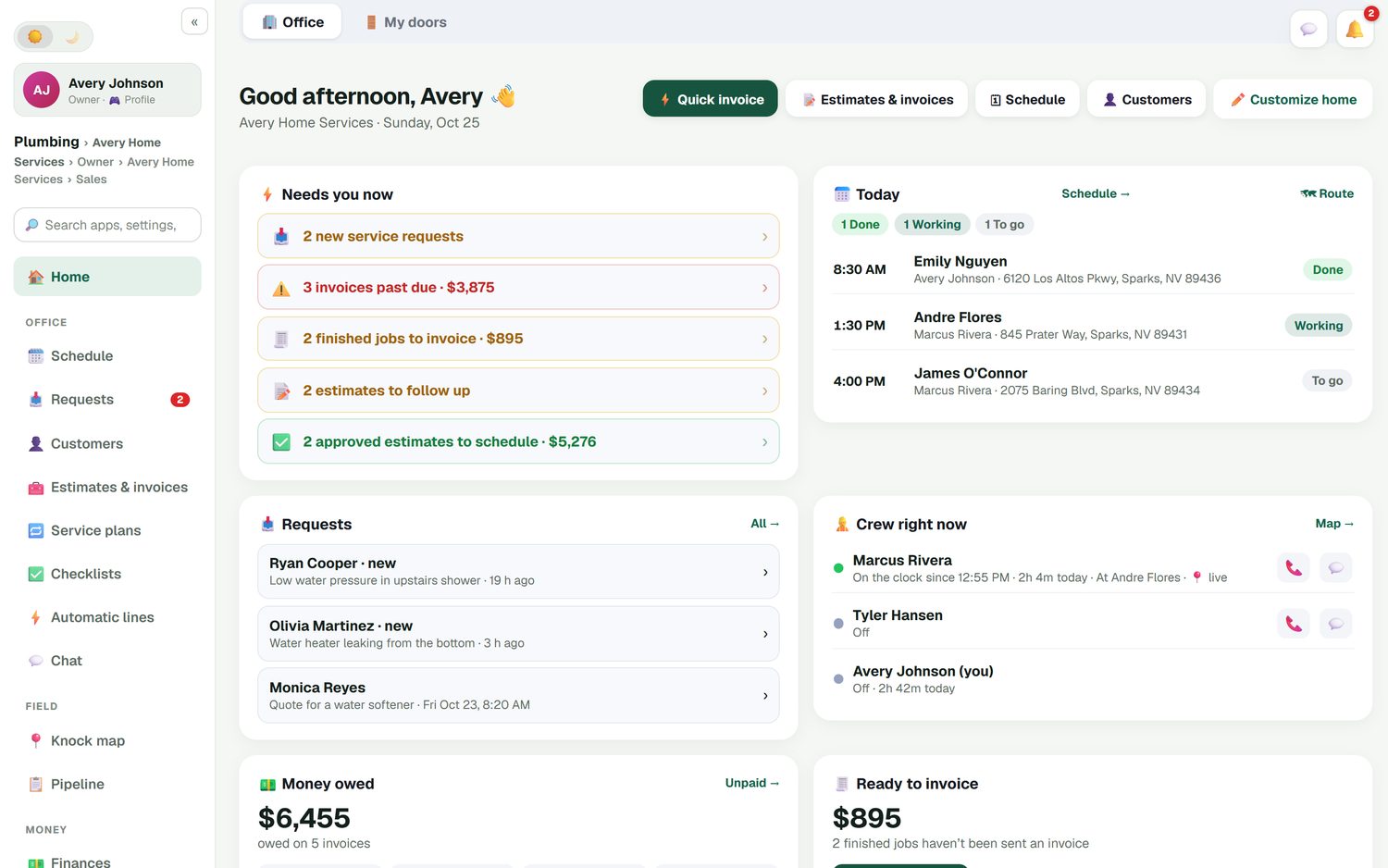
The office home screen lists new requests, past-due invoices, finished jobs not invoiced, estimates to follow up and approved estimates that still need a date.
Same-day calls
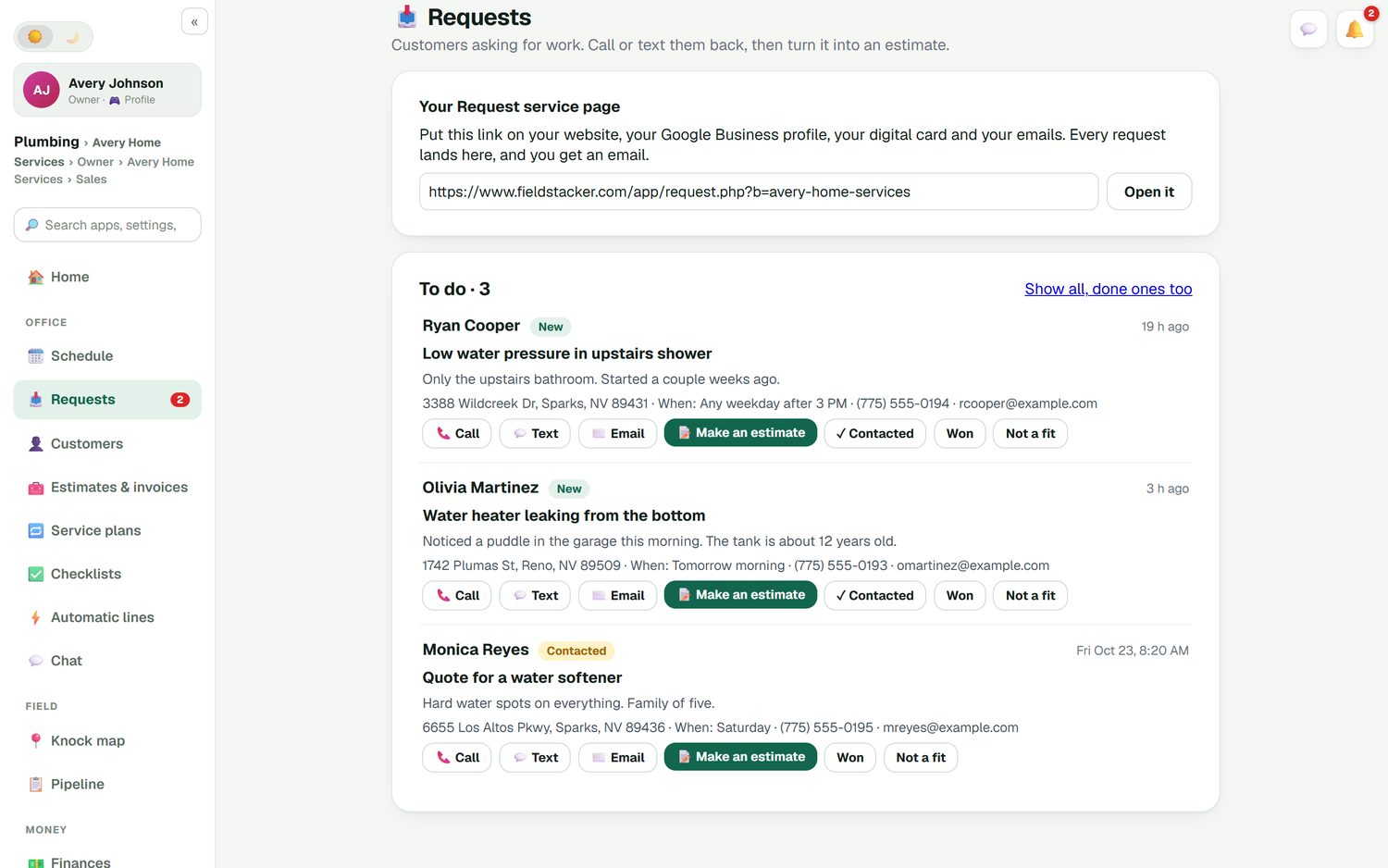
A new call lands in the Requests inbox with the address, what is wrong and when they are free. Book it onto a tech's row in a few taps.
Move work between techs
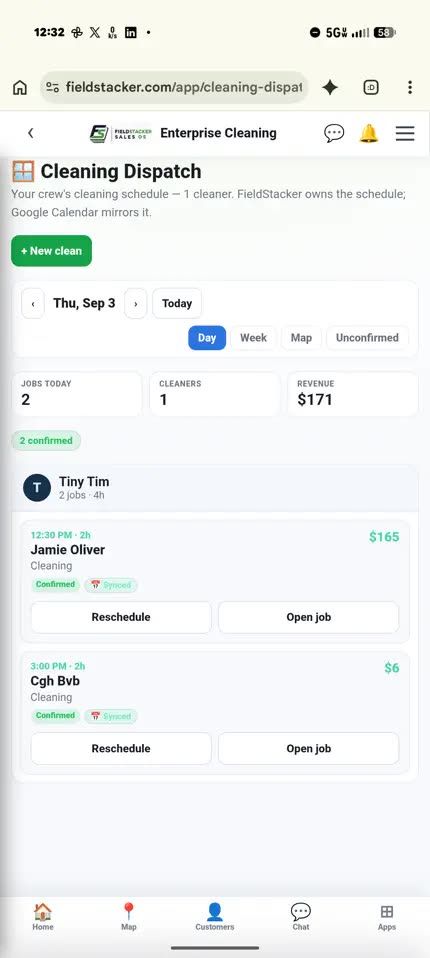
Drag a job to another tech or another day. Day, Week and Map views of the same schedule, so you can see the gap before you fill it.
Job offers
Send a job to a tech as an offer. They accept it on their phone, and it lands on their day with the notes, photos and checklist.
Confirmed or not
Every job shows confirmed or unconfirmed, and go-backs have their own list, so nothing waits on a sticky note.
Where the crew is
The home screen shows who is on the clock and at which job. Live GPS location is opt-in for each person and off by default.
Dispatch your next week of jobs in FieldStacker free
Bring your customers and open jobs over from your old app. We import them for free.
- No credit card to start
- From $30/mo after the trial
- Your techs and cleaners are free
- Cancel any time from the app
Start the day on one screen
Open FieldStacker and the office home screen has the morning's work in one place: how many jobs are done, working and to go, which tech is on the clock and where, how much money is owed and which finished jobs have not been invoiced yet. You do not need four tabs to know whether today is on track.
- Today's jobs with Done, Working and To go
- Crew right now: on the clock, at which job
- Money owed and unsent invoices on the same screen
- One tap to the schedule board or the route
The emergency call goes somewhere
Put your request page on your website, your Google Business profile and your digital card. Every request lands in one Requests inbox with the address, the problem in the customer's words and when they are free. Call or text them back from the request, then book the job or turn it into an estimate. You get an email for each one, so a leaking water heater does not sit unread until the afternoon.
- One inbox for web, card and Google requests
- Call, text or email straight from the request
- Mark it contacted, won or not a fit
- Book it or quote it without re-typing the address
When the plan breaks
A repipe runs two hours long and the 2:00 drain call is now late. On the Day view, move the drain call to the tech who just finished early, or push it to tomorrow morning. FieldStacker owns the schedule and Google Calendar mirrors it, so the customer's invite moves when the job moves. With the texting add-on, the tech who is going taps "On my way" and the customer gets a text with an ETA from the tech's GPS and a live tracking link.
- Reschedule or reassign from the job card
- The customer's calendar invite follows the job
- "On my way" texts with a live ETA (texting add-on, $15/mo for 600 texts)
- Go-backs listed so the return visit is not forgotten
Scheduling and dispatch software: what it costs
Prices from each company's own pricing page, checked October 26, 2026.
Housecall Pro includes scheduling and dispatch on its Basic plan at $79/mo ($59/mo billed yearly) for 1 user. Essentials is $189/mo for 5 users and adds routes and employee GPS. It is a well-known, mature tool and its trial is 14 days with no card. ServiceTitan does not publish prices; every plan says "Request Pricing", priced per technician, and it is aimed at larger residential and commercial shops. Jobber starts at $49/mo for one user on Core, with more users and features on Connect from $139/mo.
FieldStacker Pro is $30/mo, or $25/mo billed yearly, for one owner. Techs you add as technicians are free, so a three-truck shop does not pay per tech. If someone else in the office dispatches, Team is $60/mo for you plus 2 seats. Card payments go through your own Stripe account at standard Stripe rates, with no FieldStacker fee on top.
Comparing directly? See FieldStacker as a Housecall Pro alternative and FieldStacker vs Jobber.
Dispatch software questions
What is dispatch software?
Dispatch software is where the office decides who goes where today. It shows every tech's jobs on one board, lets you assign new calls as they come in, and lets you move work when a job runs long or a tech calls in sick. Good dispatch software also tells the tech and the customer when something changes.
What is the difference between scheduling and dispatch software?
Scheduling is booking work into future days. Dispatch is running the day you are in: assigning, re-assigning and getting techs moving. Most small shops need both in one place, which is why FieldStacker's schedule board has Day, Week and Map views on the same screen.
Is there field service dispatch software for a small team?
Yes. FieldStacker starts at $30/mo for one owner, and techs you add as technicians are free. If you have office staff who dispatch, the Team plan is $60/mo for you plus 2 seats. There is no per-technician charge.
Can I send a job to a tech and have them accept it?
Yes. You can send a job offer to a tech, and they accept it on their phone. The job then sits on their row of the board, and its photos, notes and checklist travel with it.
Does the customer find out when I move their appointment?
Yes. FieldStacker owns the schedule and Google Calendar mirrors it, so when you drag a job to another time or another tech, the customer's calendar invite moves too. With the texting add-on, the tech can also tap "On my way" to text an ETA and a live tracking link.
How much does dispatch scheduling software cost?
It varies a lot. As checked October 26, 2026, Housecall Pro's Basic plan with scheduling and dispatch is $79/mo for 1 user, and ServiceTitan only quotes on request. FieldStacker Pro is $30/mo, or $25/mo billed yearly, with a 14-day free trial and no credit card.
Related: booking the week ahead · matching techs to jobs · driving order and ETAs · HVAC dispatch · online booking · pricing
Run tomorrow's dispatch from one board
14-day free trial, no credit card. Add your techs free and put tomorrow's jobs on the board tonight.