Plumbing estimating software for quotes written at the kitchen table
Price the water heater, the repipe or the sewer line from your own price list while you're still at the house. The customer picks the options, signs on your phone, and pays the deposit before you leave.
14-day free trial · no credit card · from $30/mo · your plumbers are free
Most residential plumbing estimates are won or lost in the house. The customer with a leaking 12-year-old tank wants a price today, not an email on Thursday. The plumber who can show three clear lines, an optional expansion tank and a deposit amount, and get a signature before leaving, usually gets the job. That is the work FieldStacker is built for.
How a plumbing estimate gets built
From the request to a signed quote with a deposit.
Your own price list
Search "50 gal" or "PRV" and the part comes up with your price. The price is the same whether you write the quote or your newest plumber does.
Automatic lines
Set a rule once: add a water heater and the install labor and haul-away lines come with it. Nobody forgets the labor at the kitchen table.
Optional add-ons
An expansion tank, a drain pan, a new shut-off or a whole-house filter as lines the customer can tick. The total updates as they choose.
Discounts with a reason
Take % or $ off a line and say why: senior discount, plan member, second fixture. The customer sees it, and so does your bookkeeper.
Sign and deposit
The customer signs on your phone, or scans a QR code to sign and pay on theirs. Set the deposit as a percentage or a fixed amount.
Change orders
Opened the wall and found more galvanized than expected? Add the extra lines as a change order with its own deposit, and the customer approves it before you go on.
Write your next plumbing estimate in FieldStacker, free for 14 days
Load your price list once. Bring your customers over and we import them for free.
- No credit card to start
- From $30/mo after the trial
- Your techs and cleaners are free
- Cancel any time from the app
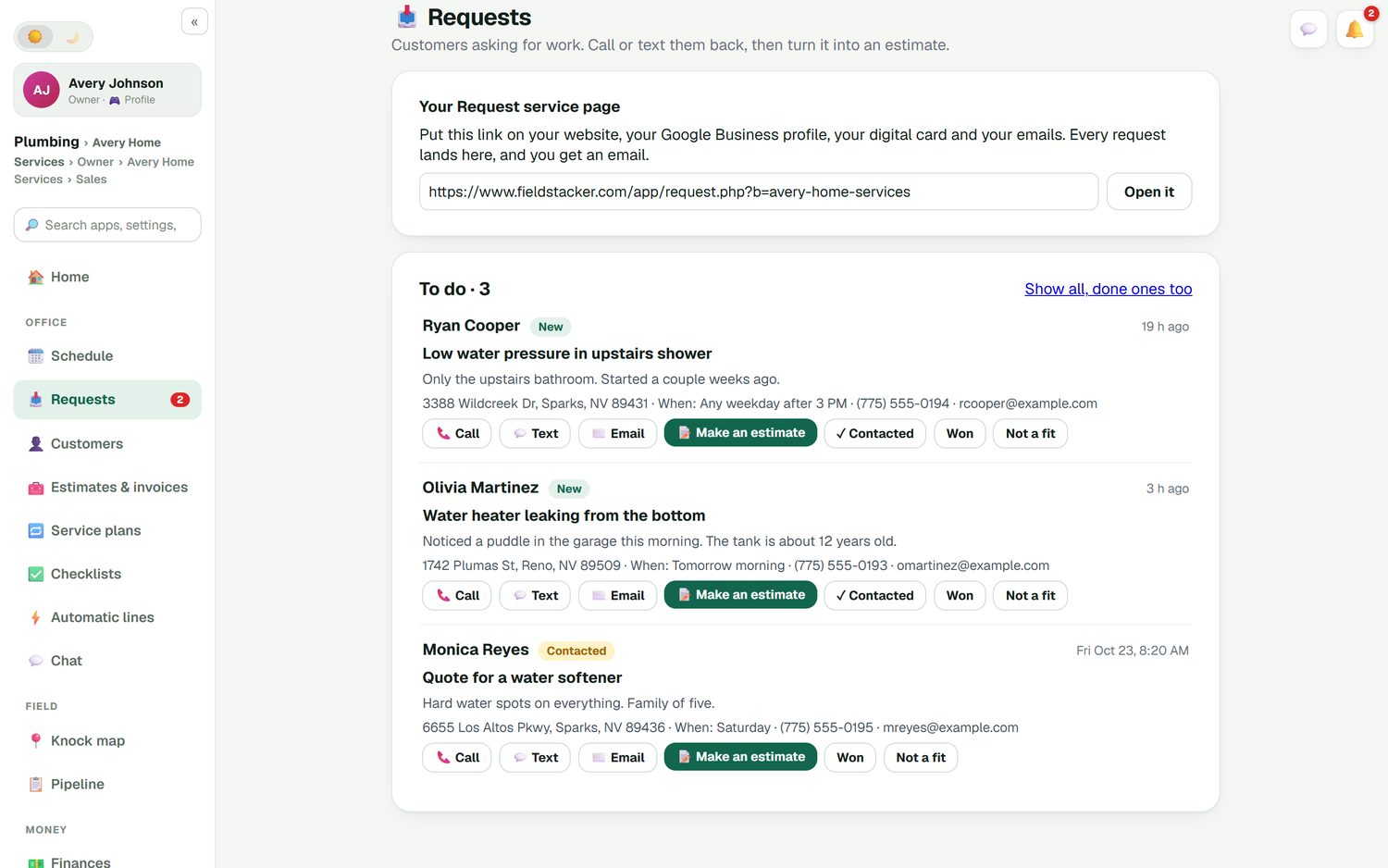
From "water heater leaking" to an estimate in one tap
Put your request page on your website, your Google Business profile and your digital card. A customer writes "Noticed a puddle in the garage this morning. The tank is about 12 years old," with their address and when they're home. It lands in your Requests inbox and you get an email. Call or text them back, then tap Make an estimate.
- Requests from your site, card and emails in one inbox
- Mark each one contacted, won or not a fit
- Book a time to look, or quote straight from the request
Big jobs, clear lines
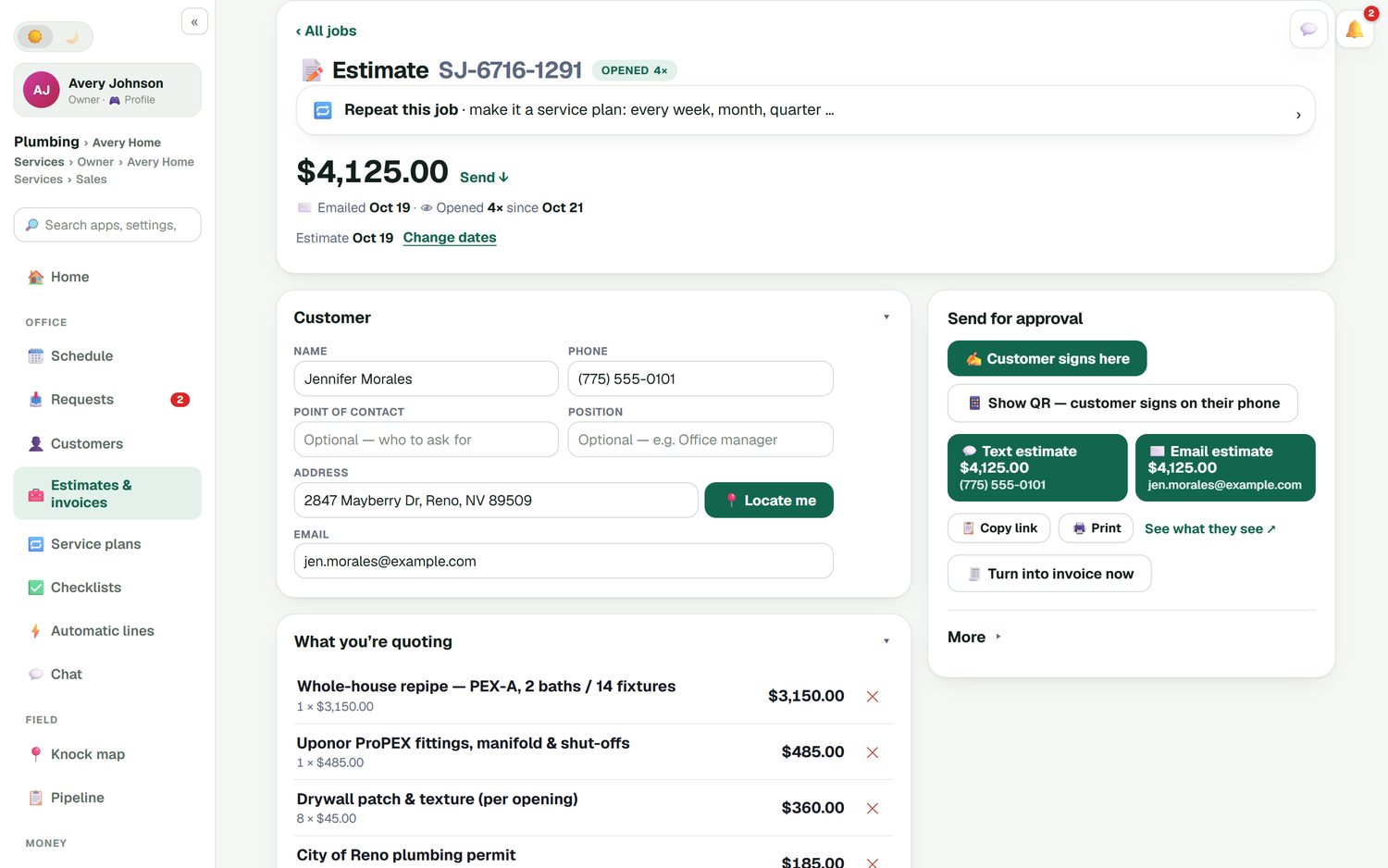
A whole-house repipe has to read clearly to the homeowner. Here is a $4,125 estimate: the repipe itself in PEX-A for two baths and 14 fixtures, the fittings, manifold and shut-offs, drywall patch and texture priced per opening, and the city plumbing permit as its own line. Email it (or text it with the texting add-on), show a QR code, or let the customer sign on your phone right there. When it's approved, turn it into an invoice or book it as a multi-day job.
- Permit fees as their own line, so nobody is surprised
- Per-opening or per-foot lines with a quantity
- "Turn into invoice now" when the work is done
A signature before you leave
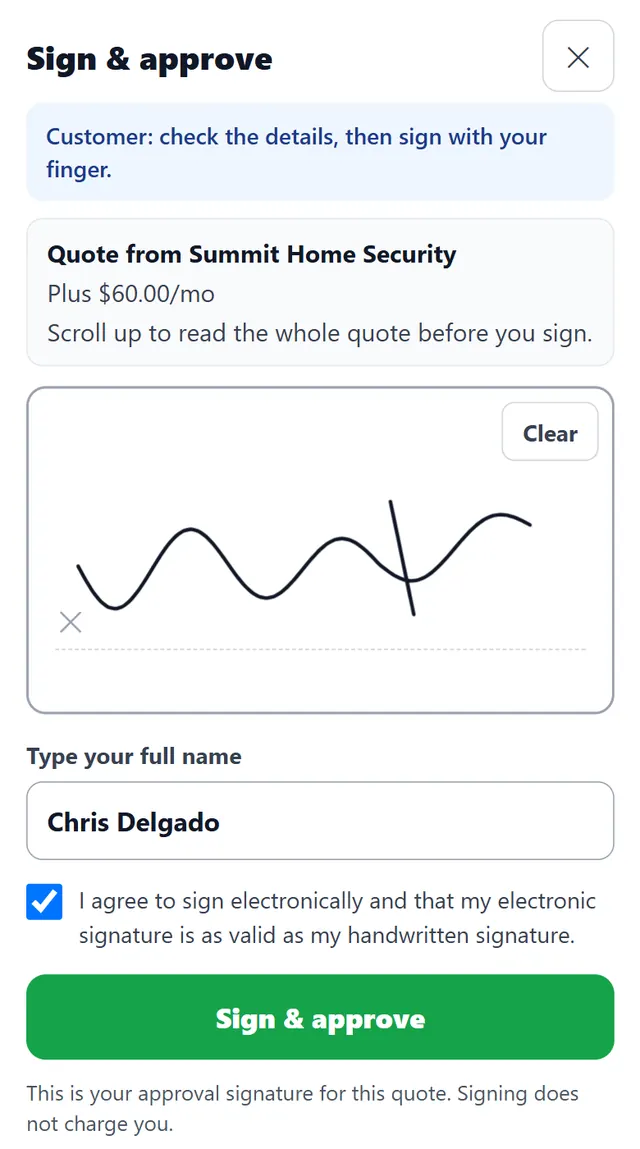
The customer reads the quote, signs with a finger and types their name. Signing approves the quote; it does not charge them. If they want to think it over, the estimate stays in your list and the follow-up automation reminds them by email, plus a text if you have the texting add-on. You can switch the follow-ups off or rewrite them.
- E-sign on your phone, or by QR code on theirs
- Estimate follow-ups you can edit or switch off
- Approved estimates wait on your home screen to be scheduled
Plumbing bidding software vs. a service estimate
Search "plumbing bidding software" and many results are takeoff programs. They are built for a different job. A mechanical contractor bidding a 40-unit apartment building or a commercial tenant improvement loads the plan set, counts every fixture, measures every run of pipe and builds labor from a database. McCormick Systems, for example, describes itself as an estimating and takeoff platform for electrical, plumbing and mechanical contractors, with digital takeoff from drawings. It doesn't publish prices on its site (checked October 26, 2026).
If that is your work, use a takeoff tool. If your estimates are a water heater, a slab leak reroute, a sewer line or a bathroom's worth of fixtures, you don't need a plan set. You need your prices on your phone, a quote the homeowner understands and a way to get a signature and a deposit before you leave. That is FieldStacker. More options are in the estimating software roundup.
Plumbing estimating questions
What is plumbing estimating software?
It turns what you see on site into a priced quote the customer can approve. In FieldStacker you search your own price list for parts and labor, add optional lines the customer can choose, apply a deposit, and send it or have the customer sign on your phone. An approved estimate becomes the job and then the invoice without re-typing.
Is FieldStacker plumbing bidding software for new construction?
No. If you bid new construction or commercial work from plan sets, you need a takeoff tool that counts fixtures and measures pipe runs off the drawings. FieldStacker is for residential service, repair and replacement quotes you write at the house: water heaters, repipes, sewer and drain work, fixtures and softeners.
Which plumbing estimating programs do takeoff from plans?
McCormick Systems sells estimating and takeoff software for electrical, plumbing and mechanical contractors, with digital takeoff from drawings. Its site does not list prices and asks you to request a demo (checked October 26, 2026). Other plan-takeoff tools exist; check each vendor's site for current details.
Can I give the customer options on a plumbing estimate?
Yes. Add optional lines the customer ticks, such as an expansion tank, a drain pan, a new shut-off valve or a whole-house filter. The total updates as they choose, and you see which options they picked.
Can customers sign the estimate and pay a deposit on the spot?
Yes. The customer signs on your phone at the kitchen table, or scans a QR code to sign and pay on their own phone. Set the deposit as a percentage or a dollar amount.
Will it follow up on estimates that go quiet?
Yes. Estimate follow-ups are an automation you switch on and edit. They send email, and also a text if you have the texting add-on. The office home screen also lists estimates waiting for a follow-up.
How much does plumbing estimating software cost?
FieldStacker starts at $30/mo, or $25/mo billed yearly, with estimates, e-sign, deposits, change orders and invoicing included. There is a 14-day free trial with no card, and plumbers you add as technicians are free.
Related: plumbing business software · plumbing invoicing · plumbing scheduling · electrical estimating · estimating software · contractor estimate app · pricing
Get the signature at the kitchen table
14-day free trial, no credit card. Load your price list and send your first plumbing estimate today.