HVAC field service software built around the tech's day
Clock in, follow the route, read the notes before you knock, tick the tune-up checklist, pull the part off the truck, and get paid before you back out of the driveway.
14-day free trial · no credit card · from $30/mo · your techs ride along free
A good HVAC tech spends the day in attics, crawlspaces and side yards, not at a keyboard. Every minute spent hunting for a gate code, guessing a filter size or writing up an invoice at the kitchen table that night is a minute not spent on the next call. In July those minutes add up to a job a day.
So the tech's side of FieldStacker is short on screens and long on what they need at that house: where to go next, what's there, what to check, what they used and how the customer pays.
Field service management software for HVAC techs
Everything on the tech's phone, nothing they have to retype at night.
The day, in order
Today's jobs in the best driving order. When the office adds a no-cool call, arrival times update and the customers on the route are told.
"On my way"
One tap texts the customer an ETA from the tech's GPS and a live tracking link. Uses the texting add-on.
Notes before the knock
Gate code, the dog, filter size and count, model and serial, what was flagged last visit. Job notes go to whoever is going.
Tune-up checklists
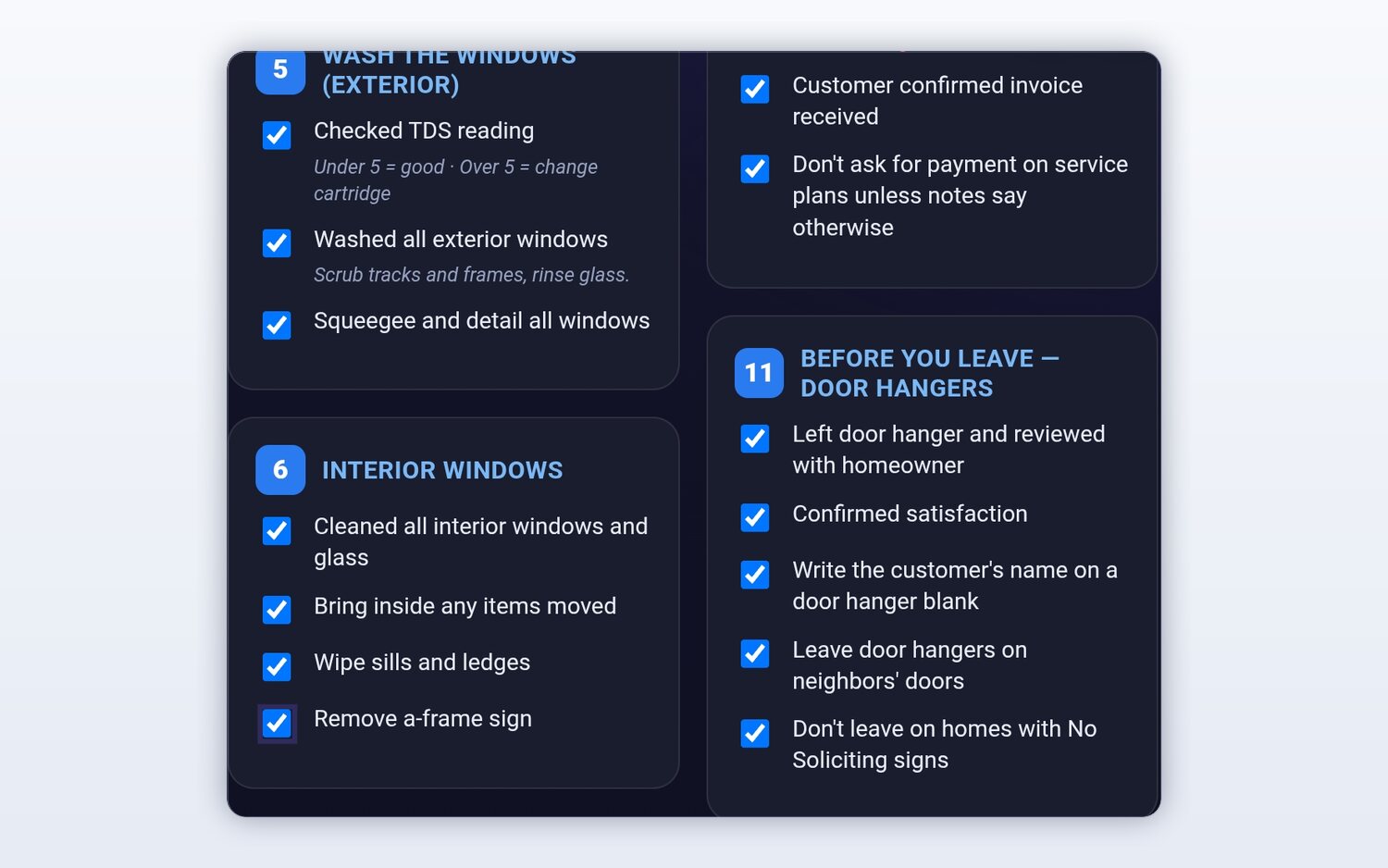
A cooling checklist and a heating checklist you build once. Techs tick steps and add photos. Always optional.
Truck stock
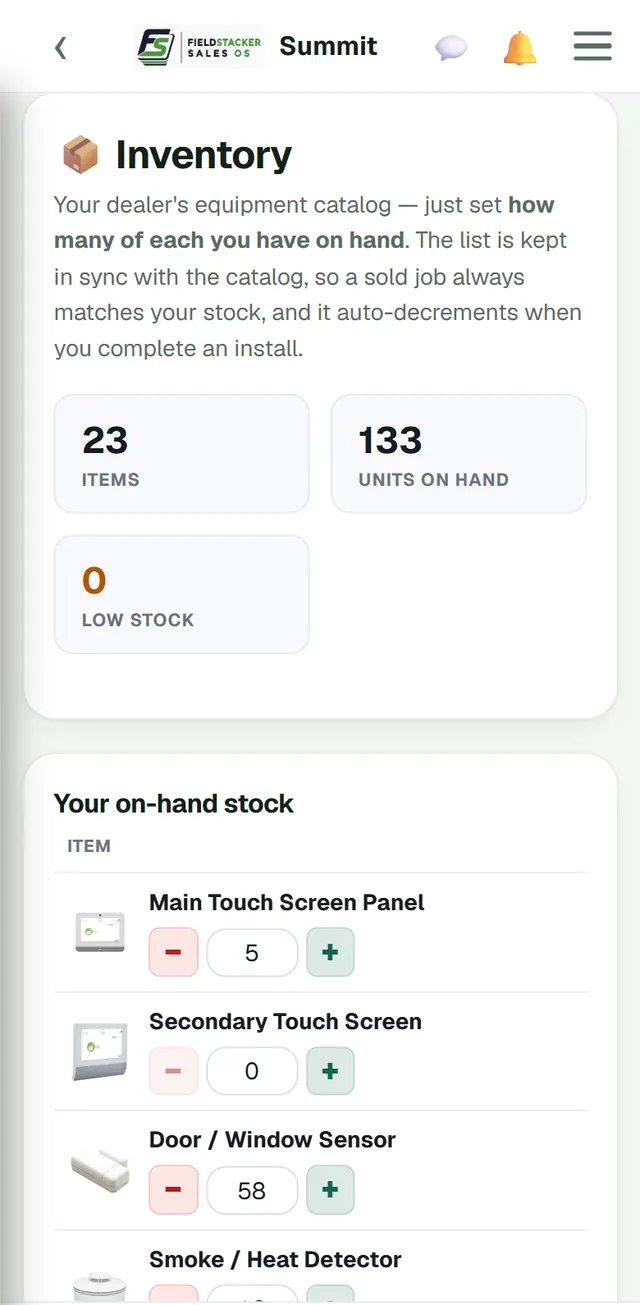
Filters, capacitors, contactors and fuses on each tech's truck. Completing a job deducts what was used.
Time clock
Clock in and out on the phone. Timesheets build themselves and the owner gets a payroll email of hours.
Put your HVAC techs on FieldStacker free for 14 days
Techs you add are free, during the trial and after it.
- No credit card to start
- From $30/mo after the trial
- Your techs and cleaners are free
- Cancel any time from the app
A tune-up day, from the tech's phone
One HVAC tech, one Tuesday in May.
7:30 · Clock in
Open the day: six agreement tune-ups and a callback, already in driving order. Check the truck has enough 16x25x1 filters.
8:05 · On my way
One tap tells the first customer the tech is coming, with a live ETA. The notes say side gate, code 4471, dog is friendly.
8:20 · The tune-up
Work the cooling checklist: capacitor reading, amp draw, coil rinse, condensate line, filter. Photo the data plate and a weak capacitor.
9:10 · Quote and pay
Quote the capacitor from your price list, the homeowner signs, the part comes off truck stock, and the card is charged with an optional tip.
The same tune-up, every time
Write your cooling and heating tune-up steps once as checklist templates: pressures, temperature split, amp draw, capacitor microfarads, flame sensor, heat exchanger inspection, condensate line, filter change. Each kind of job gets its own template. Techs tick each step and add photos, so a new hire does the same visit as your best tech, and the photos back you up if a customer asks what was done.
- Templates per kind of job
- Ticked on the phone, with photos
- Photos saved on the job and shown in customer emails
- Always optional, so emergency calls aren't held up
Know what's on every truck
Each tech carries their own stock. Set how many filters, capacitors, contactors, hard-start kits and fuses are on the truck, and completing a job takes off the parts used. The parts also land in job costing, so the office sees each call's real profit. Before the summer rush, check who's low on 45/5 capacitors instead of finding out at a customer's house.
- Each tech's own on-hand count
- Parts deducted when the job is completed
- Parts cost feeds the job profit report
- Adjust counts with plus and minus
HVAC field service management software, compared
ServiceTitan's mobile app for iOS and Android is built for large crews and ties into its pricebook, proposals and financing, on quote-only pricing. Housecall Pro adds checklists, photo reports and employee GPS on Essentials at $189/mo for five users, and Jobber adds checklists from Connect at $139/mo for one user (checked October 26, 2026). All three are proven with HVAC crews.
Where FieldStacker is different is cost and simplicity: techs are free, and day routes, checklists, truck stock, quotes and payments are on the $30/mo plan. There is no offline mode, no flat-rate price book on the tech's phone and no consumer financing.
For the office side of the same day, see HVAC dispatch software. For what happens to the customer record after the visit, see HVAC CRM. Shopping for any trade? Read field service software.
HVAC field service questions
What is HVAC field service software?
It is the part of your system the tech carries: their day's jobs in order, directions, the customer's notes and equipment details, a checklist for the tune-up, the parts on their truck, and a way to quote, invoice and take payment on site. FieldStacker does all of that on the tech's phone and keeps the office in sync.
What is the best field service management software for HVAC?
For big shops with a mobile app on every truck and a full office behind it, ServiceTitan is the heavyweight. Housecall Pro and Jobber are popular with mid-size crews. For a small shop where techs should be free to add and the owner still runs a truck, FieldStacker is a strong fit at $30/mo.
Do my techs need to pay for a login?
No. Techs you add as technicians are free. They see their own day, jobs, checklists and stock. The owner's plan starts at $30/mo, or $25/mo billed yearly.
Is there an HVAC field service management app for my techs?
Yes. FieldStacker works on your techs' phones: their day, the job notes, checklists, truck stock and payments. The office uses the same account on a computer. There is no offline mode, so the tech needs a signal to load and save a job.
Can techs give a tune-up checklist and photos?
Yes. Build a checklist template for each kind of job, such as a cooling tune-up and a heating tune-up. Techs tick each step on their phone and add photos. Checklists are always optional, so a quick no-cool call isn't slowed down.
Does it track the parts on each truck?
Yes. Each tech carries their own stock, such as filters, capacitors, contactors and fuses, and completing a job deducts the parts used. Those parts also go into the job's cost so you see what the call really made.
Related: HVAC software · HVAC invoicing · Technician app · Best HVAC software · Pricing
Give every tech a better Tuesday
14-day free trial, no credit card. Add your techs free and send them out with tomorrow's route.