The HVAC CRM that remembers every system you've touched
The serial number, the filter size, the last tune-up and the capacitor you warned them about. Plus a list of every agreement customer, charging on time, year after year.
14-day free trial · no credit card · from $30/mo · your techs are free
In HVAC, the customer list is the business. A homeowner on a maintenance agreement pays for two visits a year, calls you first when the system quits, and is the most likely person to buy a replacement from you. Keep them for ten years and they are worth far more than any single install.
Two things lose those customers. One is forgetting: the tech shows up with no idea the blower motor was flagged last fall, or with the wrong filter size. The other is the renewal: a yearly agreement invoice that gets ignored, and nobody notices until the customer has called someone else in July. FieldStacker is set up to fix both.
HVAC CRM software for the customers you already have
What stays on the record, and what keeps agreement customers coming back.
Equipment in the notes
Model, serial, install year, refrigerant type, filter size and count, thermostat. Typed once in the job notes and there for the next visit.
Photos of the data plate
Techs photograph the rating plate, the filter rack and anything they flagged. Photos stay on the job and can show in customer emails.
Agreements that don't lapse
A service plan with no end date keeps putting tune-ups on the board and charging the card on file after each visit.
A portal for each customer
Customers sign in to see estimates, invoices, receipts and visits, pay what they owe and reschedule a booking.
Reviews after payment
A thank-you and review request goes out after each paid invoice. Your digital business card collects reviews too.
Win back lapsed customers
Send an email campaign to your customer list before tune-up season. New-homeowner postcards reach people who just bought an older house.
Move your HVAC customers into FieldStacker, free for 14 days
Send us your customer list from your old app and we import it for free.
- No credit card to start
- From $30/mo after the trial
- Your techs and cleaners are free
- Cancel any time from the app
Every agreement, on one list
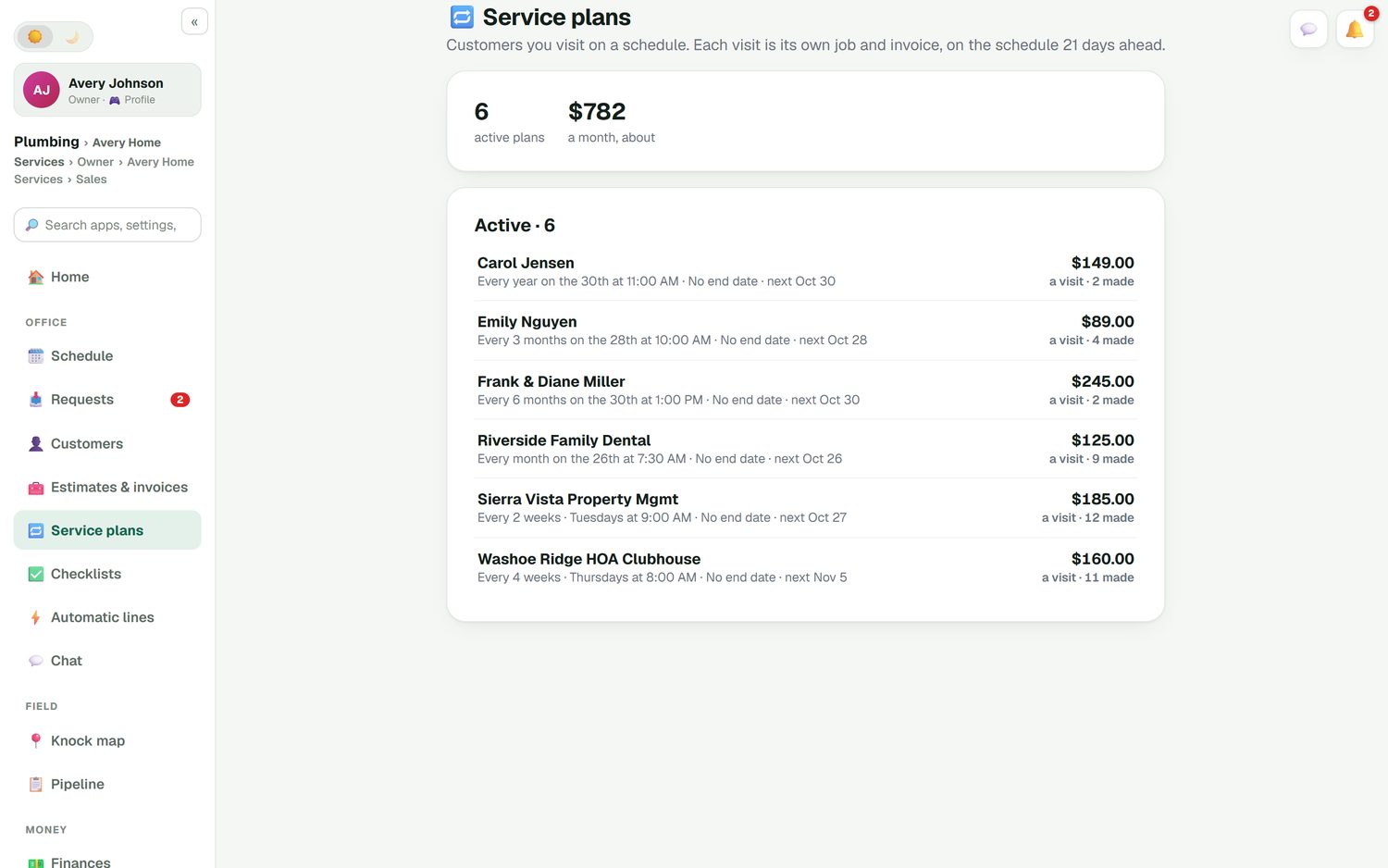
The Service plans list shows each agreement customer, how often they are visited, when the next visit is, the price per visit and how many visits have been made. The total at the top tells you roughly what your agreements bring in each month. Each visit becomes its own job and invoice and lands on the schedule three weeks ahead, so the spring and fall tune-ups are never a scramble.
- Plans from weekly to yearly; most HVAC agreements are every six months
- Card on file with autopay after each visit
- Customers manage their visits on their own page
- Members can get a line discount on repairs, with the reason shown
Why open-ended plans beat yearly renewals
The renewal problem, and how a service plan changes it.
The old way
Sell a one-year agreement, send a renewal invoice eleven months later, and hope it gets paid before the spring tune-up.
The plan way
Start a plan with no end date and a card on file. Each tune-up is charged at the plan price when it's done.
The customer stays in control
They can see their visits and move a booking from their own page, without calling you.
You see it all
Active plans, the next visit and what they bring in each month, on one screen, instead of a spreadsheet of renewal dates.
One honest note: FieldStacker charges agreement customers per visit, at the plan price. If you sell agreements as a fixed yearly fee paid up front, you can still invoice that, but the plan itself bills per visit.
The whole history, for you and for them
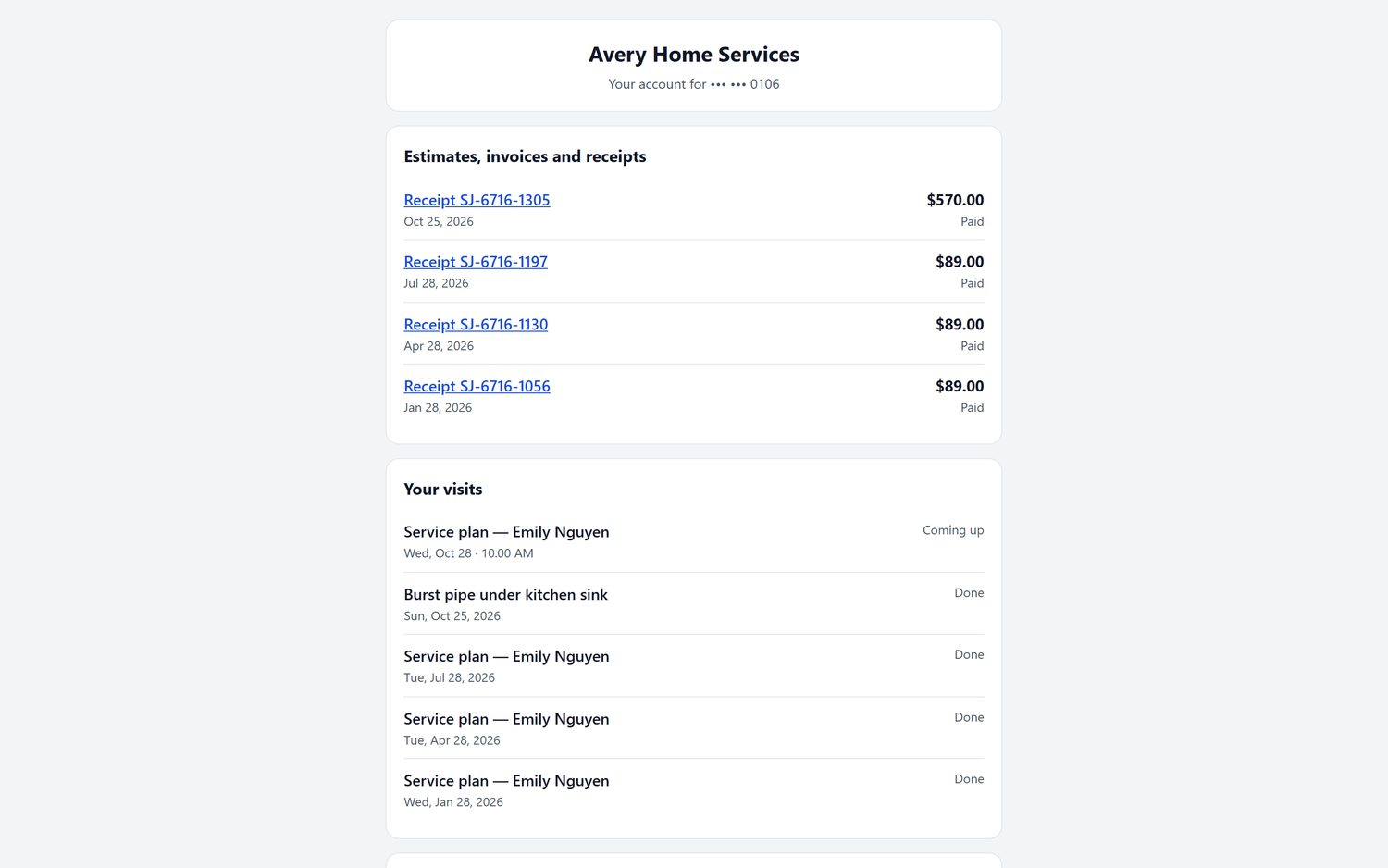
The customer's portal lists their receipts and visits: the tune-ups on their plan, the emergency call in between, what's coming up next. They can pay an invoice or reschedule from there. When we host your website, the portal runs on your own domain. On your side, the same jobs carry the tech's notes and photos, so the next tech knows the filter is a 16x25x4 and the condensate line clogged last August.
- Estimates, invoices, receipts, billing history and visits
- Pay online and reschedule a booking
- On your own domain when we host your site
- A two-way texting inbox with the texting add-on
CRM for HVAC companies: how the options compare
ServiceTitan's service agreements, memberships and marketing tools are deep and built for shops with a membership team, on quote-only pricing. Housecall Pro includes recurring service plans on its Max plan at $329/mo for up to eight users, and Jobber adds automatic payment collection from its Connect plan at $139/mo for one user (checked October 26, 2026). Each is a sound choice in HVAC.
FieldStacker includes service plans with autopay, the customer portal and the customer list in the $30/mo plan, with techs free. The gap to know about: equipment lives in job notes and photos, not a separate equipment database with warranty lookups.
Selling door to door to find new agreement customers? That's a different tool: the HVAC sales CRM. For the agreement billing itself, see HVAC invoicing software and recurring billing software.
HVAC CRM questions
What is an HVAC CRM?
An HVAC CRM keeps every customer's history in one place: their address and contacts, the equipment at the house, past visits, quotes, invoices and whether they are on a maintenance agreement. FieldStacker adds the work itself on top, so the schedule, the invoice and the customer record are the same system.
What is the best CRM for HVAC companies?
For a large shop with a call center and a membership team, ServiceTitan is built for that scale. For a small shop that wants customer history, agreements on autopay and free tech logins for $30/mo, FieldStacker fits well. Housecall Pro and Jobber are also good choices; compare them on our best HVAC software page.
How do I keep maintenance agreements from lapsing?
Set each agreement up as a service plan with a card on file and no end date. Visits keep landing on the schedule and each one is charged when it is done, so there is no yearly renewal invoice for the customer to ignore. For customers who have already lapsed, an email campaign to your customer list before tune-up season is the easy way back in.
Can HVAC CRM software store equipment serial numbers?
Yes, in the job notes and job photos. Techs type the model and serial, install year, filter size and refrigerant type into the notes and photograph the data plate, and it stays with that customer's jobs. There is no separate equipment database with warranty lookups.
Is this HVAC customer management software or a sales CRM?
This page is about managing the customers you already serve. If you sell HVAC door to door, with canvassers and appointment setters, see our HVAC sales CRM page for the knock map and rep commission tools.
Can I bring my customers over from my current software?
Yes. We import your customers and jobs for free. You can also upload a CSV or Excel file up to 250 MB, with undo, and there is a dedicated Jobber import for clients and balances.
Related: HVAC software · HVAC scheduling · HVAC estimating · New homeowner postcards · Pricing
Keep your agreement customers for the next ten years
14-day free trial, no credit card. We'll import your customer list, and your techs are free.