Lay out the whole CCTV system on the satellite map
Place security cameras on the customer's property and see what each one really covers. FieldStacker works out the cabling, PoE, recorder channels, storage, wireless links and battery backup, then turns the CCTV layout into a proposal and an estimate.
On for alarm companies on Pro, Team and Team Pro · 14-day free trial · no credit card
A CCTV quote usually starts as a sketch on the back of a work order and ends with a missed PoE budget or a recorder that is two channels short. Here the layout is the quote. Every camera you drop on the map is counted, wired, powered and recorded, and the checks run as you work, so the problems show up in the driveway instead of on install day.
Everything the CCTV designer does
Tap a part to jump to it.
The property, traced from above
Type the address, or start the CCTV layout straight from a pin on your knock map and the customer's details come with it. Trace the buildings and anything in the way, and the drawing is ready for cameras.
- Satellite view, or a clean vector view of the same drawing with a scale bar and north arrow
- Trace buildings, and obstructions such as trees and walls
- Put a floor plan under the drawing from a photo, PDF or DXF, and add rooms and inside walls
- Enter one wall you measured on site and the whole drawing is calibrated
- Works on a phone or tablet: pinch, drag, rotate, and a full-screen map
- Saves as you go, keeps your work if the signal drops, with undo, redo and saved versions
- Duplicate a layout to price a second option, or archive it
Drop the floor plan in, lay the cameras on top
Got the plans for a new build, a remodel or a tenant improvement? Put the blueprint under the drawing and lay out the CCTV system room by room, not only from the roof.
- Import a photo of the plans, a PDF page or a DXF drawing (save an AutoCAD DWG as DXF, or print it to PDF)
- Took the photo at an angle? Drag the four corners of the sheet and it is flattened square
- Drag it into place, turn it by 90° or 1° at a time, resize it, or set the scale from two points you know the distance between
- Fade it with the opacity slider, lock it so taps go through to your drawing, or hide it
- Trace rooms, inside walls and doors over it, or let a DXF make the walls from its layers
- Inside walls stop a camera's view and open doors let it through, so indoor coverage is honest
- Up to six blueprints in one layout
- The blueprint is only for you: it never goes on the customer's proposal
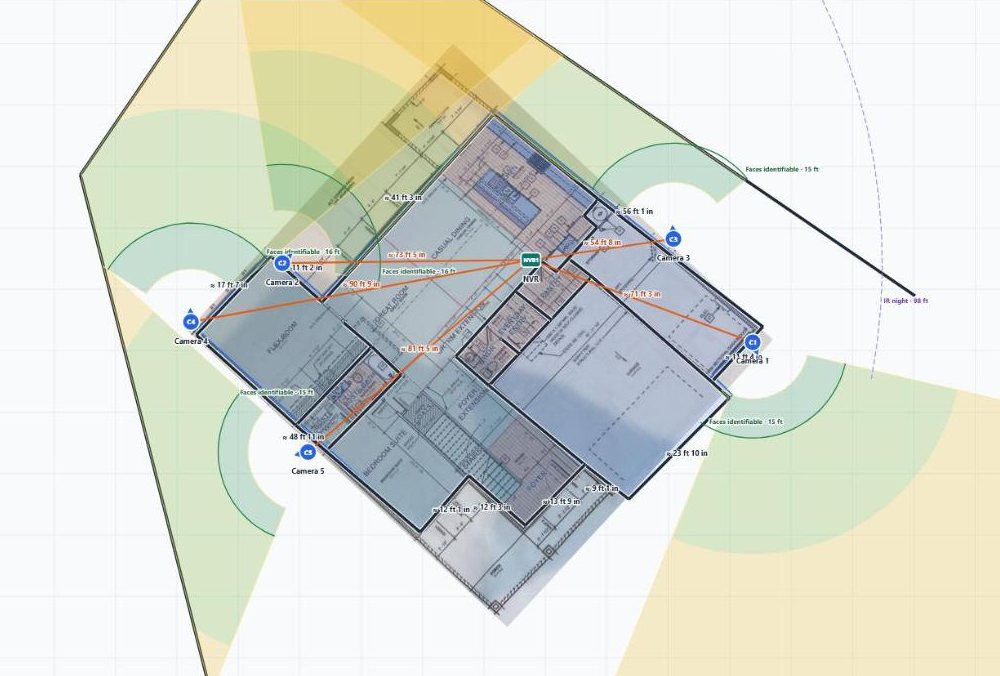
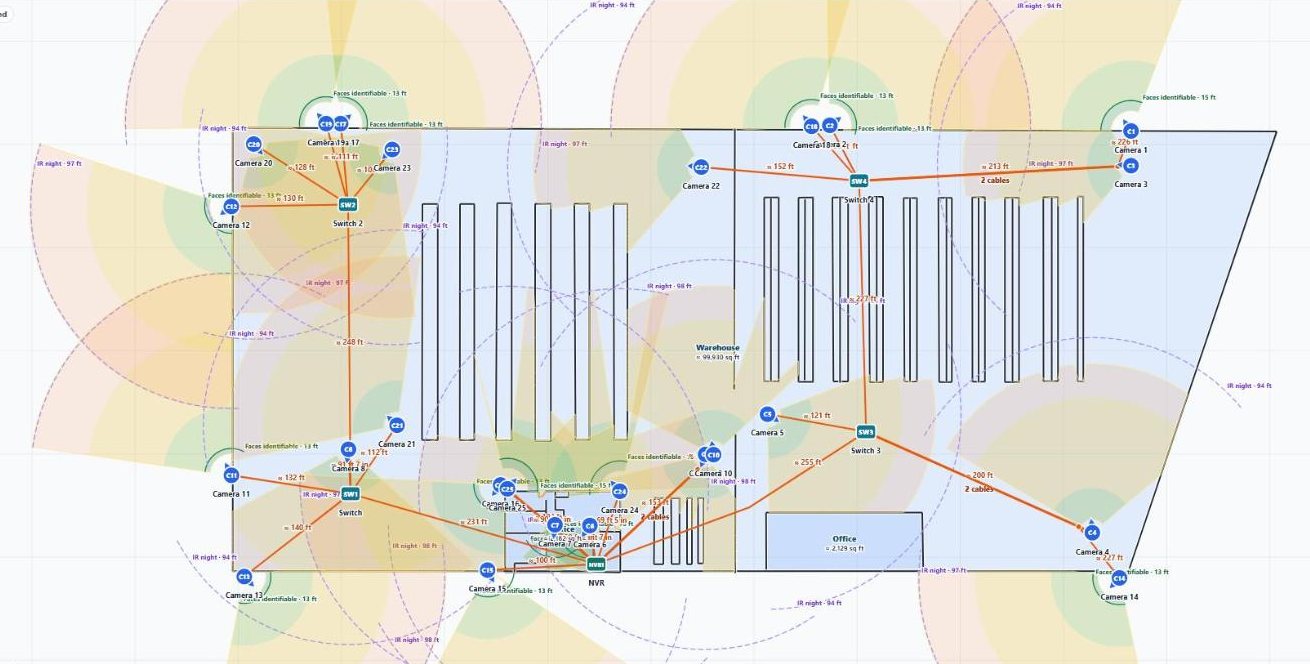
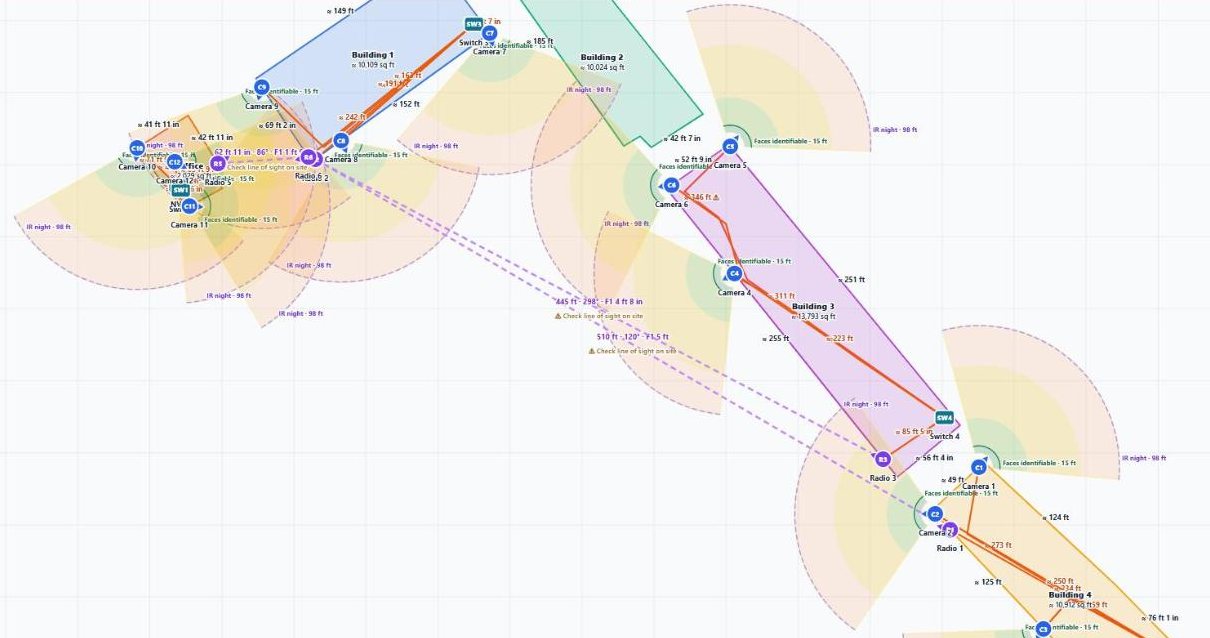
What a finished CCTV layout looks like
Two Kiwi Alarms jobs drawn in FieldStacker, shown in vector view with names and addresses removed. Tap a picture to enlarge it.
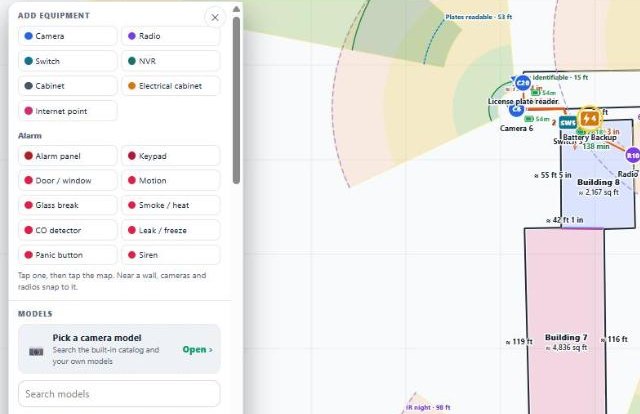
The menus you work from
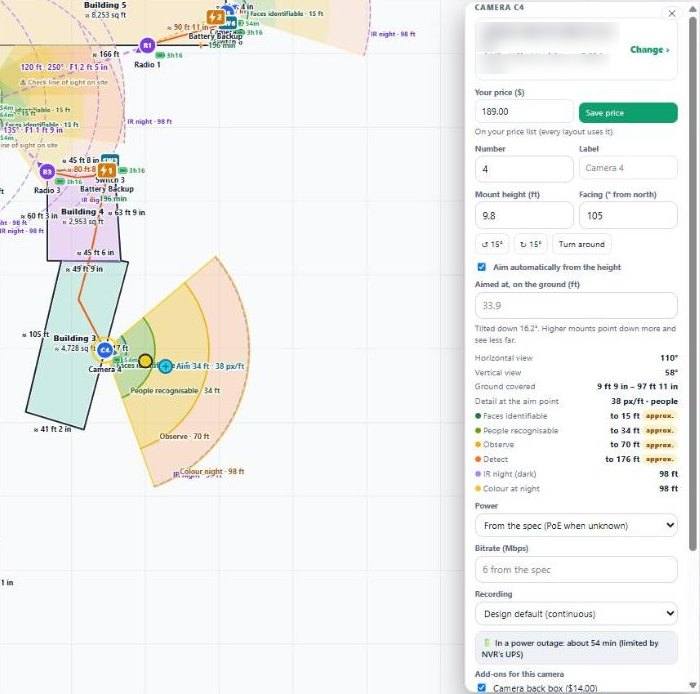
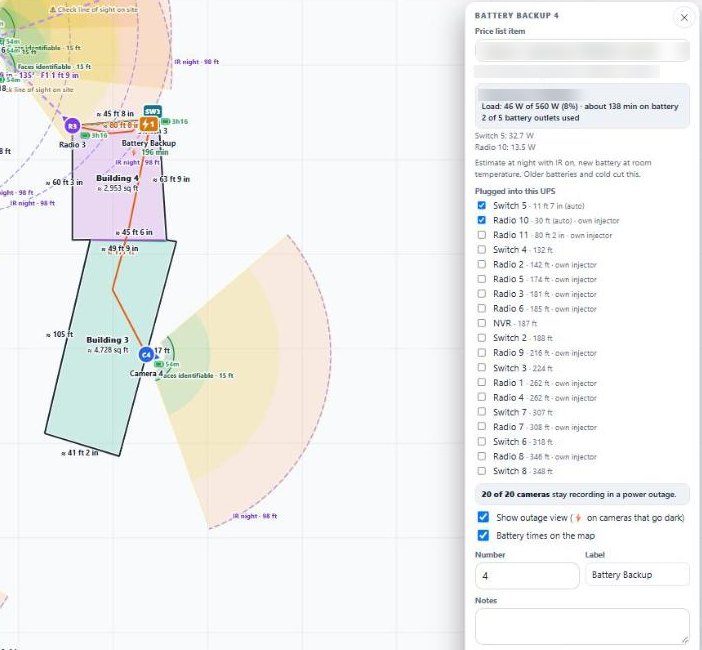
From the same Kiwi Alarms job. Model names are blurred. Tap a picture to enlarge it.
Design your next CCTV system free for 14 days
Set up as an alarm or security company and the camera designer is on when you log in.
- No credit card to start
- From $30/mo after the trial
- Your techs and cleaners are free
- Cancel any time from the app
Every security camera, drawn the way it really sees
Coverage comes from each camera's own spec sheet, not a generic cone. Where a number is estimated, the designer says so.
📚 A catalog of more than 100 cameras
Pick from more than 100 security camera models with their specs already checked, plus any of your own. Search the list or use the picker, and drag a camera straight onto the map.
📥 Add your own models
Import a model from its PDF spec sheet, its product page link or a CSV. You check every field next to where it came from before you save it, then add your cost, sell price and labour hours.
📐 The real field of view
Views are drawn with the horizontal angle. A diagonal or unlabelled angle is converted to horizontal and marked as estimated, so a wide lens never looks wider than it is.
🔍 Zoom lenses and pan-tilt
A varifocal or zoom camera gets a slider that narrows the view as you zoom in. A pan-tilt or PTZ camera shows its sweep and can be aimed inside it.
📏 Mounting height and tilt
Set each camera's height and aim. A camera mounted higher looks down more steeply, so its detail ranges reach less far along the ground, and the drawing shows that.
🙂 Face and people detail rings
Rings show where faces are identifiable, where people are recognisable, and where you can only observe or detect, using IEC 62676-4 pixel densities or the maker's own figures.
🚗 Licence-plate range
A licence-plate camera gets its own "plates readable" ring, where a plate is wide enough on screen to read.
🌙 IR and colour night range
Night rings show the IR range in total darkness and the colour-at-night range. Only total-darkness figures are used, and IR range is never treated as a face distance.
🏷️ Flags worth knowing
Models from brands on the FCC Covered List, cameras with an ongoing licence fee, cameras that record sound and end-of-life models are tagged in the picker. It is advice only; nothing is blocked.
Turn layers on and off as you work: camera views, detail rings, night rings, pan sweep, alarm coverage, links and cables, walls and rooms, blueprints, labels and measurements.
Wired, powered and recorded, checked as you draw
Each camera's power draw and bitrate is added up along its path back to the recorder, from each model's spec sheet.
⚡ PoE budget per switch
Every switch and recorder totals the PoE watts it supplies. Over 80% of its budget is a warning, over 100% is an error, and more PoE devices than PoE ports is an error too.
🔀 Switches and ports
Place switches where the runs gather. Each one is checked for how many cables land on it against its port count.
📼 NVR channels and bandwidth
Each recorder counts the cameras routed to it against its channels, and the megabits coming in against what it can take.
🧵 Cable runs and footage
Draw each run on the map and get its length, plus your waste percentage and a service loop. Any Ethernet run over 90 m (about 300 ft) is flagged, so you add a switch, an extender or go wireless.
♻️ Existing wire, not charged
Tap the cables that are already in the walls to mark them as existing. They stay on the drawing in grey and come off the quote. A new cable joined to an old run is quoted only up to the join.
🔴 No route? It turns red
A camera with no cable or wireless path back to a recorder is shown in red on the map and listed by name, so it can't slip through to install day.
🌐 Remote viewing
Enter the customer's internet upload speed and it checks whether all the cameras can be watched from a phone at once without stuttering.
🔌 Power that isn't PoE
Wi-Fi, battery and plug-in cameras are noted for what they need at the spot, and a camera that needs its own injector is called out instead of being counted on a standard switch port.
Shoot the gap to the barn, and know if it will work
When a trench isn't worth it, link the outbuilding wirelessly. Draw a point-to-point pair, or an access point with several clients, and the designer checks it against the drawing.
- Point-to-point ends and point-to-multipoint access points and clients
- A link that crosses a building or obstruction you traced turns red
- Longer than the radio's rated range: flagged
- Fresnel zone clearance to keep clear at the midpoint
- Link load: the camera traffic it carries against the radio's real throughput, amber over 65% and red over 85%
- Accessories counted per radio, such as a pole mount, and a PoE injector for a radio that needs one
The map can't see heights. Every link carries a reminder to check line of sight on site.
What the link panel tells you
- Obstruction crosses link: Tree
- Keep the Fresnel zone clear around the midpoint
- Camera traffic as a share of the link's throughput
- Only one end on battery: the cameras behind it go offline in an outage
Days of recording, turned into drives
Tell it how many days the customer wants kept. It adds up each camera's bitrate for 24 hours a day over those days, or a share of that if you record on motion, and tells you what the recorder needs.
- Days kept, continuous or motion recording, and the motion percentage
- Terabytes needed per recorder, and how many drives of your size
- How much the cameras write a day, how long one drive lasts and how long the recorder lasts when full
- The recorder's bays and the most it can hold
- A red warning when your drive size is bigger than the recorder takes per bay, or the drives won't fit its bays
- Too many days for the recorder? It tells you to cut the days, record on motion or add a recorder
Defaults you set once
Your usual drive, its usable space, your days kept and recording mode live in your install rules, so every new CCTV layout starts the way you quote.
If a camera's bitrate isn't on its spec sheet, the designer uses your default and says it assumed one.
What keeps recording when the power goes out
Plan the UPS with the cameras, and show the customer what stays on in a power cut.
🔋 Place a battery backup
Add a UPS at a location. Switches and recorders within 30 m (100 ft) plug in automatically, radios follow their switch's UPS, or tick exactly what plugs in.
⚖️ Load against the rating
It totals the watts plugged in, against the UPS's rating, and warns when it is overloaded and would shut off, or when there are more devices than battery outlets.
⏱️ Minutes on battery
About how many minutes the UPS lasts, worked out for night with IR on, the heaviest draw. A battery badge with the minutes sits under each UPS on the map.
⚡ Outage view
Switch on the outage view and every camera that would go dark is marked. The panel shows how many of the cameras stay recording, and each device shows about how long it lasts.
📡 Radios on their injector
A point-to-point radio is powered by its injector plugged in beside its switch, so it shares that switch's battery. If only one end of a link is on battery, you're warned that the cameras behind it drop.
📄 On the proposal
The battery backup shows on the customer's proposal as the part that keeps the cameras recording in a power outage.
Runtime is an estimate for a new battery at room temperature. Older batteries and cold weather cut it, and the designer says so.
Put the alarm on the same drawing
Selling cameras with an alarm? Place the alarm panel, keypads and sensors on the same layout, priced from your own price list.
- Door and window contacts that snap to the building's walls
- Motion, glass break, smoke and heat, CO, leak and freeze, panic buttons and sirens
- Rough coverage rings for motion and glass-break sensors
- Zones used against the panel's zones, and sensors past its wireless range
Catch the awkward ones before the customer does
A checklist for every layout, marked plainly as advice and not legal advice.
- Trace a neighbour's house or yard and you're warned when a camera looks into it
- The job's state comes from the address, with a note where all parties must consent to audio recording
- Turn audio recording off on every camera in one tap
- A warning on face recognition in states with a biometric-privacy law
- A suggested count of "video surveillance in use" signs, one per entrance
A CCTV proposal that sells the layout
One tap turns the layout into a clean proposal the customer can read, without the part numbers they would shop around.
🗺️ Vector layout drawing
The buildings, numbered camera locations, viewing angles and coverage, wireless links, and recorder and network locations, with a legend and scale, drawn as clean vectors.
📋 Camera schedule
Each camera with its approximate identify and recognise distances in good light, from the same pixel densities as the map.
🧰 Equipment list, no model numbers
Every item in plain words with its location, details and quantity. The make and model are never shown.
🛠️ Installation scope
What the job includes in plain words, taken only from the design: the counts, the storage target, the wireless links.
🖨️ Print, SVG and a share link
Print it, download the layout as an SVG, or send a short link to the zoomable drawing. The link shows the drawing only, with no prices, model numbers or contact details, and you can stop sharing at any time.
✅ On the estimate they approve
The customer's estimate page shows "Your security system design": the version you priced, not a draft you kept editing.
Priced from your price list, pushed to an estimate
The layout keeps a running price and profit while you design. When it's right, review the parts list and push it to an estimate in one go.
- Your prices only. Every line comes from your own price list. A model you haven't priced is a warning, never a $0 line.
- Your bundles. Install rules add what goes with each camera, radio, switch, recorder or cable run, such as a junction box per camera or a pole mount per radio.
- Your labour. Hours per camera, radio, switch, recorder and per 100 ft of cable, at your hourly rate, plus the drives and the cable footage.
- Review and push. Lines you changed by hand on the estimate are kept. Lines the design no longer needs are only suggested for removal.
- Every push is saved. Each push keeps a version with the prices of that day, even if your price list changes later.
Then it's a normal FieldStacker estimate
- Send it, get it approved and signed
- Turn it into the invoice
- Take a card payment
Who gets the CCTV designer
The camera designer is switched on for every company set up as an alarm or security company in FieldStacker, on Pro ($30/mo), Team ($60/mo, 3 people) and Team Pro ($250/mo, 16 people). It is not part of the $15 Website & Hosting plan. For other kinds of companies it is a beta that we switch on company by company, and the app still marks it as a beta while we keep adding to it.
It sits next to everything else an alarm company runs on: contracts that fill themselves in, monitoring billing, installs and techs, alarm quoting at the door and the install crew's app.
To be plain about it: the designer plans and prices the system. It does not connect to the cameras or the recorder, and the map can't confirm heights or line of sight, so walk the site before you drill.
CCTV layout questions
What is CCTV layout software?
It is where you plan a security camera system before you install it: where each camera goes, what it can see, how it is cabled or linked back to the recorder, how much storage it needs and what it costs. In FieldStacker you lay the CCTV system out on the satellite map of the customer's property, and the same layout becomes the customer's proposal and your estimate.
How many cameras does a property need?
FieldStacker does not pick a number for you. You place cameras on the map and each one draws its real view and its detail rings (faces identifiable, people recognisable, plates readable, IR night range), so you can see the gaps and add or turn a camera until the areas the customer cares about are covered. The layout counts every camera, switch and recorder for the quote.
How does the designer work out a camera's field of view and coverage?
From the camera's spec: the published horizontal angle, or a diagonal angle converted to horizontal and marked as estimated. Zoom lenses get a slider, and pan-tilt cameras show their sweep. The detail rings use IEC 62676-4 pixel densities (about 76 pixels per foot to identify a face) and come in closer when the camera is mounted higher, because it looks down at a steeper angle.
Can I import a blueprint or floor plan?
Yes. Add a photo of the plans, a PDF page or a DXF drawing (an AutoCAD DWG has to be saved as DXF or printed to PDF first) and it sits under your CCTV layout. A photo taken at an angle is flattened square by dragging the four corners of the sheet. You move, turn and resize it on the map, set the scale from two points you know the distance between, fade it, lock it or hide it, then trace rooms, inside walls and doors over it. A DXF can make the walls for you from its layers. Inside walls stop a camera's view and open doors let it through. A layout holds up to six blueprints, and they never appear on the customer's proposal.
Does it check the PoE budget on each switch?
Yes. Each switch or recorder adds up the PoE watts of every camera and radio it powers, from each model's spec sheet. You get a warning past 80% of its PoE budget, an error when the draw is over the budget, and an error when there are more PoE devices than PoE ports.
Does it work out NVR channels and how many days of storage I get?
Yes. Each recorder checks its channel count against the cameras routed to it, and its incoming bandwidth. You set the days to keep, continuous or motion recording and the drive size, and it shows the terabytes needed, the number of drives, how long one drive lasts, and a red warning if the drive size is bigger than the recorder takes per bay or the drives will not fit its bays.
Can I plan wireless links between buildings?
Yes. Draw point-to-point pairs or an access point with several clients. A link that crosses a building or obstruction you traced turns red, and you are warned when it is longer than the radio's rated range or carries too much camera traffic for the radio. It also gives the Fresnel zone clearance at the midpoint. The map cannot see heights, so it always says to check line of sight on site.
Can it work out battery backup (UPS) runtime?
Yes. Place a battery backup and the switches and recorders near it plug in automatically; radios follow their switch. It shows the load against the UPS rating, about how many minutes it lasts on battery at night with IR on, and an outage view of which cameras keep recording and which go dark when the power goes out.
How does it measure cable footage?
Draw each cable run on the map and it measures the length, adds your waste percentage and a service loop, and warns about any Ethernet run over 90 m (about 300 ft). Lengths from the map are estimates until you enter one wall you measured on site, which calibrates the whole drawing. Runs you mark as existing wire are left off the quote.
Will my customer see model numbers?
No. The proposal and the equipment list describe each item in plain words, never the make or model. A shared link shows the layout drawing only, with no prices, model numbers or contact details.
Which plan includes the CCTV designer?
It is on for every company set up as an alarm company in FieldStacker, on Pro ($30/mo), Team ($60/mo) and Team Pro ($250/mo). It is not part of Website & Hosting. For other kinds of companies it is a beta we switch on company by company. Every plan starts with a 14-day free trial with no credit card.
Related: alarm company software · alarm quoting · alarm dealer software · estimates and invoices · technicians · pricing
Lay out your next CCTV job on the map
14-day free trial, no credit card, no setup fee. Sign up as an alarm or security company and the camera designer is ready when you log in.