A CRM for restoration companies, honest about what it covers
Catch the 2 a.m. call, track every lead, schedule crews across a week-long dry-out and rebuild, keep the photos on the customer, and bill the homeowner. Keep your estimating and claims tools for the insurance side.
14-day free trial · no credit card · from $30/mo · your crew is free
Restoration work comes in two halves. One half is the insurance job: mitigation, documentation, the Xactimate estimate, the adjuster and the supplement. The other half is everything around it: the homeowner who called in a panic, the property manager who sends you five units a year, the plumber who refers every burst pipe, the deductible you still have to collect, the mold job too small to claim, and the rebuild that keeps growing. Many restoration shops run that second half on sticky notes and texts. That half is what FieldStacker is good at.
What a restoration company CRM should handle
The parts FieldStacker does, on one record per customer and property.
Every call caught
A request page for your website and Google profile. Each request lands in one inbox and emails you, day or night.
A lead pipeline
Track each lead from first call to won or lost, so the "call me after the adjuster comes" jobs get a follow-up.
Multi-day jobs
Dry-outs, demo and rebuild as multi-day jobs on a crew schedule, with go-backs for equipment pickup and final checks.
Photos and notes
Crews add photos and notes to the job from their phones. Photos also show in the emails the customer gets.
Homeowner billing
Estimates, deposits, change orders and invoices for the deductible, uncovered work and cash jobs.
Job costing
Materials, labor and expenses against each job, and a profit report, so you know which jobs paid.
Run your restoration leads and crews in FieldStacker free for 14 days
Keep your claims tools. Bring your customer list over and we import it for free.
- No credit card to start
- From $30/mo after the trial
- Your techs and cleaners are free
- Cancel any time from the app
What needs you right now
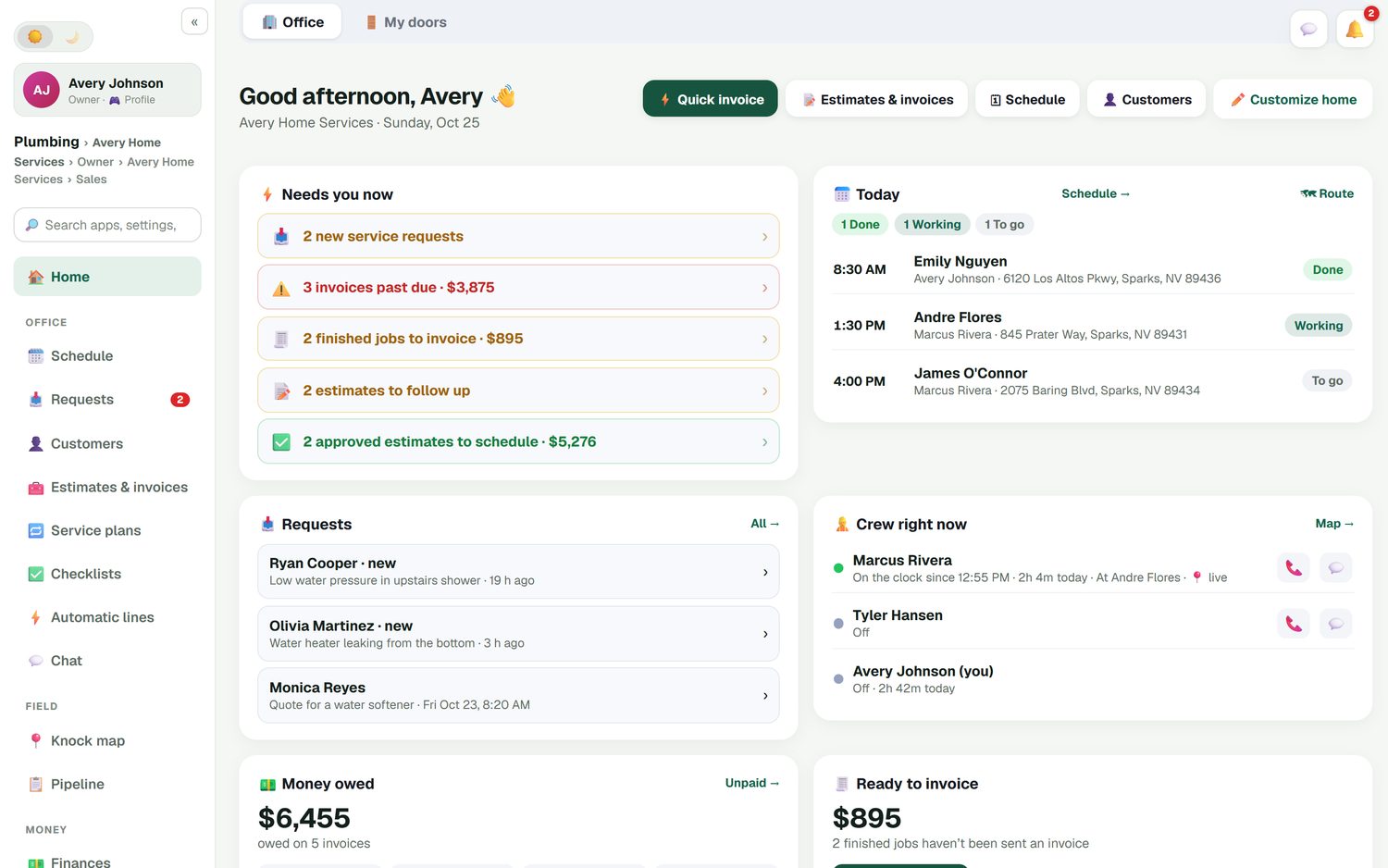
The office home screen opens on the list that matters in restoration: new requests waiting for a call back, invoices past due, finished jobs not yet invoiced, estimates to follow up and approved work to schedule. Below it are today's jobs, where each crew member is, and the money owed. When a storm brings in thirty calls in a day, nothing sits unanswered because it was buried in a voicemail.
- New requests, past-due invoices and unsent invoices up top
- Today's jobs and who is on the clock
- Estimate follow-ups and unpaid-invoice reminders that send themselves
- The week against last week, and job profit
Crews across a week-long job
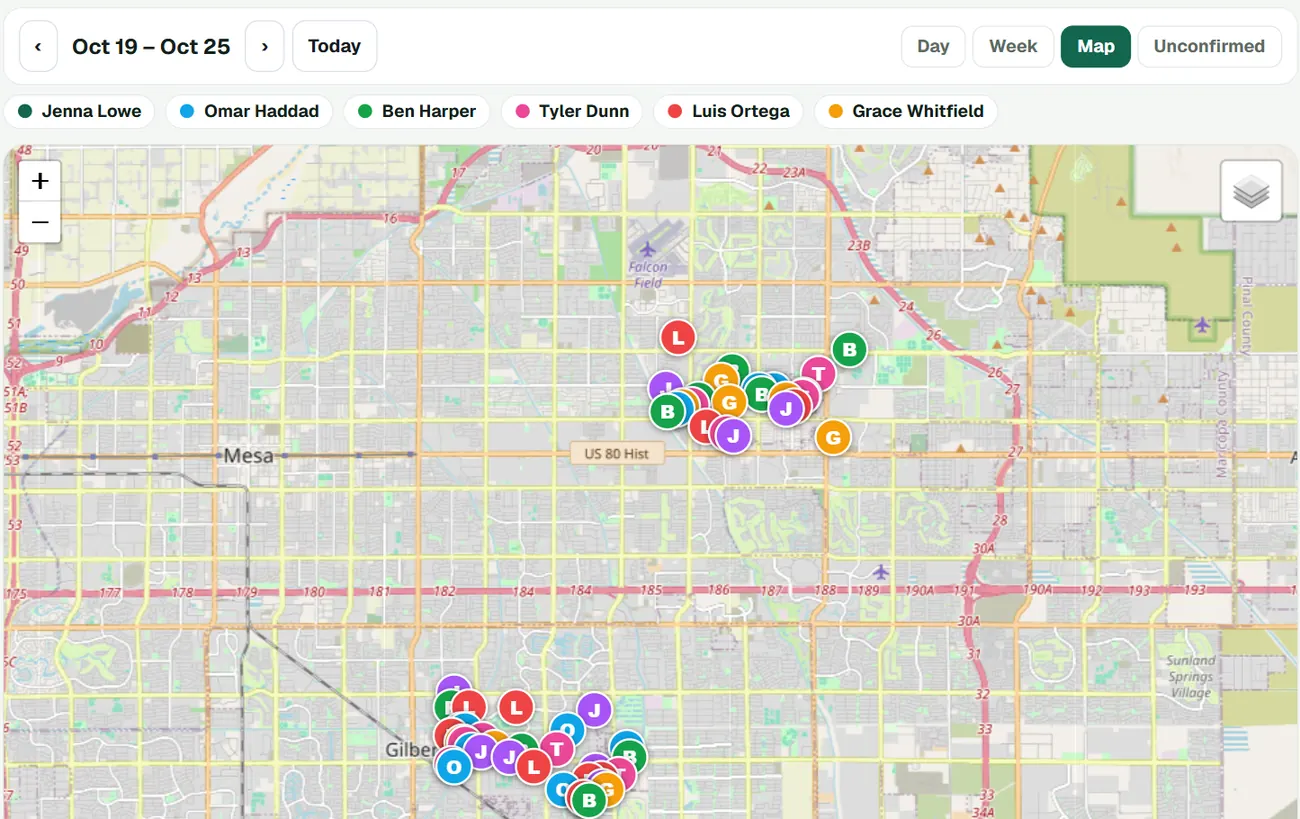
A water loss is not one appointment. It is the emergency visit, daily checks while the drying runs, the equipment pickup, then demo and rebuild. Put it on the schedule as a multi-day job, assign the crew, and drag days around when the adjuster pushes back. The Map view shows where every crew is booked this week. Crew members join free as technicians, clock in and out, and tick the steps you put in a checklist for each kind of job.
- Multi-day jobs and go-backs on the schedule board
- Day, Week and Map views; drag a job to another day or crew
- Time clock with timesheets and a payroll email of hours
- Checklist templates you write, ticked on the crew's phone with photos
Collect the part insurance doesn't pay
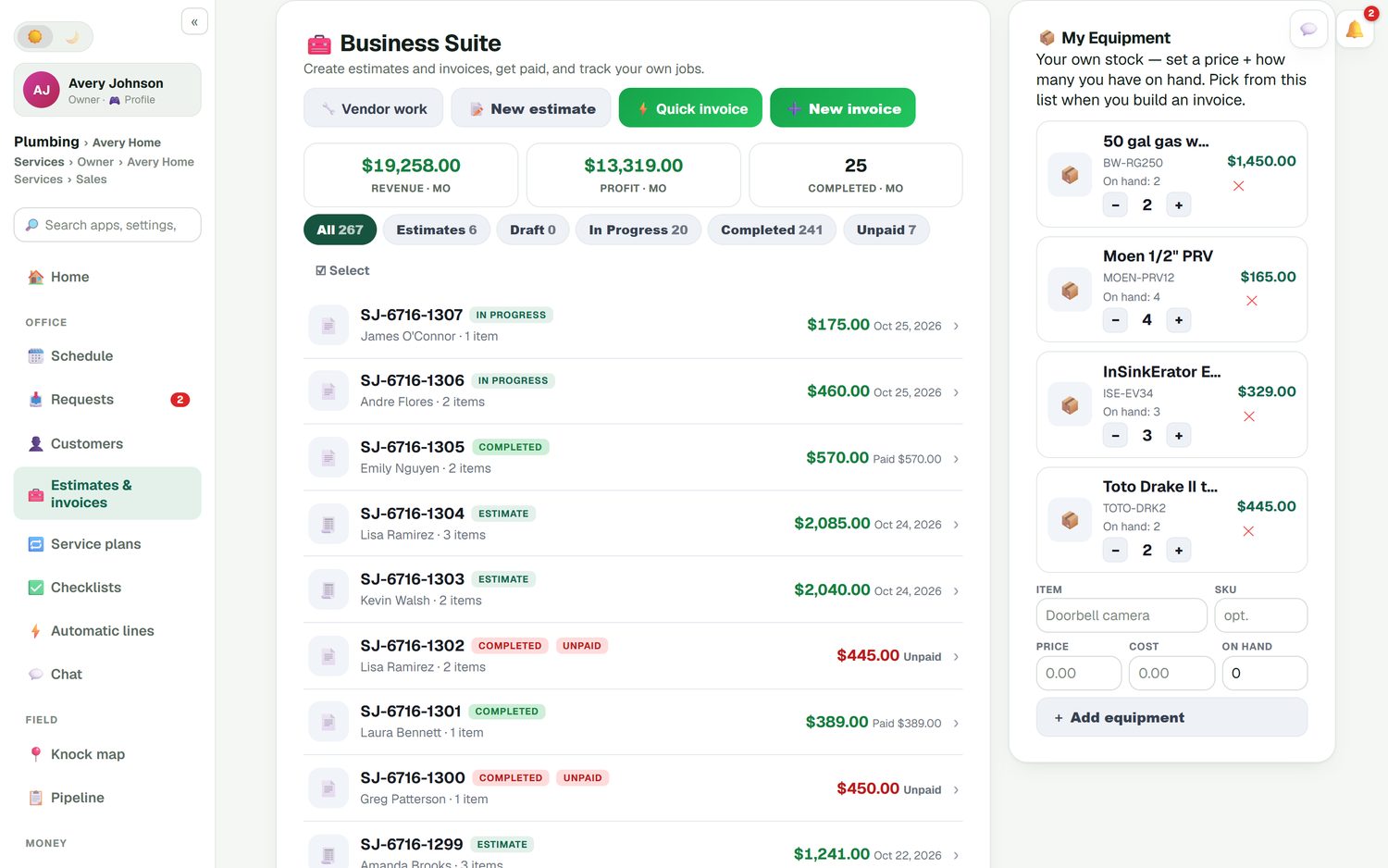
The insurance check is only part of the money. FieldStacker bills the rest: the deductible, upgrades the homeowner chose, and work outside the claim. Send an estimate they sign on your phone or by QR code, take a deposit, and add change orders as the rebuild grows; each one has its own approval and deposit. Record an insurance check as a check payment. Customers can pay, see estimates and invoices, and check their visits in their own portal, and payments sync to QuickBooks Online.
- Deposits and change orders the customer approves
- Card through your own Stripe account; cash, check, Venmo or Zelle recorded
- Batch invoicing for property managers with many finished jobs
- QuickBooks Online sync for invoices, payments and expenses
What FieldStacker does not do
Said plainly, so you can decide before you start a trial.
| Restoration need | FieldStacker |
|---|---|
| Xactimate estimates and ESX files | Not supported. Keep writing insurance estimates in Xactimate. |
| Insurance claims, adjuster portals, supplements | Not supported. |
| Moisture mapping, drying logs, psychrometric readings | Not supported. |
| Drying equipment tracking | Not supported. Parts stock per tech exists, but not dehumidifier or air mover tracking by job. |
| Leads, customers, schedule, photos, homeowner billing | Yes, that is what it is for. |
If you want one restoration-specific system with drying logs, look at tools built for it. Albi, for example, lists moisture mapping, a drying log and equipment scanning on its site; its pricing is not published (checked October 26, 2026). If your claims tool already covers the insurance side and you need the customer, crew and billing side done well for less, FieldStacker fits next to it. After a hail or wind storm, the knock map lets your team canvass the affected streets the way roofing companies do.
Restoration CRM questions
Is FieldStacker a restoration company CRM?
It is a CRM and job system that restoration companies can use for the customer side of the business: taking the call, tracking the lead, scheduling crews, saving job photos, and sending estimates and invoices. It is not a restoration-specific claims platform, and it does not do drying logs or moisture mapping.
Does FieldStacker integrate with Xactimate?
No. There is no Xactimate integration and no insurance-claim workflow. If you write insurance estimates in Xactimate, keep doing that. Use FieldStacker for the customer record, the schedule, photos and the homeowner's billing.
What should a CRM for restoration companies do?
At minimum: catch every emergency call and web request, track each lead until it is won or lost, keep the job photos and notes on the customer, schedule crews across multi-day jobs, and bill and collect. Restoration-specific tools add moisture readings, drying logs and claim documentation on top.
Can I bill the homeowner for the deductible or work insurance won't cover?
Yes. Send an estimate or invoice for the homeowner's part, take a deposit, add a change order when the scope grows, and take a card on site. Record an insurance check as a check payment so the job shows as paid.
How do after-hours emergency calls come in?
A request page on your website and Google profile sends every request to one inbox and emails you. With the AI website chat add-on ($20/mo for 200 replies), visitors get an answer at 2 a.m. and can book a time from your real open slots.
How much does it cost?
Pro is $30/mo for one owner, or $25/mo billed yearly. Team is $60/mo for you plus 2 seats. Crew members you add as technicians are free. 14-day free trial, no credit card.
Related: CRM for contractors · job management · remodeling · invoice app for contractors · handyman software · appliance repair · pricing
Stop losing restoration leads to voicemail
14-day free trial, no credit card. Add your crew free, keep your claims tools, and run the customer side here.