Software for landscaping business owners, not landscape design
Price the install, take the deposit, run the crews across a multi-day job, keep the maintenance customers on a plan and see what each job made. The business side, in one app.
14-day free trial · no credit card · from $30/mo · your crew is free
Search for "landscaping software" and most results are design tools for drawing a backyard. That is a real need, but it isn't the one that keeps a landscaping company profitable. The hard part comes after the drawing: turning it into a price the customer signs, getting a deposit before you order 14 pallets of pavers, keeping three crews busy across a four-day install and the weekly maintenance route, and knowing at the end whether the job made money.
That is what FieldStacker does. Keep the design tool you like for the drawing. Bring the price into FieldStacker and run the job from there.
Landscape company software for the work after the design
Installs and maintenance, side by side.
Estimates from your price list
Search your own price list for pavers, base, sod, plants and labor. Optional add-ons like lighting or edging are ticked by the customer.
Deposits up front
A percent or dollar deposit on the estimate, paid when the customer signs on your phone or by QR code.
Change orders
The customer wants the wall two feet longer. Send extra lines with their own deposit for them to approve.
Multi-day installs
A patio or a full yard can run across several days on the schedule board, with photos and notes on the job.
Maintenance plans
Weekly mows, monthly bed care or spring and fall cleanups on service plans, with autopay after each visit.
Job profit
Parts, labor and expenses against each job, and a job profit report that shows which work pays.
Run your landscaping company in FieldStacker free for 14 days
Bring your customers over from your old app. We import your customers and jobs for free.
- No credit card to start
- From $30/mo after the trial
- Your techs and cleaners are free
- Cancel any time from the app
Landscape business management software on one screen
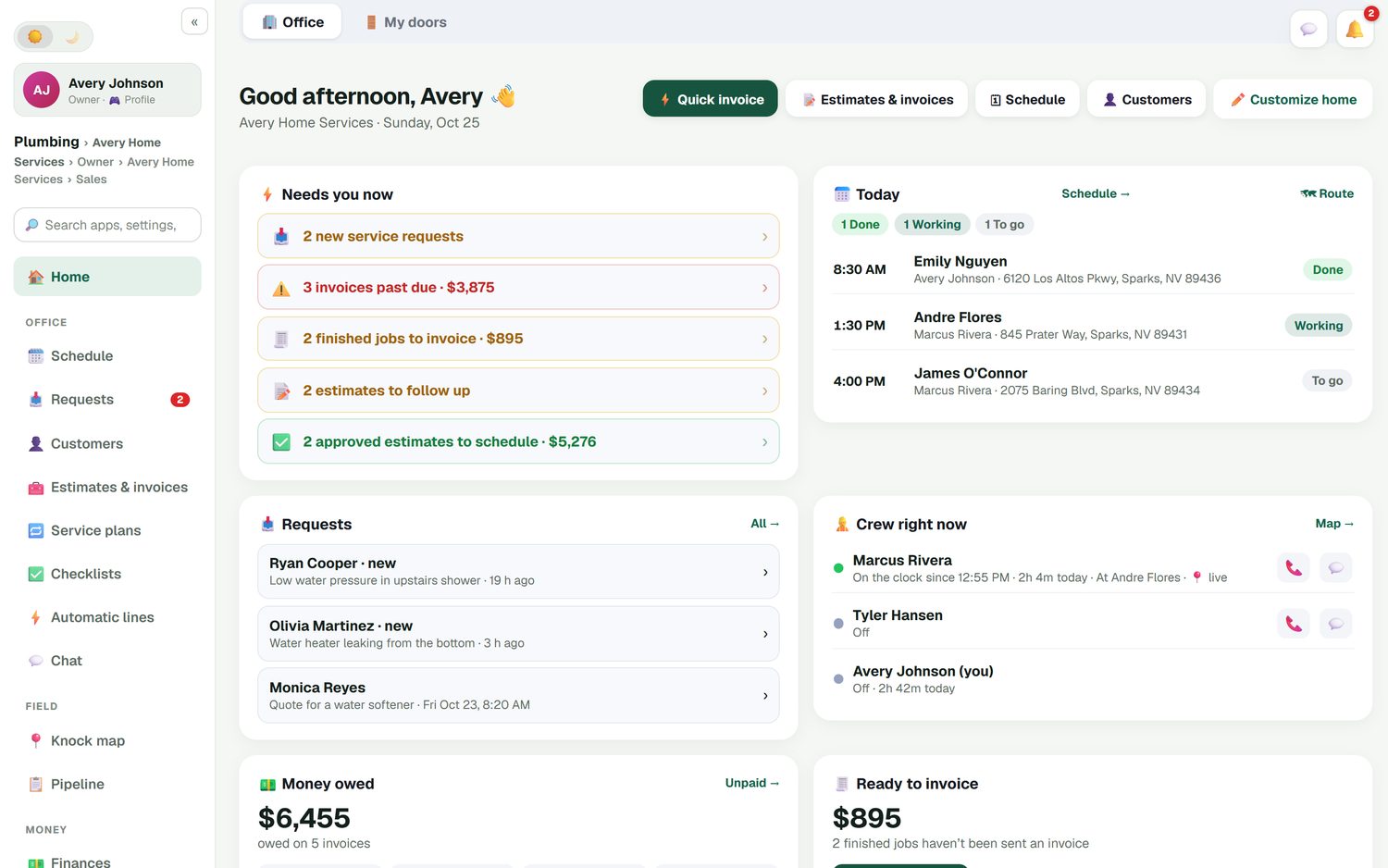
The office home screen shows what needs you now: new requests, invoices past due, finished jobs waiting for an invoice, estimates to follow up and approved estimates to schedule. Beside it are today's jobs with their status and where each crew is, if they've turned on location. Money owed sits at the bottom, so a slow-paying commercial account doesn't drift for a month.
- Approved estimates waiting to be scheduled
- Unsent invoices and money owed
- The week vs last week
From the drawing to a signed estimate
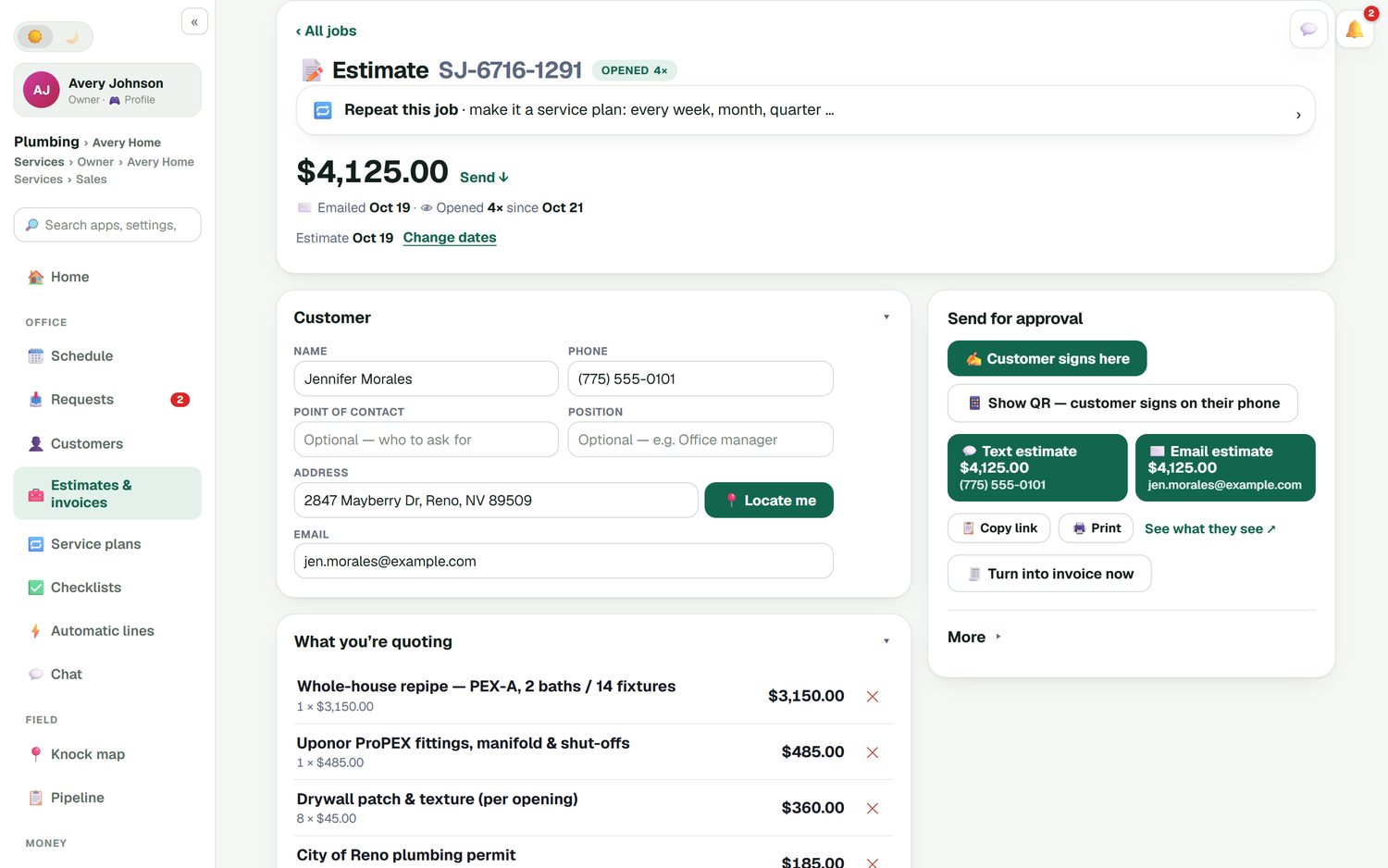
Build the estimate on your phone in the customer's yard or at the desk. Automatic lines add the labor that goes with a material, so 400 square feet of pavers brings its install line with it. Add a discount with a reason, set the deposit, and the customer signs on your phone or scans a QR code to sign and pay later. You can see when they opened it, and estimate follow-ups go out by themselves if they go quiet.
- Your own price list, searchable
- Automatic lines for labor and materials
- E-sign at the door or by QR code
- Automatic estimate follow-ups
See what the install really made
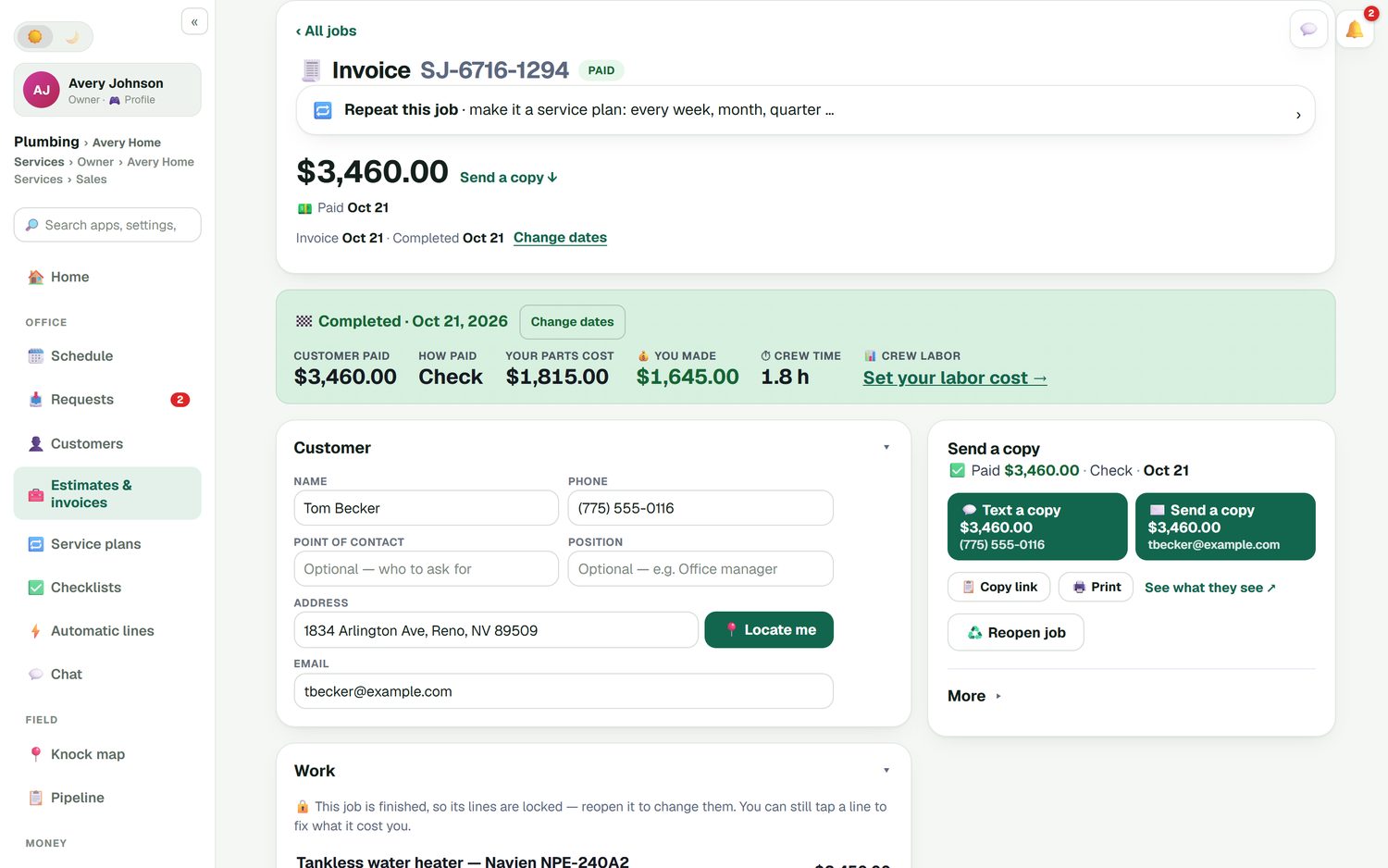
When a job is finished, its summary shows what the customer paid, how they paid, what the materials cost and what you kept, with crew time beside it. Set your labor cost and you see true profit per job. Over a season that tells you whether small planting jobs are worth the trailer trip, or whether you've been pricing retaining walls too low.
- Materials, labor and expenses per job
- A job profit report
- Invoices and payments synced to QuickBooks Online
How it compares to landscape-only platforms
LMN by Granum is built for landscapers and strong on budgeting and estimating; its Starter plan is $297/mo billed monthly after a one-time onboarding fee. Service Autopilot starts at $49/mo plus a sign-up fee, priced on an annual subscription. Aspire, part of the ServiceTitan family, is aimed at enterprise-level landscape companies and quotes on request. All prices were checked October 26, 2026. FieldStacker is the flat-priced option for owner-run companies that want installs, maintenance and their marketing in one app. The full roundup is in best lawn care software.
Landscaping business software questions
Is FieldStacker landscape design software?
No. FieldStacker has no drawing tools, 3D renders or plant library. It runs the business side of a landscaping company: estimates, deposits, crew schedules, multi-day installs, maintenance plans, invoices and job profit. Keep your design tool for the drawing, and bring the price into FieldStacker.
What is the best landscape business management software for a small company?
For one to a few crews, pick something that handles both install jobs and recurring maintenance, shows job profit and has a price you can read. FieldStacker starts at $30/mo with crew free. LMN and Service Autopilot publish prices that start higher, and Aspire quotes on request; we list them on our best lawn care software page.
Can I take a deposit before a hardscape job?
Yes. Add a deposit as a percent or a dollar amount to the estimate. The customer signs and pays the deposit, and the balance is invoiced when the job is done. If they add a retaining wall halfway through, send a change order with its own deposit for them to approve.
Does landscape company software handle maintenance contracts?
Yes. Put a maintenance customer on a service plan, weekly through yearly, and each visit lands on the schedule as its own job and invoice. A card on file can be charged after each visit.
Does it work with QuickBooks?
With QuickBooks Online, yes. Finished invoices and payments sync automatically and update in place, and expenses, job parts and mileage can sync too. QuickBooks Desktop is not supported.
Can my crews use it on their phones?
Yes. Crew members you add as technicians are free. They see their jobs, tick checklists, add photos and notes, and clock in and out.
Related: landscape estimating · landscape CRM · landscaping scheduling · tree service software · QuickBooks Online sync · pricing
Run the next install from estimate to profit
14-day free trial, no credit card. Your crew is free, and we import your customers for you.