Work order software your techs actually fill in
Where to go, what's wrong, the gate code, the checklist, the parts and the photos, on the tech's phone. When they mark it done, the office already has the invoice.
14-day free trial · no credit card · from $30/mo · your techs are free
The paper work-order pad has the same problems in every trade. The handwriting is hard to read. The carbon copy gets lost under the seat. The tech used two extra fittings and a flapper but didn't write them down, so they never get billed. There's no photo of the leak before or the repair after, and when the customer disputes the bill a month later it's your word against theirs.
A work order app fixes this only if it is quicker than the pad. That is why FieldStacker keeps the tech's screen short: today's jobs in driving order, one tap to open a job, steps to tick, a camera button and a done button. Everything else happens in the office.
What's on a FieldStacker work order
What our work order management software puts on site with the tech, and brings back to the office.
Where and when
The customer, service address, time slot and how long the job should take, in the order the tech will drive them.
What needs doing
What the job is for, plus job notes from the office: gate codes, pets, which bathroom, who to ask for.
A checklist, if you want one
Templates for each kind of job, always optional. Techs tick each step on their phone so a new hire does the job the way you would.
Parts from the truck
Each tech carries their own stock. Completing the job deducts what they used, and the parts count toward job cost.
Photos before and after
Photos stay on the job and also show in the customer's emails, so the customer sees the finished work.
Sign-off and extra work
E-sign on the estimate at the door or by QR code, and change orders for extra work, each approved by the customer first.
Send your techs out with FieldStacker free for 14 days
Add every tech as a technician at no cost. We import your customers and jobs for free.
- No credit card to start
- From $30/mo after the trial
- Your techs and cleaners are free
- Cancel any time from the app
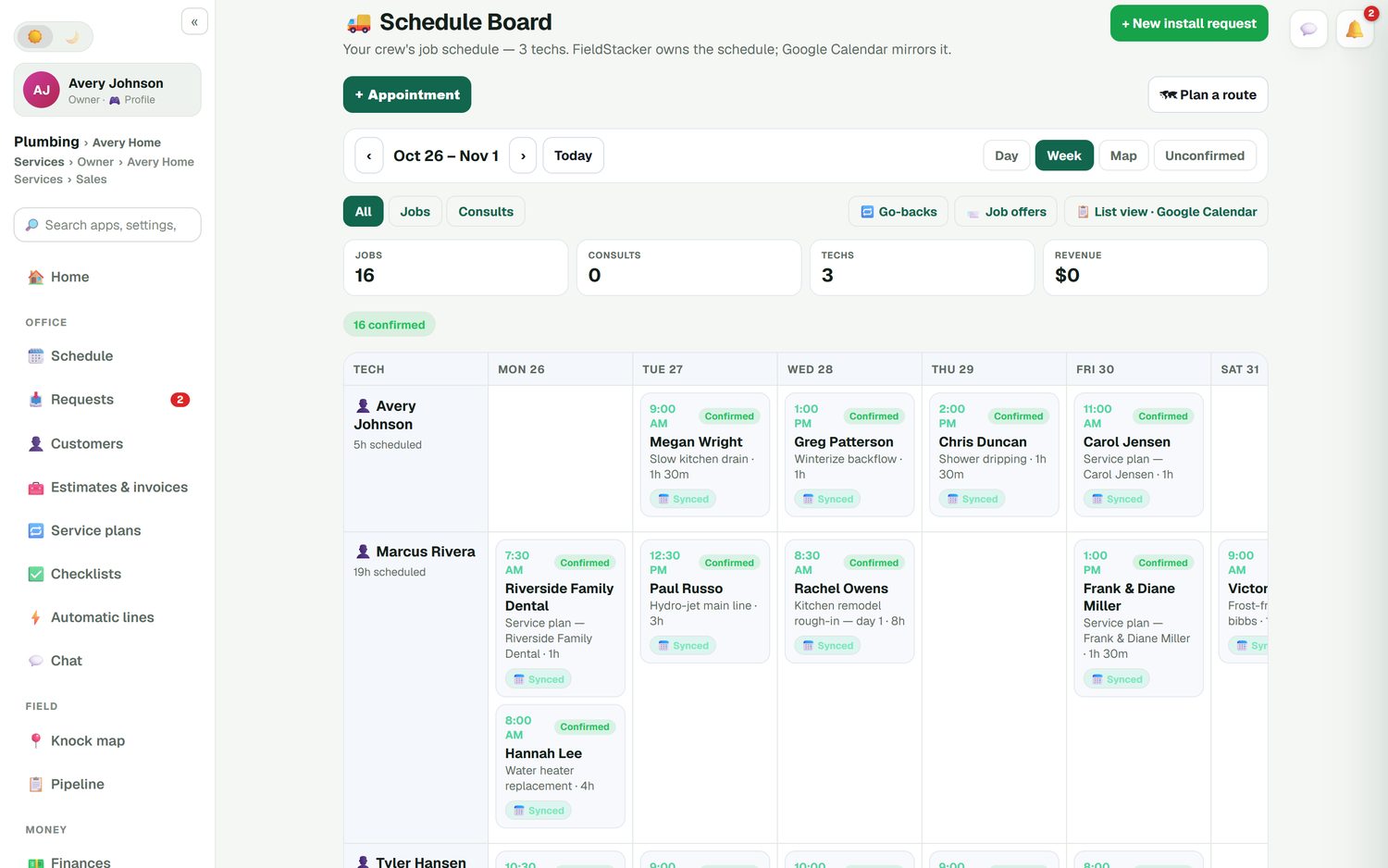
Field service work order management on one board
Work orders come from three places: a booking or request from your website, an approved estimate, or the next visit on a service plan. The office places each one on the schedule board, by tech and by day, and drags it when the day changes. Go-backs keep their own list so a callback doesn't get lost, and job offers let you send an open job to your techs. With the texting add-on, the tech taps "On my way" and the customer gets an ETA and a live tracking link.
- Confirmed and unconfirmed jobs at a glance
- Day routes put each tech's stops in driving order
- The customer's calendar invite moves when the job moves
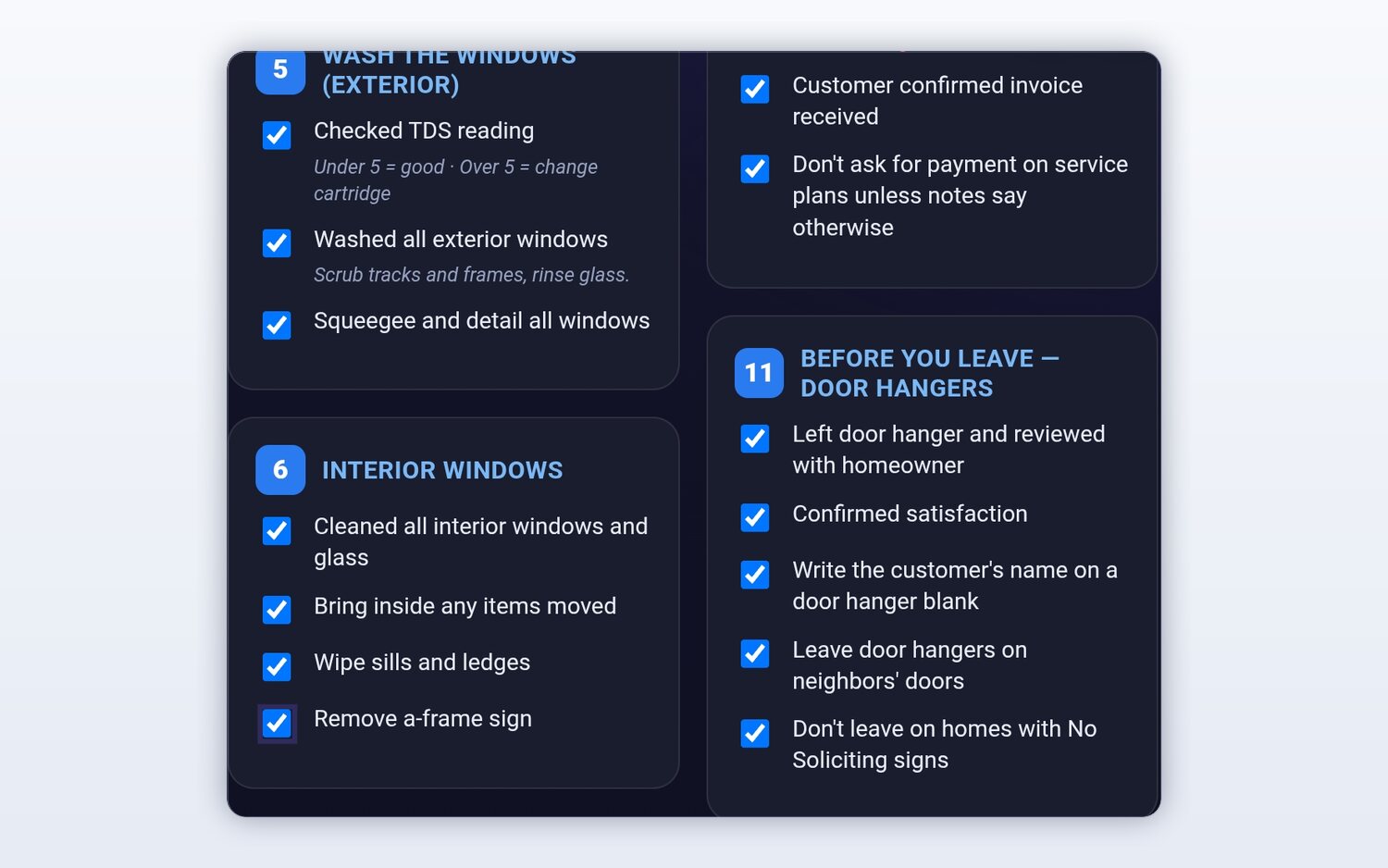
A work order app that shows the steps
Write a checklist once for each kind of job, like a water heater install, an AC tune-up or a quarterly pest treatment, and it appears on every job of that kind. Steps can carry a short note, such as the reading to take or the part to check. Techs tick them on their phone and add photos as proof. Checklists are always optional, so a quick service call doesn't need ten taps.
- Different templates for different job kinds
- Photos added from the job
- Job notes passed to whoever goes next time
Every part used gets billed
Unbilled parts are the quiet cost of paper work orders. In FieldStacker each tech has their own on-hand stock, kept in sync with your price list. When they complete a job, the parts on it come off their stock, and the cost goes into the job's profit. A low-stock count warns you before the tech runs out on a Saturday call.
For the office view of the same job, from request to payment, see job management software. For planning the day itself, see technician scheduling and field service routing.

Work order questions
What is work order software?
Work order software replaces the paper work-order pad. It tells a tech where to go, when, what the customer asked for and what to do, then records what was done, the parts used and the photos, and hands the finished job to billing. In FieldStacker the work order is the job itself, so there is nothing to retype into an invoice afterward.
Is there a work order app my techs can use on their phones?
Yes. Techs open FieldStacker on their phone to see their day in driving order, open each job, read the notes, tick the checklist, add photos and mark it done. Techs you add as technicians are free, so every person in the field can have it.
What is field service work order management?
It is the office side of work orders: creating them from requests and estimates, assigning them to techs, moving them when the day changes, and checking that each one was finished and billed. In FieldStacker that happens on the schedule board, with confirmed and unconfirmed jobs, go-backs and job offers to techs.
Can customers sign off on the work?
Customers sign the estimate on your phone at the door, or scan a QR code to sign and pay on their own. If the job grows on site, a change order adds the extra lines with their own deposit, and the customer approves it before you do the extra work.
Does it track the parts a tech used?
Yes. Each tech carries their own stock in the app, and completing a job deducts the parts used. Those parts also count toward the job's cost, so job profit is right without a separate spreadsheet.
Is this maintenance or CMMS software?
No. FieldStacker is service order software for businesses that do work at customers' homes and properties, like plumbing, HVAC, electrical, pest control and cleaning. If you need to track the upkeep of your own factory equipment, a CMMS is the better tool.
Related: field service software overview · estimating software · the technician app · customer history · pricing
Retire the work-order pad this week
14-day free trial, no credit card. Your techs join free and see their first jobs today.