The field service CRM that remembers every visit
Every estimate you sent, every job you did, every invoice and receipt, and the next visit on their plan, on one customer. Your customer sees the same history in their own portal.
14-day free trial · no credit card · from $30/mo · your techs are free
A customer calls and says, "You were out here last spring for the water heater. Is it still under your warranty?" In a lot of shops the answer lives in a paper invoice book, a tech's memory or three different apps. In a field service CRM it is one search: the customer, the job, the date, what was installed and what they paid.
That history is what turns a one-time customer into a repeat one. It tells you who is due for a tune-up, who has an estimate they never answered and who always pays late. Contact lists and sales pipelines don't hold that. Your service records do.
What your CRM for field service management keeps
Built around the house and the work done there, not a sales funnel.
A record for every customer
Name, phone, email and service address, plus a point of contact and their position for the property manager or office manager you deal with.
Every estimate, job and invoice
See what you quoted, what was approved, what is in progress and what is unpaid, with the dollar amount on each line.
Notes and photos on the job
Job notes carry gate codes and "dog in the back yard" to whoever goes next. Photos of the finished work stay on the job and show in the customer's emails.
Service plans and card on file
Weekly through yearly visits stay on the calendar, and the saved card is charged for each one through your own Stripe account.
Follow-ups that run themselves
Estimate follow-ups, unpaid-invoice reminders, and a thank-you with a review request after payment. Switch each on or off and edit the words.
Your old data, brought over
CSV or Excel import with undo, a dedicated Jobber import for clients and balances, plus Zapier, Make, webhooks and an API key for your other tools.
Move your customer list into FieldStacker free for 14 days
Send us the export from Jobber, HubSpot or a spreadsheet. We import your customers and jobs for free.
- No credit card to start
- From $30/mo after the trial
- Your techs and cleaners are free
- Cancel any time from the app
Your customer sees the same history
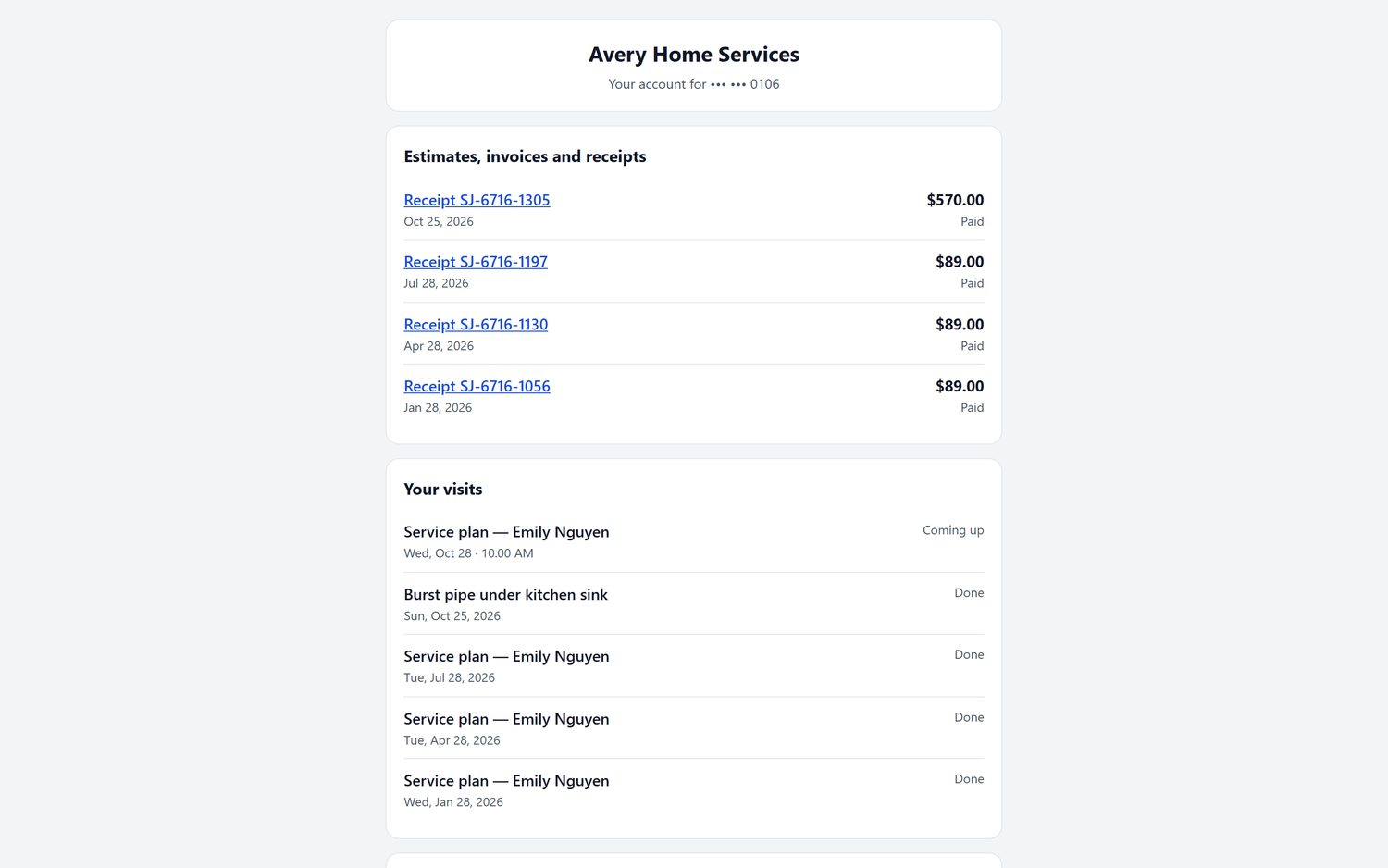
Most "can you resend that invoice?" calls go away when customers can look it up themselves. Each customer gets a portal where they sign in to pay invoices, see estimates, invoices, receipts and billing history, check their upcoming visits and reschedule a booking. When we host your website, the portal runs on your own domain, so it looks like your company, not ours.
- Receipts for every paid job, in date order
- Upcoming and past visits, including service-plan visits
- Pay an open invoice by card without calling the office
The customers who come back on their own
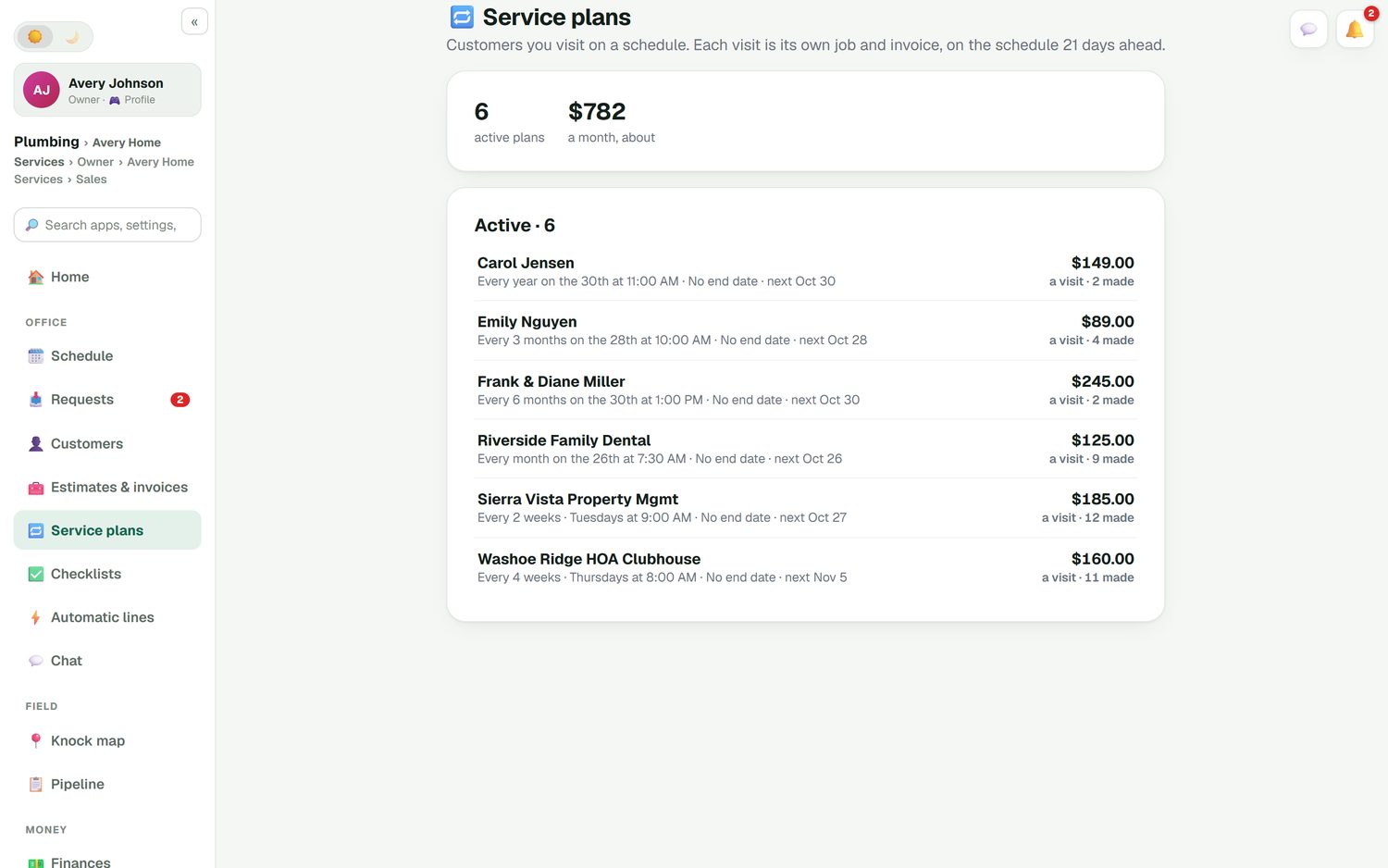
The most valuable line in a service CRM is "next visit". Put a customer on a service plan and every visit becomes its own job and invoice, placed on the schedule ahead of time. You see how many plans are active and roughly what they bring in each month. Customers manage their visits on their own page, and autopay charges the card on file when each visit is done.
- Any cadence from weekly to once a year, for any trade
- Turn a finished job into a plan with "Repeat this job"
- Recurring commercial accounts alongside homeowners
Sales CRM or field service CRM?
If your money comes from work done at an address, the second column is the one you need.
| What it tracks | A typical sales CRM | FieldStacker as a field service CRM |
|---|---|---|
| The customer | Contact and company | Contact, service address, point of contact |
| The sale | Deal stages to "won" | Estimates with e-sign, deposits and change orders |
| After the sale | Usually hands off to another tool | Schedule, job notes, photos, checklists |
| The money | Deal value | Invoices, payments, receipts, job profit |
| Coming back | A reminder task | Service plans with autopay |
A general CRM for small business is fine for keeping contacts. Once you invoice for work at a customer's address, you want the job and the payment on the same record. For the repeat-billing side in depth, see recurring billing software, and if your books live in QuickBooks Online, see QuickBooks field service software.
Field service CRM questions
What is a field service CRM?
A field service CRM is a customer database built around the work you do at a customer's address, not around sales deals. Alongside name, phone, email and address it keeps the estimates you sent, the jobs you did, the invoices and receipts, and any service plan the customer is on. In FieldStacker that history is shared with the customer in their own portal.
How is a field service management CRM different from HubSpot or Salesforce?
Sales CRMs are built to move a deal through a pipeline to "closed won", and then they stop. A field service management CRM keeps going after the sale: scheduling the visit, recording what the tech did, invoicing, collecting payment and booking the next visit. If you came from HubSpot, we import your contacts for free.
What is the best CRM for a service based business?
Pick one that holds the work and the money, not just contact details, and that your techs can use from a phone. For a small crew, also check whether you pay for every tech. FieldStacker includes customers, estimates, scheduling, invoices and service plans from $30/mo, and techs are free. Our list of the best field service management software compares it with Jobber, Housecall Pro and others.
Can my customers see their own history?
Yes. Each customer can sign in to a portal to see their estimates, invoices, receipts, billing history and visits, pay an invoice and reschedule a booking. When we host your website, the portal runs on your own domain.
Can I bring my customer list from my old CRM?
Yes. Upload a CSV or Excel file up to 250 MB and undo it if it is wrong. Coming from Jobber, a dedicated import brings clients and their balances. We also import your customers and jobs for you for free, from Jobber, HubSpot, SalesRabbit or whatever you use now.
Does it work for commercial customers and property managers?
Yes. A customer record can carry a point of contact and their position, such as an office manager, so the tech knows who to ask for. Regular commercial visits, like a monthly backflow check or a biweekly service at a clubhouse, go on a service plan.
Related: field service software overview · job management from request to paid · software for owner-operators · best field service management software · pricing
Bring every customer's history into one place
14-day free trial, no credit card. We import your customers and jobs for free.