Recurring billing software for the customers you see on a schedule
Quarterly pest treatments, biweekly cleans, spring and fall tune-ups. Put the customer on a service plan once, and every visit lands on the calendar and gets paid by the card on file when it is done.
14-day free trial · no credit card · from $30/mo · your techs are free
Recurring revenue is the steadiest money a service business has, and the easiest to leak. A quarterly customer gets missed because nobody put the next visit on the board. A visit gets done but never billed. A customer who pays by check falls two visits behind before anyone notices. A spreadsheet of "who is due" cannot warn you about any of that.
Service plans turn the spreadsheet into the schedule. The plan knows the next date. The visit is a real job your tech sees on their day. When the tech marks it done, the bill follows. You are not rebuilding the same invoice four times a year.
Recurring invoicing software that follows the visits
Billing tied to work that actually happened.
Any schedule
Weekly, every two weeks, monthly, quarterly, twice a year, yearly and the steps in between. Pick a day and time.
Visits on the calendar
Each visit is its own job on the schedule board, assigned to a tech, so nothing waits on someone remembering it.
Autopay after the visit
The card on file is charged after each completed visit, not before, through your own Stripe account.
The customer's own page
Customers see their plan, the price per visit and the next date, and manage their visits without calling you.
Repeat any job
Finished a one-off job the customer wants again? "Repeat this job" turns it into a plan in a few taps.
Books that keep up
Each visit's invoice and payment can go to QuickBooks Online automatically.
Put your regular customers on autopay this week
Free for 14 days. We bring your customer list over from your old app for free.
- No credit card to start
- From $30/mo after the trial
- Your techs and cleaners are free
- Cancel any time from the app
Know what your plans are worth each month
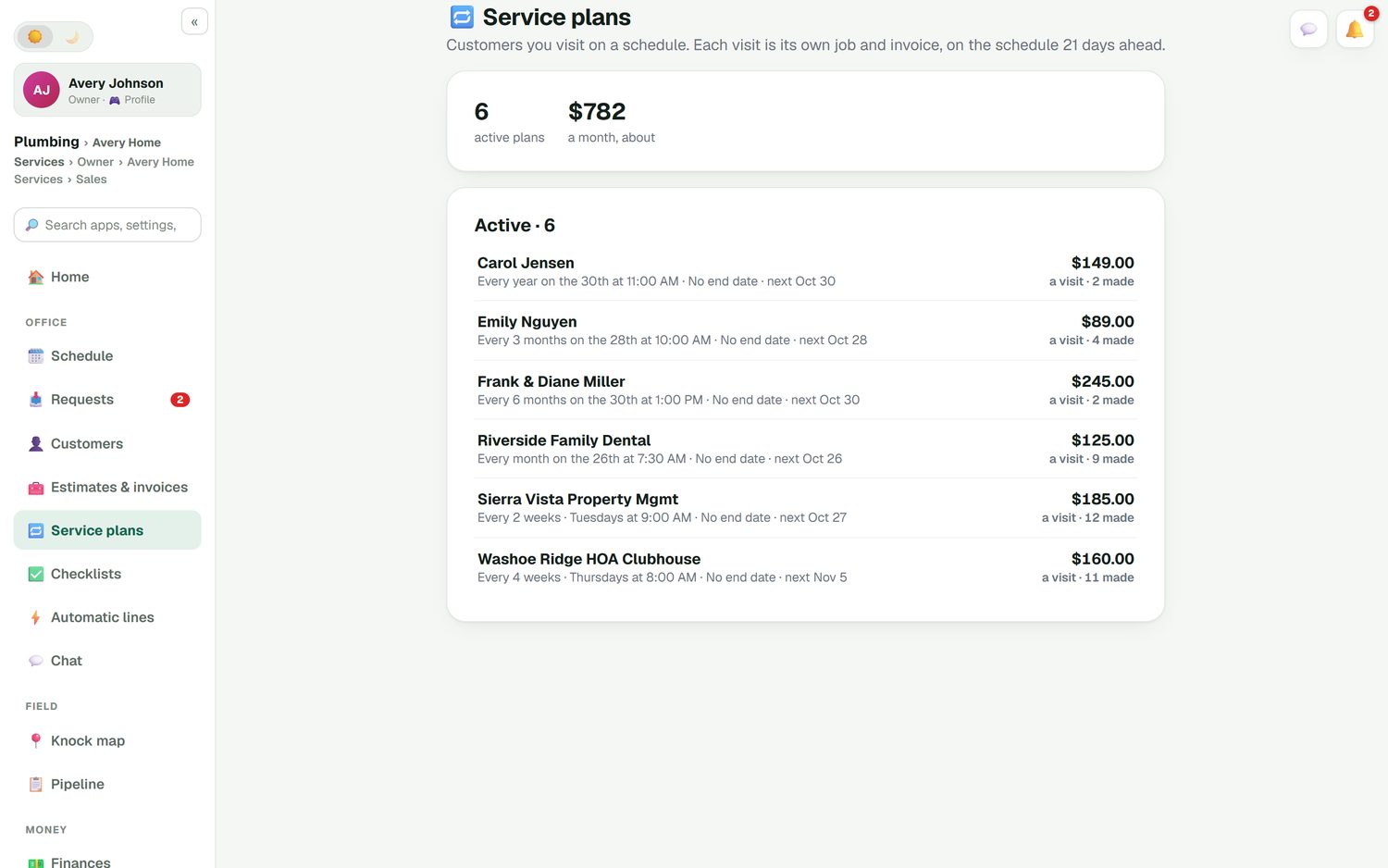
The Service plans page lists every active plan with its schedule, the price per visit, how many visits have been made and when the next one is. At the top, a single number tells you roughly what your recurring customers bring in each month. Homeowners, property managers and an HOA clubhouse can all sit on the same list with different schedules.
- Every week, two weeks, month, quarter, six months or year
- Each visit is its own job and invoice
- No end date unless you set one
- Visits made so far on every plan
Card on file, charged after the work
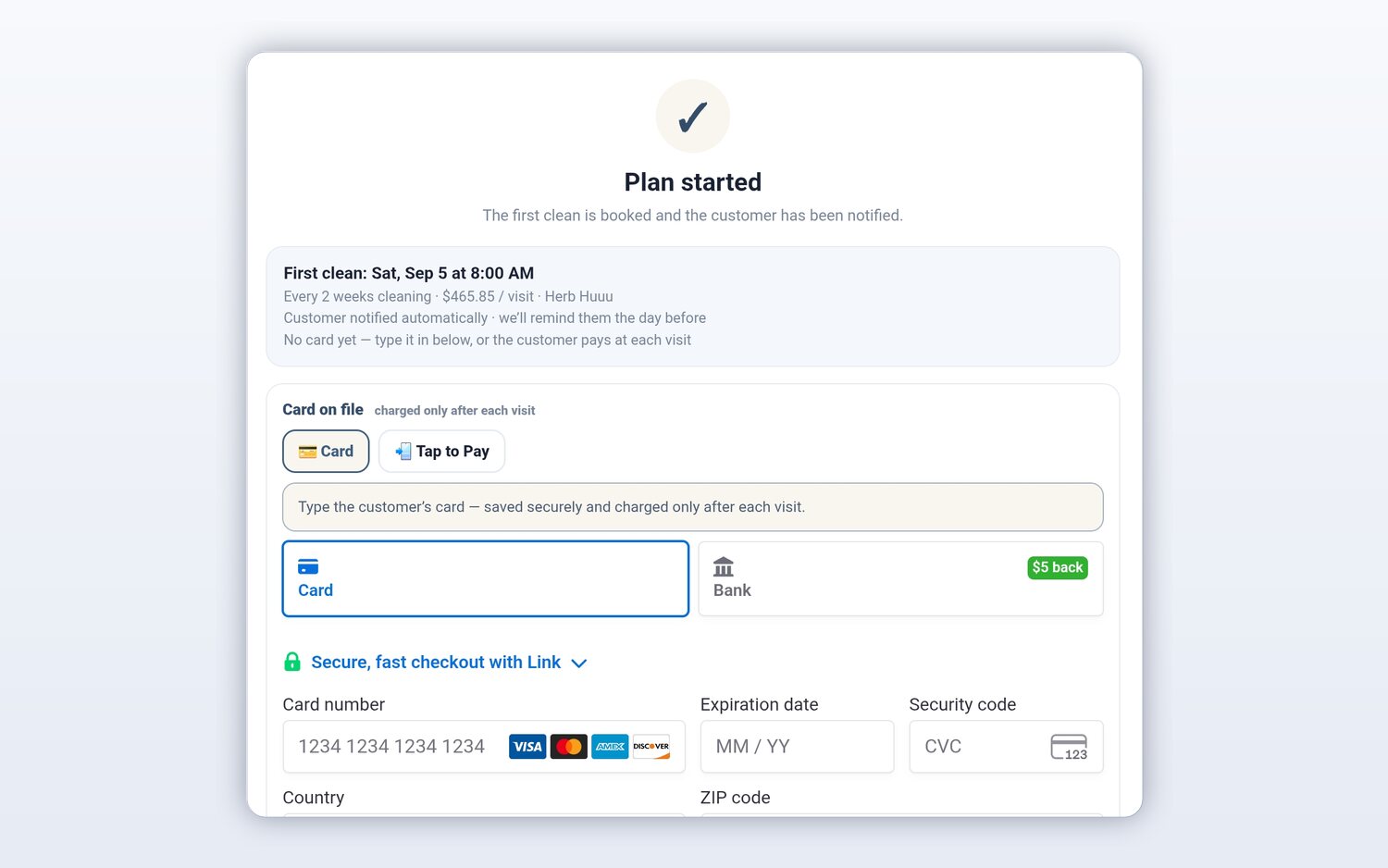
When a plan starts, the first visit is booked and the customer is notified. You can save their card right there, or send them their link to add it themselves. From then on the card is charged after each visit is completed. Customers like that they never pay for a visit that did not happen, and you like not sending an invoice every month.
- Charged after each completed visit
- Your own Stripe account, no FieldStacker fee
- Or the customer pays at each visit
- Reminder the day before each visit
Skip, pause or cancel in one tap
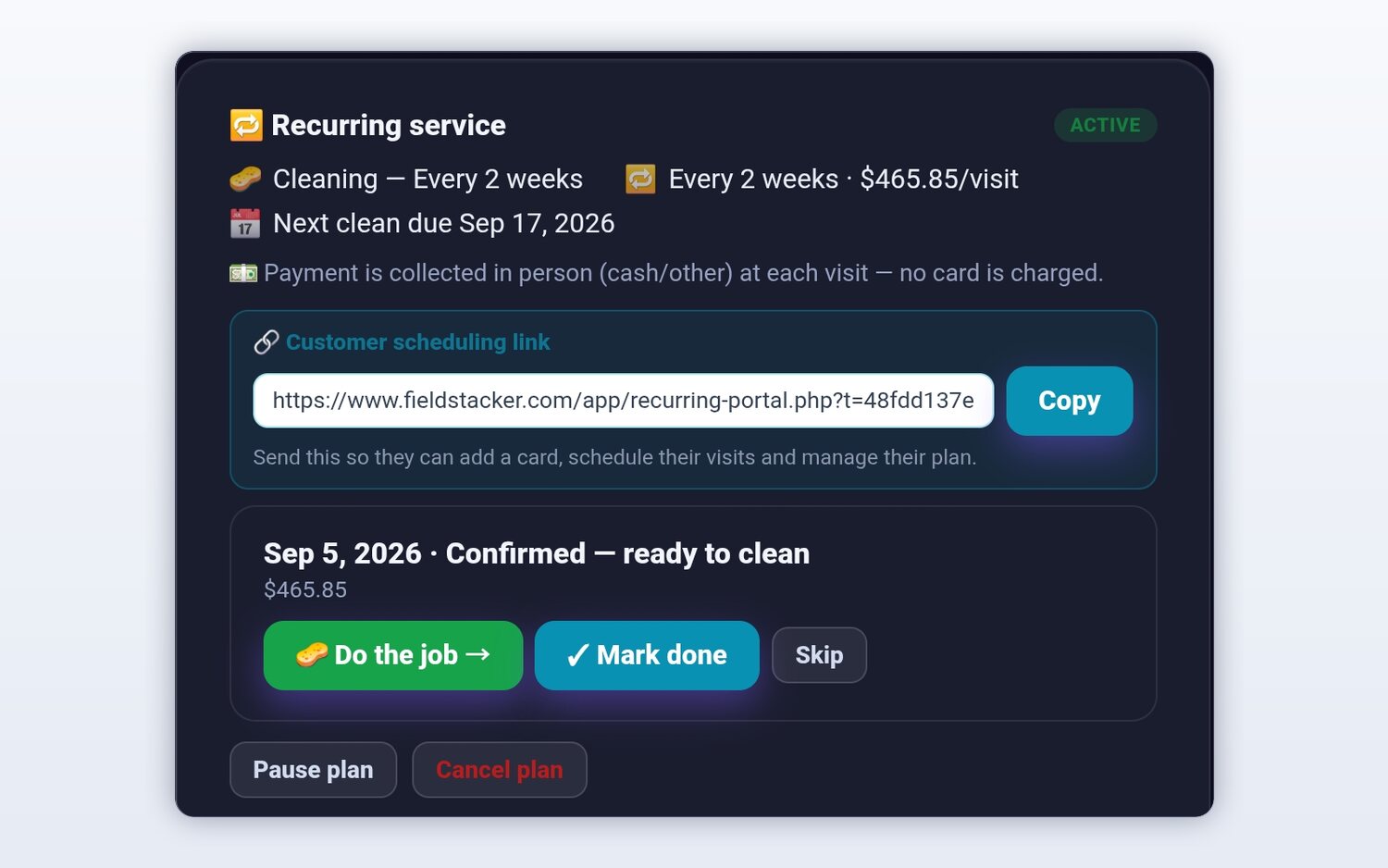
Plans change. The customer is away in July, wants to move a visit, or sells the house. Each plan has a scheduling link you can send so they add a card, schedule their visits and manage their plan. On your side, each upcoming visit has Do the job, Mark done and Skip, and the plan has Pause and Cancel.
Automatic invoicing by trade
The same plans, set up the way each trade already sells recurring work.
Pest control
Quarterly treatments on a set day, with re-services booked as one-off jobs between them. See pest control software.
HVAC maintenance agreements
A spring and a fall tune-up every year, billed per visit. See HVAC software.
Commercial accounts
An office, a clinic or an HOA on a monthly visit, with their own invoice for each visit.
Recurring billing questions
What is recurring billing software for a service business?
It bills customers you visit on a schedule without you building each invoice by hand. In FieldStacker you put a customer on a service plan, the visits go on the calendar, and each visit is billed at the plan price when it is done. With a card on file, autopay charges it for you.
Is it auto billing software that charges the card by itself?
Yes, when the customer has saved a card. The card on file is charged after each completed visit, through your own Stripe account at standard Stripe rates. FieldStacker adds no fee on top. Customers who would rather pay at each visit can do that instead.
What about customers who pay by check? Is there recurring invoicing for them?
Yes. Each visit still gets its own invoice. Record the check, cash, Venmo or Zelle against it, and unpaid-invoice reminders follow up on any that are late.
Which schedules can a service plan use?
Anything from weekly through yearly: weekly, every two weeks, monthly, every three or six months, once a year and more. Pest quarterly treatments, biweekly cleans, twice-a-year HVAC tune-ups and weekly mowing all fit.
Can customers skip or move a visit themselves?
Yes. Each customer gets their own page to see and manage their visits. You can also pause a plan, skip a visit or cancel the plan from the app.
Is this automatic invoicing software for subscriptions or memberships?
Not really. Service plans bill visits, so they fit work you go out and do. If you sell software subscriptions or memberships with no visits, a subscription billing tool is a better fit. The exception is alarm dealers: monitoring accounts bill monthly monitoring on their own.
How much does it cost?
Service plans and autopay are included in Pro at $30/mo, or $25/mo billed yearly. Techs are free. Start with a 14-day free trial, no card.
Related: invoicing software for small business · QuickBooks Online sync · pricing
Turn your regulars into steady monthly money
14-day free trial, no credit card. Set up your first service plan and let autopay handle the billing.