Technician scheduling software that sends the right tech
Book the next available tech, offer a job and let the tech accept it, and see who has the parts before anyone leaves the shop. Your techs run their day from their phone, and they ride along free.
14-day free trial · no credit card · from $30/mo · your techs are free
Putting a job on the calendar is the easy part. The harder question is who should go. The water heater swap needs the tech with the 50-gallon tank on his truck. The new customer across town should get whoever finishes nearest. The senior tech should not spend Friday on drain calls a newer tech can handle. If the software only knows "9:00 AM," the office is still matching techs to jobs in its head.
FieldStacker gives you what you need to make that call quickly, then gives the tech what they need to do the job without calling the office back.
Field tech scheduling software: the matching part
How a job finds its tech, and how the tech gets the job.
Next available tech
Book a job and see the next open times by tech. Customers who book online can get the next available tech too.
Job offers
Offer a job to a tech. They see the address, time and what the job involves, and accept it on their phone.
Parts on each truck
Each tech carries their own stock. Completing a job deducts the parts used, so the counts stay honest.
The tech's own day
Techs see their own day, with notes, photos and the checklist for that kind of job. They tick steps and add photos as they go.
Time clock
Clock in and out on the phone, timesheets for the week, and a payroll email of hours for whoever does payroll.
Techs are free
Add every tech as a technician at no extra cost. Adding a fourth truck does not raise your bill.
Add your techs to FieldStacker free and try it for 14 days
Techs you add as technicians never cost extra. We import your customers and jobs for free.
- No credit card to start
- From $30/mo after the trial
- Your techs and cleaners are free
- Cancel any time from the app
The next available tech, with the kit
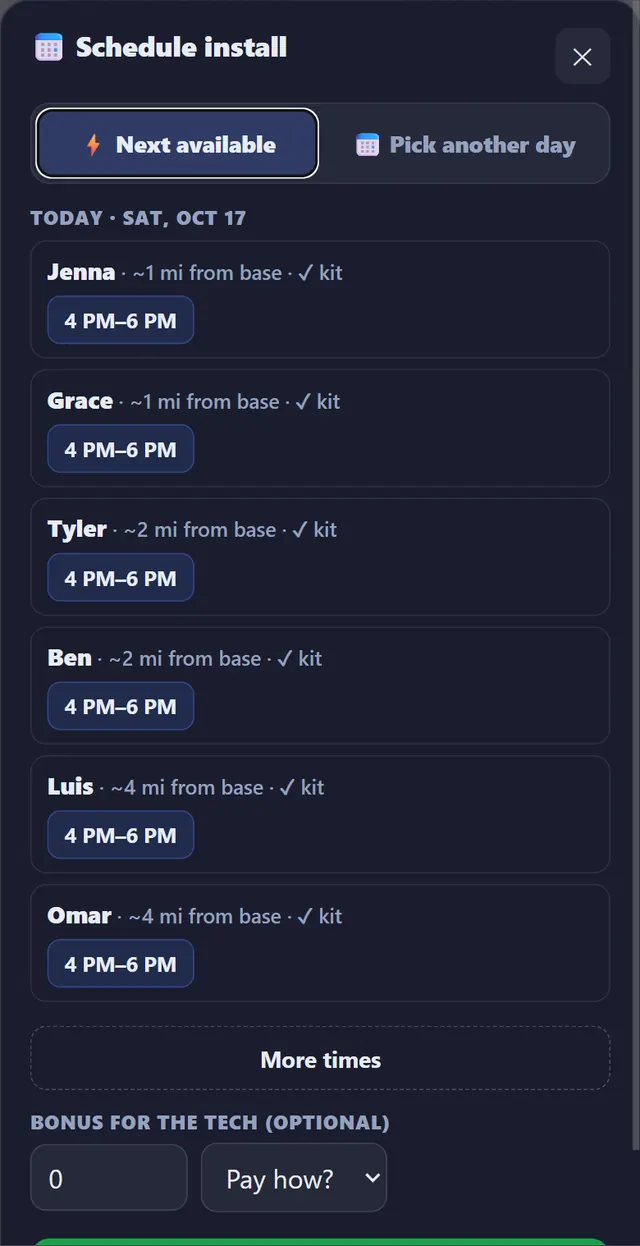
When you schedule a job, FieldStacker can list the next open times by tech instead of making you scan every row of the board. In this example from an alarm company, each tech's next slot shows next to how far they are from their base and whether they have the kit for the install. Pick one, or switch to "Pick another day" if the customer wants a different date.
- Next open time for each tech on one list
- Or pick any tech and day by hand
- The job lands on that tech's row of the schedule
- The customer gets a calendar invite
A job offer the tech says yes to
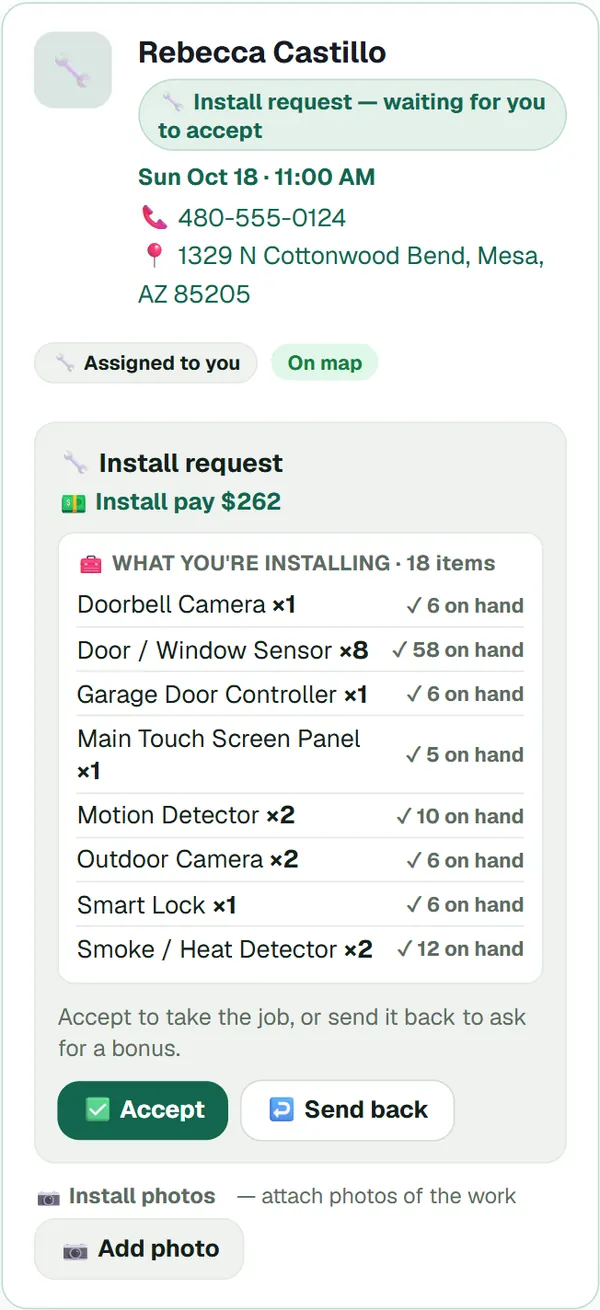
Some shops assign every job. Others, especially with 1099 techs or subcontracted installers, offer the job and let the tech take it. A job offer shows the tech the date, the address, what they are installing or fixing, and how many of each part they already have. They accept it, or send it back. Once accepted, it is on their day with the photos and checklist attached.
- Offer to one tech, or assign directly
- Parts needed next to what the tech has on hand
- Accept or send back from the phone
- Photos of the work saved on the job
Send the tech who has the part
A second trip to the supply house costs more than the part. In FieldStacker each tech carries their own stock, with counts, stock value and a low-stock count. When a job is completed, the parts used come off that tech's count. Before you send someone to a water heater, a panel swap or a system install, you can check who actually has it.
- Stock kept per tech, not one shared guess
- Parts deducted when the job is completed
- Parts and labor count toward job costing

What technician scheduling costs per tech
From each company's own pricing page, checked October 26, 2026.
Per-person pricing matters more than the headline price once you have a few trucks. Jobber includes 1 user on Core at $49/mo and charges $29/mo for each extra user. Housecall Pro includes 1 user on Basic ($79/mo), 5 on Essentials ($189/mo) and 8 on Max ($329/mo), then $35/mo per extra user. ServiceTitan says its pricing is per technician and quotes on request. Each of these is a capable product, and Housecall Pro and ServiceTitan offer more depth for larger shops.
In FieldStacker, Pro is $30/mo for the owner, and every person you add as a technician is free. Office staff who need their own login go on Team ($60/mo for you plus 2 seats) or as extra seats at $20/mo each. If you run 1099 installers, the technician software page covers the installer's own side.
Technician scheduling questions
What is technician scheduling software?
Technician scheduling software decides which tech does which job, then puts it on that tech's phone. It shows each tech's booked time, lets you offer or assign work, and gives the tech everything for the job: address, notes, photos, checklist and parts. The point is the right person at the right house, not just a time on a calendar.
Is there a technician scheduling app my techs can use on their phone?
Yes. Techs use FieldStacker on their phone. They see their own day, accept job offers, open the job's notes, photos and checklist, tick steps as they go, clock in and out, and complete the job. Techs you add as technicians cost nothing.
Can it find the next available tech?
Yes. When you book a job, FieldStacker can offer the next available tech and open times, and customers who book online can be given the next available tech too. You can still pick a specific tech and day by hand.
How does service technician scheduling software charge for techs?
Many tools charge per user or per technician. As checked October 26, 2026, Jobber charges $29/mo per extra user, Housecall Pro charges $35/mo per extra user on Max, and ServiceTitan prices per technician on request. In FieldStacker, people you add as technicians are free on every paid plan.
Can techs see what parts they need?
Yes. Each tech carries their own stock in FieldStacker, and completing a job deducts the parts used. A job offer shows the tech the parts needed next to how many they have on hand.
Does it track technician hours?
Yes. Techs clock in and out on their phone, timesheets build from that, and you can get a payroll email with everyone's hours. FieldStacker does not run payroll or pay people; it gives you the hours to pay from.
Related: dispatching today's jobs · routes and ETAs · crews and multi-day jobs · time tracking · plumbing scheduling · pricing
Match every job to the right tech
14-day free trial, no credit card. Add your whole crew as technicians at no extra cost.