Roofing software for everything after the handshake
Book the inspection, send the estimate, take the deposit, email the material order, put the crew on a two-day tear-off, get the change order for bad decking approved, and collect the final payment. The office and the crew work from the same app.
14-day free trial · no credit card · from $30/mo · your crew is free
Most roofing companies run on a whiteboard, a group text and a spreadsheet. The inspection gets booked by phone, the estimate goes out as a PDF, the deposit arrives as a check nobody logs, and the crew finds out about the second day of the job from a text at 6 a.m. Then the decking is rotten, the price changes, and the homeowner remembers a different number than you do.
FieldStacker puts each of those steps on one record. The homeowner who asked for an inspection is the same person on the estimate, the deposit, the two-day job, the change order and the final invoice. You see where every roof stands, and the crew sees only what they need for today.
What roofing company software should cover
Six jobs a roofing office does every week, and how FieldStacker handles each one.
Inspections on the calendar
Homeowners book an inspection from your website or digital card, or send a request like "leak over the garage" that lands in your Requests inbox, ready to schedule.
Estimates with deposits
Build the estimate from your own price list, add upgrades the homeowner can tick, and ask for a deposit as a percentage or a dollar amount before you order shingles.
Crews on multi-day jobs
Tear-off and dry-in on Monday, shingles and cleanup on Tuesday, as one job on the board. Roofers you add as technicians are free.
Change orders
Found soft decking or a second layer? Add the extra lines with their own deposit. The homeowner approves the change before the crew keeps going.
Invoices that get paid
Send the final invoice from the job, take a card through your own Stripe account, or record a check, Zelle or Venmo. Reminders go out for unpaid ones.
Profit on every roof
Materials, labor and expenses like the dumpster go against the job, so you see what each roof actually made. It all syncs to QuickBooks Online.
Run your next roof replacement in FieldStacker free for 14 days
Bring your customers and jobs over from your old app. We import them for free.
- No credit card to start
- From $30/mo after the trial
- Your techs and cleaners are free
- Cancel any time from the app
New for roofers: quotes, materials, claims and commissions
Live now on roofing accounts. Each one works off the same homeowner record as the rest of the job.
Good, Better, Best roof quotes
Price three roof options per square, with adders for steep pitch, extra layers, two- and three-story homes, low slope and decking, or price to a target margin. The homeowner approves one and pays the deposit. Add-ons like the permit, chimney re-flash, ridge vent or gutters you left out are offered as optional extras, and the right-to-cancel notice for home sales is included.
Bill of materials from the measurement
Shingles, starter, hip and ridge, underlayment, ice and water, drip edge, flashing, vents, pipe boots, nails, sealant and decking each have a quantity formula over the roof's eaves, rakes, ridges, hips, valleys and squares. Waste goes on field shingles only. You edit the catalog, costs and formulas.
Material order and job sheet
The job sheet shows the material order, the labor plan and estimated against actual costs from receipts. Email the order to your supplier from your business email, or print or copy it. Pull materials from stock, put leftovers back, and the next order uses them first.
Import the report you bought
Measure roof gives area, pitch and pitch bands from satellite data, an estimate and not a certified report. For exact edges, trace them on the map, type them in, or import an EagleView, Roofr, Hover or GAF QuickMeasure report. The material order email waits until the edges are real.
Insurance claims and supplements
Mark the quote as a claim and FieldStacker reads the adjuster's scope PDF. The estimate is priced at RCV plus approved supplements, the deposit is the ACV, and it suggests items the scope seems to miss. Supplements are tracked to approved or denied. The deductible is never waived.
Rep commissions
Pay reps on gross profit, the sale, per square or a flat amount per job, with setter/closer splits and a self-gen bonus. Reps see their commission on the quote. It moves from Pending to Earned to Paid, a cancelled or refunded job claws it back, and it flows into the Payroll tracker.
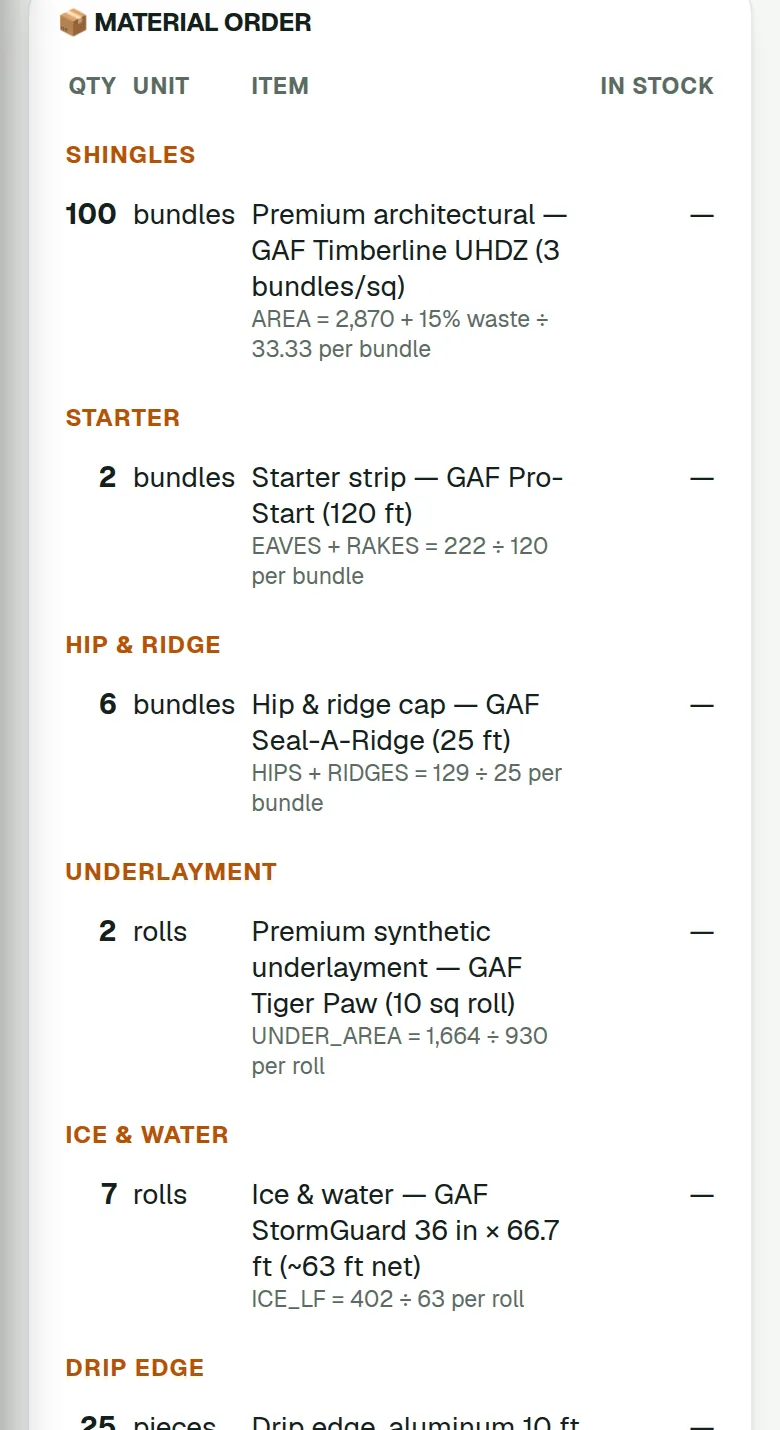
The material order, from the roof you measured
Once the homeowner approves, open the job sheet. The material order is already there, worked out from the measurement: shingle bundles from the roof area plus waste, starter from the eaves and rakes, hip and ridge from the hips and ridges, then underlayment, ice and water, drip edge and the rest. The formula is printed under each line, and you can change any formula, product or cost. Email the order to your supplier from your business email, or print or copy it. It will not email while the edges are still estimates, so a satellite guess never turns into a truckload of shingles.
- A labor plan for the crew on the same job sheet
- Estimated against actual costs from the receipts you tag to the job
- Take materials from stock; put leftovers back and the next order uses them first
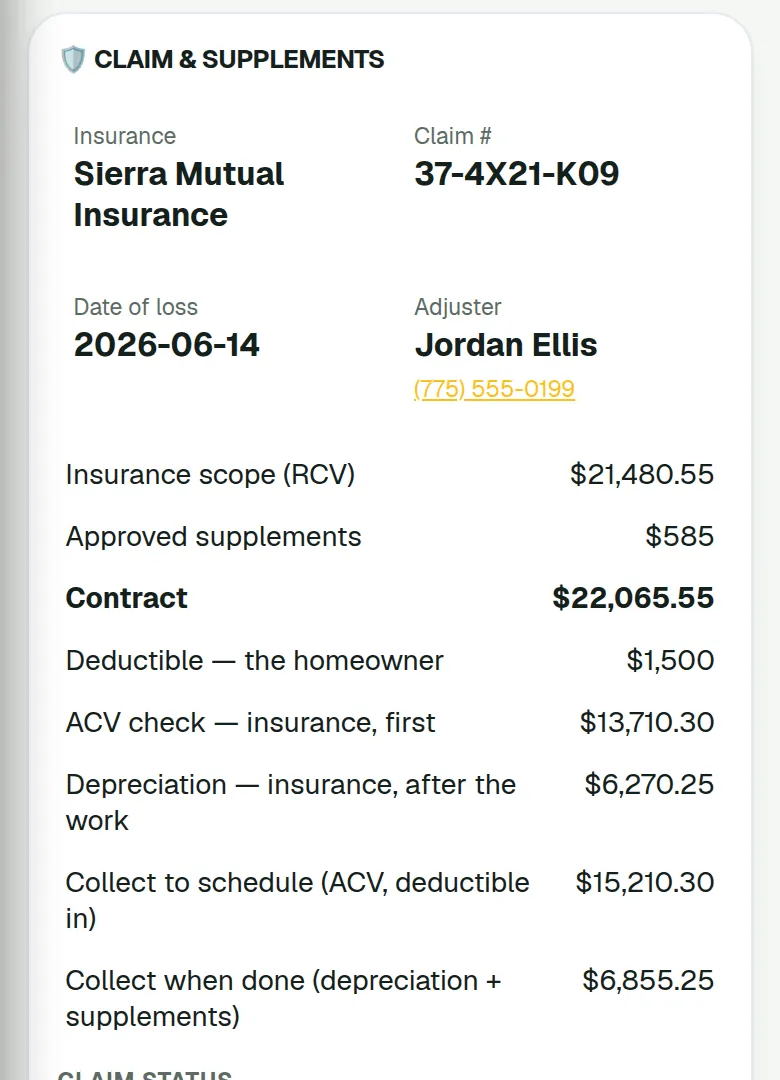
Who pays what on a claim, and when
On an insurance roof the money arrives in parts, and the office needs to know which part comes next. The contract is the scope's replacement cost (RCV) plus any supplements the carrier approves. ACV is that replacement cost less depreciation, and it is the deposit: the insurance company's first check plus the homeowner's deductible. The deductible is the homeowner's share and is never waived. The recoverable depreciation is the rest of the insurance money, released after the work. The claim card adds it up: what to collect before you schedule the build, and what to collect when the roof is done, depreciation plus approved supplements.
- Reads the adjuster's scope PDF to fill in the numbers and roof lines
- An approved supplement goes on the estimate, or becomes a change order once money is in
- It does not create Xactimate or ESX estimates, and it is not a public adjuster
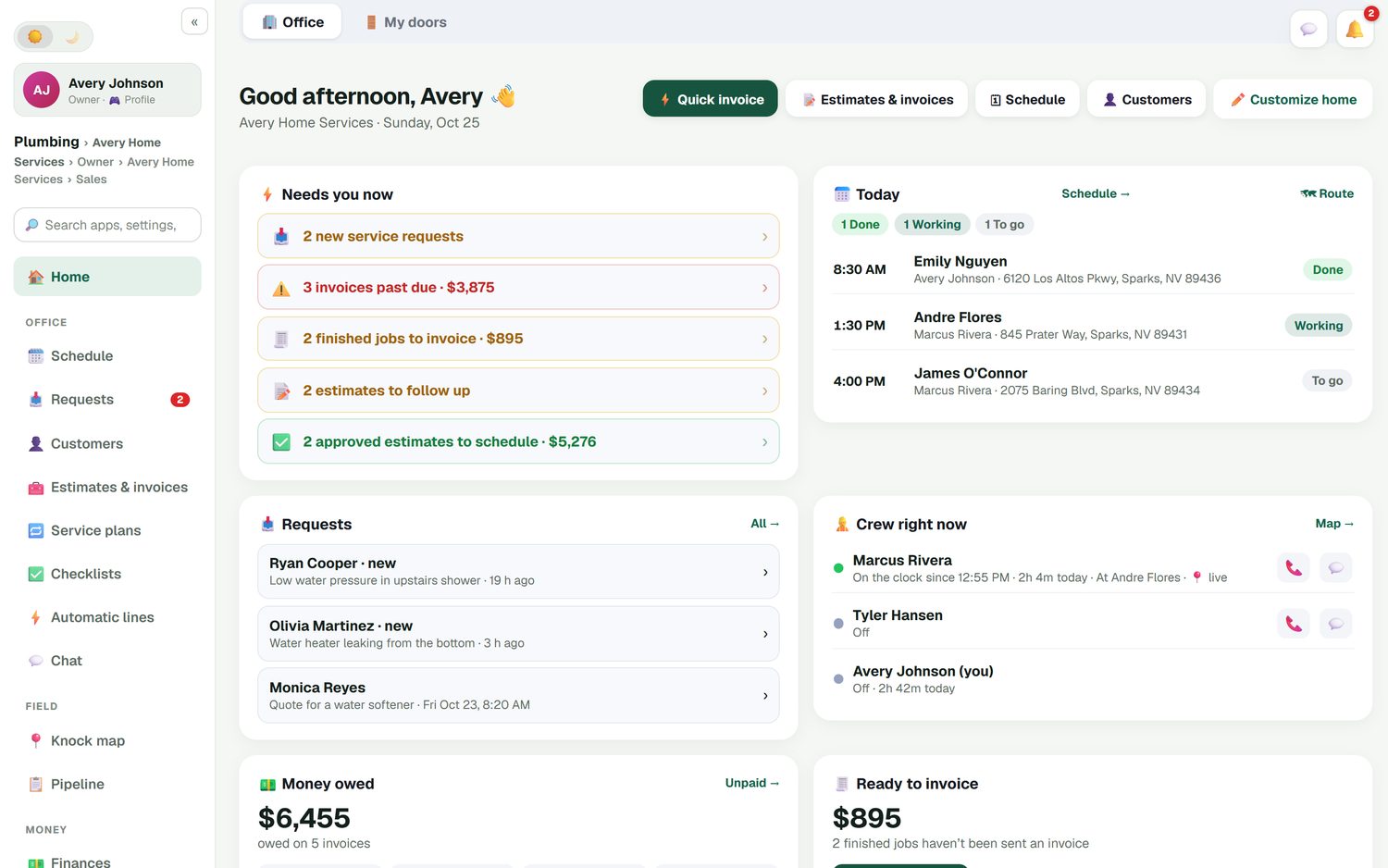
Roofing business software that opens on what needs you
The office home screen answers the morning questions before you ask them. New inspection requests. Estimates waiting on a homeowner. Approved estimates that still need a build date. Finished roofs that have not been invoiced. Money owed and how this week compares with last week. Where the crew is right now, if they have turned on location.
- Today's jobs, with which are done, in progress and still to go
- Estimates waiting, unsent invoices and money owed in one place
- Job profit and this week against last week
- Crew location is opt-in and off by default
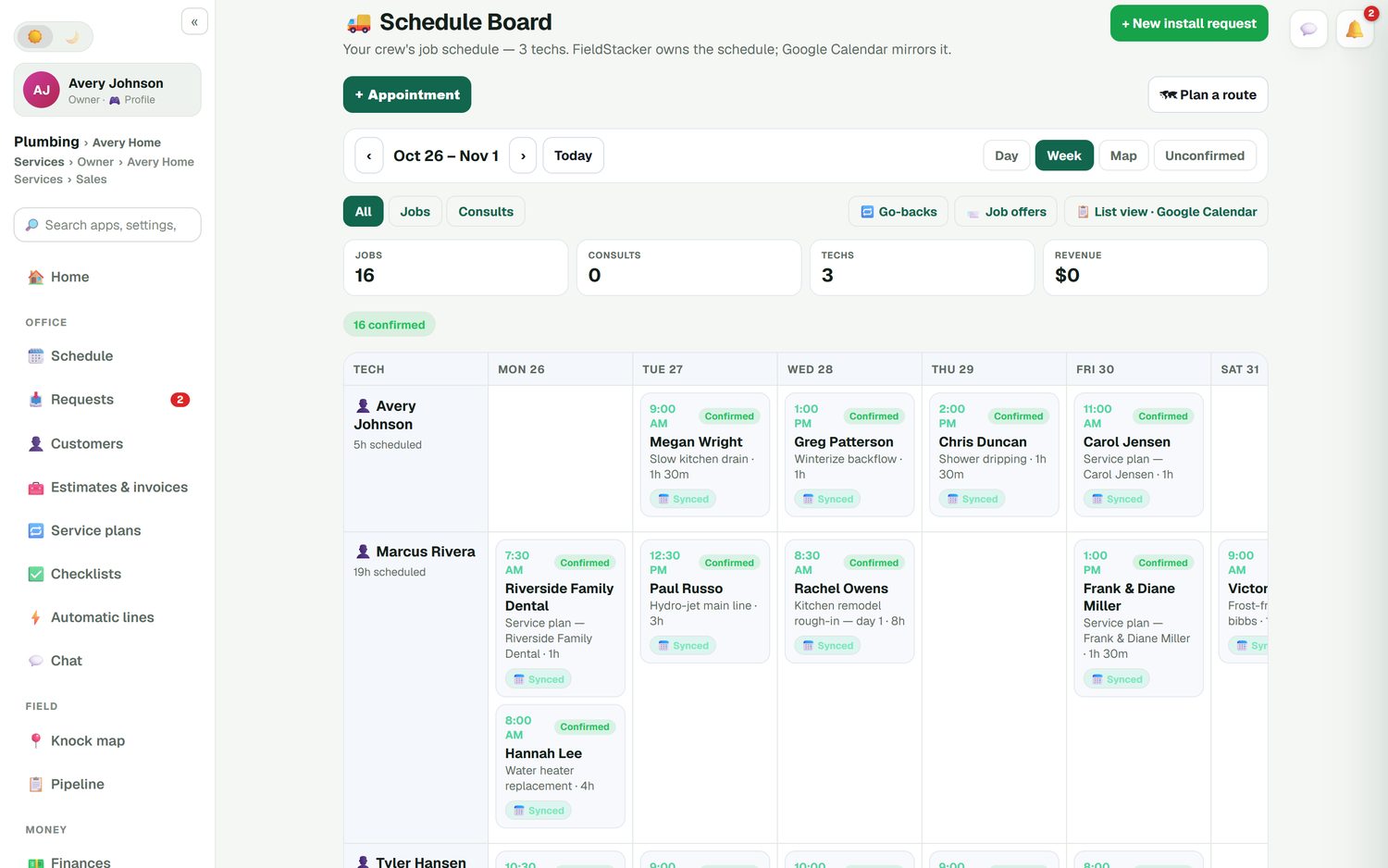
Two-day tear-offs on one board
Every crew lead runs down the side and the days run across the top, with Day, Week and Map views. Rain on Wednesday? Drag the job to Thursday. FieldStacker owns the schedule and Google Calendar mirrors it, so the homeowner's invite moves when you move the job. Mark jobs confirmed once the homeowner knows the date, and book go-backs for the punch list or a warranty leak call.
- Multi-day jobs for tear-off, dry-in and install days
- Checklist templates per kind of job, such as a full replacement or a repair, always optional
- Crews tick steps on their phone and add photos of the decking and the finished roof
- A time clock with timesheets and a payroll email of hours
Deposit, change order, final invoice, profit
Roofing money comes in pieces. The deposit when the homeowner signs, sometimes a change order in the middle, and the balance when the roof is done. FieldStacker keeps each piece on the job. When the crew marks the roof finished, the invoice is ready to send, or you can batch-email up to 100 finished jobs at once. Job costing puts shingles, underlayment, labor and the dumpster against the price, so the job shows what you made.
- Deposits as a percentage or a dollar amount
- Change orders with their own deposit, approved by the homeowner
- Estimated against actual material costs from receipts on the job sheet
- Card payments through your own Stripe account, no FieldStacker fee on top
- Invoices and payments sync to QuickBooks Online and update in place
A roof replacement in FieldStacker, start to finish
The same homeowner record carries through every step.
Inspection
The request comes in from your website or a call. Book it on the board, and use the satellite roof measurement to size the roof before you drive out.
Estimate and signature
Send the roof estimate with Good, Better and Best options from your phone. The homeowner picks one, signs at the table or scans a QR code, and pays the deposit.
Build days
Email the material order to your supplier, schedule the multi-day job, add a change order if the decking is bad, and let the crew work from their checklist and photos.
Paid and reviewed
Send the final invoice, take the card, and an automatic thank-you asks for a review once it is paid.
What this roofing contractor software does not do
FieldStacker handles retail and insurance roofs from the door. A claim, the adjuster's scope, the supplements and the ACV deposit sit on the same estimate as a retail Good/Better/Best quote. It does not create Xactimate estimates or read or write ESX files, it does not track mortgage checks, it has no claim-stage production board, and it does not act as a public adjuster. The satellite roof measurement is an estimate for quoting and planning, not a certified report; when you need exact numbers, import the report you bought. FieldStacker does not sell or order measurement reports. If you run a large insurance production team, JobNimbus and AccuLynx are built around that work, and our best roofing CRM roundup compares them fairly. For the door-knocking side of roofing, see the roofing sales CRM.
Roofing software questions
What is the best roofing software for a small roofing company?
The best roofing software is the one that fits the work you actually do. If you run retail and insurance roofs with a small crew and want inspections, Good/Better/Best estimates with deposits, insurance claims and supplements, crew scheduling and invoices at a published price, FieldStacker fits, from $30/mo with your crew added free. If you run a large insurance production team that needs a claim-stage production board or mortgage-check tracking, a roofing-only system such as AccuLynx or JobNimbus is built around that.
Does FieldStacker handle multi-day roofing jobs?
Yes. A job can run over several days, so a tear-off and dry-in on day one and shingles on day two sit on the schedule board as one job. Drag either day to another date or another crew lead, and the homeowner's calendar invite moves with it.
Can I collect a deposit before I order materials?
Yes. Put a deposit on the estimate as a percentage or a dollar amount. The homeowner signs and pays it by card through your own Stripe account, or you record a check. FieldStacker adds no fee on top of standard Stripe rates. When you are ready to order, the job sheet turns the roof measurement into a material order you can email to your supplier.
How do change orders work when we find rotten decking?
Add a change order to the job with the extra lines, for example sheets of decking replaced, and its own deposit if you want one. The homeowner approves it, and it becomes part of the job, so the final invoice already includes it and nobody argues about it later.
Does this roofing business software work with QuickBooks?
Yes, with QuickBooks Online. Sent invoices and payments go to QuickBooks Online automatically and update in place, and a payment you record in QuickBooks marks the invoice paid in FieldStacker. Expenses, job parts and mileage can sync too. QuickBooks Desktop is not supported.
Does FieldStacker do insurance claims or Xactimate estimates?
It does insurance claims, but it does not create Xactimate estimates or read or write ESX files. Mark a roof quote as an insurance claim with the carrier, claim number, adjuster, date of loss and cause. FieldStacker can read the adjuster's scope PDF to fill in the claim numbers and roof lines, prices the estimate at the scope's replacement cost (RCV) plus approved supplements, asks for the ACV as the deposit and suggests items the scope seems to miss. It never waives the deductible. It does not track mortgage checks, so a large insurance production team may still prefer a roofing-only system, as our best roofing CRM page explains.
How much does roofing contractor software cost?
FieldStacker Pro is $30/mo, or $25/mo billed yearly, for one owner. Team is $60/mo for you plus two office or sales seats, and roofers you add as technicians are free on every plan. There is a 14-day free trial with no credit card and no contract.
Related: roofing CRM · roof estimating software · roof measuring software · QuickBooks Online sync · online booking · pricing
Put your next roof on the board this week
14-day free trial, no credit card. Add your crew free and send your first estimate today.