The roofing CRM that follows every lead to paid
Inspection requests, phone leads and storm-area doors in one list. Each one shows where it stands, the estimate follows up on its own, and the record carries through to the signed job and the paid invoice.
14-day free trial · no credit card · from $30/mo · your crew is free
Roofing leads rarely die because the homeowner said no. They die in the gap. The inspection happened, the estimate went out, and nobody called back. A homeowner said "try me after the holidays," and the note lived on a sticky in somebody's truck. A storm brought forty calls in a week, and half of them never got a second touch.
A CRM for roofing contractors fixes the gap by giving every lead a status and a next step. In FieldStacker that next step is either on the calendar, waiting in a follow-up email, or showing on your home screen under "needs you now." Nothing depends on someone remembering.
Roofing CRM software, lead by lead
What happens to a roofing lead in FieldStacker from the moment it arrives.
One inbox for requests
Put your request page on your website, Google profile, digital card and emails. "Leak in the back bedroom" lands in Requests with the address, phone and best time.
A status on every lead
New, Contacted, Won or Not a fit. Call, text or email from the request, then turn it into an estimate with one tap.
Inspections booked online
Homeowners pick a real open time on your website or card page. Next-available booking puts the inspection with whoever is free.
Estimates that follow up
Estimate follow-ups go out by email on their own, plus an optional text with the texting add-on. Switch them off or edit the words any time.
Go-backs and reminders
Set a date and time to return on any house, and FieldStacker reminds you. The "call me next month" lead gets its call.
Paid, then reviewed
After the final invoice is paid, a thank-you asks for a review. Unpaid invoices get reminders until they are settled.
Put every roofing lead in one pipeline, free for 14 days
Send us your list from JobNimbus, AccuLynx or a spreadsheet. We import your customers for free.
- No credit card to start
- From $30/mo after the trial
- Your techs and cleaners are free
- Cancel any time from the app
New for roofers: from lead to claim to commission
Live now on roofing accounts. The lead you logged at the door carries all of this with it.
Good, Better, Best quotes
Turn the lead into three roof options priced per square, with adders for steep pitch, extra layers, stories, low slope and decking, or priced to a target margin. The homeowner approves one and pays the deposit.
The claim on the lead record
Mark the quote as an insurance claim with the carrier, claim number, adjuster, date of loss and cause. FieldStacker can read the adjuster's scope PDF to fill in the numbers, and the deposit asked is the ACV.
Supplements tracked
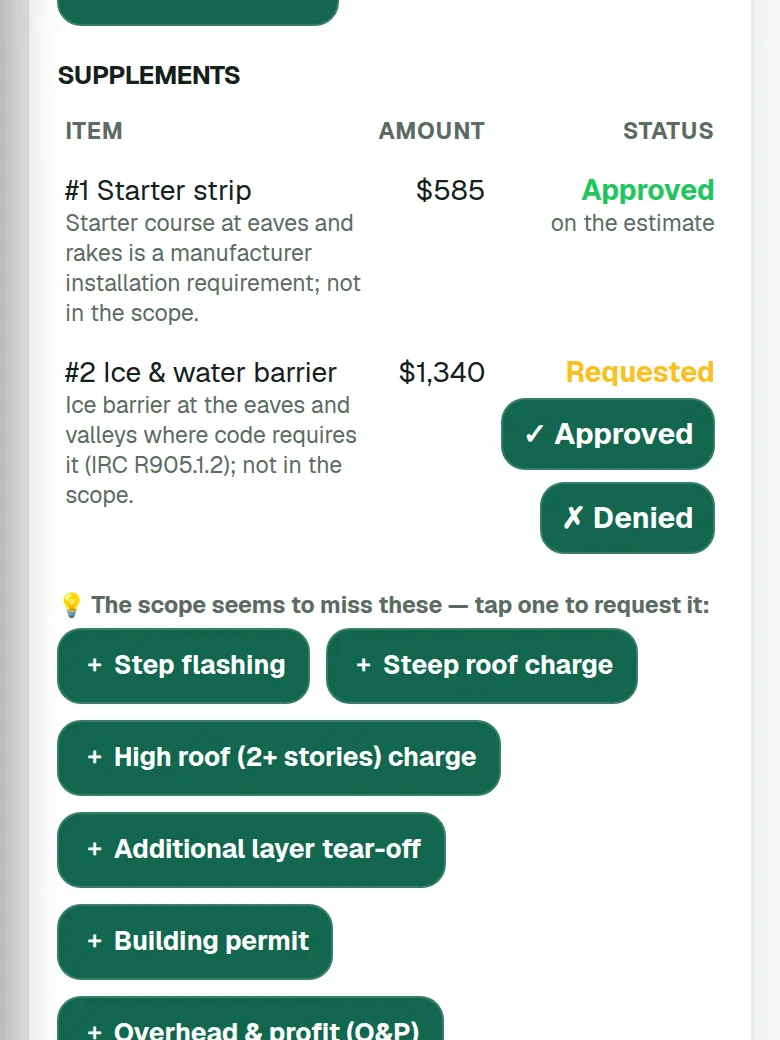
It suggests items the scope seems to miss and gives you a supplement request to copy or email to the adjuster. Each one is tracked from requested to approved or denied. The deductible is never waived.
Measurement reports imported
Already bought an EagleView, Roofr, Hover or GAF QuickMeasure report? Import it as PDF, CSV, JSON or XML. Or trace the edges on the map, or start from the satellite Measure roof estimate.
Material order from the roof
The bill of materials works out every line from the measured edges and squares. Email the order to your supplier from your business email, or print or copy it, and track estimated against actual costs from receipts.
Rep commissions
You set the pay plan, with per-rep rates that can end on a date. Commissions move from Pending to Earned to Paid, a cancelled or refunded job claws it back, and the list exports to CSV and flows into the Payroll tracker.
Insurance roofs, in plain words
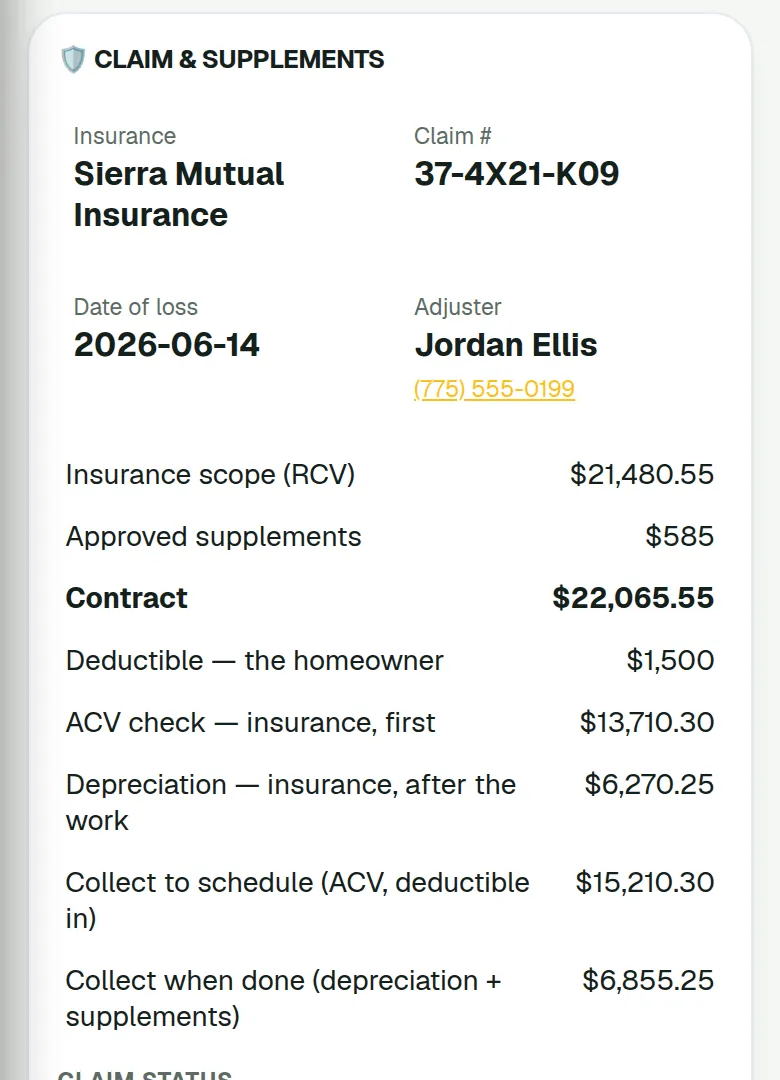
When the homeowner files, the lead does not move to another system. Mark the roof quote as a claim with the carrier, claim number, adjuster, date of loss and cause, or let FieldStacker read them from the adjuster's scope PDF. Then the numbers on the claim card mean this:
- RCV (replacement cost value) is the scope's price for the roof. Your contract is the RCV plus approved supplements.
- ACV (actual cash value) is the RCV less depreciation. It is the deposit: the first insurance check plus the deductible.
- The deductible is the homeowner's share. FieldStacker never waives it.
- Recoverable depreciation is the rest of the insurance money, paid after the work.
- Supplements are items the scope missed. FieldStacker suggests likely ones, you copy or email the request to the adjuster, and each one is tracked like a lead: requested, then approved or denied.
It does not create Xactimate or ESX estimates, and it is not a public adjuster.
The same record ends at the rep's commission
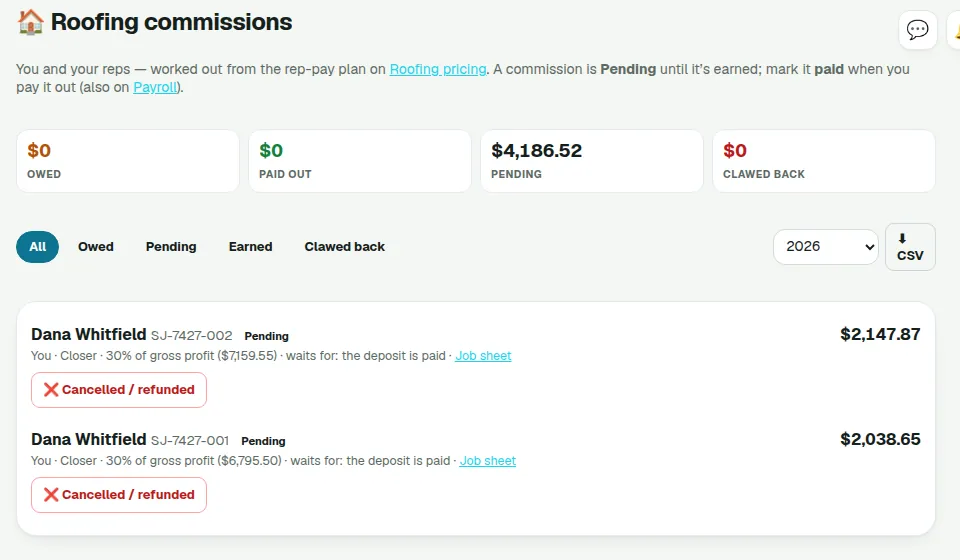
The door a rep knocked, or the request your office booked, carries through to what that rep earns on it. The owner sets the pay plan once. Each commission shows who it is for, how it was worked out and what it is waiting for, such as the deposit being paid. Mark a job cancelled or refunded and the commission is clawed back. Filter by owed, pending, earned or clawed back, pick the year, and export to CSV.
- Pending, then Earned, then Paid when you mark it paid out
- Flows into the Payroll tracker; FieldStacker tracks it, it does not pay anyone
- Pay plans and splits are covered on the roofing sales CRM page
From inspection request to estimate
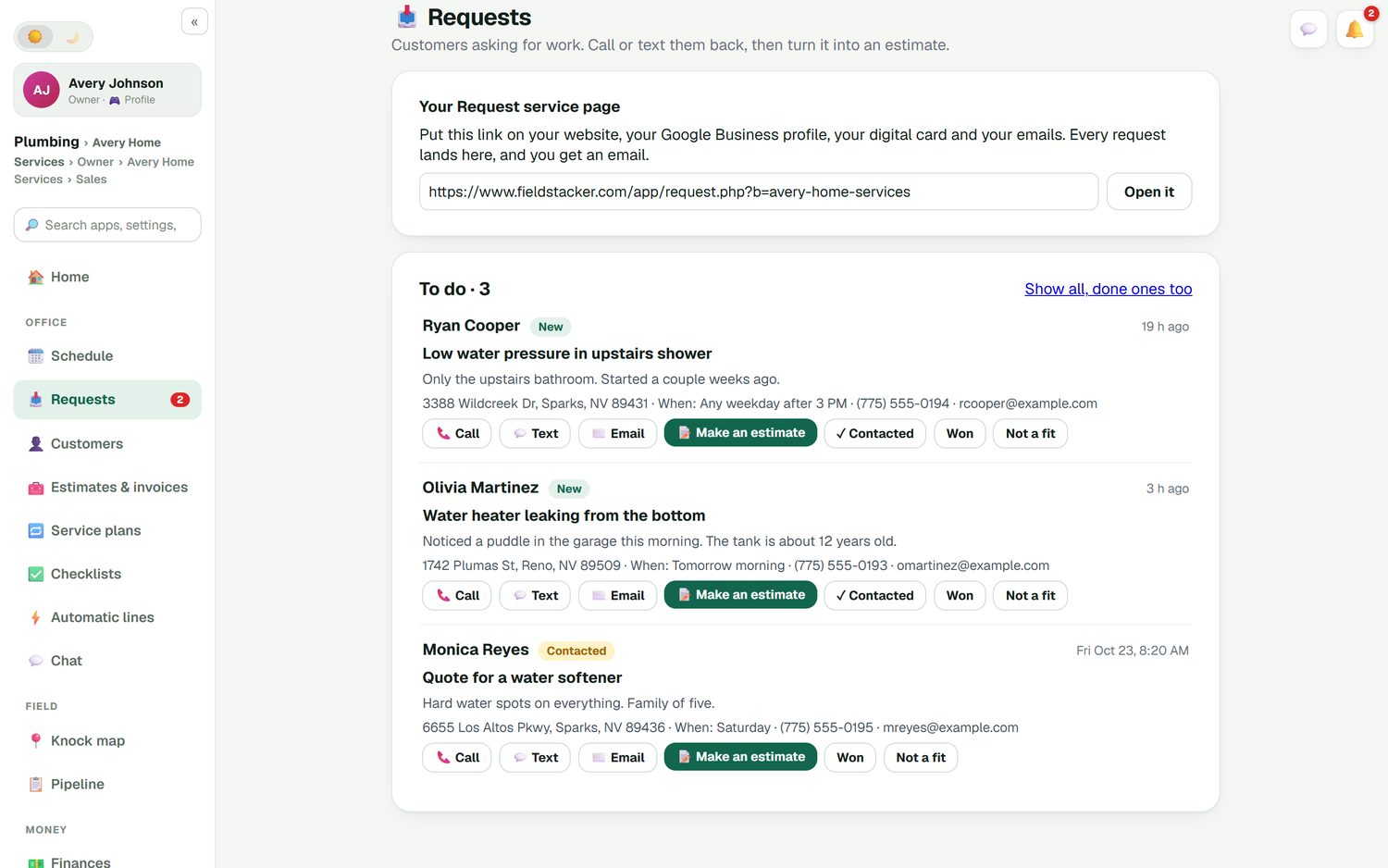
Every request shows who asked, what they wrote, the address and when they want you there. Call or text them back from the card, mark it Contacted, and when you have seen the roof, tap Make an estimate to start the quote from that request. Requests you lost stay on file as Not a fit, so you can see how many leads you are actually closing.
- One request link for your website, card, emails and Google profile
- An email to you for every new request
- Statuses: New, Contacted, Won, Not a fit
- One tap from request to estimate
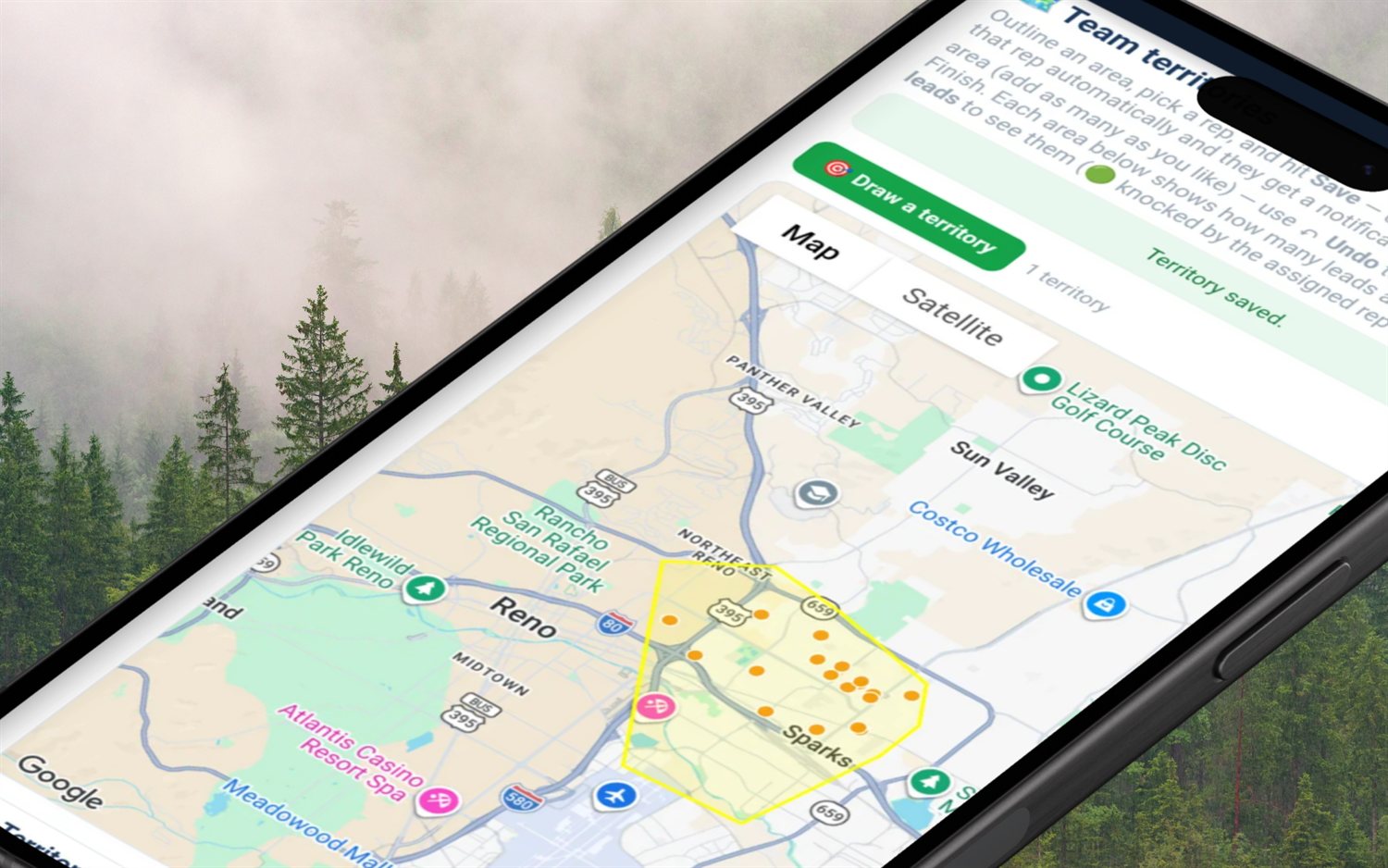
After the storm, work the whole area
When a storm rolls through, the calls come in from a few streets, but the damage covers the whole neighborhood. Draw that area on the map as a territory and every lead inside it goes to the rep you pick. One owner reveal shows up to 500 homeowners in the area, with name, mailing address, whether they live there or it is likely a rental, and estimated age. Up to 25,000 a month are included.
- Draw the area and assign the leads inside it to a rep
- Go-backs for every "come back after the adjuster visits"
- Mark the quote as an insurance claim when the homeowner files
- Automatic neighbor postcards, paid per card
- Email campaigns to past customers when storm season starts
Follow-ups that do not depend on memory
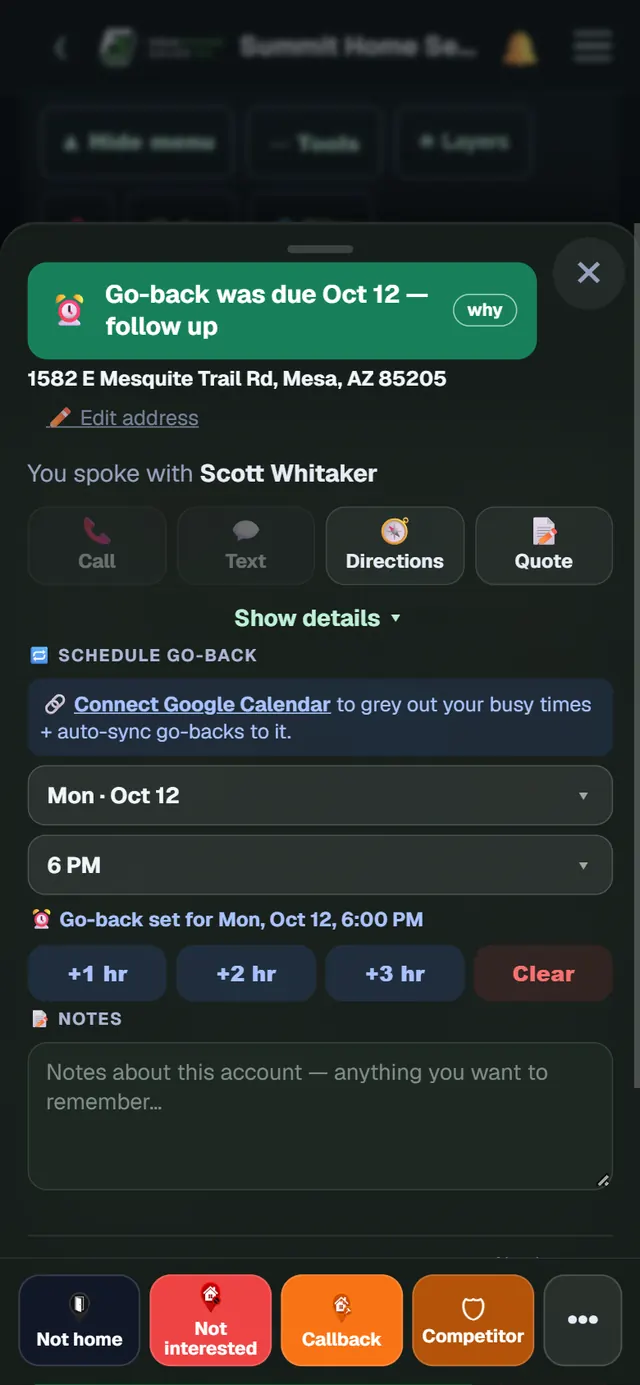
Open any house on the map and the card tells you what happened last: who you spoke with, the notes, and whether a go-back is due. Pick a day and time to come back and it goes on the calendar. In the office, estimate follow-ups and unpaid-invoice reminders run on their own, and each one can be switched off or reworded to sound like you.
- Go-back date and time on every house, with a reminder
- Notes and voice notes saved on the pin
- Automatic estimate follow-ups and unpaid-invoice reminders
- A two-way texting inbox with the texting add-on, $15/mo for 600 texts
The roofing pipeline, inspection to paid
Five stages, one record, no second app.
Lead
A request, a booking, a phone call or a door your rep knocked. It gets a status the moment it arrives.
Estimate
Good, Better and Best options from your price list, or priced from the adjuster's scope on a claim. Signed on a phone, deposit taken. See roof estimating.
Paid
The job is built, the invoice is paid, and the review request goes out. Then the house is a past customer you can mail next season.
How FieldStacker compares with roofing-only CRMs
JobNimbus and AccuLynx are built only for roofing and exterior contractors, and they show it. JobNimbus is built around job boards and automations, and every plan includes estimates, e-sign, invoices, financing options and supplier integrations. AccuLynx's Elite plan tracks supplements, permits and mortgage checks for insurance work. Neither publishes a price; both ask you to request one (checked October 26, 2026). FieldStacker publishes its price, handles retail and insurance roofs from the door, with claims and supplements on the estimate, and adds a door-knocking map and marketing for small roofers. It does not track mortgage checks, run a claim-stage production board or create Xactimate estimates, so a large insurance production team may still be better served by AccuLynx or JobNimbus. If you sell door to door, the roofing sales CRM page covers that side. For the jobs themselves, see roofing software.
Roofing CRM questions
What should a CRM for roofing contractors do?
It should catch every lead in one place, show where each one stands, and follow up for you. For a roofer that means inspection requests from your website and phone, estimates that chase themselves, a reminder when a homeowner says "call me after the storm season," and a clear line from signed estimate to paid invoice. FieldStacker does each of those in one app.
Is there a free roofing CRM?
Some exist with limits. Roofr has a free Starter plan with one job board and 10 trial proposals, invoices and work orders. FieldStacker has a 14-day free trial with no card, then Pro is $30/mo; our free Digital Business Card plan is a card with review capture, not a CRM. Our free CRM for contractors page lists more options.
What is the best roofing CRM for a small company?
For a small roofer, look for a published price, no seat minimum and estimates, scheduling and invoicing in the same place as the leads. FieldStacker fits that, from $30/mo, for retail and insurance roofs. If you run a large insurance production team that needs a claim-stage production board or mortgage-check tracking, JobNimbus or AccuLynx may suit you better; see our best roofing CRM roundup for a fair comparison.
Can I follow up with homeowners after a storm?
Yes. Draw the affected neighborhood on the map as a territory and assign the leads inside it to a rep. One owner reveal shows up to 500 homeowners in a drawn area with names and mailing addresses, and go-backs remind you when to return. You can also send automatic neighbor postcards, paid per card. When a homeowner files a claim, mark their roof quote as an insurance claim and it stays on the same record.
Can a roofing CRM track insurance claims and supplements?
FieldStacker can. Mark a roof quote as an insurance claim with the carrier, claim number, adjuster, date of loss and cause, and it can read the adjuster's scope PDF to fill in the numbers. It suggests items the scope seems to miss, gives you a supplement request to copy or email to the adjuster, and tracks each supplement from requested to approved or denied. It does not create Xactimate or ESX estimates or track mortgage checks, and it never waives the deductible.
Can my office and my sales reps share the same roofing CRM software?
Yes. Team is $60/mo for you plus two seats, and extra seats are $20 a person. Reps get the knock map and territories; the office sees requests, estimates, the schedule and invoices. Roofers you add as technicians are free.
Can I move my customers over from JobNimbus, AccuLynx or a spreadsheet?
Yes. Export your customers from your old app and import the CSV or Excel file, up to 250 MB, with an undo if something maps wrong. We import your customers and jobs for free. There is also a dedicated Jobber import that brings over clients and balances.
Related: best roofing CRM · free CRM for contractors · JobNimbus alternative · AccuLynx alternative · pricing
Stop losing roofing leads in the gap
14-day free trial, no credit card. Put your open estimates and inspection requests in one list today.