Pest control scheduling software that fills the week for you
Your quarterly and monthly customers are already on the board. Fit the new initials and the re-services around them, route each tech's day, and let customers know when you're coming.
14-day free trial · no credit card · from $30/mo · your techs are free
A pest schedule has three kinds of work in it. The recurring visits are most of the week and should never need to be typed twice. The new initial services come in from calls, your website and door hangers, and they are worth the most. The re-services are free to the customer and need to happen fast. Good scheduling keeps those three apart, so you can see at a glance how much of tomorrow is paid work and how much is a callback.
Pest control management software for the schedule
What the office uses every morning.
Every tech, every day
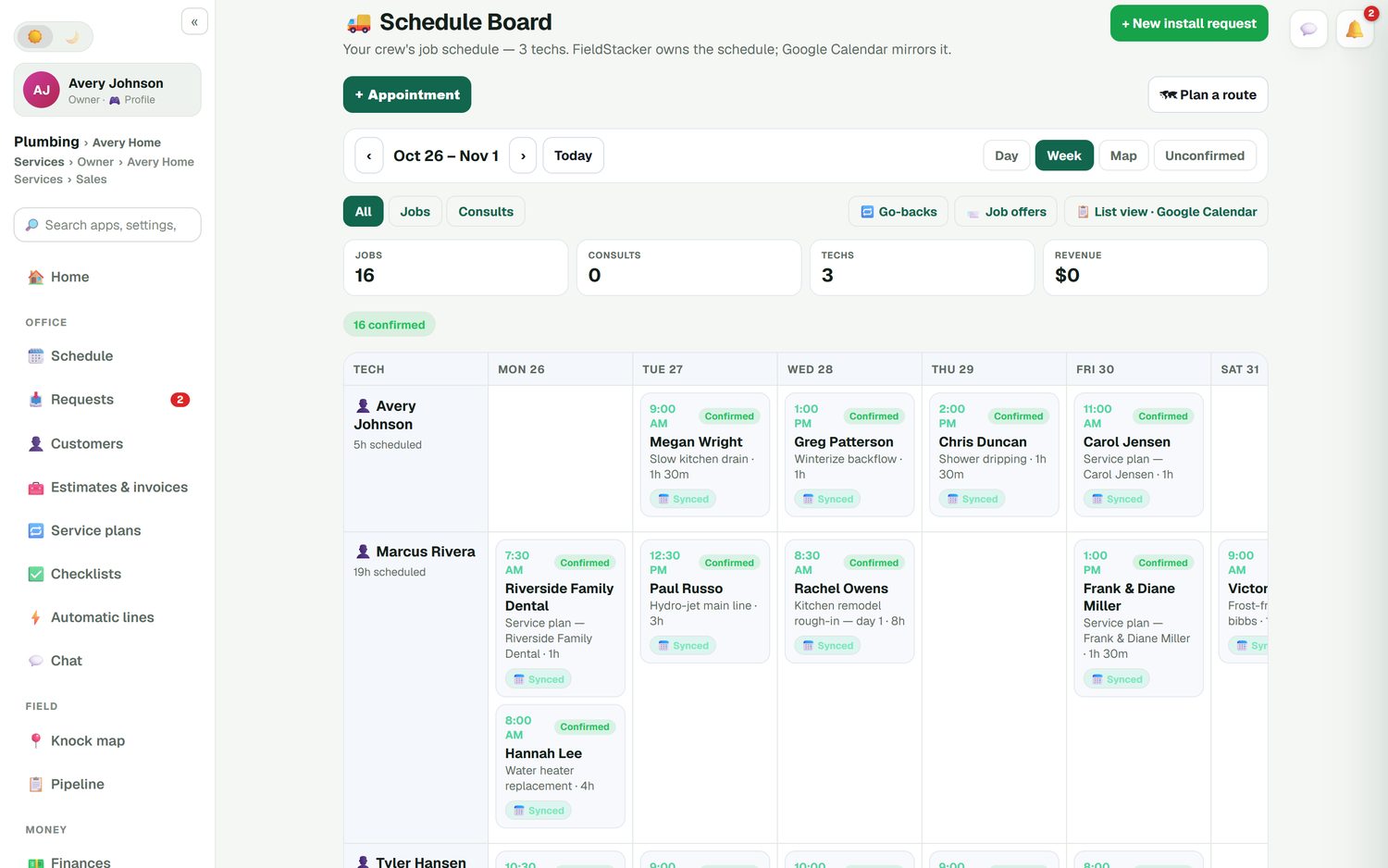
Techs down the side, days across the top, in Day, Week or Map view. Drag a visit to another day or tech and the customer's calendar invite moves with it.
Recurring visits, ahead of time
Service plans place each quarterly or monthly visit on the board as its own job, at the day and time you set for that customer.
Re-services kept apart
Book a callback as a go-back so it never counts as new revenue, and the tech can read what was done on the last visit.
Confirmed or not
Each job shows confirmed or unconfirmed, so the office knows which customers still need a call before the truck rolls.
Online booking
New customers book an initial service in your real open times, on your website or digital card. Send it to the next available tech.
On my way, with an ETA
With the texting add-on, one tap texts the customer an ETA from the tech's GPS and a live tracking link.
Put next quarter's pest visits on the board free for 14 days
We import your customers and their service history from your old app for free.
- No credit card to start
- From $30/mo after the trial
- Your techs and cleaners are free
- Cancel any time from the app
A Monday in the pest office
How the week comes together in FieldStacker.
The recurring week is already there
Service plans have placed this week's quarterly and monthly visits on each tech's row. Check the unconfirmed ones first.
Book the new initials
Weekend requests and online bookings are waiting in the Requests inbox. Turn each one into an estimate or a booked job.
Squeeze in re-services
Add callbacks as go-backs on the tech who already works that area that day, so the extra stop costs minutes, not an hour.
Route each day
Run a day route for each tech. Stops go in driving order, arrival times update and customers are told.
Move a visit in one drag
A customer can't be home Thursday. Drag their quarterly to Friday on the same tech, or to another tech who is working that street. FieldStacker owns the schedule and Google Calendar mirrors it, so the customer's invite moves when you move the job and your techs' calendars stay right. Filter to jobs only, see go-backs in their own list, and send a job offer to your techs when someone calls in sick.
- Day, Week and Map views
- Confirmed and unconfirmed at a glance
- Go-backs and job offers in their own lists
- Synced to Google Calendar
New initials land in one inbox
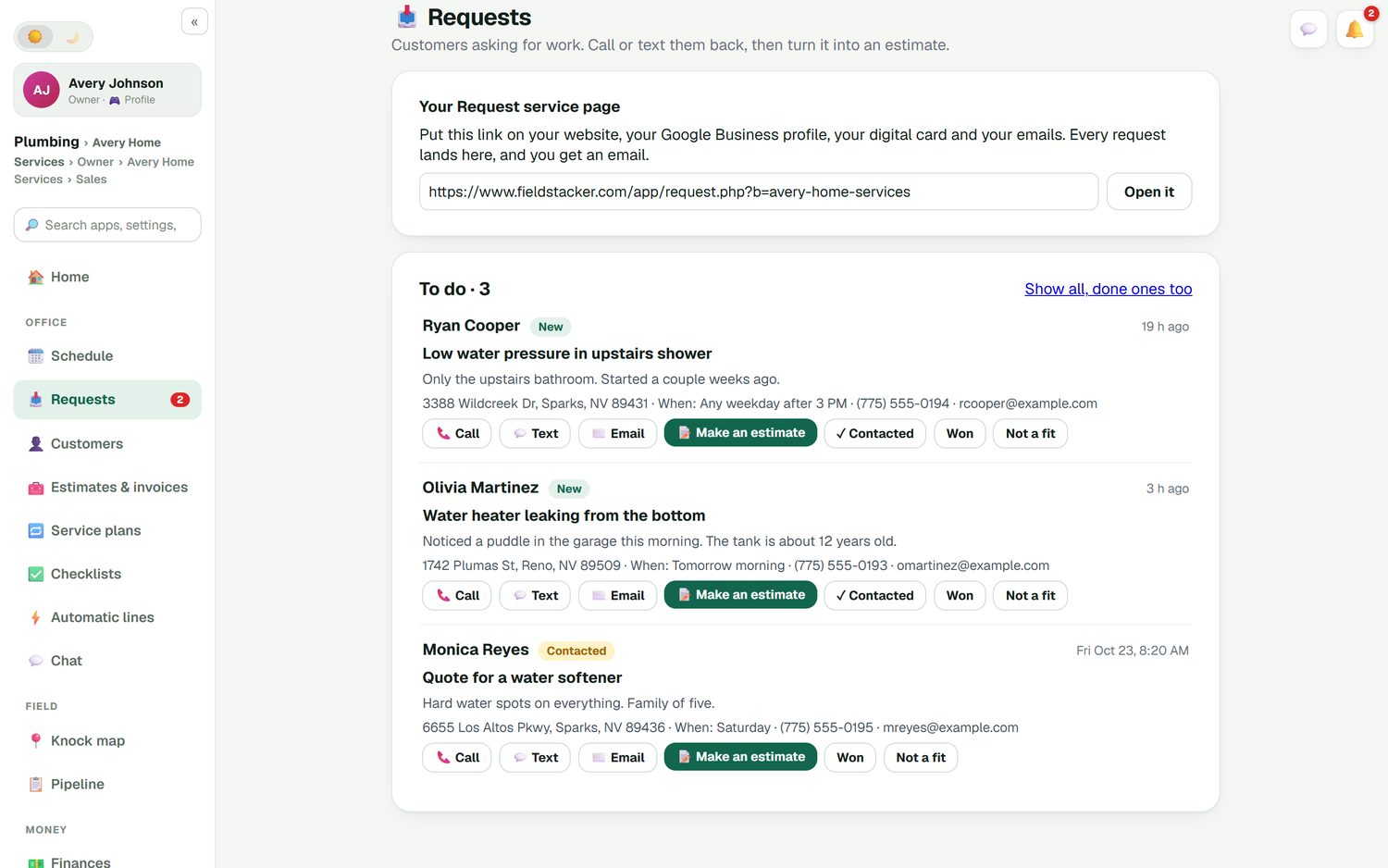
Put your request page link on your website, your Google Business profile and your digital card. Every "I have mice in the garage" request lands in the Requests inbox with the address, the best time to come and how to reach them. Call or text back, then make an estimate with the initial and recurring price, or book the visit straight away. Mark it won or not a fit so the inbox stays clean.
- A request page for your website and card
- Call, text, email or estimate from each request
- Online booking in your real open times
See today before you call anyone
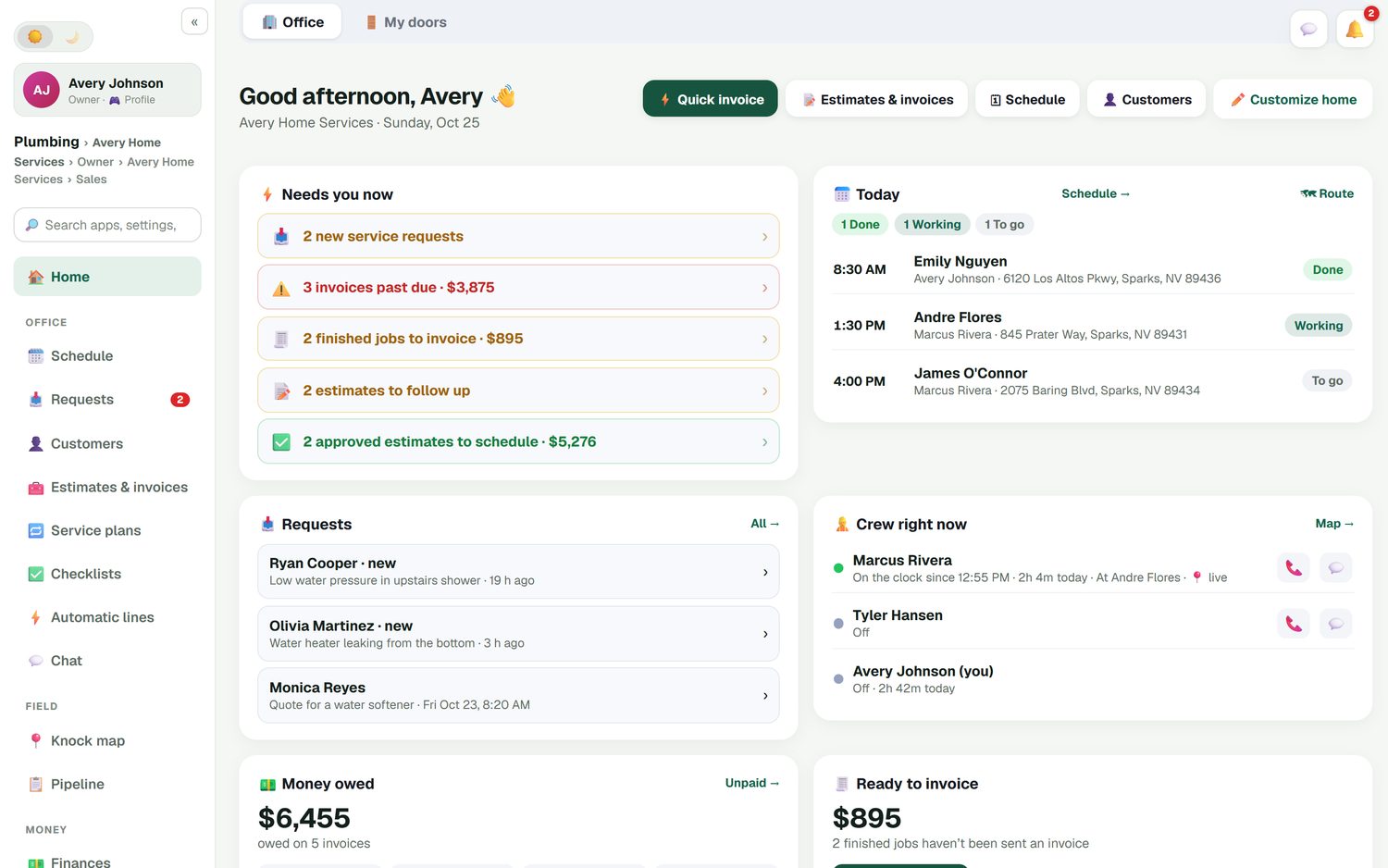
The office home screen shows what needs you now: new requests, invoices past due, finished visits not yet invoiced and estimates to follow up. Next to it is today's schedule with each visit done, working or to go, and where the crew is right now if they have turned on location, which is off by default. Techs clock in and out, and you get timesheets and an email of hours for payroll.
- Today's visits with status
- Opt-in crew location
- Time clock and timesheets
How it compares
Pest-only platforms such as FieldRoutes and PestPac are built for larger pest and lawn operations and quote their prices on request. GorillaDesk leads with pest control and publishes route-based pricing from $49/mo, with office and crew users free (checked October 26, 2026). FieldStacker is a simpler, flat-priced option that covers scheduling, plans, routes and payments. See the full comparison in best pest control software.
Pest scheduling questions
What is the best pest control scheduling software for a small business?
For a small pest company, the best scheduler is one that keeps recurring visits on the calendar without retyping them, lets you move a visit by dragging it, and routes each tech's day. FieldStacker does those from $30/mo with techs free. Larger companies with many branches often look at FieldRoutes or PestPac, which quote their pricing on request.
Can quarterly visits schedule themselves?
Yes. A service plan puts each upcoming visit on the schedule ahead of time as its own job, on the day and time you set for that customer. You can still drag any single visit to another day or tech when you need to.
Is pest control management software different from a calendar app?
A calendar holds times. Pest control management software also holds the customer, the plan, the price per visit, the checklist, the photos and the payment, so a visit marked done becomes a charged invoice. In FieldStacker, Google Calendar mirrors the schedule, so you can keep looking at your calendar if you like.
Can new customers book an initial service online?
Yes. Online booking shows your real open times on your website, your digital card page or embedded in a site you already have. You can send the booking to the next available tech, and it lands on the schedule board for you to confirm.
What is pest control software for small business supposed to cost?
Prices vary a lot. FieldStacker is $30/mo for one owner, $60/mo for you plus 2 seats, and techs you add as technicians are free. Some pest-specific platforms only quote pricing after a call, so ask for the total with setup before you compare.
Do my techs get their own schedule on their phone?
Yes. Each tech sees their own day in order, opens the job for notes, the checklist and photos, and marks it done. You can also offer an open job to techs and let one take it.
Related: pest control software · technician scheduling · online booking · pest door-to-door CRM · lawn care scheduling · pricing
Stop retyping the quarterly schedule
14-day free trial, no credit card. Your techs are free, and we import your customers for you.