Field service software from the first call to the paid invoice
Take the request, send the estimate, put the job on a tech's day, finish it on a phone and get paid the same afternoon. One app for the office and the truck, at a price you can read before you sign up.
14-day free trial · no credit card · from $30/mo · your techs are free
Most service businesses do not lose money on the work. They lose it in the gaps between steps. A request sits in a voicemail until the customer calls someone else. An estimate goes out and nobody follows up. A job gets finished on Friday and the invoice goes out the following Wednesday, or never. The test of any FSM software is simple: does it show you, every morning, which gap has something stuck in it?
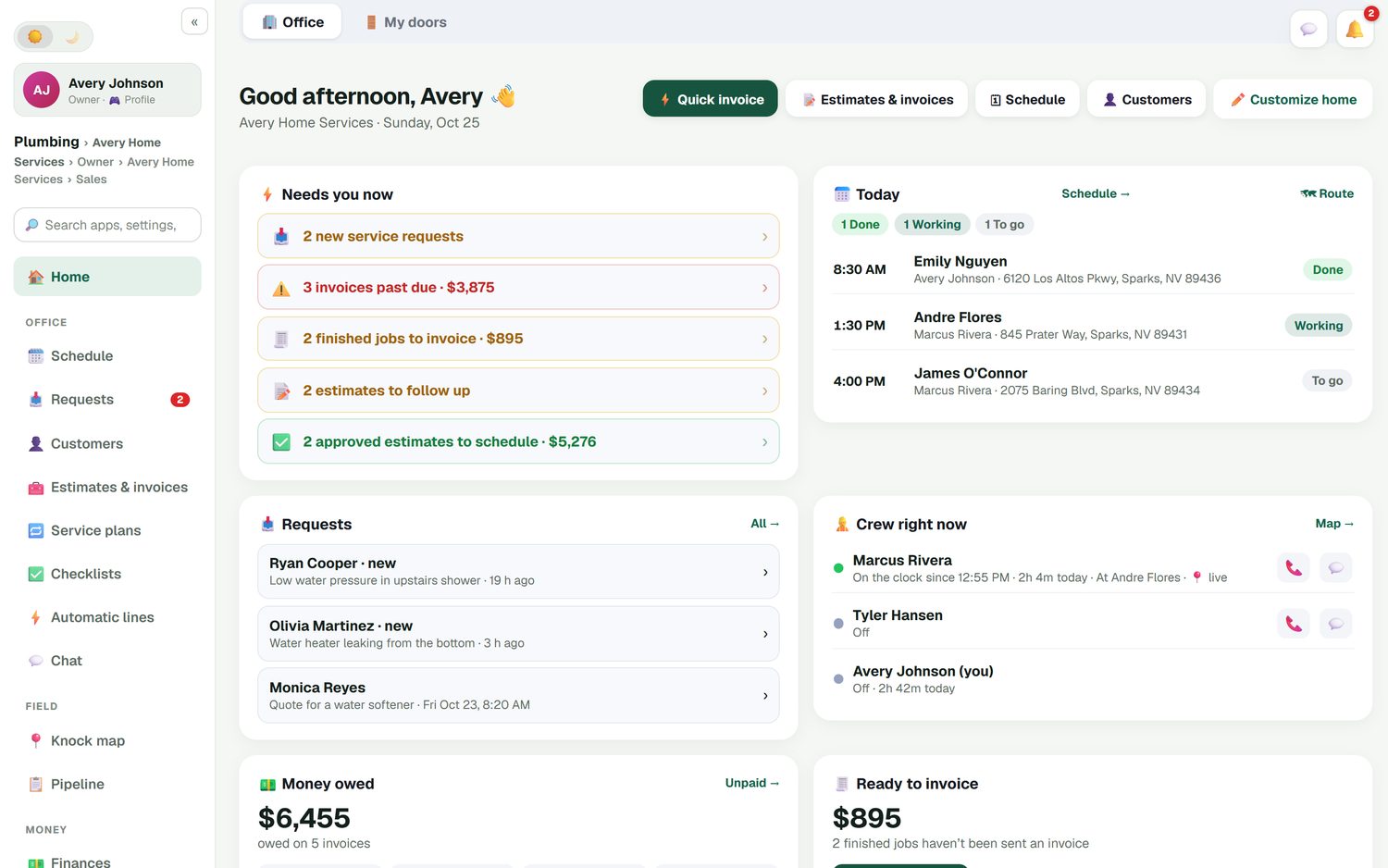
FieldStacker opens on an office home screen that does exactly that. It lists new service requests, invoices past due, finished jobs not yet invoiced, estimates waiting on a follow-up and approved estimates that still need a date, each with the dollars attached. Tap one and you are in the job.
What field service management software covers
Six steps every service job goes through, and what FieldStacker does at each one.
1. The request
A request page for your website and digital card, plus online booking that shows customers your real open times. Every request lands in one Requests inbox, ready to call back, quote or book.
2. The estimate
Build it from your own price list on your phone, add optional extras the customer can tick, take a deposit, and let them sign at the door or by scanning a QR code. Unanswered estimates get an automatic follow-up.
3. The schedule
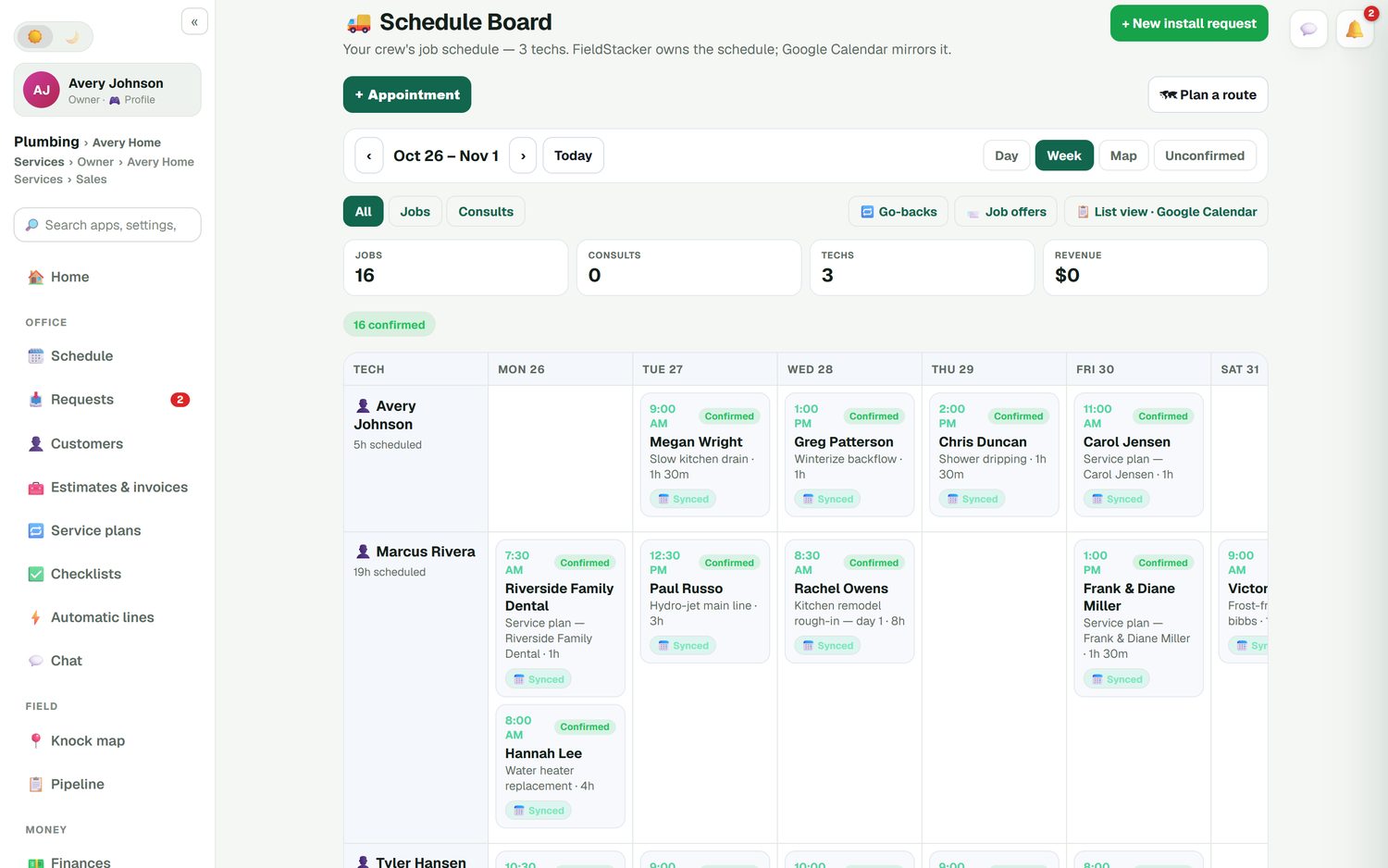
Every tech down the side, days across the top, with Day, Week and Map views. Drag a job to another day or another tech and the customer's Google Calendar invite moves with it.
4. The work
Techs see their day in driving order, open the job's notes, tick an optional checklist, add photos and log the parts they used from the stock they carry.
5. The money
Turn the job into an invoice in one tap, take a card through your own Stripe account, or record cash, check, Venmo or Zelle. Unpaid invoices get reminders and paid ones trigger a review request.
6. The repeat visit
Put maintenance customers on a service plan, weekly through yearly, with the card on file charged for each visit. Their own portal shows visits, receipts and billing history.
Run your next week of jobs in FieldStacker free for 14 days
Bring your customers and jobs over from your old app. We import them for free.
- No credit card to start
- From $30/mo after the trial
- Your techs and cleaners are free
- Cancel any time from the app
One screen that shows what needs you now
The office home screen is built around the question an owner asks at 7 a.m.: what is stuck, and what is it worth? You see today's jobs, where your crew is, money owed, estimates waiting and unsent invoices, plus this week against last week and job profit.
- New requests and unsent invoices flagged with dollar amounts
- Today's jobs marked done, working or to go
- Who is on the clock and where, when they share location
- Job profit from the parts, labor and expenses on each job
A schedule board your techs and your customers can trust
FieldStacker owns the schedule and Google Calendar mirrors it, so there is one version of the truth. Mark jobs confirmed or unconfirmed, keep go-backs in their own list, and offer an open job to your techs. Day routes put each tech's stops in the best driving order and update arrival times. For more on assigning and moving work, see our dispatch software page.
- Multi-day jobs that hold the same tech across several days
- Next-available-tech booking from your website
- A crew map next to the board
Mobile field service software for the driveway
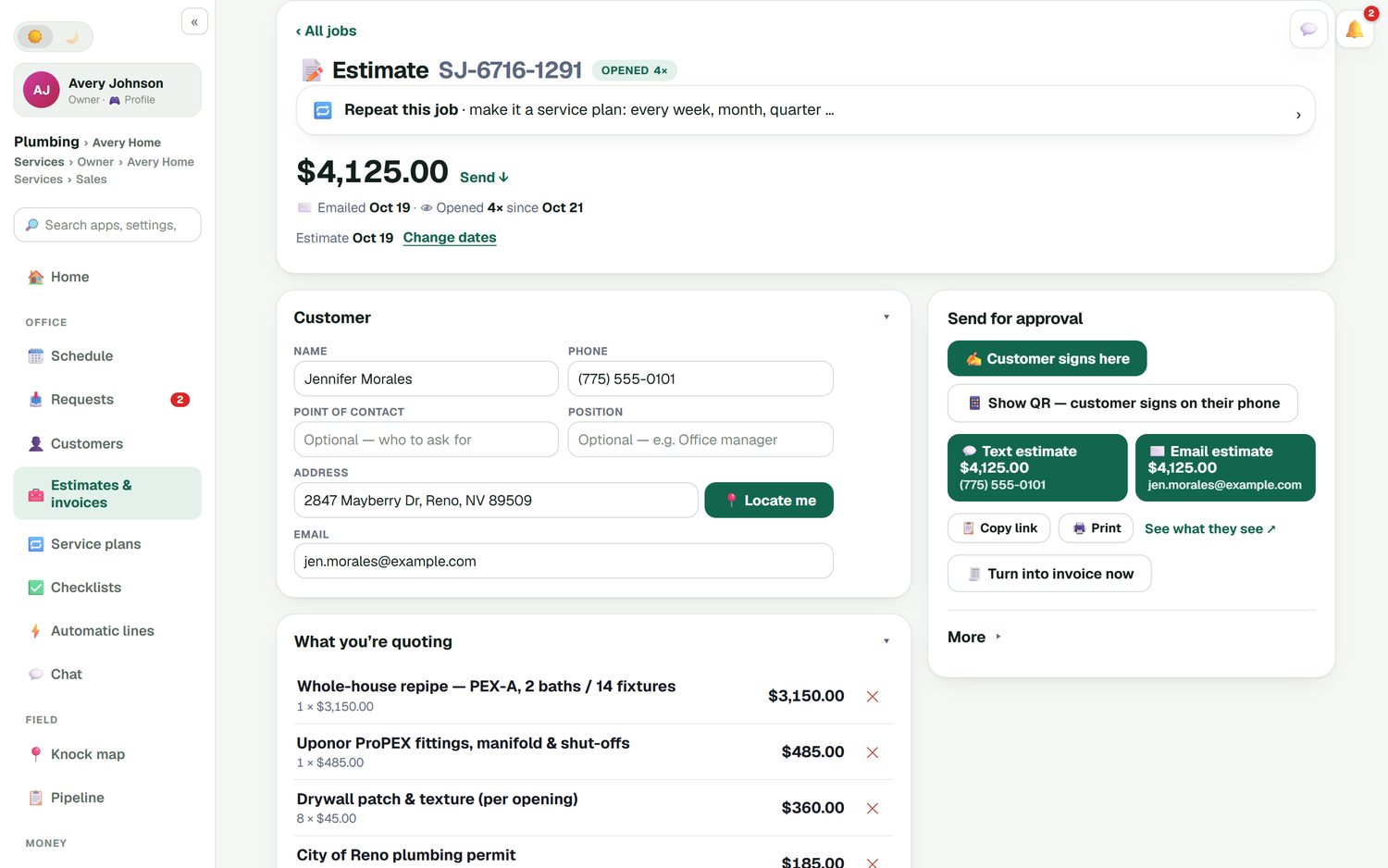
Quote a whole-house repipe or a $95 service call from your phone. Search your own price list, let automatic lines add the labor that goes with a part, discount a line with a reason, and send it by text or email. The customer can sign on your screen, or scan a QR code and sign and pay on their own. If the job grows, a change order adds the extra lines with their own deposit for the customer to approve.
- See when the customer opened the estimate
- Turn an approved estimate into an invoice in one tap
- Job photos show in the customer's emails
What field service software costs
Starting prices from each company's own pricing page, checked October 26, 2026.
| What you pay | FieldStacker | Jobber | Housecall Pro | ServiceTitan |
|---|---|---|---|---|
| Lowest plan, billed monthly | $30/mo (Pro) | $49/mo (Core, 1 user) | $79/mo (Basic, 1 user) | Request pricing |
| A small team plan | Team $60/mo (you + 2 seats), techs free | Connect, 5 users: $199/mo | Essentials, 5 users: $189/mo | Per-technician quote |
| QuickBooks Online sync | Included in Pro | From Connect ($139/mo, 1 user) | From Essentials ($189/mo) | Check their site |
| Job costing | Included in Pro | From Grow ($199/mo, 1 user) | Included in Basic | Check their site |
| Free trial, no card | 14 days | 14 days | 14 days | Demo request |
The others do real things well. Jobber has been serving small service businesses for years and includes online booking and a website on its Core plan, Housecall Pro includes consumer financing and a price book from its first plan, and ServiceTitan is built for large HVAC, plumbing and electrical shops with many technicians. FieldStacker is for the owner who wants the whole job in one app without paying per tech. If you are weighing Jobber specifically, read FieldStacker vs Jobber. If you need to start at $0, see our honest list of free field service management software.
Find the page for your question
Field service software is a big category. These pages each go deep on one part of it.
Run a small trade business
The owner who does the work and the books: home service business software.
Field service software questions
What is field service software?
Field service software runs work that happens at the customer's address: taking the request, quoting it, putting it on a tech's day, doing the job, invoicing and getting paid. The office side, with a schedule board, customer records, reports and the books, is usually called field service management software, or FSM software. FieldStacker covers both, in a browser at the office and on your phone in the truck.
What is the best field service software for small business?
It depends on how many people you have and what you are willing to pay per person. A crew of one to fifteen usually wants a price it can read on the website, no seat minimum and techs who do not cost extra. We compare FieldStacker, Jobber, Housecall Pro, ServiceTitan and others side by side, with published prices, on our best field service management software page.
Is there a mobile field service app for my techs?
Yes. Your techs open FieldStacker on their phone, see their day, open each job, tick the checklist, add photos and mark it done. With the texting add-on, one tap sends the customer an "on my way" text with an ETA from the tech's GPS. Techs you add as technicians are free.
How much does field service management software cost?
FieldStacker Pro is $30/mo, or $25/mo billed yearly, and Team is $60/mo for you plus two seats, with techs free on every plan. On their own pricing pages, checked October 26, 2026, Jobber Core starts at $49/mo for one user billed monthly, Housecall Pro Basic at $79/mo, and ServiceTitan publishes no prices; every plan says "Request Pricing".
Does FieldStacker work with QuickBooks?
It syncs with QuickBooks Online. Sent invoices and payments go across automatically and update in place, a payment recorded in QuickBooks marks the invoice paid in FieldStacker, and expenses, job parts and mileage can sync too. QuickBooks Desktop is not supported.
Can I switch from Jobber or Housecall Pro without retyping everything?
Yes. Upload a CSV or Excel export up to 250 MB and undo the import if it went wrong. There is a dedicated Jobber import that brings over clients and their balances, and we import your customers and jobs for you for free.
Related: best field service management software · free options · dispatch software · FieldStacker pricing
Put this week's jobs in one app
14-day free trial, no credit card. Add your techs free and we bring your customers over from your old software.