HVAC dispatch software for the day the phone won't stop
A no-cool call at 1pm, a tech running long in an attic, and three tune-ups that can wait. See the whole day on a map, move jobs with a drag and tell customers when the tech is really coming.
14-day free trial · no credit card · from $30/mo · your techs are free
Scheduling is what you plan on Monday. Dispatch is what happens on Wednesday at 1pm when it's 104 outside and four people have no cooling. A compressor won't start at one house, a breaker keeps tripping at another, and one call is an elderly couple in a house that is already 88 degrees. Somebody has to decide in a few minutes who goes where, what gets pushed, and who gets a call to say so.
That decision is easier when you can see everything at once: where each tech is, what's left on their day and which jobs are firm. FieldStacker puts that on one board, and makes every change a drag instead of a round of phone calls.
HVAC service dispatching software, built for the rush
What the person at the desk needs on a no-cool day.
Map view of the day
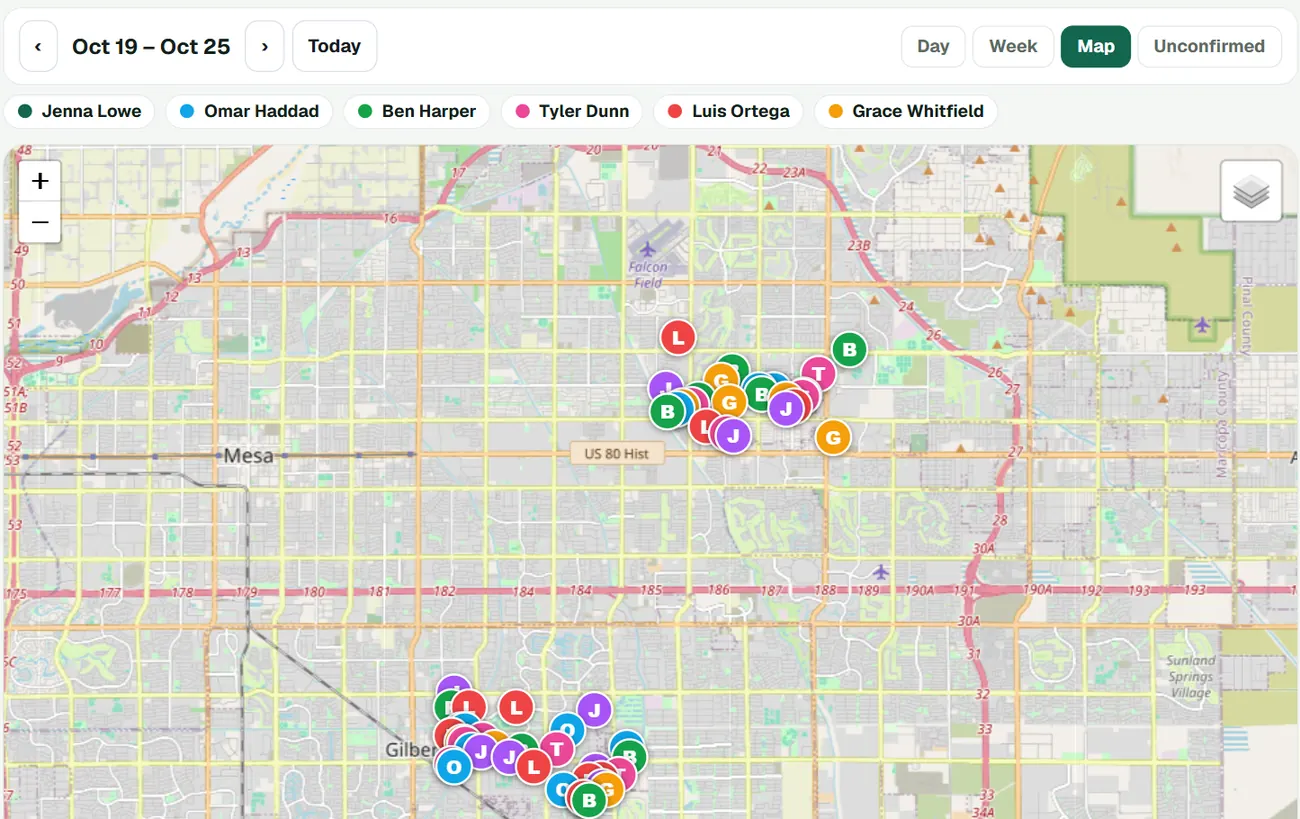
The same jobs as the board, as pins colored by tech. See at a glance who has a job across town and who is two streets from the new call.
Drag to reassign
Drag a job to another tech or another day. The customer's calendar invite moves too, because Google Calendar mirrors the FieldStacker schedule.
Job offers
Post an open emergency call as a job offer and let a tech who has room take it, instead of calling down the list.
Day routes
Put a tech's jobs in the best driving order after you add a call. Arrival times update and the customers on that route are told.
"On my way" texts
One tap sends the customer an ETA from the tech's GPS and a live tracking link. Uses the texting add-on.
Go-backs
When a repair needs a second look, book it as a go-back so the return visit is on the board and not on a sticky note.
Dispatch your next no-cool day from FieldStacker, free for 14 days
Add your techs free. We import your customers from your old app at no charge.
- No credit card to start
- From $30/mo after the trial
- Your techs and cleaners are free
- Cancel any time from the app
See who's closest before you pick up the phone
Switch the schedule board to Map and the week's jobs show as pins with each tech's initial and color. When a no-heat call comes in from the north side, you can see which tech already has work up there and slot it between their stops instead of sending someone across the metro.
- Day, Week and Map views of the same schedule
- Pins colored by tech, with a legend
- Unconfirmed view to find jobs you can safely move
- Multi-day install jobs stay blocked out
Dispatching a no-cool call, step by step
From the request to the customer knowing when to expect you.
The call lands
It comes in through your request page or the phone. Add it as a job with the address and a note: "unit running, blowing warm, 12-year-old condenser."
Pick the tech
Check the map and today's board. Drag the job onto the nearest tech with room, or post it as a job offer.
Push what can wait
Drag a routine tune-up to tomorrow. The customer's invite moves, and you call them knowing exactly what slot they have.
Re-route and tell them
Re-run the tech's day route. Arrival times update, and "On my way" texts the next customer a live ETA.
Today, at a glance
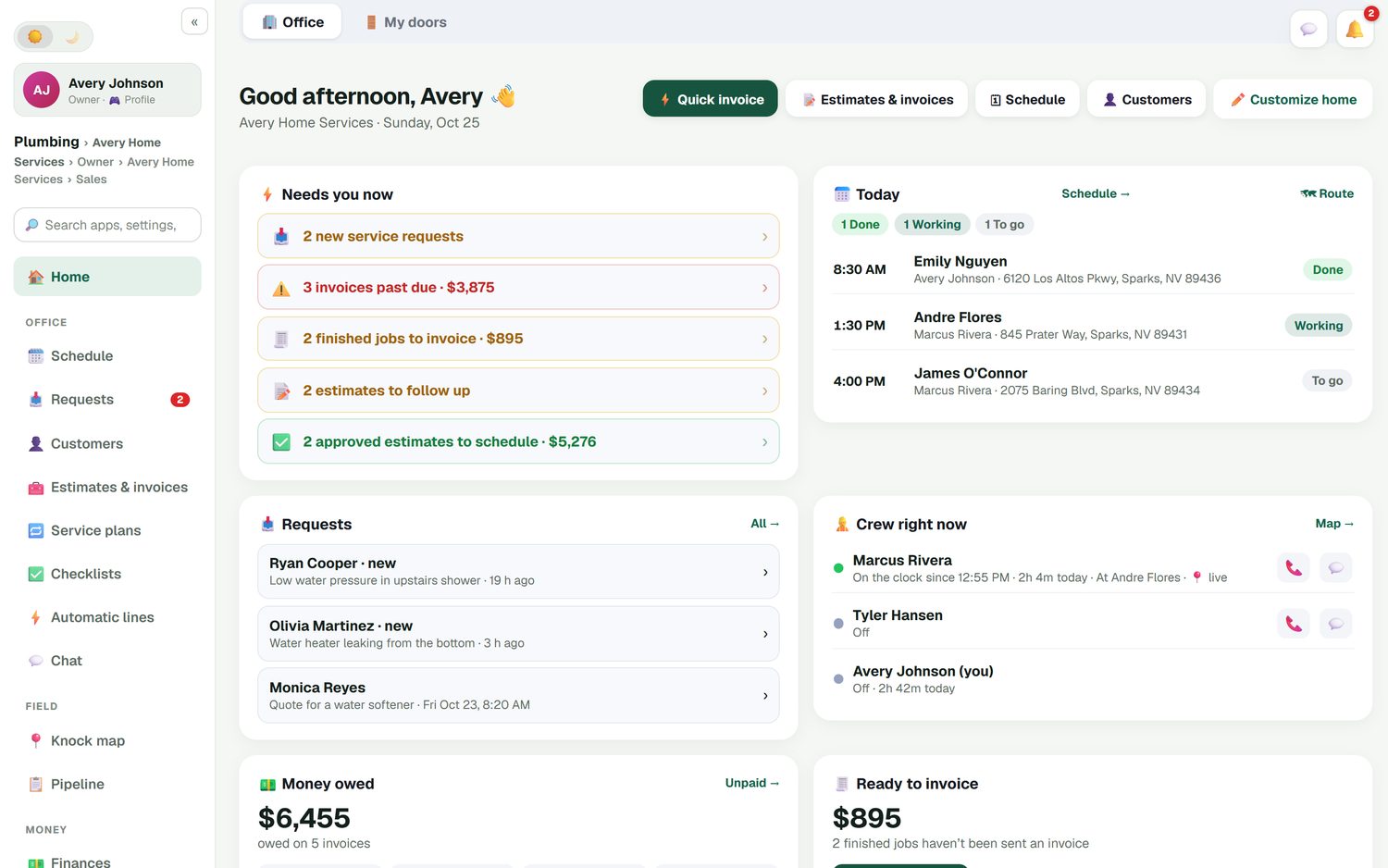
The office home screen shows today's jobs as done, working or to go, and a Crew right now card with who is on the clock, since when and which job they're at, with a button to call or message them. New requests sit right beside it, so a fresh no-heat call doesn't wait behind an email.
- Jobs done, working and still to go
- Who is on the clock and where
- A live team map on Team plans, opt-in and off by default
- Finished jobs waiting to be invoiced
Dispatch programs for HVAC, honestly compared
If you have a full-time dispatcher, a call center and fifteen-plus trucks, ServiceTitan's dispatch board, call booking and reporting are built for you. Its pricing is quote-only and per technician. Housecall Pro includes scheduling and dispatch from its $79/mo Basic plan and adds employee GPS and routes on Essentials at $189/mo (checked October 26, 2026). Both are strong in HVAC.
FieldStacker is for the owner who dispatches from a phone between calls, or a small office with one person on the board. Dispatch, routes and free tech logins come in the $30/mo plan, and the "On my way" texts need the $15/mo texting add-on. We don't sell a phone system, vehicle telematics or dashcams.
Once the tech arrives, see HVAC field service software for what's on their phone, and HVAC invoicing for getting paid before they leave. Shopping wider than HVAC? Read about dispatch software for any trade.
HVAC dispatch questions
What is HVAC dispatch software?
It is the tool the office uses to decide which tech goes where, and to change that during the day. FieldStacker gives you a schedule board with a map view, drag-to-reassign, job offers to techs, day routes in driving order and an "On my way" text that tells the customer when the tech will arrive.
What are the best dispatch programs for HVAC?
ServiceTitan has one of the most complete dispatch boards in HVAC and suits shops with a full-time dispatcher. Housecall Pro and Jobber both have solid scheduling and dispatch for smaller teams. FieldStacker is aimed at small shops that want dispatch, invoicing and maintenance agreements at $30/mo with techs free.
How do I dispatch an emergency no-heat call?
Open the board in Map view to see where today's jobs are, pick the tech with the nearest job and room in their day, and drag the call onto them. Then re-run their day route so the arrival times update and the customers on that route are told. Tune-ups that can wait move to another day with one drag.
Can customers see when the HVAC tech is on the way?
Yes, with the texting add-on ($15/mo for 600 texts from your own business number). One tap on "On my way" texts the customer an arrival time based on the tech's GPS and a live tracking link.
Does HVAC service dispatching software track my techs?
On the Team plans there is a live team map, and location sharing is opt-in and off by default. The office home screen also shows who is on the clock and which job they are at. FieldStacker does not do vehicle telematics or dashcams.
How much does HVAC dispatch software cost?
FieldStacker starts at $30/mo, or $25/mo billed yearly, and techs you add as technicians are free. Add office seats for a dispatcher on Team, $60/mo for you plus two people. There is a 14-day free trial with no credit card.
Related: HVAC software · HVAC scheduling · Routing software · ServiceTitan alternative · Pricing
Be ready for the next 100-degree Saturday
14-day free trial, no credit card. Add your techs free and run tomorrow's board from FieldStacker.