Roofers can now go from a measured roof to three priced options, a deposit, a material order, an insurance claim and the rep's commission, all on one record. Lighting, tint, water and ad sales got tools of their own, and QuickBooks Online keeps itself up to date.
She's at the kitchen table with your number in one hand and somebody else's in the other. "Why is yours four thousand more?" And there's nothing to point at, because there's only one price on your page.
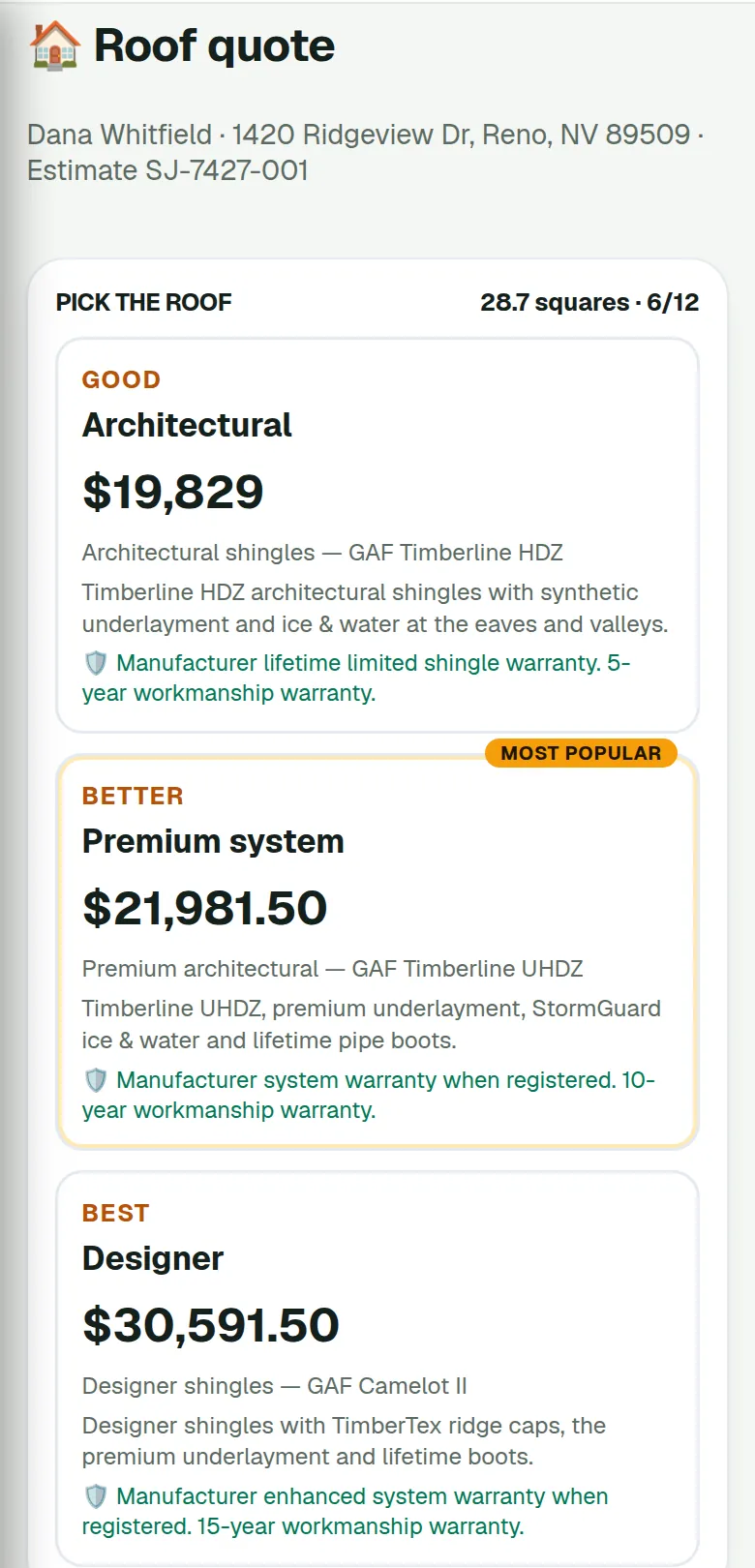
Open the pin, tap 📐 Measure roof, then 🏠 Roof quote. Good, Better and Best come up side by side, priced per square from the measurement, with your adders for steep pitch, extra layers, two and three stories, low slope and decking. Or set a target margin and let it price to that.
She picks one and pays the deposit online. Anything you left out, the chimney re-flash, ridge vent, gutters, guards, re-decking, sits underneath as an add-on she can tick. The right-to-cancel notice is already on it.
One roof, three ways to do it. Squares and pitch along the top, your shingles and your prices underneath.
Roofing & solar
Every number says where it came from
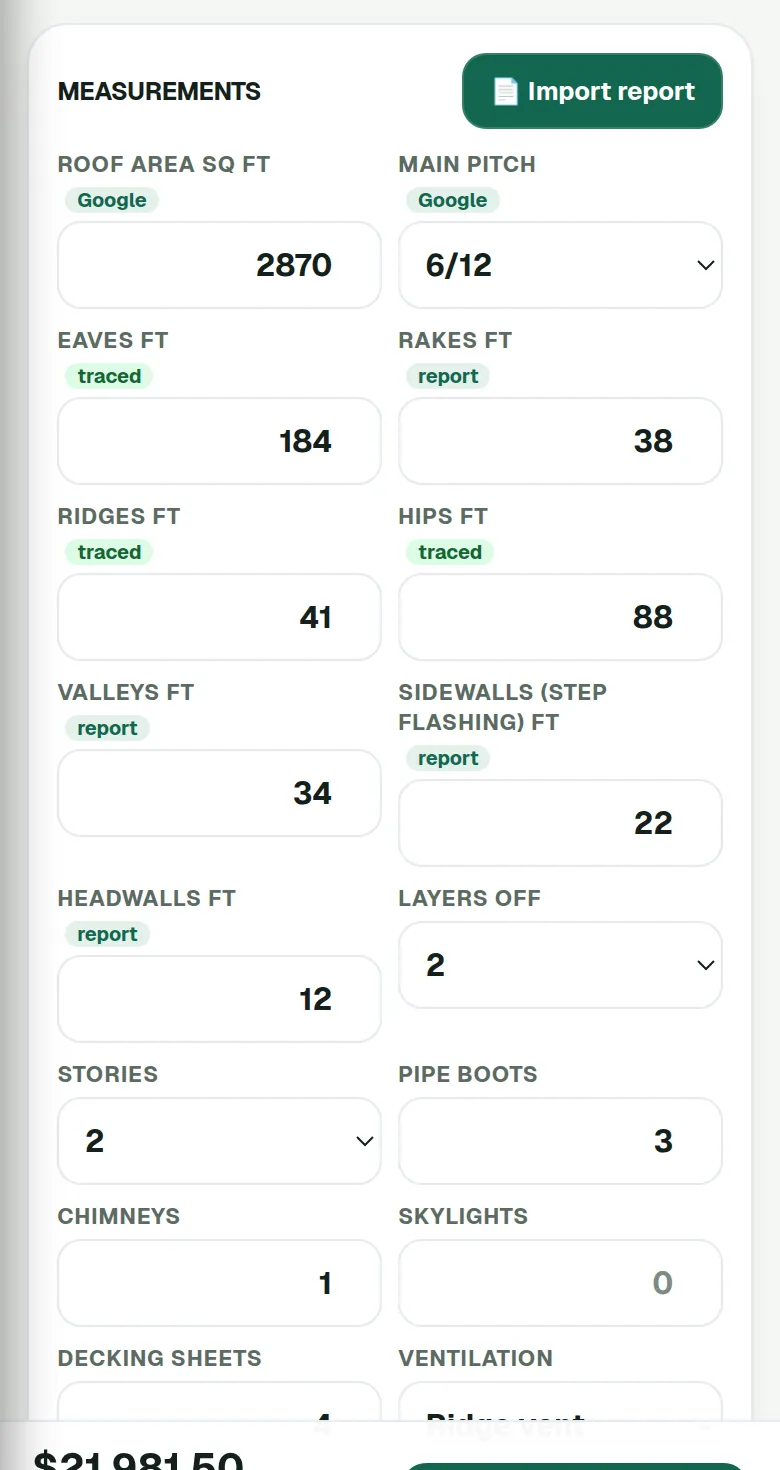
Roof area and pitch come off Google's satellite data. It's a good estimate, not a certified report, and coverage varies. The edges, eaves, rakes, ridges, hips, valleys, step flashing, you trace on the map, type in, or import from the report you already bought: EagleView, Roofr, Hover or GAF QuickMeasure, as a PDF, CSV, JSON or XML file.
Each box carries a little tag, Google, traced or report, so nobody has to guess which numbers are real. We don't sell or order reports. You bring the one you trust.
Area from Google, eaves and ridges traced on the map, valleys and flashing from the report. All on one card.
Roofing & solar
The material order writes itself
Two in the afternoon, half the roof dried in, and the crew is out of starter. Somebody is driving to the yard and the clock is still running.
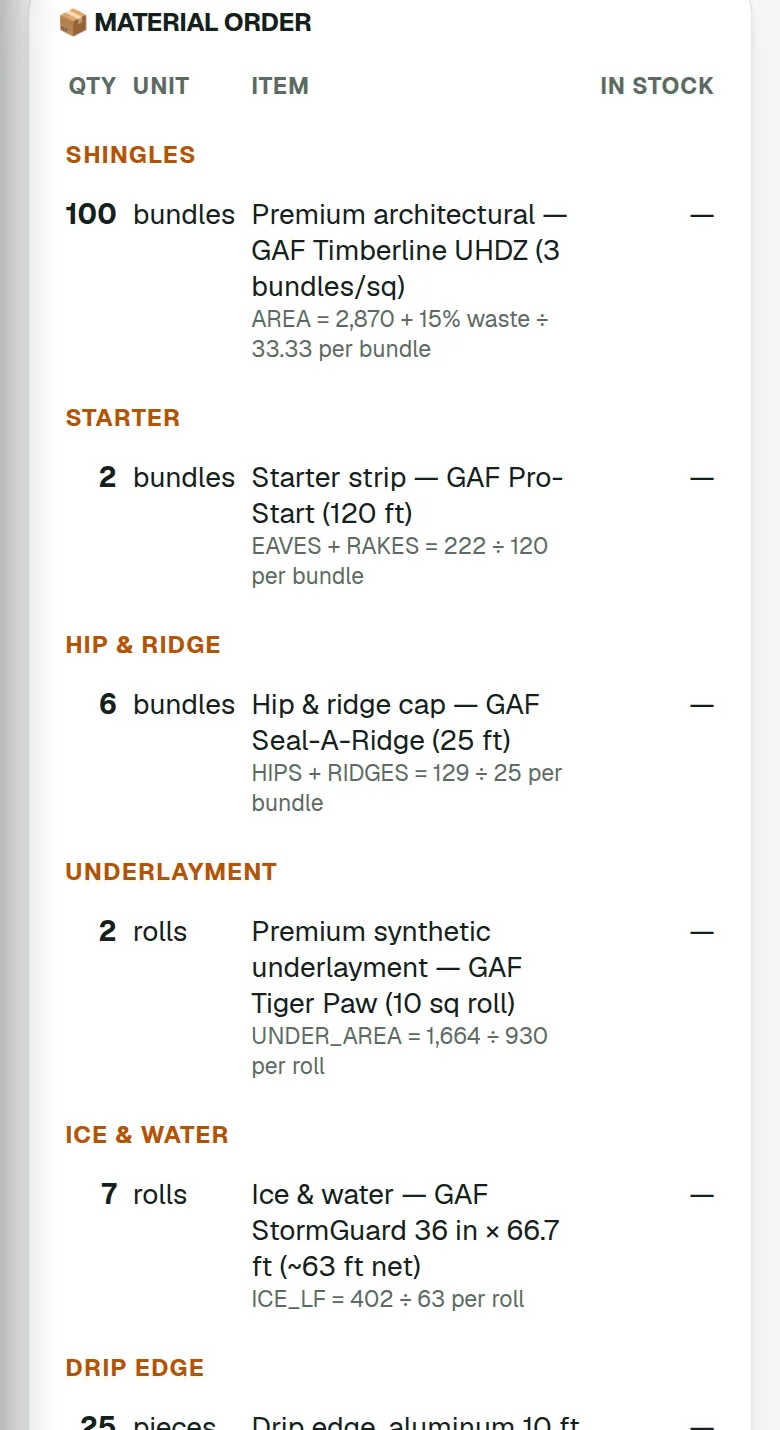
Every line on the bill of materials, shingles, starter, hip and ridge, underlayment, ice and water, drip edge, flashing, vents, pipe boots, nails, sealant, decking, has a formula over the measurement, and you can change any of them. Waste goes on field shingles only. The order goes to your supplier from your own business email, or you print it or copy it. It won't send while the edges are still estimates, which is the point.
The job sheet keeps the labor plan and puts estimated against actual from the receipts you tag to the job. Take materials from stock, put the leftovers back, and the next order uses them first.
The math sits under every line. When somebody asks why seven rolls of ice and water, the answer is right there.
Roofing & solar
Insurance roofs, with who pays what on the screen
He's holding the adjuster's letter. Four pages of line items, and the only question he has is the one you can't answer off the top of your head: "So what do I actually owe you?"
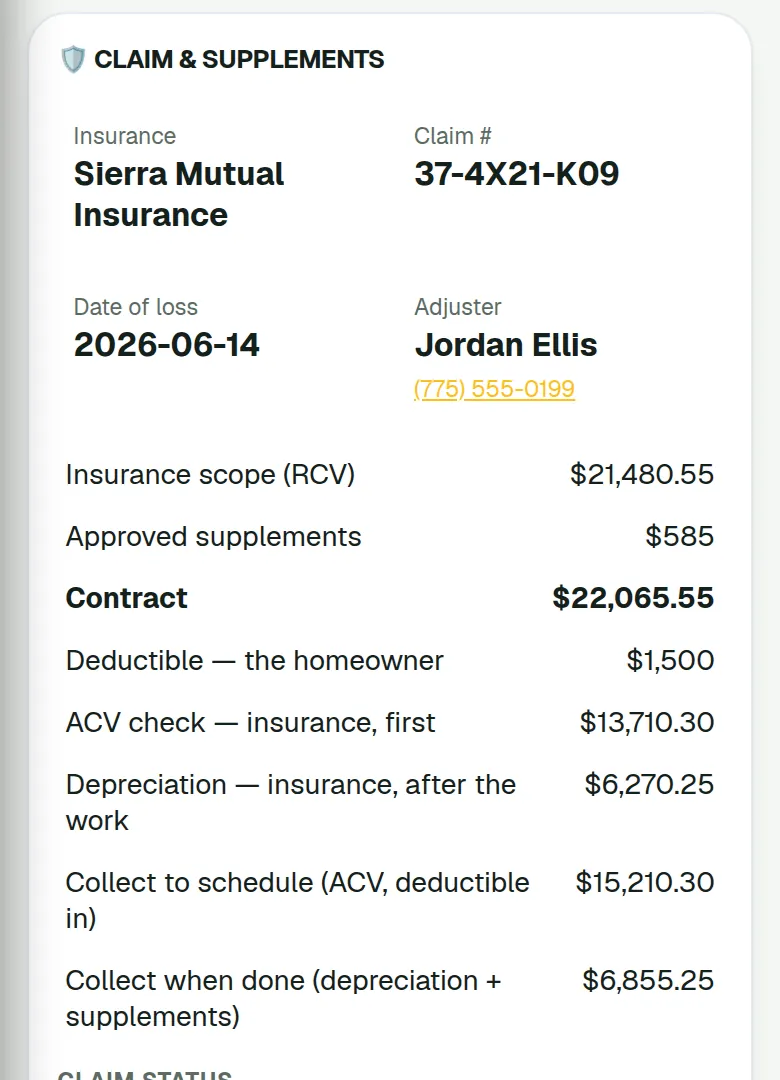
Mark the quote as a claim: carrier, claim number, adjuster, date of loss, cause. FieldStacker reads the adjuster's scope PDF and fills in the numbers and the roof lines. The estimate is priced at the scope's replacement cost (RCV) plus approved supplements, the deposit is the ACV, and it spells out who pays what. The deductible is his. The ACV check and the recoverable depreciation come from insurance. The deductible is never waived.
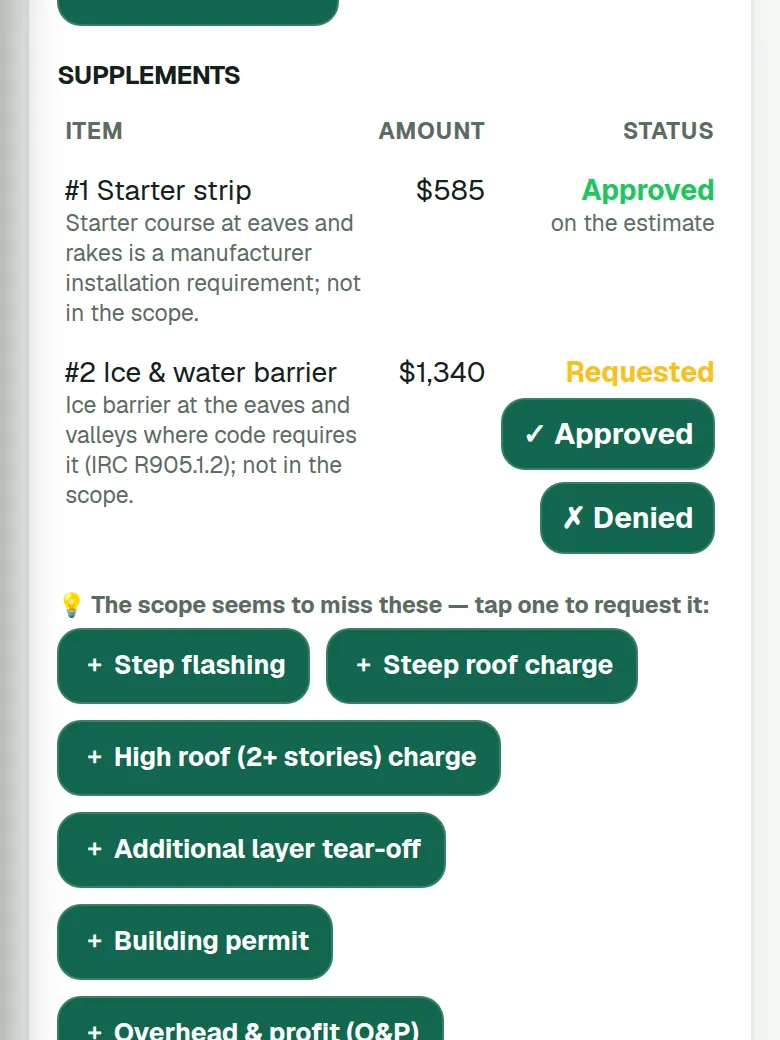
It also points at what the scope seems to miss, drip edge, starter, ice and water, hip and ridge, step flashing, pipe boots, steep and high-roof charges, extra layers, the permit, overhead and profit. Tap one to request it, copy or email the request to the adjuster, and mark it approved or denied when you hear back. Approved goes on the estimate, or becomes a change order once money is in.
It doesn't write Xactimate or ESX estimates, and it isn't a public adjuster. It just keeps the claim straight.
What to collect before you start, and what comes after the work. Then the supplements, one tap each.
Roofing & solar
What am I owed on that one?
Friday. A rep is leaning on your truck asking about a job from three weeks ago, and you are scrolling a spreadsheet you last touched on Tuesday.
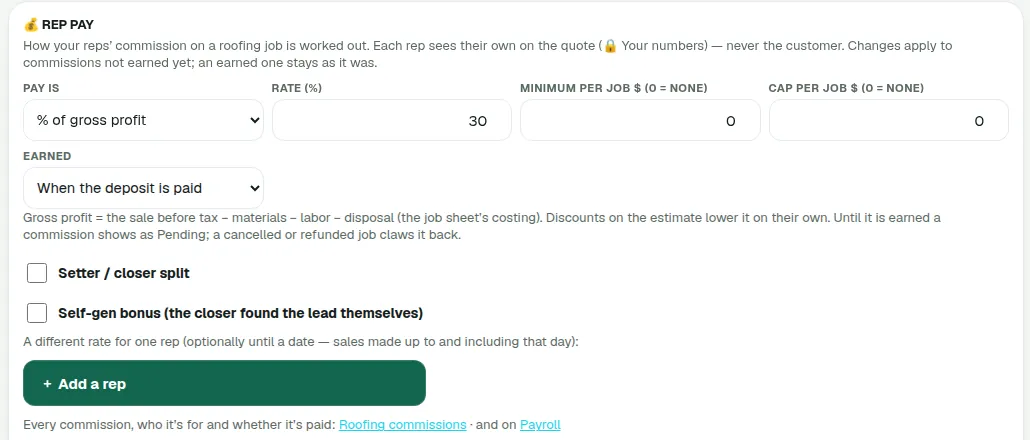
Set the pay plan once: a percentage of gross profit, a percentage of the sale, dollars per square, or a flat amount. Add a minimum or a cap. Pick when it's earned, at signing, when the deposit is paid, or when the job is finished and paid. Setter/closer split, a self-gen bonus, and a different rate for one rep with an end date if you need it.
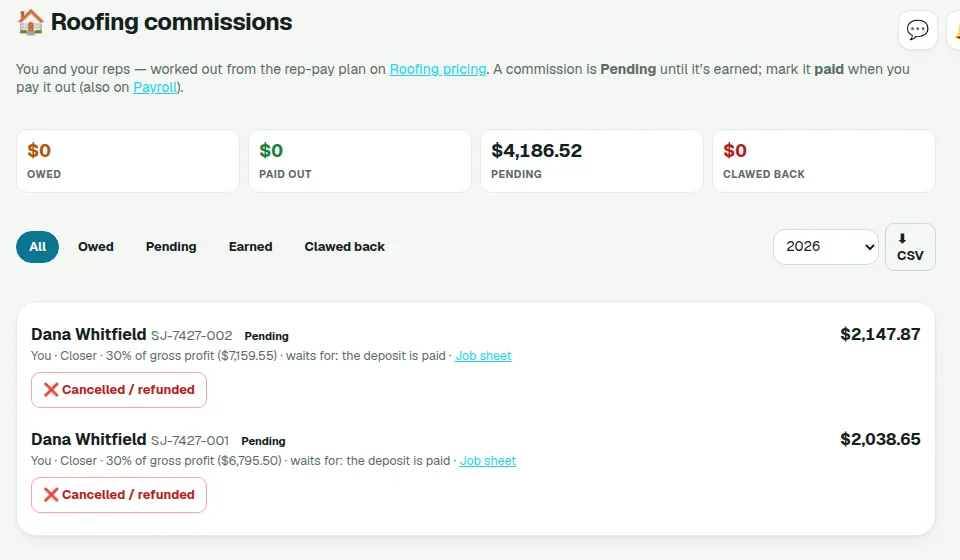
Each rep sees their own commission on the quote while they build it. The customer never does. It goes Pending, Earned, Paid, and a cancelled job claws it back. The Roofing commissions list exports to CSV and feeds the Payroll tracker. It keeps the score; you still pay people the way you always have.
Set it once. A change only touches commissions not earned yet.
Owed, paid out, pending, clawed back. And a CSV for whoever does the books.
Permanent lighting
Permanent lighting, priced by the foot
Measure the roofline from the map, price it per foot, and offer your packages. The materials sheet works out what goes on the truck, and your reps get paid on the same pay plan roofers use, set the way you want it.
Window tinting
Window tint: quote it, and it's the invoice
Vehicle, home or commercial, each quoted the way that work is quoted. When they accept, the quote becomes the invoice, so nobody types it twice.
Film is tracked in square feet. Finish a job and what you used comes off the roll count, so the count in the app matches what's on the shelf.
Water treatment
Water treatment: test, size, three packages
Run the water test, size the softener, and put three packages in front of them from the quote builder. The right-to-cancel notice is on it.
If they want to ask about financing, there's a button that sends you the request. That is all it does. The financing conversation is yours.
Advertising sales
Selling ads to the shops on Main Street
Turn on Businesses here and the local businesses show up on the map. It's public map data, so check the phone number and website before you walk in.
Work them through an ad sales pipeline, build packages, and send a proposal the owner approves online. Renewal reminders come round before the run ends. Between visits, the AI objection coach helps you practise the "we already do Facebook" answer.
Security
Monitoring accounts for alarm companies
Set up a monitoring account and it's billed monthly. One less thing living in a spreadsheet.
Running the business
QuickBooks Online, without typing it twice
End of the month. Invoices open in one window, QuickBooks in the other, and you copying numbers across like it's 1998.
Connect QuickBooks Online and finished or sent invoices, and the payments on them, go across on their own. Mark one paid in QuickBooks and it shows paid here too. Expenses, parts and mileage can sync as well if you want them to.
QuickBooks Online only. Desktop isn't supported.
Running the business
When the job grows after they said yes
You open it up and it's worse than it looked.
Add a change order: the extra lines, with their own deposit if you want one. The customer approves it online, and the final invoice already has it on, so nobody remembers a different number later.
Invoices take a deposit as a percentage or a dollar amount now, and any line can carry its own discount with the reason written next to it. Neighbor discount, second job on the street, whatever it was.
Every trade
Signed at the door, paid on your own website
Hand them the phone to sign, or show a QR code and let them read it and sign on their own phone while you pack up.
And your customer portal can live on your own website now, at yourdomain.com/portal, with their billing history in it. To them it's your company, because it is.
Every trade
Work that comes to you
Put your request link on your website and card, and "leak over the garage" lands in Requests with the address, phone and best time. One tap turns it into a quote.
When you book it, the staff calendar shows the whole month with what's already booked, so you don't put two jobs on one Tuesday morning.
Every trade
Jobs that repeat, run long, or sit across town
Set up a recurring service plan and the jobs come back on their own. A job can run over several days and stay one job on the board. Route planning puts the day in a sensible order before you leave the yard.
On a service call, close the visit as service and record the equipment you put on, so the next tech knows what's on the wall.
Running the business
Small money things
Quick invoice for the job that never needed a quote. Tips on invoices, so the customer who wants to say thanks can. And job costing, so materials, labor and the rest go against the price and you see what the job actually made.
Every trade
Postcards that stop when they book
Design a 6×9 postcard with your offer on it. Each one gets its own QR code page. Send them as a series, and the series stops for anyone who books, so you're not paying to mail a customer you already have.
Running the business
Bring it with you, plug it in
Import from whatever you used before: CSV or Excel files up to 250 MB or 500,000 rows. It runs in the background, so you can keep working while it loads.
For the rest of your tools there are webhooks, an API key and a leads API, so leads can come in from elsewhere and jobs can go out.
Every trade
New look, new apps
Everyone has the new look now, with the hub menu, so everything is a tap or two from the top.
The iPhone app 1.2 and Android 1.5 both went out on October 26. On Android, On my way keeps sharing the trip with the customer even when the app isn't on screen. And on Android and the web you can leave a voice note on a map pin instead of typing on the step.
It's already in there
Nothing to install, nothing to switch on. Open the app and it is waiting. Roofers, open a pin and tap Measure roof. New here? Fourteen days free, and you could have a quote out this afternoon.