Territory mapping software that draws on real streets, not ZIP codes
See where the new homeowners are, where your team has already knocked and who owns each house. Then trace territories your reps can actually walk, name them, color them, and redraw them as you learn.
14-day free trial · no credit card · Team from $60/mo · no seat minimum
Most territory maps for door-to-door teams start with ZIP codes because they're easy to pick. They make poor territories. One ZIP can run across a highway, include a gated community and a block of apartments, and hold three times the doors of the ZIP next to it. The rep who gets it either drives all day or burns out the good streets in a week.
A workable door-to-door territory is a set of streets a rep can walk, bounded by the things they won't cross on foot: arterials, rail lines, canals, the edge of a subdivision. You can only draw that by looking at the map, which is what this part of FieldStacker is for.
Sales territory mapping, layer by layer
What you can see on the map before and after you draw.
Shapes you trace by hand
Tap each corner of the area on the map, as many as the streets need. Follow the arterial, cut around the apartments, stop at the canal.
Names and colors
"North of Brown Rd," "Hail zone, 3rd St." Each territory gets a name and a color, so the whole team talks about the same place.
New homeowner layer
Recently sold homes on the map show where people just moved in. Clusters of new owners are where a fresh territory pays off fastest.
Owner reveal
Draw an area and reveal up to 500 homeowners at once: name, mailing address, owner-occupied or likely renter, estimated age.
Knock history
GPS-verified knocks from the whole team on the live team map, so you can see which streets were worked last month and which never were.
Coverage per territory
Each territory shows how many leads are inside, and its doors plot as knocked or still to knock, so a half-worked area is easy to spot.
Map your first territories in FieldStacker, free for 14 days
Bring your reps and your door lists over from SalesRabbit or a spreadsheet. We import them for free.
- No credit card to start
- From $30/mo after the trial
- Your techs and cleaners are free
- Cancel any time from the app
How to map territories reps can work
A method, not a feature list. It works with any tool, and FieldStacker is built around it.
Look before you draw
Turn on new homeowners and the team's knocks. Note the clusters of fresh doors and the streets nobody has touched.
Follow real edges
Trace along the roads and barriers a rep won't cross on foot. A territory should be walkable from one parking spot or a short hop.
Size by doors, not acres
Count the doors inside, not the area. For example, a rep doing 120 doors a shift, four shifts a week, covers about 480 doors; give them enough for a full pass and a round of go-backs.
Redraw on a schedule
Check coverage every few weeks. Split the territory a strong rep finished, shrink the one nobody is getting through, and draw new ones where new owners appear.
A whole market, split into colors
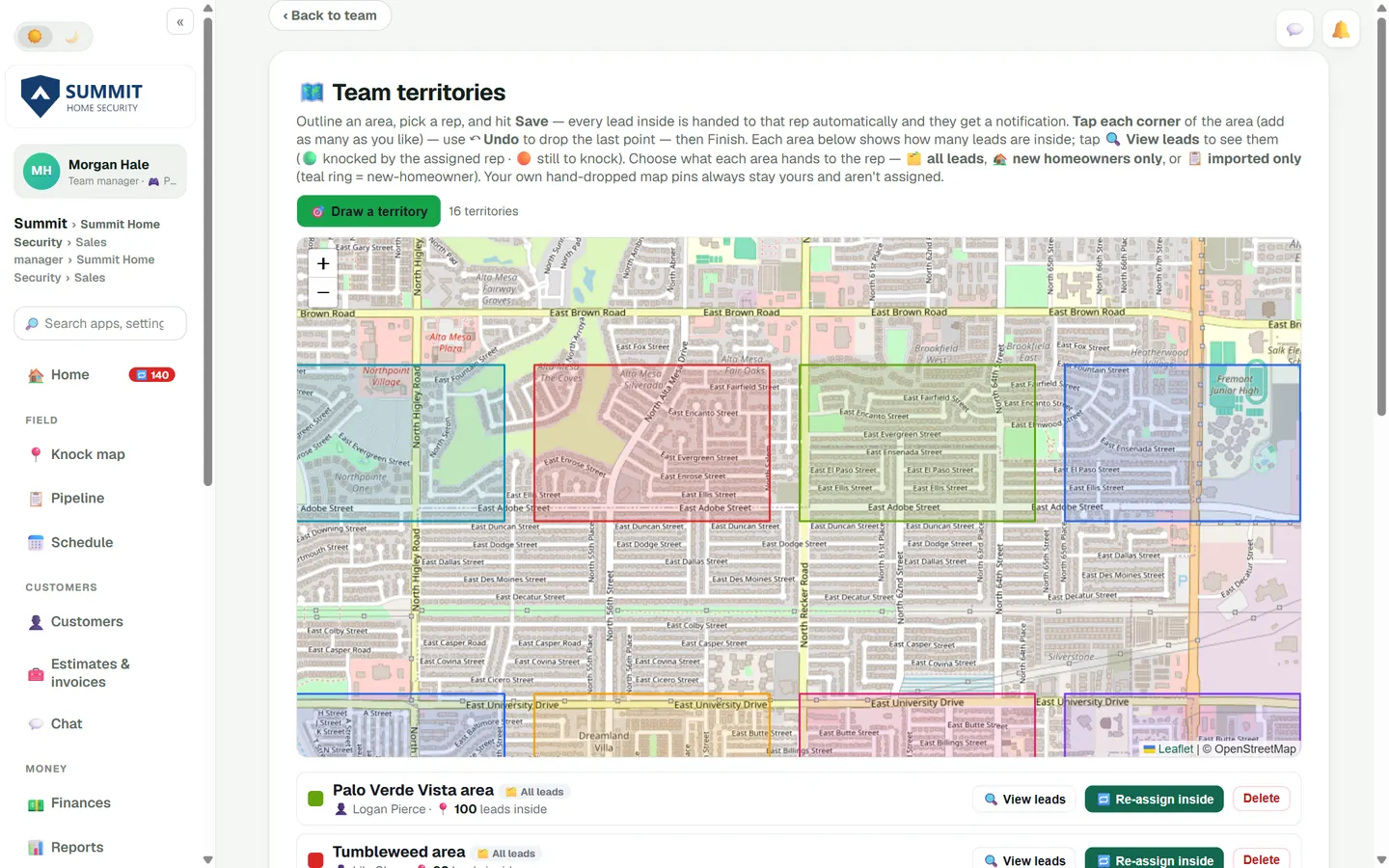
On the Team territories page every territory sits on one map in its own color, with a row below for each: its name, the rep, the kind of leads it hands out and how many leads are inside. View leads zooms the map to that area and plots its doors. Seeing sixteen territories side by side is how you spot the one that's twice the size of its neighbors.
- Every territory on one map, each in its own color
- Leads inside each territory, counted on its row
- View leads to zoom in and see the doors
Draw it from the truck
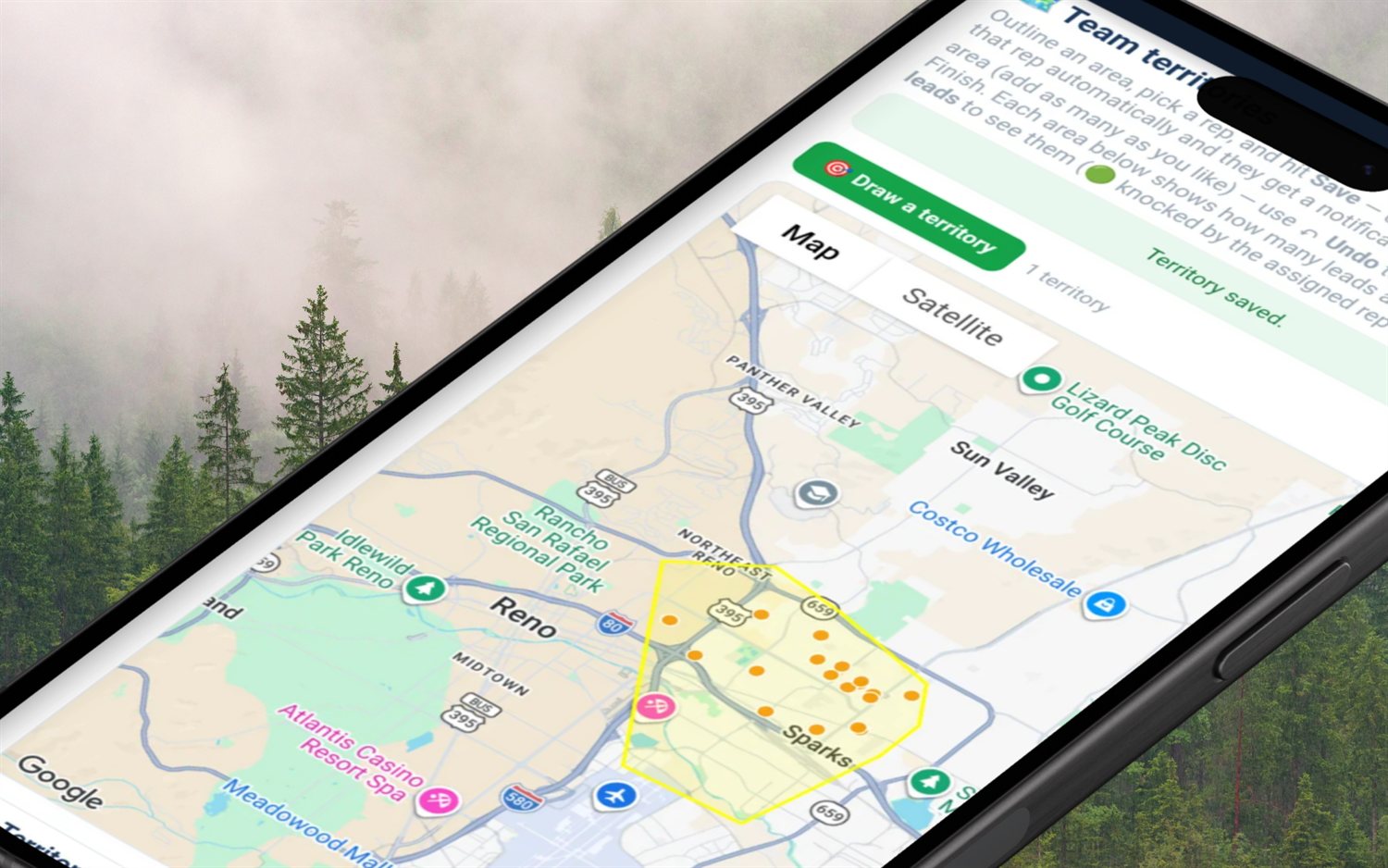
You don't need a desk to map a territory. Tap Draw a territory, tap the corners, finish the shape, then name it, pick a color and choose the rep. Flip to satellite to see where the subdivision really ends. The dots inside are the leads that come with it.
- Map and satellite views
- Undo the last corner if a tap lands wrong
- Shapes as rough or as exact as the streets need
Let the new owners show you the lines
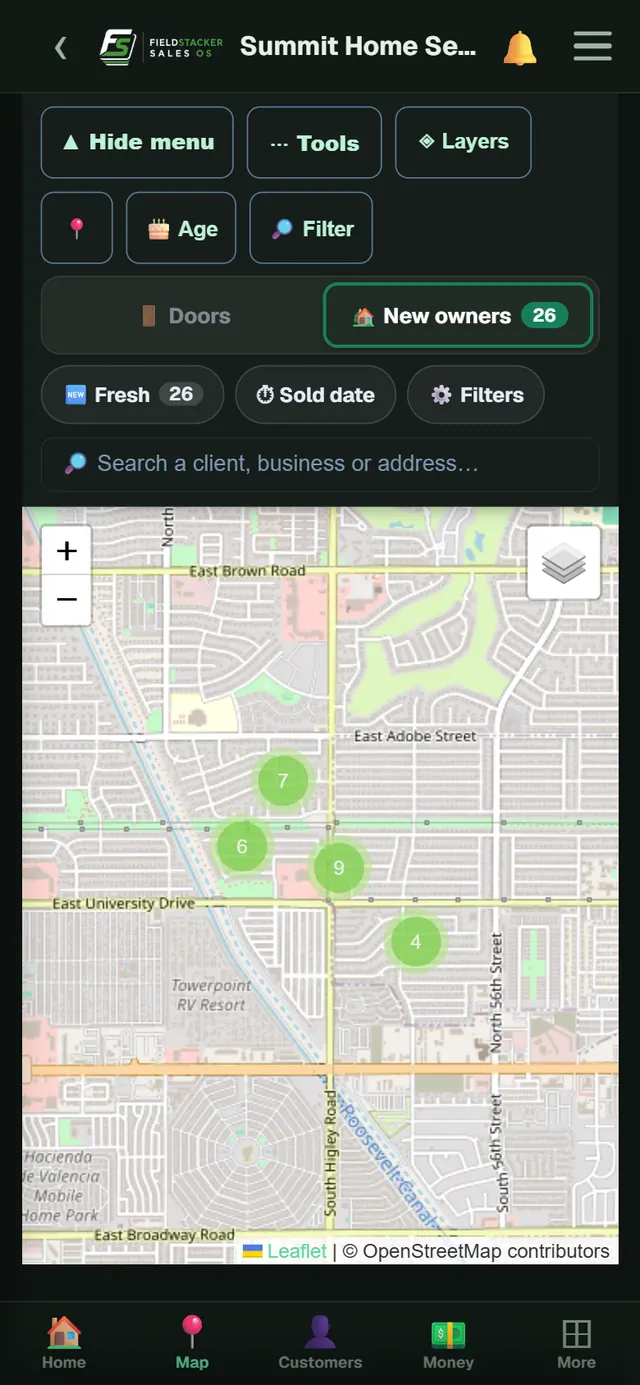
Switch the map to New owners and recently sold homes group into clusters with a count on each. A tight cluster of new move-ins in one subdivision is a territory waiting to be drawn. Filter by sold date to see only the freshest, then trace around them and hand the area to a rep while those homeowners are still choosing who to hire.
- New owners shown as numbered clusters
- Sold-date filter for the freshest doors
- Owner reveal for names and owner-occupied status
What the drawing tool does and doesn't do
- Hand-traced shapes only. You tap the corners. There's no ZIP or county boundary picker, radius circle, drive-time shape, or KML and shapefile import. Sorting leads by ZIP or county happens on the team lead list instead.
- A territory guides; it doesn't fence. Another rep can still knock inside it. What keeps reps apart is that each lead has one owner.
- To change a boundary, redraw it. Delete the old shape and trace the new one; leads already handed out stay with their rep until you move them.
If your team sells to businesses on fixed routes and you need territories built from ZIP codes or counties and balanced by workload or travel time, a dedicated mapping tool such as eSpatial does that (per its site, checked October 26, 2026). FieldStacker is for door-to-door sales teams selling home services and products. It isn't built for political canvassing turf.
Territory mapping questions
What is territory mapping software?
Territory mapping software shows your market on a map and lets you draw the areas each rep or crew will work. Good tools also show what is inside each area, such as homes, leads and past knocks, so you can draw balanced territories instead of guessing. In FieldStacker you trace each territory on the map and see the doors inside it.
What is the best sales territory mapping tool for door-to-door teams?
For door-to-door, you want shapes drawn around walkable streets, with the leads and knock history visible on the same map. FieldStacker does that on the Team plan at $60/mo. If you need ZIP-code or county territories balanced by revenue for an outside B2B team, a dedicated mapping tool such as eSpatial is built for that.
Can I map sales territories by ZIP code?
Not as shapes. FieldStacker territories are traced by hand on the map, which suits door-to-door because ZIP codes cross highways and mix very different neighborhoods. You can still sort and hand out leads by ZIP or county from the team lead list.
Is sales rep territory mapping software included in every plan?
Drawing territories comes with the team tools on Team ($60/mo for you plus 2 seats) and Team Pro ($250/mo for 15 seats). Pro ($30/mo) is for one owner or rep and includes the knock map, new-homeowner leads and owner reveal, but not team territories. Every plan has a 14-day free trial.
Do reps see the territory outline on their own map?
No. The outline lives on the manager's territory page. When you save a territory with a rep on it, the leads inside are handed to that rep and appear on their knock map. The rep works the doors; you see the shape and its coverage.
Can I use it to map political canvassing turf?
No. FieldStacker is built for sales teams selling home services and products, not political campaigns. It has no voter files or turf tools for campaigns.
Related: territory management · field sales software · canvassing app · team GPS map · pricing
Draw your market this week
14-day free trial, no credit card. Turn on new homeowners, trace three territories and see which one your team finishes first.