HVAC scheduling software that fills the slow months first
Your agreement tune-ups land on the board by themselves, customers book the open times you really have, and the no-cool calls have somewhere to go when July hits.
14-day free trial · no credit card · from $30/mo · your techs are free
HVAC scheduling is a timing problem more than a calendar problem. If your spring tune-ups are still unbooked when the first heat wave arrives, they collide with the no-cool calls and both get done badly. The shops that have a calm July booked their agreement customers in March and April and left room on the board for emergencies.
FieldStacker is built for that rhythm. Service plans keep the tune-ups coming on their own, online booking fills the gaps without phone tag, and when the rush starts you can see at a glance which jobs are firm and which can move.
HVAC scheduling, from March to the first cold snap
The parts of the calendar that cost you money when they slip.
Agreement tune-ups on their own
A customer on an every-six-months plan gets a spring cooling and a fall heating visit as separate jobs, each with its own invoice, on the board ahead of time.
Online booking
Customers pick from your real open times on your website or digital card. Next-available-tech booking puts the job with whoever is free.
One Requests inbox
"Upstairs isn't cooling" or "furnace short-cycling" from your request page lands in one list. Call or text back, then book it or quote it.
Confirmed or not
Every job is marked confirmed or unconfirmed. Before the rush, work the unconfirmed list instead of guessing who is expecting a tech.
Multi-day installs
A full system replacement that runs two days books as one multi-day job, so the second day doesn't get double-booked with tune-ups.
Customers reschedule themselves
From their own portal page a customer can move a booking or manage their plan visits, so a cancelled Tuesday becomes an open slot, not a voicemail.
Book your spring tune-ups in FieldStacker free for 14 days
Send us your customer list and we import it for free, agreements and all.
- No credit card to start
- From $30/mo after the trial
- Your techs and cleaners are free
- Cancel any time from the app
An HVAC scheduling board you can read in five seconds
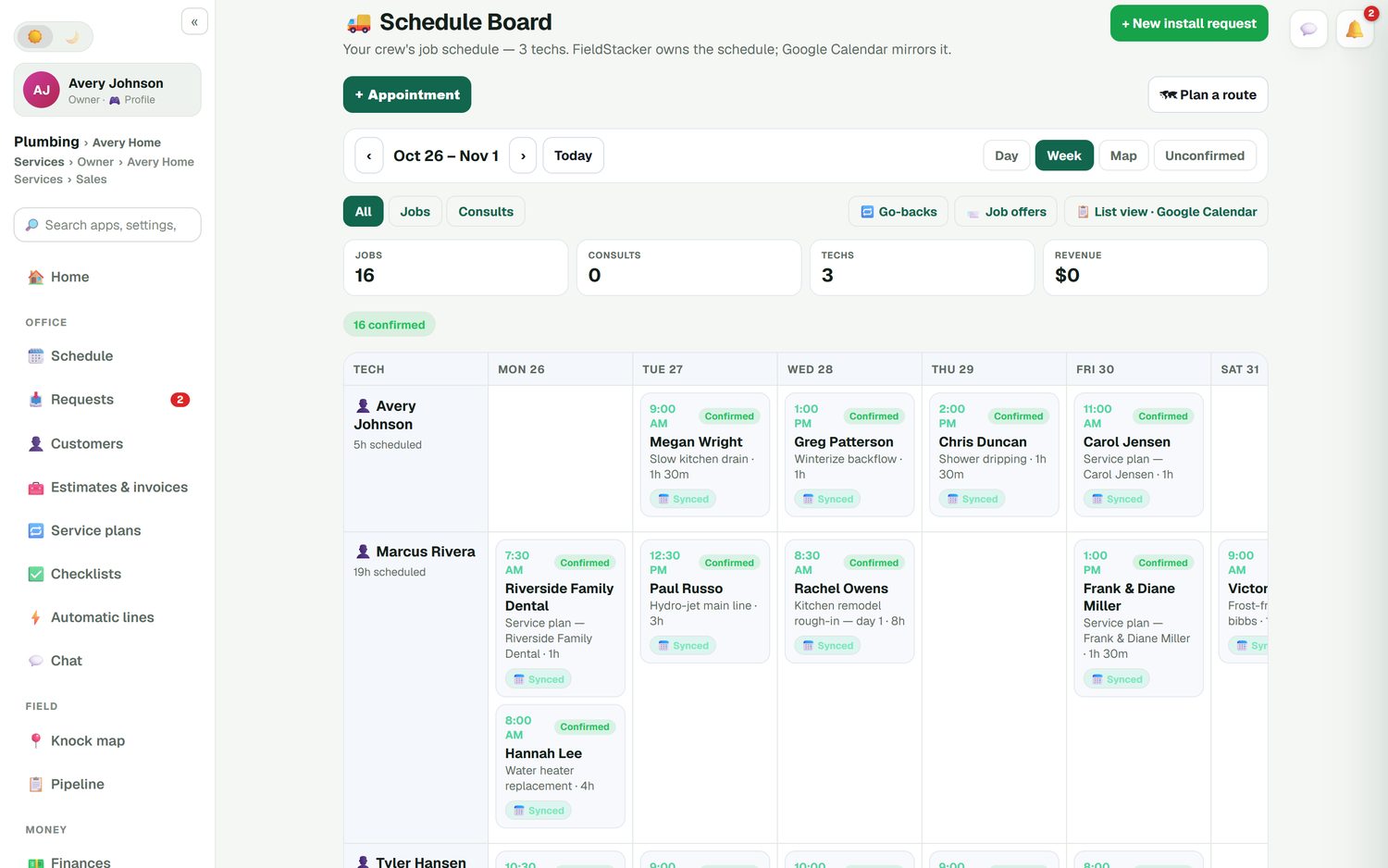
Each tech is a row and each day is a column. Every job shows its time, the customer, what it's for and how long it takes, so you can see who has a two-hour gap on Thursday for a no-heat call. Switch between Day, Week and Map views. Drag a job to another day or another tech and the customer's Google Calendar invite moves with it.
- Day, Week and Map views of the same jobs
- Filter to jobs only, or to unconfirmed jobs
- Go-backs listed so callbacks don't get lost
- Job offers: post an open job and let a tech take it
Every request in one place, ready to book
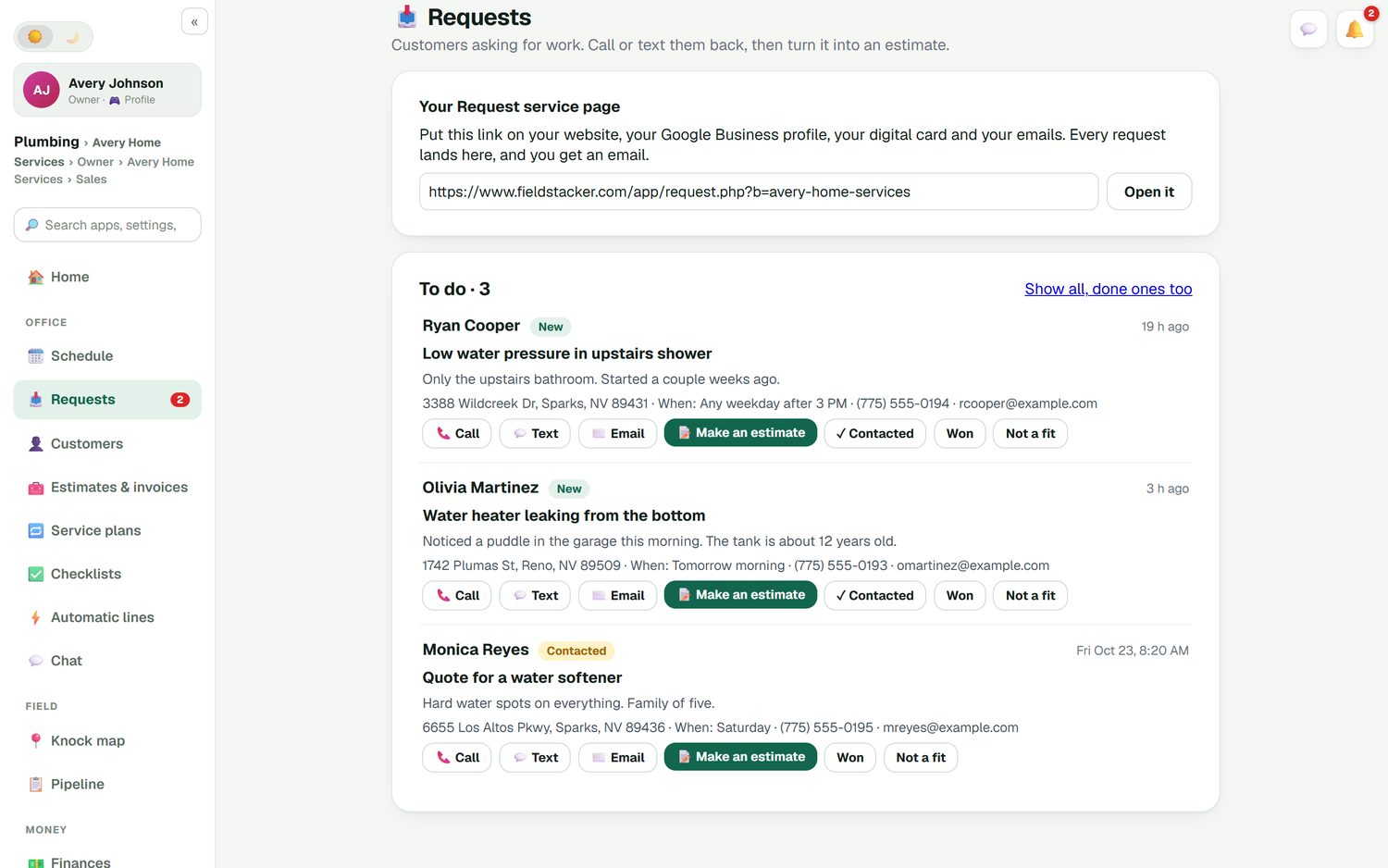
Put your request page link on your website, your Google Business profile and your digital card. Each request shows the customer, the address, what's wrong, when they're home and how to reach them. One tap calls or texts them back, and another turns it into an estimate. Mark it contacted, won or not a fit so nothing sits there for a week.
- A request page for your website and business card
- An email to you when each request arrives
- Turn a request into an estimate or a booked job
- An AI website chat add-on ($20/mo) that can price from your price list and book a time
A shoulder-season scheduling plan
How small HVAC shops use the board to stay ahead of the season.
Load the agreements
Import your maintenance customers and set each one's plan: the visit price, how often, and the day the visits fall on.
Open the gaps online
Turn on online booking so one-off tune-up customers fill the free slots in March, April, September and October.
Keep room for emergencies
Leave space on each tech's day in peak weeks. No-cool and no-heat requests drop into those holes instead of bumping a confirmed job.
Work the unconfirmed list
The week before, filter to unconfirmed and get a yes or a new time. Anything that moves frees a slot you can sell.
The HVAC scheduling app, compared fairly
ServiceTitan and Housecall Pro both have mature HVAC scheduling, and both are worth a look. ServiceTitan adds call booking and a large dispatch board for shops with a full office, and its pricing is quote-only. Housecall Pro includes scheduling and online booking from its $79/mo Basic plan, but its recurring service plans are on the Max plan at $329/mo. Jobber Core starts at $49/mo for one user with online booking (all checked October 26, 2026).
FieldStacker includes service plans, online booking, the schedule board and free tech logins on the $30/mo plan. What we don't have is a phone system or call center tools. If your office books most work by phone with call recording and scripts, ServiceTitan fits that better.
Once the board is full, the day still changes. See HVAC dispatch software for moving techs around during a no-cool day, and HVAC CRM for keeping your agreement customers renewing.
HVAC scheduling questions
What is the best HVAC scheduling software?
The best one is the one your office and techs will actually keep up to date. For larger shops with a call center, ServiceTitan and Housecall Pro are strong. For a small shop that wants agreement tune-ups to land on the board by themselves, online booking and free tech logins at $30/mo, FieldStacker is a good fit. Try two side by side during a busy week before you decide.
Is there an HVAC scheduling app my techs can use on their phone?
Yes. FieldStacker runs in the browser on any phone, so each tech sees their own day, the job notes and the address without installing anything. Techs you add as technicians are free.
Can customers book HVAC tune-ups online?
Yes. Customers see your real open times and book on your website, on your digital business card page, or in a booking widget on a site you already have. You can let it pick the next available tech, so nobody books a slot that is already taken.
How do I schedule maintenance agreement visits automatically?
Put the customer on a service plan with the visit price and the cadence, such as every six months for a spring and fall tune-up. Each visit becomes its own job and invoice and shows up on the schedule ahead of time, so the spring list is already on the board before the season starts.
Does HVAC scheduling sync with Google Calendar?
Yes. FieldStacker owns the schedule and Google Calendar mirrors it. When you drag a job to another day or tech, the customer's calendar invite moves too.
How much does HVAC scheduling software cost?
FieldStacker is $30/mo for the owner, or $25/mo billed yearly, with scheduling, online booking and service plans included and techs free. A 14-day trial needs no credit card. Texting customers is an add-on at $15/mo for 600 texts.
Related: HVAC software · HVAC field service · Online booking · Best HVAC software · Housecall Pro pricing · Pricing
Put next spring's tune-ups on the board now
14-day free trial, no credit card. Your techs are free, and we'll import your customers for you.