Track your reps and hand out territories1:32
See who’s out right now on the live team map and the doors they knocked today, then draw a territory and give it to a rep.
Where to cut a city, how big a territory should be, how to keep two reps off one street, when to rotate and when to redraw — the method first, then how to do it in one save in FieldStacker.
Flat from $30/mo, or $25/mo billed yearly · 14-day free trial · no seat minimums, no contract required
Territory assignment is the highest-leverage thing a canvassing manager does, and most crews do it in a group chat. Someone says "Dave, take everything north of Route 9," Dave interprets that generously, and three weeks later two reps are arguing about who knocked Elm Street. The fix is not a stricter rule. It is a shape on a map, one name on it, and a way to see which doors inside it have actually been worked.
This guide is the method, in the order you have to make the decisions. It is useful whether you run it in a spreadsheet, on a paper map with a highlighter, or in software. At the end there is a concrete walkthrough of how it works in FieldStacker, plus a plain account of how our territory tool behaves, limits included.
A territory does three jobs at once, and if you are not clear which one you are optimising for you will draw the wrong shape. It gives a rep exclusivity, so they can invest in a neighborhood without a teammate harvesting it. It creates accountability, because coverage of a defined area is measurable in a way that "how many doors did you hit?" is not. And it gives a rep a finish line — a knowable amount of work that can be completed, which is the difference between a job and an infinite grind.
That third one is the one managers forget. A rep who can see the end of their area works differently from one staring at an unbounded map. Draw territories that can be finished.
Square miles tell you nothing. A half-mile square of new-build townhomes and a half-mile square of five-acre lots differ by an order of magnitude in knockable doors. So do the arithmetic in doors:
For most full-time D2D crews that lands somewhere around one to two thousand homes per rep — in a typical suburb, a handful of subdivisions rather than a whole ZIP code. Adjust hard for your product: a high-consideration sale with long conversations chews far fewer doors per day than a fast pitch.
The failure modes are symmetrical. Too small and your best rep exhausts it in two days, gets bored, and starts drifting onto a teammate's streets. Too big and it never gets finished — coverage goes patchy, and human nature means the rep works the blocks nearest where they park, forever.
The single most common mistake is drawing straight lines on a map that do not exist on the ground. A rep at door level cannot see your boundary. They can see a six-lane road, a river, a rail line, a park, a golf course, a school campus, the one entrance into a subdivision.
Cut on those. Good boundaries are physical, unambiguous, and hard to cross by accident. Bad boundaries are street names in the middle of a uniform grid, ZIP code edges, and anything that requires a rep to check their phone to know whose side they are on.
Also prefer whole subdivisions. A subdivision usually has one or two entrances and a single character of housing stock, which means it behaves as one unit for pitching, pricing and referrals. Splitting one across two reps is how you get a homeowner telling your rep "someone from your company already came by."
Never make a road the boundary between two territories. A rep working the odd numbers will eventually cross to the evens, because it is right there and they are mid-stride. Put the boundary behind the houses — along a back fence line, an arterial with no addresses, a creek — and give both sides of every residential street to the same person.
The same logic applies to cul-de-sacs and loops: they belong entirely to one rep. Any shape where a rep has to stop mid-block and turn around is a shape that will be violated.
There is a strong pull toward carving up the entire metro on day one so the map looks impressive. Resist it. An unassigned territory is a promise you are not keeping, and a map full of them makes real coverage impossible to read at a glance.
Draw the three or four areas your current crew can genuinely cover, work them properly, and cut the next one when you hire. It is far easier to add a territory than to explain to a rep why theirs just got smaller.
Rotation is real and it works — fresh eyes on a worked area find deals the previous rep talked themselves out of, and rotating removes the "this is my patch forever" entitlement that makes territories hard to reassign later. A cadence of roughly four to eight weeks, or whenever a rep has covered their area once properly, suits most crews.
Two cautions. First, rotating too fast kills follow-ups: the rep who set the go-back is no longer the one on that street, and scheduled callbacks are where a lot of canvassing revenue actually lives. Second, rotation is a handover, not a deletion — the outgoing rep should hand over live conversations, not just vacate the shape. Whatever tool you use, moving the boundary and moving the open leads are two different acts.
Three signals mean the map is wrong, not the rep:
Redraw deliberately and tell the crew why. Silent boundary changes are how you lose a good rep.
Territories live under Team → Territories and are a manager tool — the page is for accounts that own a team or have reps reporting to them.
Tap "Draw a territory", then tap each corner of the shape on the map — as many corners as you want, with an Undo point button for the one you misplaced — and tap Finish area. Minimum three corners; it is a free-form polygon, not a rectangle or a radius.
Give it a name like "North side", pick a colour so it reads at a glance on the map, and choose the rep. Assignable people are you plus your team — you can also leave a territory unassigned while you plan.
All leads, new homeowners only, or imported leads only. That is how the same footprint can feed two different reps two different lead types.
Every lead you own inside the outline is handed to that rep in the same action, and they get a notification naming the territory and how many leads are waiting, linking straight to their knock map.
Drawing the shape is the easy part. The work is getting the doors inside it into the right rep's hands, and that is usually where a territory map turns back into a spreadsheet. Here the polygon is the assignment mechanism: save it against a rep and every lead of the chosen kind inside the boundary changes hands in the same click.
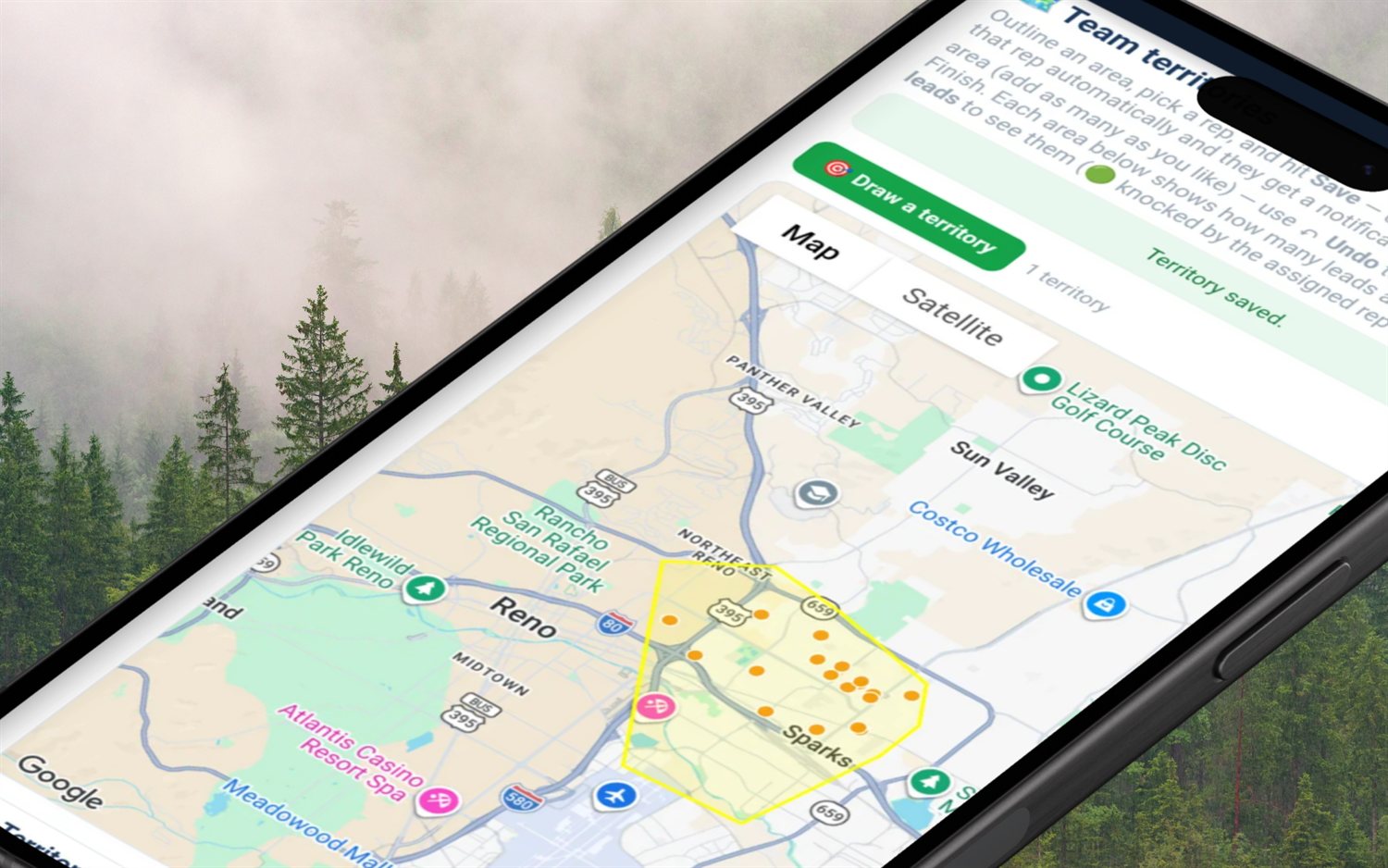

A territory is only as useful as your ability to see whether it is being worked. Two views do that job:
Boundaries stop honest mistakes. They do not stop a rep who wandered. The second layer is visibility of doors already knocked: on the rep's own knock map there is an optional layer showing teammates' knocks from the last seven days as anonymous coloured dots — no address, no name, no disposition, and each teammate a different colour so the pattern reads without exposing who did what. It is off by default and older knocks simply drop off after a week.
That combination — a shape with one name on it, plus a visible trail of recent activity — is what ends the "I swear I hit that block" argument. Worth being plain about what a territory is: in FieldStacker it is a work assignment rather than a geofence. It hands the leads inside it to one rep and guides who works where; staying inside the lines is a management conversation rather than something the software enforces.
The specifics most feature pages leave out — worth reading before you build a process on top of them:
Size it in doors, not acres. Work out what one rep actually knocks in a week — a full-time canvasser on a five-day week covers a few hundred doors — then decide how often you want that area re-knocked. If you want a rep back on the same street every three or four weeks, a territory of roughly one to two thousand homes is the usual landing spot; in most suburbs that is a handful of subdivisions, not a whole ZIP code. Too small and your best rep burns it out in two days and starts poaching a teammate's streets. Too big and nobody ever finishes it, coverage goes patchy, and the rep only ever works the easy blocks near their car.
Two things, and you want both. First, draw territories so every street has exactly one owner — and never split a street down the middle, because a rep working one side will cross the road eventually. Assign both sides of the road to the same person. Second, make already-knocked doors visible. In FieldStacker a manager traces a territory around an area and hands the leads inside it to one rep, and on the rep's own knock map there is an optional layer showing teammates' knocks from the last seven days as anonymous coloured dots — no address, no name, no disposition, just "somebody has been here". Territory lines prevent the overlap; the dots catch it when someone strays.
Go to Team, then Territories. Tap "Draw a territory" and tap each corner of the area on the map — as many corners as you like, with an Undo point button for the one you got wrong — then tap Finish area. Name it, pick a colour, choose the rep from your team, choose whether the area hands out all leads, new-homeowner leads only, or imported leads only, and hit Save. Every lead you own inside that outline is handed to that rep in the same action and they get a notification naming the territory and the number of leads waiting. It is one save, not a per-lead checklist.
Rotate when an area stops producing for the person in it, not on a rigid calendar. A useful cadence is every four to eight weeks, or whenever a rep has covered their area once properly — fresh eyes on a worked area do genuinely find deals the last rep talked themselves out of. Two cautions. Rotate too fast and follow-ups die on the vine, because the person who set the go-back is no longer the person on that street. And in FieldStacker, deleting a territory leaves its leads where they are: doors already handed to a rep stay assigned to that rep until you redraw the area, assign it to the new person, and save again. Plan the handover, do not just delete the shape.
Yes, and this is the one overlap that is deliberate. Each territory carries a lead kind — all leads, new homeowners only, or imported leads only — so you can draw the same footprint twice: one territory handing the new-homeowner leads to your closer, another handing the imported list to a newer rep. FieldStacker lets you draw two territories over the same block, which is exactly what makes this work. It also means accidental overlap is yours to catch — there is no warning when two shapes cover the same street.
FieldStacker publishes its numbers: flat month-to-month from $30/mo, a 14-day free trial with no credit card, no seat minimums and no annual contract, and Team Management Pro at $250/mo which carries the manager tools plus ten seats. The big canvassing platforms tend to quote per seat through a sales conversation and often with an annual commitment, so check their sites for current pricing rather than trusting a number on someone else's comparison page. The honest difference is not only price: you can draw your first territory during a trial without talking to anyone.
The rest of the manager stack, and the map the territories sit on.
Recruiting, onboarding, accountability and comp — the systems around the territory map.
The layer territories hand leads onto: pins, dispositions and the doors your crew has already worked.
Where the fresh doors inside a territory come from — and why they get their own lead kind.
Cutting the map is step one. The hub page covers the rest of the manager layer — teams, seats, reporting lines, overrides and install verification.
Door-to-door sales team management software →
Territory software · Lead distribution · Team GPS map · Commission payroll · Leaderboard · Coaching · Recruiting · Managing a team
Short, real walk-throughs — no sign-up needed to watch.
See who’s out right now on the live team map and the doors they knocked today, then draw a territory and give it to a rep.
Start a 14-day free trial — no credit card — trace an area, assign it to a rep, and hand over every door inside it in one save. Flat month-to-month, cancel anytime.