Electrical service business software for the work between the truck and the panel
Dead outlets and tripping breakers in the morning, a 200-amp panel upgrade on Thursday, an EV charger waiting on the permit. One app for the schedule, the quote, the permit notes and the invoice.
14-day free trial · no credit card · from $30/mo · your electricians are free
An electrical service business runs on two kinds of work. Service calls are short and unpredictable: a GFCI that won't reset, half the kitchen dead, lights that flicker when the dryer starts. Installs are planned and bigger: a panel upgrade with a utility disconnect, a Level 2 EV charger with a new 240-volt circuit, a basement finish with rough-in one week and trim-out the next. Both need a permit trail, photos for the inspector, and an invoice that goes out the day the work is done.
Electrical field service software, built around your jobs
What FieldStacker does for each kind of electrical work.
Service calls
A "breaker keeps tripping" request lands in your inbox with the address and when they're home. Drag it onto an electrician's day; the customer's calendar invite follows.
Panel upgrades
Quote the panel, breakers, labor and permit from your price list. Automatic lines add the labor that goes with the panel so it's never left off.
EV charger installs
Charger, circuit, labor and permit, plus optional lines like a surge protector. If the panel can't carry it, a change order adds the upgrade with its own deposit.
Permits on the job
Permit number, inspection date and inspector notes in the job notes. A checklist template for each kind of job puts "permit pulled" and "inspection passed" in front of the tech.
Multi-day jobs
Rough-in and trim-out, or a service change across two days, book as one job with its notes, photos and parts together.
Photos for the inspector
Techs add photos of the open panel, the grounding and the finished work on their phone. Job photos can show in the customer's emails too.
Run your electrical jobs in FieldStacker free for 14 days
Bring your customers over from your old app or a spreadsheet. We import them for free.
- No credit card to start
- From $30/mo after the trial
- Your techs and cleaners are free
- Cancel any time from the app
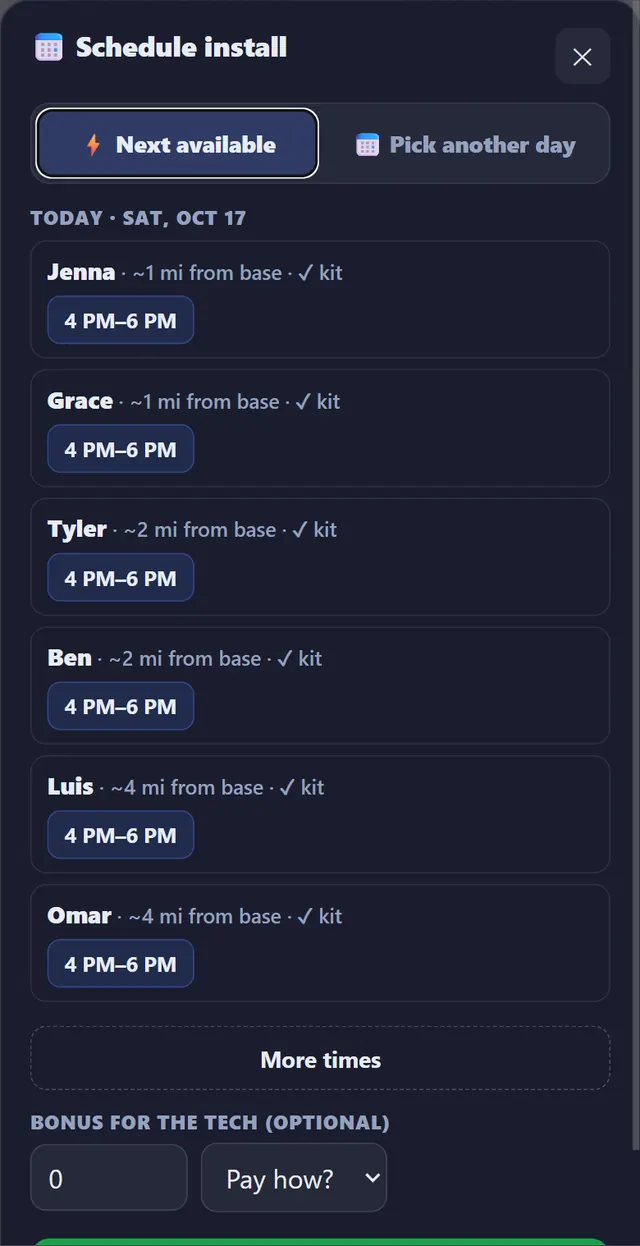
Book the next available electrician
When a customer approves an EV charger install, book it with the next available tech: FieldStacker lists who is free and their open time windows. Customers can also book your real open times online, on your website or your digital card. The schedule board shows every electrician by day, with Day, Week and Map views, and Google Calendar mirrors it. Day routes put each tech's service calls in driving order.
- Next-available-tech booking, in the office or online
- Confirmed and unconfirmed jobs, go-backs and job offers
- "On my way" texts with an ETA (texting add-on)
- Time clock with timesheets and a payroll email of hours

Know what's on each truck
Each electrician carries their own stock: breakers, GFCI and AFCI devices, wire, boxes, the charger you keep for installs. When a job is completed, the parts used come off that tech's stock, so you know what to reorder before someone drives to the supply house mid-job. The same parts feed job costing, so the invoice shows what the materials actually cost you.
- Stock per tech, deducted as jobs are completed
- Parts, labor and expenses against each job
- A job profit report across all your work
Invoicing software for electrical contractors, built in
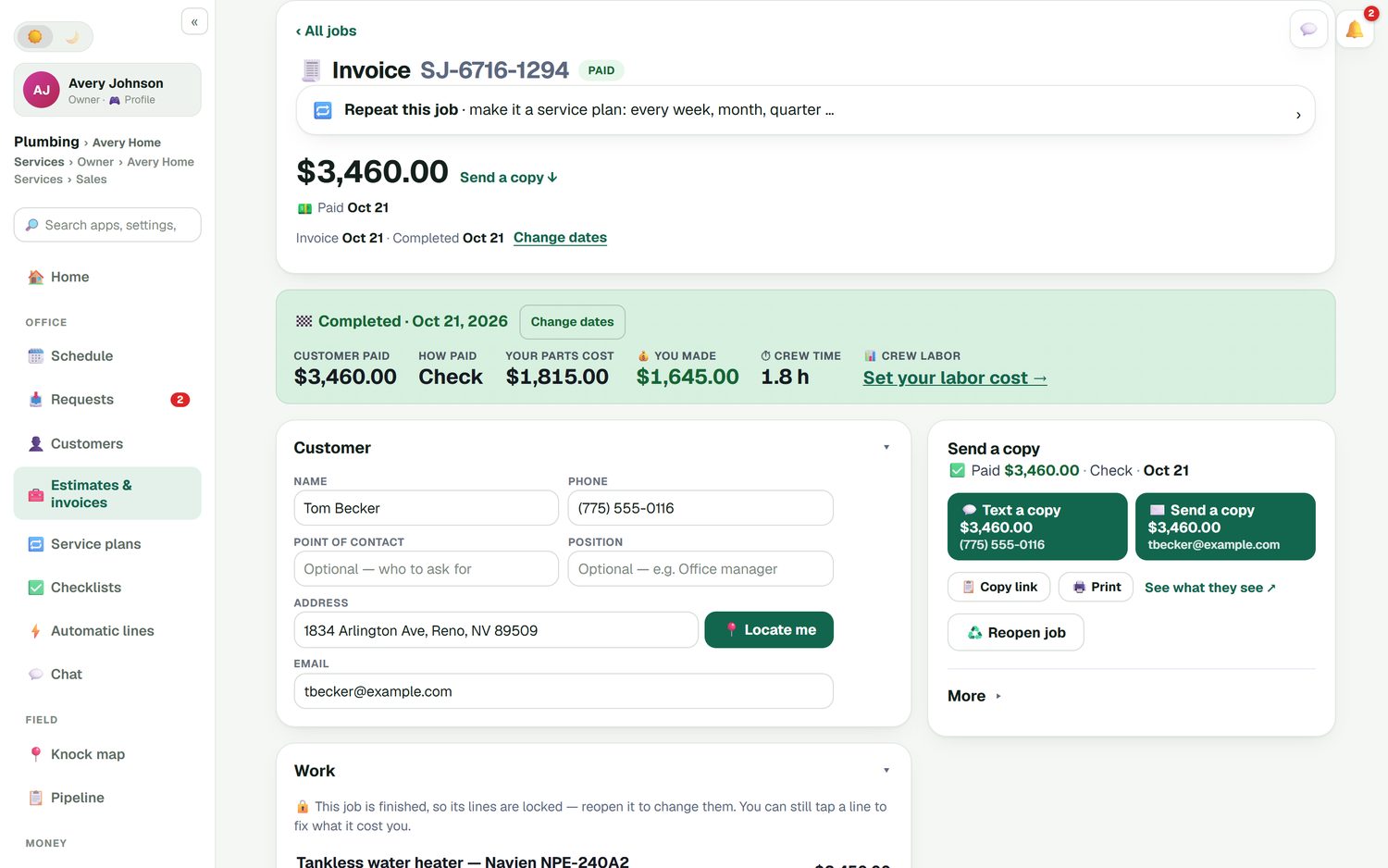
An approved panel upgrade estimate turns into the invoice, so nothing is typed twice. A service call gets a quick invoice on one screen. Customers pay by card through your own Stripe account, with no FieldStacker fee on top, or you record a check. When the job is finished, the invoice shows what the customer paid, what the parts cost and what you made. Invoices and payments sync to QuickBooks Online, and customers can pay and see their history in their own portal.
- Deposits and change orders on installs
- Batch invoicing for up to 100 finished jobs
- Unpaid-invoice reminders and a review request after payment
A CRM for electrical contractors who do service work
Electrical customers come back. The homeowner who had you replace a Federal Pacific panel will call when they buy an EV, add a hot tub or finish the basement. Keep every customer's history in one record: the requests they sent, the estimates, the jobs with their photos and permit notes, the invoices and receipts. Estimate follow-ups go out by email when a quote goes quiet, and a thank-you with a review request follows each paid invoice. Each automation can be switched off or rewritten.
To find new customers, the New Homeowners map shows recently sold homes in your area, and the marketing suite can mail them a postcard. People who just bought an older house often need a panel looked at. Your paid plan also includes a website on your own domain with your request page and online booking on it. See new homeowner postcards and the CRM for contractors page.
Electrical contractor software questions
What should electrical field service software do for a small shop?
Get the call onto the right electrician's day, put the quote in front of the customer while you are still at the panel, and get paid when the work is done. FieldStacker does that with a schedule board, estimates from your own price list, e-sign, invoices with card payments, job costing and QuickBooks Online sync, from $30/mo with your electricians free.
Is FieldStacker a CRM for electrical contractors?
Yes, for service and residential work. Every customer has one record with their requests, estimates, jobs, invoices, receipts and photos. Requests from your website land in one inbox, estimate follow-ups go out automatically, and a review request follows each paid invoice. Email campaigns and new-homeowner postcards help you reach new customers.
Can I track permits and inspections on a job?
You can note the permit number, inspection date and inspector notes on the job, add the permit fee as its own line on the estimate, and put "permit pulled" and "inspection passed" in a checklist your electricians tick on their phone. FieldStacker does not file permits with your city or county.
Does it handle panel upgrades and EV charger installs?
Yes. Quote the panel, the breakers, the labor and the permit from your price list, add optional lines like a whole-home surge protector, and take a deposit when the customer signs. A panel change that spans two days books as one multi-day job. If the EV charger needs a panel upgrade first, a change order adds it with its own deposit.
Is there invoicing software for electrical contractors built in?
Yes. Turn an approved estimate into an invoice, or make a quick invoice on one screen for a service call. Take a card through your own Stripe account with no FieldStacker fee on top, or record cash, check, Cash App, Venmo or Zelle. Batch invoicing emails up to 100 finished jobs at once.
Does it work with QuickBooks?
With QuickBooks Online. Finished and sent invoices and payments sync automatically and update in place, and expenses, job parts and mileage can sync too. QuickBooks Desktop is not supported.
How much does electrical service business software cost?
FieldStacker starts at $30/mo, or $25/mo billed yearly, with a 14-day free trial and no card. Electricians you add as technicians are free. Team is $60/mo for you plus two more seats, with extra seats at $20 a month.
Related: electrical estimating software · plumbing software · HVAC software · field service software · technician app · pricing
Put your service calls and installs on one board
14-day free trial, no credit card. Your electricians join free as technicians, and we import your customers for you.