A customer portal on your own domain
Your customers sign in with a code, see their next visit, book or move it, pay what they owe and get their receipts, all under your name instead of ours.
Included in Pro from $30/mo · 14-day free trial · no credit card
A portal is only useful if customers actually open it. So there is no account to create and no password: the customer types the email you already have for them and gets a code. Approving a quote signs them in on the spot and sends them the portal link, so the first visit is already set up when they need it.
What your customers can see and do
Everything below is in the portal today.
📅 Their next service
The day, time or arrival window and address, whether you've confirmed it yet, and buttons to add it to their calendar or call you.
🧾 What the job includes
The price, whether it's one-time or repeating, and the itemised list of what's being done.
🗓️ Book an accepted quote
Pick a day and time from your open slots, without a phone call.
🔁 Reschedule or cancel
Move or cancel a booking. Some changes go straight through; others wait for you to confirm.
💳 Pay what's due
The amount due, with a Pay button on each invoice that opens its payment page.
📑 Billing history and receipts
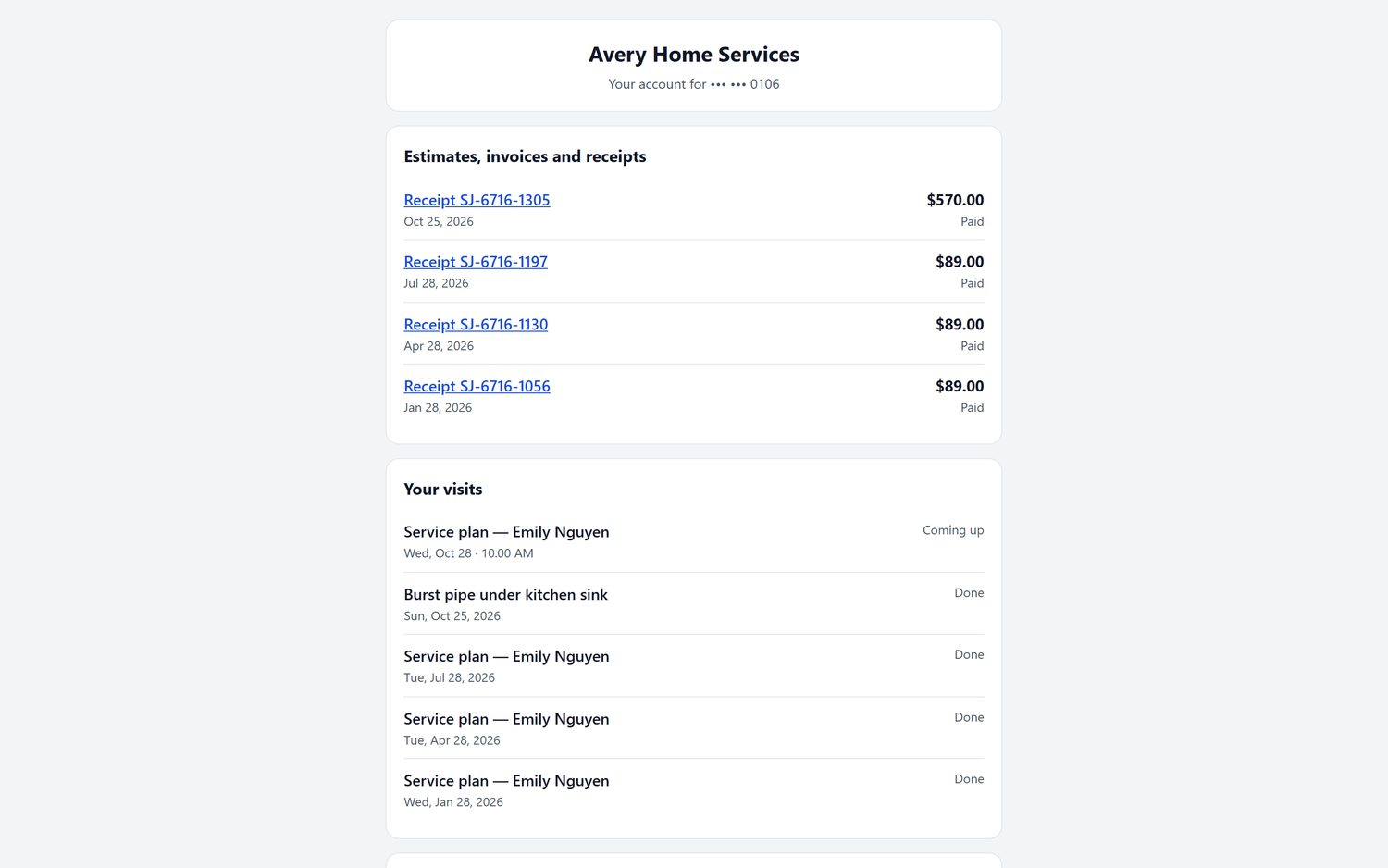
Every payment with the date, what it was for, how they paid and the amount, a receipt for each, and the total paid this year.
🔒 A card for after the job
Save a card that is charged only once the job is complete, never before.
📆 Service plans and autopay
Monthly lines, the next bill or visit, contract start, term and end, account numbers, and the card on file, with a button to change it or save one for autopay.
🙋 Ask for a visit
Up to three preferred days, each with a morning, afternoon or evening window, and a note about what they need.
💬 Send you a message
A question with no date needed goes straight to you.
🕘 Previous services
Their last six visits, each marked when it was completed.
⭐ Rewards and reviews
If you run rewards, they see what they've earned and can refer friends by link or email. A Google review button is there too, with no reward tied to it.
Give your customers their own portal
Try FieldStacker free for 14 days. We bring your customers over from your old app for free.
- No credit card to start
- From $30/mo after the trial
- Your techs and cleaners are free
- Cancel any time from the app
It looks like your business, not ours
When FieldStacker hosts your website or serves your domain, the portal lives at your domain with /portal on the end. Customers see your business name and logo, the sign-in email comes from your business, and on your address the portal only ever shows your business.
- On your own domain when we serve it, or on the FieldStacker address if you don't have one
- Your website can wrap the portal in its own header and footer with a small portal template; without one, it shows as its own page with your name and logo
- The portal link goes out in the welcome email after a customer approves a quote
- Booking confirmation emails carry a link to reschedule in the portal
- A "Customer login" button on your digital business card
No passwords, no account to create
- Email plus a 6-digit code
- The code lasts 15 minutes; they stay signed in for 30 days
- Only emails you already have on file get a code
- Approving a quote signs the customer in automatically
- A welcome email with the portal link follows the approval
Built for repeat customers
Service plan and alarm monitoring customers see their next bill or visit, contract dates and account numbers, and keep their own card up to date for autopay. Free months of monitoring earned as rewards show here too.
Cleaning plan customers also get a plan page from their link, where they schedule and move visits, add a card and see photos from each visit.
What the portal doesn't do
So you know what to expect.
- Estimates are approved and signed on the quote link you send, not inside the portal. Once accepted, the job shows in the portal to book.
- Paying an invoice opens that invoice's own payment page. Card payments need your Stripe account connected; until then customers are asked to settle up with your technician.
- Customers can cancel a single booking or visit, not a whole plan; that stays with you.
The portal comes with Pro ($30/mo) and the team plans, alongside service plans and autopay. The $15/mo Website & Hosting plan is a website without the CRM, so it has no invoices or service plans to show in a portal. See pricing.
Customer portal questions
What is a customer portal?
It is a private page where your customers look after their own account with you: see the next visit, move or cancel a booking, pay what they owe, see what they paid, and keep a card on file. In FieldStacker every customer you have an email for can sign in to it.
How do customers log in?
With their email and a 6-digit code we send them. There is no password to forget. The code lasts 15 minutes and they stay signed in for 30 days. Only email addresses you already have on file get a code. A customer who approves a quote is signed in automatically and gets a welcome email with the portal link.
Does the portal run on my own domain?
Yes, when FieldStacker hosts your website or serves your domain: the portal is at your domain with /portal on the end, with your business name and logo, and it shows only your business. Your site can also wrap it in its own header and footer with a small portal template. Without your own domain, the portal runs on the FieldStacker address.
Can customers pay invoices in the portal?
Yes. The portal shows what is due with a Pay button on each invoice, which opens that invoice's payment page. Their billing history lists every payment with the date, what it was for, how they paid, the amount and a receipt, plus the total paid this year. Card payments go through your own Stripe account.
Can customers book or reschedule themselves?
Yes. A customer with an accepted quote picks a day and time from your open slots. They can reschedule or cancel a booking; some changes go straight through and others wait for you to confirm. They can also ask for a visit by picking up to three days with a morning, afternoon or evening window and adding a note.
Can customers see their estimates in the portal?
Estimates are approved and signed on the quote link you send them, not inside the portal. Once a quote is accepted, the portal shows what the job includes and lets them book it. The portal lists invoices and payments.
Does it handle service plans, autopay and alarm monitoring?
Yes. Customers on a service plan or a monitoring account see the monthly lines, the next bill or visit, the contract start, term and end, their account numbers, and the card on file, with a button to change it or save one for autopay.
Which plan includes the customer portal?
The customer portal, service plans and autopay are part of Pro at $30/mo ($25/mo billed yearly) and the team plans, starting with Team at $60/mo. Every plan starts with a 14-day free trial with no credit card.
Related: field service CRM · estimates and invoices · online booking · recurring billing · pricing
Let customers help themselves
14-day free trial, no credit card. Your customers can sign in to their portal as soon as you have their email.