The cleaning company CRM that remembers every client
The gate code, the dog that can't go out, the bathroom they always want redone, every visit and every receipt. Kept on the client, in front of whoever cleans there next, and used to bring them back.
14-day free trial · no credit card · from $30/mo · cleaners ride along free
A cleaning business does not lose clients because the clean was bad. It loses them quietly. The move-out clean that was supposed to turn into a monthly never got a second call. The biweekly regular got a new cleaner who didn't know about the cat. The quote you sent in March is still sitting there. A CRM for a cleaning business is the thing that stops those leaks, and it only works if it is the same app you schedule and invoice from.
Sales CRMs built for other industries track deals and pipelines. A cleaning client is not a deal you close once. They are a relationship measured in visits, and the numbers that matter are how often they book, when they last booked, and whether they paid.
What a CRM for a cleaning business should keep
All of it lives on the client, without anyone typing it twice.
Every visit and receipt
Past cleans, what was on each one, what they paid and how. One-time jobs and plan visits side by side.
Notes that travel
Job notes carry the alarm code, parking and requests to whichever cleaner is going. The checklist has them confirm pets and the alarm before starting.
Photos of the work
Finished rooms saved on the job. Useful when a client asks whether the oven was done, and they can show in the client's email.
The plan they are on
Cadence, price per visit, next visit and visits completed. Pause, skip or cancel from the record.
Follow-ups that send
Estimate follow-ups, unpaid reminders, and a thank-you with a review request after payment. Each one can be switched off or edited.
Who to ask for
A point of contact and their position on the record, for the rental manager or the office manager who books the clean.
Bring your client list into FieldStacker free for 14 days
Send us your old spreadsheet or app export. We import your customers and jobs for free.
- No credit card to start
- From $30/mo after the trial
- Your techs and cleaners are free
- Cancel any time from the app
Book the next clean before you leave
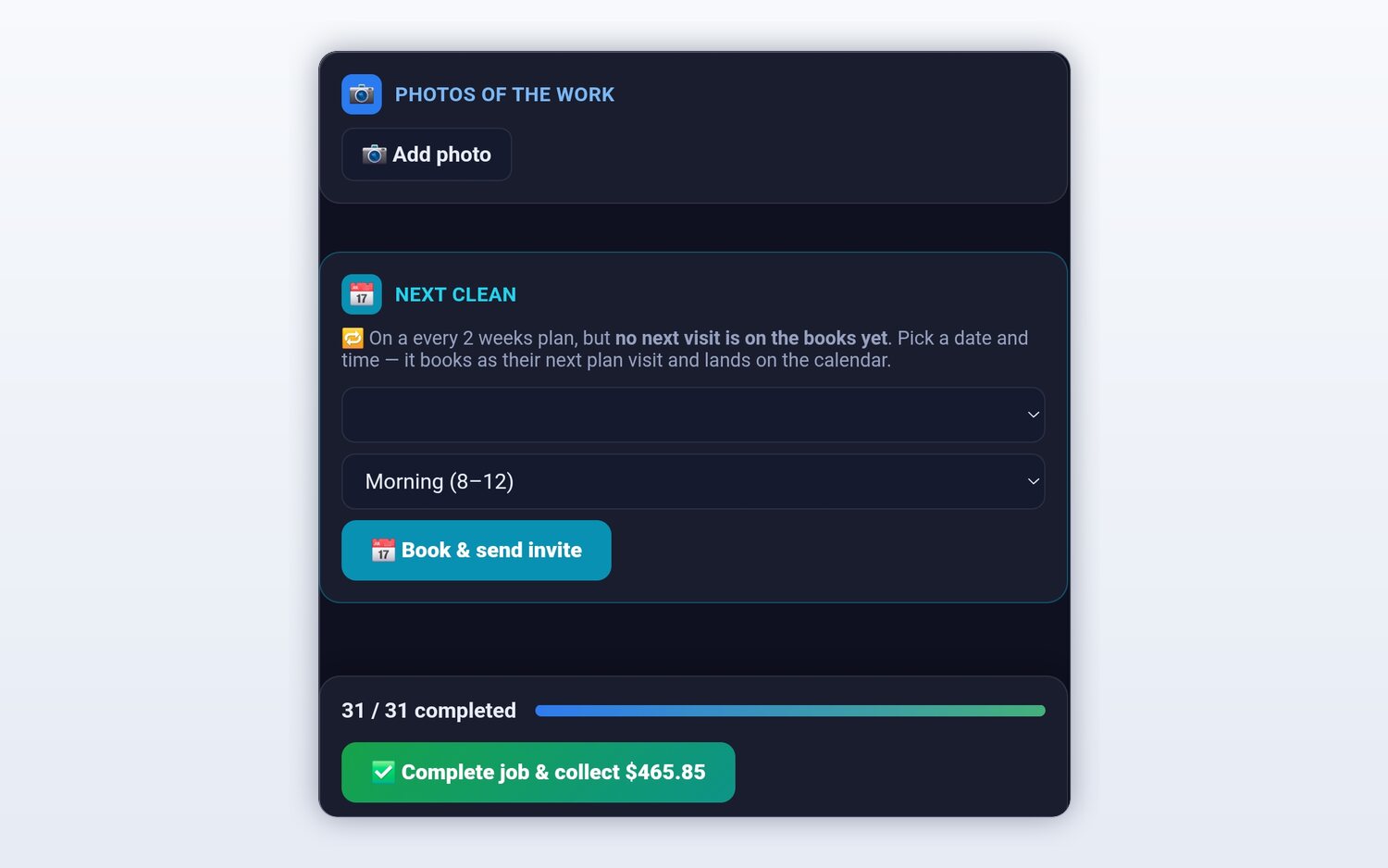
The best moment to rebook is while the client is standing in a clean kitchen. If they are on a plan and no next visit is on the books, the end of the job screen asks for a date and a time of day, then sends the calendar invite. If they booked a one-time deep clean, any finished job has a Repeat this job option that turns it into a service plan, weekly, every two weeks, monthly or quarterly.
- Next-clean prompt at the end of every plan visit
- Turn a one-time clean into a plan from the finished job
- A cadence discount you set, so regulars pay less per visit
- Card saved once and charged after each visit
Clients see their own history
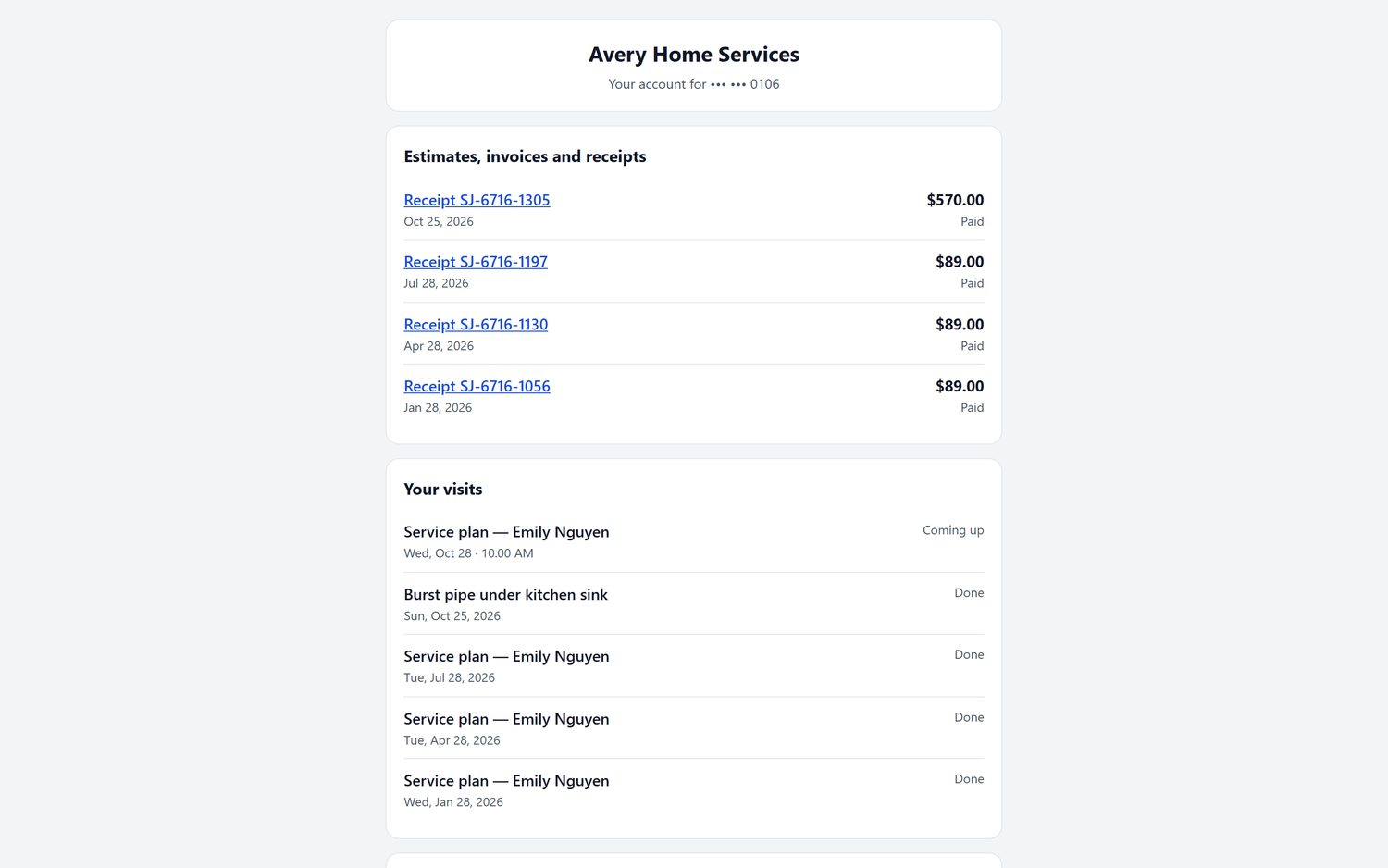
"Did I pay for the last one?" and "When are you coming next?" are the two texts every cleaning owner gets. The client portal answers both. Clients sign in to pay an open invoice, see estimates, invoices and receipts, check their billing history and upcoming visits, and reschedule a booking. When we host your website, the portal runs on your own domain.
- Receipts and billing history without asking you
- Upcoming and past visits in one list
- Reschedule a booking from the portal
- Your business name at the top, not ours
From first inquiry to regular client
A cleaning company CRM should follow the client from the first message. Requests from your website and digital card land in one Requests inbox, where you call or text back and turn the request into an estimate. The client can sign on your phone at the walkthrough, or scan a QR code to sign and pay on their own. If they go quiet, the estimate follow-up sends itself.
After the first clean is paid, the thank-you email can ask for a review, and your digital business card collects them too. To find new clients, the New Homeowners map shows recently sold homes, and the marketing tools can mail them a postcard, which suits move-in cleans. See new homeowner leads and the marketing suite.
Moving from another app
Your client list is the business, so moving it should not be a weekend of typing. Upload a CSV or Excel file up to 250 MB and undo the import if something lands wrong. Coming from Jobber, a dedicated import brings clients and balances. Coming from ZenMaid, see our ZenMaid comparison. Either way, we import your customers and jobs for free.
Cleaning CRM questions
What is a CRM for a cleaning business?
It is the record of every client: who they are, what you clean, how often, what they paid, and what they asked you to remember. A cleaning company CRM also does something with that record, like rebooking the next clean, following up on a quote, or asking a happy client for a review.
What is the best CRM for a cleaning business?
For most small cleaning companies, the best CRM is the one that also runs the schedule and the payments, so the client record fills itself in. A separate sales CRM means typing every visit twice. FieldStacker keeps quotes, visits, photos, invoices and receipts on the same client, from $30/mo.
Can I see a client's full cleaning history?
Yes. Every visit, invoice and receipt stays with the client. The client sees the same history on their own portal page, where they can pay, look at past receipts and reschedule a booking.
How do I get one-time clients to rebook?
Ask before you leave. When a clean is finished, FieldStacker prompts for the next date if the client is on a plan, and any finished job can be turned into a service plan with Repeat this job. The thank-you email after payment can include a review request.
Can I import my clients from another app?
Yes. Upload a CSV or Excel file up to 250 MB, with undo. There is a dedicated Jobber import for clients and balances, and we import your customers and jobs for free.
Does the CRM send automatic follow-ups?
Yes. Estimate follow-ups, unpaid-invoice reminders and a thank-you with a review request after an invoice is paid. Each one can be switched on or off and edited. They send email, plus an optional text with the texting add-on.
Related: cleaning business software · cleaning scheduling · best cleaning business software · pricing
Keep every client, and book their next clean
14-day free trial, no credit card. Send us your list and we bring it over.