The best invoice app for contractors depends on your jobs
Seven invoice apps contractors actually use, with who each one fits, what it does well, its published starting price and one honest limitation.
14-day free trial · no credit card · from $30/mo · your techs are free
We make FieldStacker, so weigh our pick accordingly. Prices below come from each company's own pricing page, checked October 26, 2026. Where a company does not print a price, we say so.
Contractor invoicing needs things a generic invoice tool misses: deposits before materials, change orders mid-job, labor that follows the parts, and knowing what a job cost. Some apps below cover all of that; some cover the invoice and leave the rest to you. Which is right depends on whether you send a few invoices a week or run three techs.
Seven contractor invoice apps, compared
In no ranked order. Each entry says who it is for and one thing to watch.
FieldStacker
For: owner-operators and small crews who want estimates, scheduling and invoices in one app. Does well: estimates from your own price list with automatic labor lines, deposits and change orders, e-sign at the door or by QR, batch invoicing, job costing, and QuickBooks Online sync included. Techs are free. Price: Pro $30/mo, or $25/mo billed yearly; 14-day trial, no card. Limitation: no consumer financing, and the accounting sync is QuickBooks Online only, not Desktop.
Jobber
For: established home service businesses that want a polished, well-known field service app. Does well: quotes, invoicing with online payments, online booking and a website from the first plan, with a wide set of automations as you move up. Price: Core $49/mo for 1 user billed monthly; 14-day trial, no card. Limitation: QuickBooks Online sync and automatic payment collection start on Connect ($139/mo, 1 user), and job costing on Grow.
More: FieldStacker vs Jobber · Jobber pricing
Housecall Pro
For: residential trades that want consumer financing and a price book from day one. Does well: the Basic plan already includes estimates and invoicing, payments with consumer financing, a price book, job costing and review management. Price: Basic $79/mo, or $59/mo yearly, 1 user; 14-day trial, no card. Limitation: QuickBooks Online sync starts on Essentials ($189/mo) and recurring service plans on Max ($329/mo).
Joist
For: solo remodelers and handymen who mostly write estimates and turn them into invoices. Does well: quick estimates to invoices, online payments and deposit requests on every plan. Price: Basics $12/mo billed monthly ($8.34/mo yearly), Pro $17/mo, Elite $32/mo; 14-day trial, no card. Limitation: Basics is capped at 5 documents a month, change orders need Elite, and scheduling visits needs the Run plan ($100/mo monthly).
More: Joist alternative
Invoice2go
For: sole traders who want a simple invoice-first app on the phone. Does well: estimates, projects and invoice reminders on every plan, with no cap on team members; recurring invoices on Premium. Price: Starter, Professional and Premium; the pricing page we read did not print dollar amounts, so check their site. 30-day trial; their FAQ says a card is needed to start it. Limitation: Starter is capped at 30 invoices a year and Professional at 100, and card fees run from 3.5% down to 2.9% by plan.
More: Invoice2go alternative
QuickBooks Online
For: contractors whose bookkeeper or accountant already works in QuickBooks. Does well: invoices and estimates sit right inside your books, with no sync to manage. Price: Simple Start $38/mo (shown at $19/mo for the first 3 months), Essentials $85/mo for 3 users; a Free tier sends 2 invoices a month unless you use QuickBooks Payments; 30-day trial. Limitation: it is accounting software first, and the price rises with users: Plus is $140/mo for 5.
Square Invoices
For: contractors who already take payments with Square and want simple billing. Does well: the free plan includes invoices and recurring invoices, estimates and contracts, and projects. Price: free plan at $0; Plus and Premium prices and processing rates were not printed on the page we read, so check their site. Limitation: payment schedules for deposits and milestones are listed under Plus, not the free plan.
At a glance
Published starting prices, checked October 26, 2026. "Check their site" means the price was not printed on the page.
| App | FieldStacker | Jobber | Housecall Pro | Joist | Invoice2go | QuickBooks Online | Square |
|---|---|---|---|---|---|---|---|
| Starting price | $30/mo | $49/mo | $79/mo | $12/mo | Check their site | $38/mo (Free tier: 2 invoices/mo) | $0 |
| Invoice cap on the entry plan | None stated | Check their site | Check their site | 5 documents/mo | 30 invoices/yr | Check their site | Check their site |
| QuickBooks Online sync from | Pro $30/mo | Connect $139/mo | Essentials $189/mo | Check their site | Professional | It is QuickBooks | Check their site |
| Change orders | Yes · Pro | Check their site | Check their site | Elite $32/mo | Check their site | Check their site | Check their site |
| Free trial | 14 days, no card | 14 days, no card | 14 days, no card | 14 days, no card | 30 days, card needed | 30 days | Free plan |
| Techs or extra users | Techs free | $29/mo each | Max: $35/mo each | Check their site | No cap on team members | 3 users on Essentials | Check their site |
Send your next contractor invoice from FieldStacker free
Try it on real jobs for 14 days. We import your customers from your old app for free.
- No credit card to start
- From $30/mo after the trial
- Your techs and cleaners are free
- Cancel any time from the app
How to pick the best contractor invoice app
Four questions narrow the list quickly.
How many invoices a month?
Under a handful: a capped plan or free tier may do. Dozens: avoid caps of 5 a month or 30 a year.
Who else is on the job?
If techs or helpers finish jobs, per-user pricing adds up fast. Count the seats before comparing prices.
Deposits and changes?
Remodel and install work needs deposits and signed change orders. Check which plan includes them.
Where are your books?
If you use QuickBooks Online, find the plan where sync starts. That is your real starting price.
What contractor invoicing looks like in FieldStacker
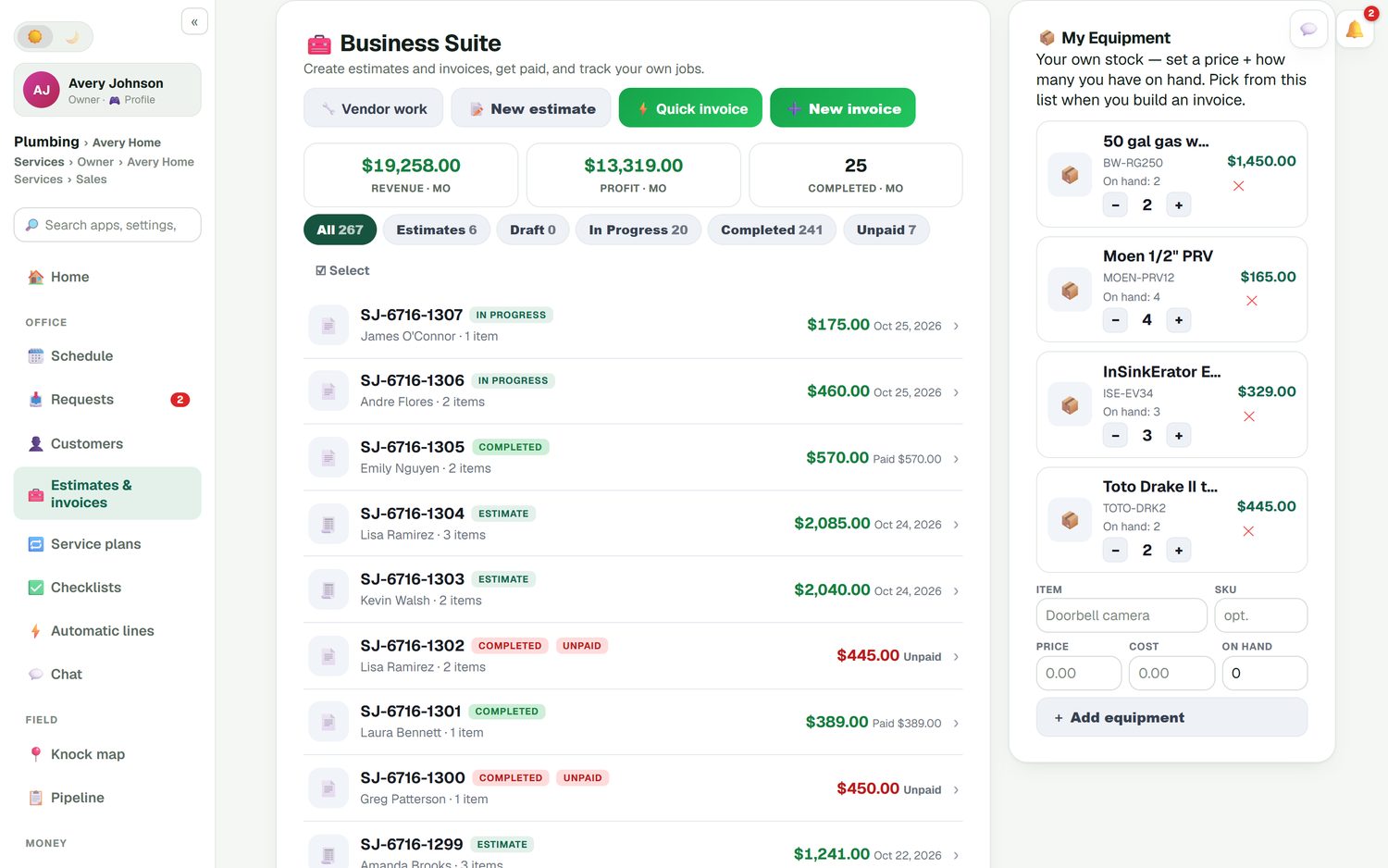
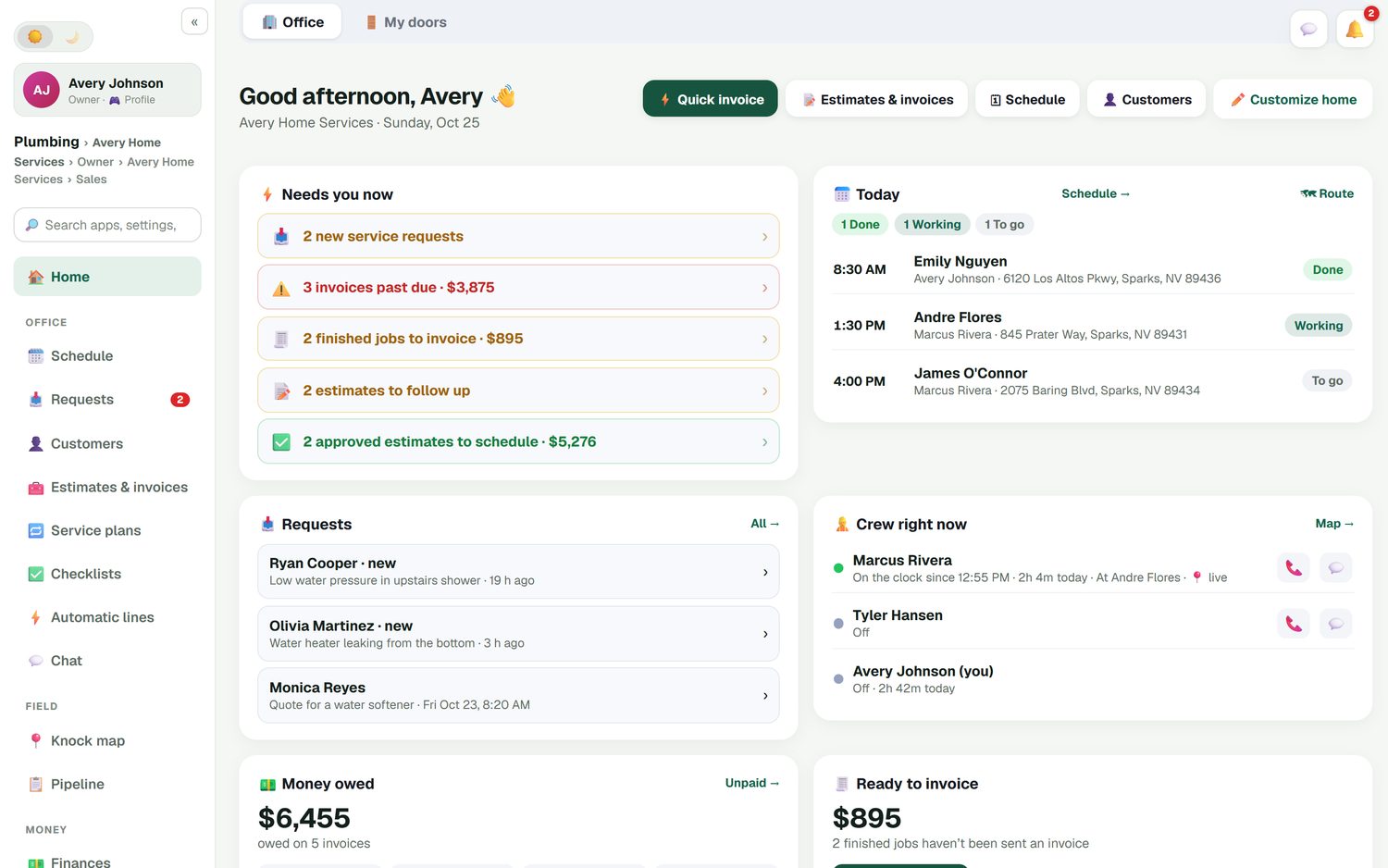
The office home screen lists what needs you: invoices past due with their total, finished jobs not yet invoiced, estimates to follow up and approved estimates to schedule. The estimates and invoices list filters by draft, in progress, completed and unpaid, with the month's revenue and profit at the top.
Contractor invoice app questions
What is the best invoice app for contractors?
It depends on the size of your jobs and your crew. A solo handyman who mostly needs estimates turned into invoices can do well with Joist. A contractor with techs, a schedule and job costs needs a field service app such as FieldStacker, Jobber or Housecall Pro. If your accountant lives in QuickBooks, check where each app's QuickBooks sync starts.
What is the best invoicing software for contractors who use QuickBooks?
QuickBooks Online itself can send invoices, and Simple Start is $38/mo. If you also schedule jobs and techs, an app that syncs with QuickBooks Online saves double entry. FieldStacker includes QuickBooks Online sync at $30/mo. Jobber lists it from Connect ($139/mo, 1 user) and Housecall Pro from Essentials ($189/mo). FieldStacker does not support QuickBooks Desktop.
What is the best contractor invoice app for a one-person business?
Look for a low monthly price with no invoice cap. Joist Basics is $12/mo but limited to 5 documents a month; Joist Pro at $17/mo removes the cap. FieldStacker Pro is $30/mo and adds scheduling, job costing and a website. Invoice2go Starter is capped at 30 invoices a year.
Which contractor invoice apps handle change orders?
FieldStacker includes change orders with their own deposit on Pro. Joist lists change orders on its Elite plan at $32/mo. For the others, check each company's site for the plan that includes them.
How much do contractor invoice apps charge per card payment?
It varies. Jobber lists 2.9% + 30¢ for cards. Invoice2go lists 3.5%, 3.0% or 2.9% depending on the plan. FieldStacker uses your own Stripe account at standard Stripe rates and adds no fee on top. Always check the processing line, not just the monthly price.
Is there a free invoice app for contractors?
A few, with limits. Square has a free plan, and QuickBooks Online has a free tier capped at 2 invoices a month unless you use QuickBooks Payments. Joist no longer offers a free plan. Our list of free invoice apps for contractors covers what each free tier really includes.
Related: FieldStacker's invoice app for contractors · construction invoicing · FieldStacker pricing
Try the contractor invoice app with free techs
14-day free trial, no credit card. Estimates, change orders, invoices and QuickBooks Online sync from $30/mo.