The best CRM for contractors, compared honestly
Six contractor CRMs, who each one is for, what it does well, what it costs to start, and the one thing to know before you sign up.
14-day free trial · no credit card · from $30/mo · your techs are free
Disclosure: we make FieldStacker, so weigh our pick accordingly. Every competitor price below comes from that company's own pricing page, checked October 26, 2026. Where a company doesn't publish prices, we say so instead of guessing.
A contractor CRM earns its price in three places: how fast you can get a signed estimate with a deposit, how cleanly the job moves to the crew schedule, and whether the invoice and its costs land in your books without re-typing. Check those three on any trial before you compare feature lists.
Six contractor CRMs worth a look
In no ranked order beyond fit. Starting prices are the lowest published monthly figure.
FieldStacker
For: small residential contractors and home service trades, solo or with a few crews, who also go out and find work.
Does well: estimates from your own price list with deposits and customer-approved change orders, e-sign at the door or by QR, a crew schedule board, job costing, QuickBooks Online sync, plus a knock map, new-homeowner postcards and a website on your domain in the same plan.
Starts at: $30/mo (Pro), or $25/mo billed yearly. Techs are free. 14-day trial, no card.
Limitation: no QuickBooks Desktop, no consumer financing and no flat-rate price book (you use your own price list). Not built for commercial GCs.
Jobber
For: home service businesses that want a well-known, polished field service app.
Does well: Core already includes online booking, quotes, invoicing with online payments, a website and reporting. Higher plans add automated reminders, QuickBooks Online sync, job costing and two-way SMS.
Starts at: Core $49/mo billed monthly for 1 user. 14-day trial, no card.
Limitation: QuickBooks Online sync starts on Connect ($139/mo for 1 user) and job costing on Grow ($199/mo). Extra users are $29/mo each.
Housecall Pro
For: home service trades such as HVAC, plumbing and electrical.
Does well: Basic includes online booking, scheduling and dispatch, estimates and invoicing, a price book, job costing, review management, and payments with consumer financing.
Starts at: Basic $79/mo billed monthly ($59/mo yearly) for 1 user. 14-day trial, no card.
Limitation: QuickBooks Online sync and checklists start on Essentials ($189/mo); recurring service plans are on Max ($329/mo). Add-on prices aren't published.
See our Housecall Pro alternative page.
JobNimbus
For: roofing contractors, plus siding, gutter and fencing companies.
Does well: project boards to move jobs through stages, automations, estimates, two-way texting and email, invoicing and payments, and a mobile app.
Starts at: pricing on request. Plans run from Essentials (up to 3 users) to Enterprise. 14-day trial, no card.
Limitation: no published prices, so you can't compare cost until you talk to sales. Focused on exterior trades.
AccuLynx
For: roofing companies, especially residential insurance restoration and retail roofing.
Does well: roofing-specific sales and production, measurement data in estimates, live material pricing with supplier ordering, a production calendar and a customer portal.
Starts at: pricing on request. Its pricing page offers a demo and a pricing form.
Limitation: no published prices and no self-serve trial on the pricing page. Built for roofing, not other trades.
ServiceTitan
For: larger residential and commercial trade businesses (HVAC, plumbing, electrical, roofing, garage door, pest).
Does well: a deep platform for shops with many technicians and an office team, sold in Starter, Essentials and The Works plans.
Starts at: pricing on request; the pricing page says pricing is per technician.
Limitation: no published prices, and contract and onboarding terms aren't stated on the page. More system than a one- or two-truck contractor usually needs.
At a glance
Checked October 26, 2026 on each vendor's own site. "On request" means no public price.
| What matters | FieldStacker | Jobber | Housecall Pro | JobNimbus | AccuLynx | ServiceTitan |
|---|---|---|---|---|---|---|
| Lowest published price | $30/mo | $49/mo (1 user) | $79/mo (1 user) | On request | On request | On request |
| Self-serve free trial | 14 days, no card | 14 days, no card | 14 days, no card | 14 days, no card | Demo / pricing form | Request pricing |
| QuickBooks Online sync on the entry plan | Yes | From Connect | From Essentials | Check their site | Check their site | Check their site |
| Job costing on the entry plan | Yes | From Grow | Yes | Check their site | Check their site | Check their site |
| Consumer financing | No | Check their site | Yes | Yes (per their site) | Check their site | Check their site |
| Main focus | Small home service and contractor businesses | Home service | Home service trades | Roofing and exterior | Roofing | Larger trade shops |
Put FieldStacker on your next real job, free for 14 days
Coming from Jobber or a spreadsheet? We import your customers and jobs for free.
- No credit card to start
- From $30/mo after the trial
- Your techs and cleaners are free
- Cancel any time from the app
How to choose
Four questions settle most shortlists.
What trade?
Roofers doing insurance work have different needs from a plumber running service calls. Roofing-first tools make sense for roofing-only shops.
How many people?
Count office users and field techs separately. Some tools charge per user or per tech; FieldStacker adds techs free.
Which plan has what you need?
QuickBooks sync, job costing and recurring plans sit on different tiers at different companies. Price the plan you'd actually use.
Run one real job
On the trial, write a real estimate, get it signed, schedule it, invoice it. That tells you more than any feature grid.
Estimate, schedule, invoice and find the next job
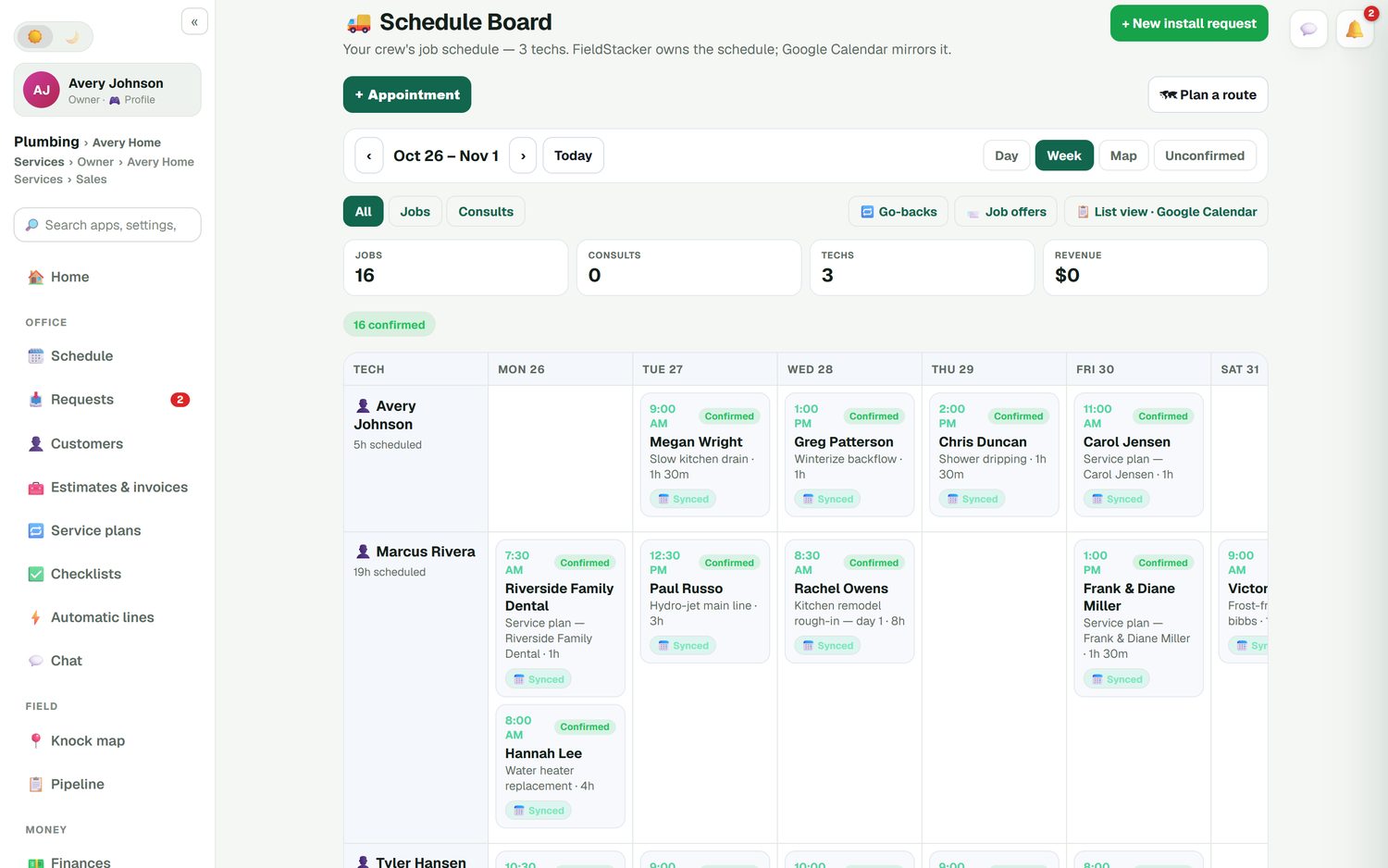
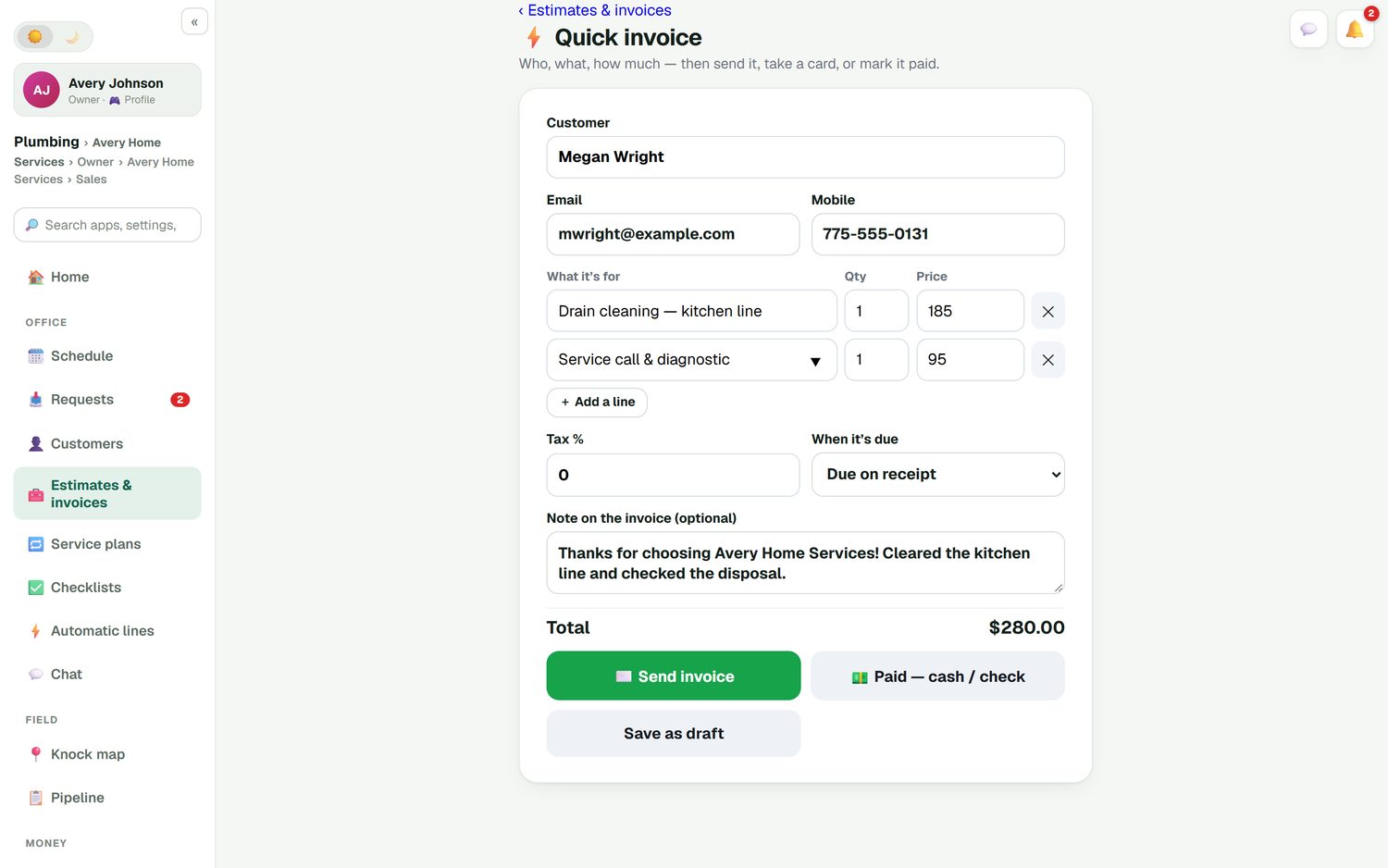
FieldStacker's schedule board puts every tech down the side and the week across the top, with confirmed jobs, go-backs and job offers. FieldStacker owns the schedule and Google Calendar mirrors it, so the customer's invite moves when you drag the job. Finished work becomes an invoice in one screen.
- Day, Week and Map views of the crew
- Quick invoice: send it, take a card, or mark it paid cash or check
- Card payments through your own Stripe account, no fee on top from us
Running long builds with subs?
None of the six tools above is construction project management software. If you're a GC managing bid packages, submittals, RFIs and subcontractor schedules on months-long builds, look at a construction platform such as Buildertrend. Its site blocked our pricing check today, so check their site for current plans. If your work is residential remodels and repairs, a contractor CRM is usually the better and cheaper fit.
Want the no-cost route first? See free CRM for contractors.
Questions contractors ask
What is the best CRM for contractors?
There isn't one winner. Small residential contractors who want estimates, scheduling, invoicing and marketing at a published price should look at FieldStacker, Jobber and Housecall Pro. Roofing and exterior contractors should also look at JobNimbus and AccuLynx. Larger trade shops with many technicians and an office team often evaluate ServiceTitan.
What is the best CRM for a small construction business?
For a small construction business doing residential jobs that last days or weeks, you want estimates with deposits, change orders the customer approves, multi-day jobs on a crew schedule and job costing. FieldStacker, Jobber and Housecall Pro all cover parts of that; check which plan includes job costing and QuickBooks sync, because on some tools those are higher tiers.
What is the best CRM for a general contractor?
If you are a general contractor running long builds with subcontractors, bids, submittals and RFIs, look at construction project management software such as Buildertrend rather than a field service CRM. If you are a GC doing smaller residential remodels and repairs, a contractor CRM with estimates, change orders and scheduling usually fits better and costs less.
How much does a CRM for contractors cost?
Published starting prices checked October 26, 2026: FieldStacker $30/mo, Jobber Core $49/mo billed monthly for 1 user, Housecall Pro Basic $79/mo billed monthly for 1 user. JobNimbus, AccuLynx and ServiceTitan don't publish prices; you request a quote.
Which contractor CRMs have a free trial?
FieldStacker, Jobber, Housecall Pro and JobNimbus each list a 14-day free trial with no credit card on their sites, checked October 26, 2026. AccuLynx and ServiceTitan offer a demo or pricing request instead of a self-serve trial on their pricing pages.
Is FieldStacker really the best CRM for contractors?
We make it, so we are not neutral. It is a strong fit for small residential contractors who also want to find work (door knocking, new-homeowner postcards, a website) in the same app at $30/mo. It is not built for commercial GCs, it has no QuickBooks Desktop support and no consumer financing.
Related: CRM for contractors · roofing CRM · remodeling CRM · HVAC CRM · pricing
Try a contractor CRM on one real job
14-day free trial, no credit card. Write an estimate, get it signed and invoice it before you decide.